

Plantillas para lista de tareas

Plantilla para Lista De Tareas De Empleados
Una Plantilla para Lista de Tareas de los Empleados es una hoja de cálculo en línea utilizada para dar seguimiento a las tareas de los empleados. Excelente para gerentes y jefes de departamentos, esta Plantilla gratuita para Lista de Tareas de Empleados le permite asignar tareas a sus empleados, establecer fechas límites, y monitorear su progreso - ¡solo añada a su empleado, las tareas y actualice la hoja de cálculo a medida que avanzan! La información puede ser añadida desde cualquier dispositivo, ver las tareas como un calendario y dar un fácil seguimiento a las fechas límites. Añada etiquetas con colores únicos para los estados de las tareas, añada las fechas límites al calendario, o añada nuevas filas y columnas para incluir a los nuevos empleados. ¡Solo toma unos cuantos clicks personalizar a su gusto esta Plantilla para Lista de Tareas de Empleados! Sin importar el tamaño del equipo que tenga a cargo, utilizar una hoja de cálculo en línea le permitirá a su equipo mantenerse en el camino - así que utilice la Plantilla gratuita para Lista de Tareas de Empleados de Jotform y aumente la productividad.
Ir a la categoría:Plantillas para lista de tareas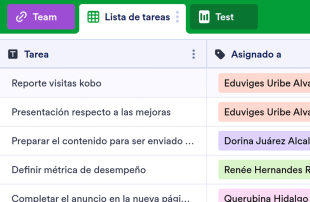
Plantilla de lista de tareas para empleados
Una plantilla de lista de tareas para empleados es una hoja de cálculo en línea utilizada para dar seguimiento a las tareas de los empleados. Excelente para gerentes y jefes de departamentos, esta plantilla gratuita para lista de tareas de empleados le permite asignar tareas a sus empleados, establecer fechas límites, y monitorear su progreso - ¡solo añada su empleado y sus tareas y actualice la hoja de cálculo a medida que avanzan! La información puede ser añadida desde cualquier dispositivo, ver las tareas como un calendario y dar un fácil seguimiento a las fechas límites. Añada etiquetas de colores únicos para los estados de las tareas, ponga sus fechas límites en el calendario, o agregue nuevas filas y columnas para incluir a los nuevos empleados. ¡Solo toma unos cuantos clics personalizar a su gusto esta plantilla para lista de tareas de empleados! Sin importar el tamaño del equipo que tenga a cargo, al usar una hoja de cálculo en línea le permitirá a su equipo mantenerse en el camino - así que utilice la plantilla gratuita de lista de tareas para empleados de Jotform y aumente la productividad.
Ir a la categoría:Plantillas para lista de tareas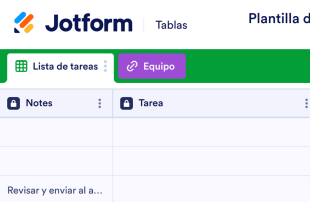
Plantilla de lista de tareas de empleados
Una plantilla de lista de tareas de empleados es una hoja de cálculo en línea que se utiliza para realizar un seguimiento de las tareas de los empleados. Ideal para gerentes o jefes de departamento, esta plantilla gratuita de lista de tareas para empleados le permite asignar tareas a los empleados, establecer plazos y supervisar su progreso: solo tiene que añadir a sus empleados y tareas y actualizar la hoja de cálculo a medida que avanza. La información se puede añadir desde cualquier dispositivo, e incluso puede ver sus tareas en una vista de calendario para realizar un seguimiento más fácil de los plazos. Añada colores de etiqueta únicos para los estados de las tareas, introduzca sus plazos en un calendario o añada nuevas filas y columnas para incluir a nuevos empleados. ¡Solo se necesitan unos pocos clics para personalizar esta plantilla de lista de tareas de los empleados a su gusto! Independientemente del tamaño del equipo del que esté a cargo, el uso de una hoja de cálculo en línea puede ayudar a su equipo a mantenerse al día, así que utilice la plantilla gratuita de lista de tareas de los empleados de Jotform para gestionar las tareas de los empleados y aumentar la productividad.
Ir a la categoría:Plantillas de recursos humanosAcerca de Plantillas para lista de tareas
Las plantillas de listas de tareas de Jotform Tablas son plantillas de tablas personalizables específicamente diseñadas para organizar y gestionar los registros recopilados a través de los formularios de Jotform. Estas plantillas son cruciales para recopilar y gestionar información específica de cada categoría, como solicitudes de proyectos, evaluaciones de empleados, comentarios de clientes o pedidos de productos. Los propietarios de formularios de varios sectores, como la educación, la sanidad o la gestión empresarial, consideran que estas plantillas son de gran utilidad para gestionar de manera sistemática los envíos. Al organizar automáticamente la información recopilada a través de los formularios de Jotform, estas tablas garantizan que los propietarios de los formularios y sus equipos puedan revisar y actuar sobre los datos de manera eficaz, todo ello en un formato estructurado y de fácil acceso.
Jotform Tablas es la plataforma central donde aparecen de forma automática los envíos de los formularios de Jotform conectados, permitiendo una gestión fluida de cada respuesta. Cada envío se transforma en una entrada, que suele mostrarse como una fila en la vista de tabla o examinarse en la vista detallada. Los usuarios se benefician de una variedad de herramientas de organización, como funciones de búsqueda, filtros y agrupación de datos, así como de diferentes opciones de visualización, como la vista de calendario y la vista de informe, para mejorar el proceso de revisión. Aunque es posible la introducción manual de datos y la importación desde archivos CSV o Excel, la explicación se centra sobre todo en el flujo de trabajo automatizado de envío de formularios a tablas, que es fundamental para la gestión eficiente de los datos recibidos.
Why Use Task List Templates?
- Streamlining the management of form submissions is a key benefit, as Task List Templates eliminate the need for manual data transfer from forms to tables, ensuring all responses are captured in one centralized location.
- By utilizing these templates, form owners can keep all collected responses organized, making it easier to find and access records quickly when needed, which enhances efficiency and productivity.
- Task List Templates allow for comprehensive review and analysis of submission details, enabling users to coordinate follow-up actions effectively and maintain continuity in workflows.
- With the ability to track changes and report on collected data, these tables provide form owners with the tools needed to monitor trends and make informed decisions based on real-time information.
- The capability to search and filter submissions by specific criteria means that users can quickly locate specific entries, reducing the time spent sifting through large volumes of data.
Common Problems Solved by Task List Templates
- Many users struggle with manually copying submissions from forms into spreadsheets, a time-consuming process that Task List Templates resolve by automatically capturing responses in the connected table.
- Responses scattered across different systems or documents can lead to inefficiencies, which these tables address by centralizing all incoming data in one accessible location.
- Locating specific records can be challenging when dealing with a high volume of submissions, but the search and filter capabilities in Jotform Tables make this task straightforward and efficient.
- Inconsistent review processes can lead to errors or overlooked information. Task List Templates provide a structured format for reviewing each submission, ensuring thorough and consistent evaluation.
- Submissions that include uploads can be difficult to review without the proper tools, but with Uploads View, users can easily manage and access attached files alongside other submission data.
Matching Form Submission Use Cases to Jotform Tables Features
- When form owners collect data through Jotform Forms, the responses automatically populate the connected table, streamlining data entry and ensuring that all submissions are captured efficiently.
- Reviewing and organizing submissions is made simple with Table View and Detail View, allowing users to examine each entry thoroughly and categorize data using column types or grouping.
- For teams managing shared responsibilities, access settings and assignees enable effective collaboration, ensuring that each team member can contribute to the workflow while maintaining data integrity.
- Reporting on collected data is facilitated by Report View, which allows users to generate insights and share findings, enhancing decision-making processes based on analyzed data.
- Utilizing search and filter functions, form owners can efficiently sift through submissions to identify specific entries, reducing the time spent managing large datasets and improving overall productivity.
How to Use Task List Templates with Jotform Forms
- Begin by selecting a category-relevant Jotform Tables template, a blank table, or the table connected to an existing Jotform Form. The Jotform Form will collect the necessary category-specific information, and new responses will automatically appear in the connected table.
- Configure the table for submission review by naming columns, choosing appropriate column types, and selecting relevant views such as Table View, Detail View, Calendar View, or Uploads View to suit the specific data management needs.
- Manage submissions effectively using search, filters, data grouping, formulas, access settings, and assignees. Use revision history to track changes and linked tables or action buttons for advanced data management tasks.
Top Use Cases for Task List Templates
- For Form Owners: Form owners play a crucial role in reviewing incoming responses collected via Jotform Forms. They utilize Jotform Tables to edit submission data, check detailed information or uploads, and ensure that records remain organized. By leveraging the various views and organizational tools available, form owners can maintain an efficient workflow and ensure that all submissions are accurately processed and stored.
- For Teams: Authorized team members benefit from the collaborative features within Jotform Tables, allowing them to find and maintain entries effectively. With access settings and assignees, teams can coordinate responsibilities and ensure that all members are working from the same set of data. Revision history supports shared work by providing a clear record of changes, enabling teams to track progress and maintain consistency.
- For Managers: Managers use Jotform Tables to monitor collected data and review category-specific patterns. They can check the progress of submissions and ownership using real-time tracking and access various views like Report View for oversight. This allows managers to make informed decisions based on comprehensive and up-to-date information, enhancing overall organizational efficiency.
Summarizing Task List Templates
Task List Templates in Jotform Tables provide a robust solution for collecting and managing category-specific information through Jotform Forms. By automatically capturing and organizing submissions in one central location, these tables facilitate efficient review and data management. Jotform Tables empower form owners, teams, and managers to collaborate effectively, gain insights, and take action based on reliable data, making them an essential tool for various professional settings.
Preguntas Frecuentes
1) Is it free to use Task List Templates with Jotform Tables?
Jotform offers a Starter plan that provides access to Task List Templates and Jotform Tables. This plan allows users to explore the features and capabilities of Jotform Tables without an initial investment. It is a useful option for those who want to test the waters and see how these templates can benefit their workflow.
2) How do submissions from Jotform Forms appear in Task List Templates?
Submissions from Jotform Forms automatically appear in Task List Templates through a connected process. Once a respondent submits a form, the data becomes an entry in the linked table, typically as a row in Table View. This auto-population ensures that future responses will continue to populate the table seamlessly.
3) Can I edit, search, filter, group, and calculate data in Task List Templates?
Yes, you can edit submissions, search through entries, apply filters, group data, and perform calculations within Task List Templates. Each column can be customized with various column types to organize data effectively. These capabilities allow users to manage and analyze their data thoroughly without relying on external systems.
Casos de uso de hojas de presupuesto
Data from Task List Templates can be exported as CSV or Excel files, which is particularly useful for adding existing information alongside connected-form submissions. This feature allows users to integrate their data with other systems or create backups for offline analysis, enhancing data accessibility and flexibility.
5) Which Jotform Tables views can I use with Task List Templates?
Task List Templates support several views, including Table View, Detail View, Calendar View, and Report View. Table View provides an overarching look at all entries, while Detail View allows for in-depth examination of each submission. Calendar View is ideal for date-specific tracking, and Report View aids in creating visual representations of collected data.
6) Can teams collaborate on submissions in Task List Templates?
Teams can collaborate effectively using Task List Templates through features like access settings and assignees. Real-time tracking ensures that team members can monitor changes and progress, while revision history allows for a clear view of all modifications. This collaborative environment supports efficient teamwork and data management.
7) Can I connect Task List Templates to related data or other applications?
Task List Templates can be connected to related data through linked tables and integrated with other applications using action buttons. This connectivity allows users to streamline workflows and ensure that all necessary information is available within the Jotform Tables ecosystem, enhancing operational efficiency.
8) Can I create reports, PDFs, and manage files from Task List Templates?
Yes, you can create reports and PDFs from Task List Templates, as well as manage files using Uploads View. These features enable users to document and share their findings, ensuring that all data is effectively communicated and stored. Signed documents can also be associated with table data when relevant to the category.