

Plantillas de inventario

Plantilla para Inventario de Libros
Un inventario de libros registra el número de libros que están en existencia en la tienda, librería o colección. Ya sea que usted sea un dueño de una librería independiente, un bibliotecario de escuela o un ávido lector con una gran colección personal, nuestra Plantilla gratuita para Inventario de Libros le ayudará a tener un mejor registro de cada título disponible. Solamente ingrese detalles para cada libro — tales como título, autor, ubicación y cantidad — a su Plantilla para Inventario de Libros para crear una hoja de cálculos visualmente impresionante que contenga toda la información que necesita. Usted puede visualizarla desde cualquier dispositivo y descargarlo como un archivo CSV, hoja de Excel o un PDF para su expediente. Jotform le ofrece todos los trucos para ayudarle a estar organizado y así automatizar su flujo de trabajo. ¿Necesita llevar un registro de las ordenes de libros y reservaciones? ¿Quiere etiquetar sus libros por algo además del género? ¡Solamente añada tantas filas, columnas, pestañas y etiquetas como las necesite — sin necesidad de codificar! Con nuestro Plantilla para Inventario de Libros mantener la información importante en un único sistema, usted no tendrá que buscar entre las muchas páginas de sus hojas de inventario impresas nunca más.
Ir a la categoría:Plantillas de inventario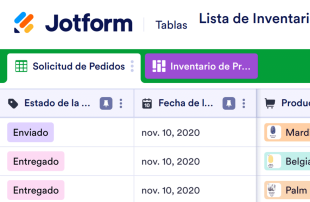
Lista de Inventario para Tienda de Productos de Belleza
Lleve el registro de cada artículo que posee y vende en su tienda de productos de belleza. ¡Registre las existencias de su inventario y maneje sus órdenes en línea con la Lista de Inventario para Tienda de Productos de Belleza gratuito! Simplemente llene la Lista de Inventario para Tienda de Productos de Belleza a mano cuando este registrando el inventario, o llene el formulario de inventario adjunto para sincronizar los envíos a su tabla. Usted también puede adjuntar el formulario de ordenes en línea, que hará que se re direccione la información de las ordenes a su tabla. Usted podrá tener un mejor control de los implementos de belleza de su tienda, así como productos para el cabello, cosméticos y productos para el cuidado de la piel, productos para las uñas y más. Usted sabe lo importante que es el estilo — así que siéntase libre de personalizar su Lista de Inventario para Tienda de Productos de Belleza para que se vea y trabaje tal como usted lo desea. Sin necesidad de codificación usted puede añadir filas, columnas, pestañas, etiquetas, filtros y más. Usted puede incluso cambiar la vista de hoja de cálculo, calendario o tarjeta para ver la información en la manera que mejor le parezca. Una vez que sea llenado usted puede compartirlo con otros miembros de su equipo para una colaboración más fácil del equipo o descargar su tabla a cualquier dispositivo. ¡Mantenga los estantes de su tienda hermosos con una Lista de Inventario para Tienda de Productos de Belleza personalizada que haga el inventario más fácil que nunca!
Ir a la categoría:Plantillas de inventario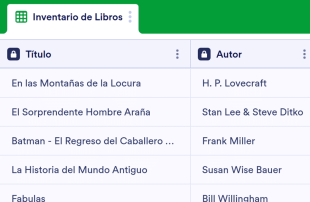
Plantilla de Inventario de Libros
Un inventario de Libros registra el número de libros actualmente en el inventario de su tienda, librería, o colección. Ya sea que seas dueño de una librería independiente, bibliotecario escolar, o un ratón de biblioteca con una gran colección, nuestra Plantilla de Inventario de Libros le ayudara a llevar un seguimiento de cada título disponible. Solo ingrese los detalles de cada libro — como el título, autor, ubicación y cantidad — a tu Plantilla de Inventario de Libros para crear una hoja de cálculo visualmente impactante con toda la información que necesita. Puedes verle en cualquier dispositivo y descargarla como un archivo CSV, Excel o PDF para su base de datos fácilmente. Jotform Ofrece todos los trucos posibles para ayudarle a mantenerse organizado y automatizar su flujo de trabajo. ¿Necesita registrar órdenes de libros y reservaciones? ¿Desea etiquetar los libros por algo diferente a su género? Solo agregue todas las filas, columnas, pestañas y etiquetas que necesite — ¡no requiere codificación! Con nuestra Plantilla de Inventario de Libros manteniendo la información importante en un sistema único y sin fisuras, no tendrá que volver a pasar por las páginas de su inventario de papel otra vez.
Ir a la categoría:Plantillas de inventarioAcerca de Plantillas de inventario
Las plantillas para inventarios son plantillas de tablas especializadas que ayudan a los propietarios de formularios y a los equipos a organizar y gestionar los registros recopilados a través de los formularios de Jotform. Estas plantillas son perfectas para recopilar una gran variedad de información propia de cada categoría, como recuentos de inventario, detalles de productos, niveles de existencias y datos de proveedores, que resultan esenciales para las empresas, las operaciones minoristas y la gestión de la cadena de suministro. Mediante los formularios de Jotform, los propietarios de los formularios pueden recopilar solicitudes, comentarios, pedidos o inspecciones de los encuestados, agilizando el proceso de recopilación y gestión de datos. Estas tablas son un recurso valioso para los responsables de almacén, los equipos de compras y los departamentos de ventas, ya que permiten gestionar de forma sistemática toda la información recopilada y acceder a ella fácilmente, sin que se mezcle con formularios, aplicaciones o herramientas de seguimiento de tareas.
Jotform Tablas está desarrollado para funcionar como una plataforma sólida en la que aparecen de forma automática los envíos de los formularios de Jotform conectados, permitiendo una gestión eficaz. Cada respuesta del formulario se convierte instantáneamente en una entrada dentro de la tabla conectada, que puede revisarse meticulosamente utilizando la vista de tabla o la vista detallada. Los usuarios pueden organizar y analizar los datos sin esfuerzo mediante funciones como la búsqueda, los filtros y la agrupación de datos, o utilizando diferentes vistas, como la vista de calendario y la vista de reporte. Aunque es posible introducir datos manualmente o importarlos desde archivos CSV y Excel para complementar los datos existentes, el objetivo principal sigue siendo un flujo de trabajo fluido desde el envío del formulario hasta la gestión de la tabla, lo que asegura que los datos se actualicen y organicen de forma coherente.
Why Use Inventory Templates?
- Managing form submissions in Jotform Tables eliminates the need for manual data transfer, ensuring that all responses are automatically captured and neatly organized in one place. This reduces errors and saves time for businesses that handle large volumes of data.
- Keeping all submissions together in a centralized location makes it easier for form owners to monitor and access collected data. This centralization is particularly beneficial for inventory management, where quick access to updated stock levels is crucial.
- With powerful search and filter options, users can easily locate specific records within the table, enhancing efficiency and productivity. This feature is invaluable for teams needing to quickly find and act on particular inventory items or supplier information.
- Reviewing complete submission details is streamlined, as each entry can be expanded to show all associated data and uploads. This comprehensive view aids in thorough analysis and informed decision-making regarding stock and supplier management.
- Coordinating follow-up actions with integrated forms and tables ensures that staff can track changes and updates in real-time. This capability is essential for maintaining accurate inventory counts and timely reorder processes.
Common Problems Solved by Inventory Templates
- Manual copying of submissions into spreadsheets is a time-consuming and error-prone process. Jotform Tables automatically captures form responses, eliminating the need for redundant data entry tasks and reducing the potential for mistakes.
- Scattered responses across different platforms can lead to data inconsistencies and oversight. By centralizing submissions within a connected table, all data is uniformly organized, ensuring easy access and consistency.
- Locating specific records can be challenging when dealing with large volumes of data. Jotform Tables' search and filter capabilities allow users to quickly find the necessary information, significantly improving the efficiency of inventory management tasks.
- Inconsistent review processes can lead to missed updates or errors. With the ability to view detailed submission data and uploads within the table, users can ensure that all relevant information is consistently accounted for and reviewed.
- Slow reporting can delay critical business decisions. By using Jotform Tables to generate reports directly from collected data, businesses can expedite reporting processes and make timely, informed decisions.
Matching Form Submission Use Cases to Jotform Tables Features
- When new inventory data is collected via connected Jotform Forms, the responses automatically appear in the linked table. This seamless integration ensures that inventory levels are always up-to-date and readily accessible for review.
- Reviewing submissions is simplified using Table View and Detail View, where users can sort, filter, and group data to match specific inventory management needs. This organization aids in identifying trends and making inventory adjustments.
- For team management, access settings and assignees allow for clear responsibility assignments and collaborative efforts. This ensures that each team member knows their role in managing inventory data and can effectively contribute to the process.
- Data reporting is enhanced with the Report View, enabling users to create detailed reports based on the collected data. This facilitates better communication and decision-making regarding stock management and supplier relations.
- For submissions that require immediate action, action buttons can be configured to trigger specific tasks or notifications directly from the table, streamlining workflow and enhancing operational efficiency.
How to Use Inventory Templates with Jotform Forms
- Start with a relevant Jotform Tables template or create a blank table connected to an existing Jotform Form. The form collects inventory-specific information, and new responses automatically populate the connected table, ensuring that data is continuously updated.
- Configure the table for submission review by naming columns and choosing appropriate column types, such as text or number, and selecting relevant views like Table View, Detail View, or Calendar View. This setup ensures that data is organized and easily accessible for analysis.
- Manage submissions using features like search, filters, data grouping, and formulas to analyze inventory data. Utilize access settings, assignees, or linked tables to coordinate team efforts and use action buttons to facilitate quick responses or generate reports as needed.
Top Use Cases for Inventory Templates
- For Form Owners: Form owners can efficiently review incoming responses by accessing organized entries in Jotform Tables. They have the ability to edit submission data and check details or uploads to ensure accuracy. Keeping records organized within this structured environment simplifies data management and supports better decision-making for inventory control.
- For Teams: Authorized team members can easily find and maintain entries in Jotform Tables, ensuring that inventory data remains up-to-date. They can coordinate responsibilities with assignees and use access settings or revision history to track changes and support collaborative efforts. This shared workspace enhances team productivity and accountability.
- For Managers: Managers can monitor collected data and review category-specific patterns in inventory submissions. They can use views like Report View to gain insights into stock levels, check progress, and ensure timely reorder processes. This oversight supports strategic planning and efficient inventory management.
Summarizing Inventory Templates
Inventory Templates offer significant value by streamlining the process of collecting and managing information through Jotform Forms and Jotform Tables. They ensure that all submissions related to inventory management are automatically organized and accessible, facilitating efficient data analysis and decision-making. By leveraging the capabilities of Jotform Tables, businesses can maintain accurate inventory records and enhance their operational workflows.
Preguntas Frecuentes
1) Is it free to use Inventory Templates with Jotform Tables?
Jotform offers a Starter plan that allows users to access Inventory Templates. This plan provides essential features for managing submissions and organizing data without incurring initial costs. Users can explore the capabilities of Jotform Tables and decide if additional features are needed as their requirements evolve.
2) How do submissions from Jotform Forms appear in Inventory Templates?
Submissions from Jotform Forms are seamlessly integrated into Inventory Templates through connected forms. Once a form is submitted, the data automatically appears as a new entry or row in the linked table. This auto-population ensures that future responses continue to populate the table, keeping the data current and organized.
3) Can I edit, search, filter, group, and calculate data in Inventory Templates?
Yes, you can edit data directly within Inventory Templates to ensure accuracy. The tables support search and filter functions, allowing users to locate specific entries quickly. You can also group data by categories and use formulas for calculations, enhancing the analysis of inventory data without relying on automated decisions.
Casos de uso de hojas de presupuesto
Absolutely, Jotform Tables allows you to export data as CSV or Excel files. This feature enables users to integrate existing information with connected-form submissions, providing a comprehensive view of inventory data. Exporting data is a convenient way to share information or conduct further analysis outside the platform.
5) Which Jotform Tables views can I use with Inventory Templates?
Inventory Templates can be reviewed using several views, including Table View, Detail View, Calendar View, and Report View. Table View provides a structured layout for entries, while Detail View allows for in-depth review of each submission. Calendar View helps in tracking timelines, and Report View facilitates the creation of comprehensive reports for analysis.
6) Can teams collaborate on submissions in Inventory Templates?
Yes, teams can effectively collaborate on submissions using Inventory Templates. Access settings ensure that only authorized members can view or edit data, while assignees can be designated to manage specific entries. Real-time tracking and revision history enhance collaborative efforts by providing insights into changes and updates.
7) Can I connect Inventory Templates to related data or other applications?
You can connect Inventory Templates to related data through linked tables, enabling users to draw insights from multiple sources. Additionally, integrations with other applications can be set up using action buttons, facilitating seamless workflows without specifying unsupported integrations.
8) Can I create reports, PDFs, and manage files from Inventory Templates?
Yes, you can create reports using the Report View, which allows for in-depth data analysis. PDF generation is available for converting table data into easily shareable documents. Uploads View helps manage files associated with inventory entries, and signed documents can be associated when relevant to the category.