

Plantillas de Hojas de cálculo para salones

Hoja de Inscripción al Salón
Si tiene un salón de manicura, peluquería o spa, deje que los clientes lleguen con estilo usando nuestra Hoja de Inscripción al Salón online gratuita. Para empezar, abra esta plantilla personalizable en las Tablas de Jotform — nuestra avanzada herramienta de base de datos — en la tableta de su salón para que los clientes la rellenen antes de sus citas. O pídales que rellenen el formulario de registro adjunto en sus dispositivos móviles para una experiencia sin contacto. Podrá recopilar nombres, direcciones de correo electrónico, información de contacto y detalles de la cita, como fecha, hora, servicios y estilistas preferidos. Usted y el personal de su salón trabajan duro para atender a cada cliente, así que ¿por qué no hacer que la hoja de registro del salón le ayude a usted? No hace falta ensuciarse las manos — basta con arrastrar y soltar para añadir filas, columnas, pestañas, etiquetas y mucho más a la tabla. Incluso puedes cambiar entre la vista de hoja de cálculo, tarjeta y calendario para ver la información de la forma que más te convenga. Con una Hoja de Inscripción al Salón personalizada, que organice con pulcritud la información de las citas, ¡no querrá volver a tirarse de los pelos!
Ir a la categoría:Salón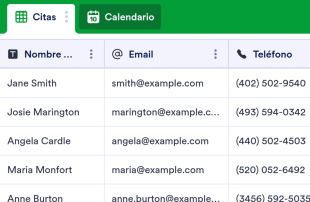
Hoja de registro del salón de belleza
Hoja de registro sin contacto para salones de belleza, peluquerías y más. Funciona en cualquier dispositivo. Fácil de personalizar y compartir con el personal o los visitantes. No requiere conocimientos de programación.
Ir a la categoría:Salón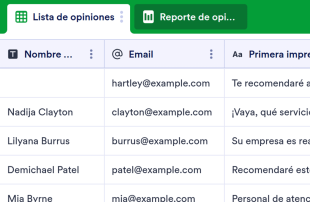
Registro de opiniones de los clientes
Recopile opiniones de clientes en línea. Cambie entre la vista de hoja de cálculo, tarjeta o informe para analizar las opiniones. No se requiere programación. Funciona perfectamente en cualquier dispositivo.
Ir a la categoría:Planeación eventosAcerca de Plantillas de Hojas de cálculo para salones
Las plantillas de hojas de cálculo para salones de belleza son plantillas de tablas diseñadas para categorías específicas, cuyo objetivo es ayudar a los propietarios y equipos de los salones a organizar y gestionar de manera eficaz los registros recopilados de su clientela. A través de los formularios de Jotform, los salones pueden recopilar una gran variedad de información concreta, como reservas de citas, opiniones de los clientes, pedidos de productos y horarios de los empleados. Estos datos son cruciales para mantener un funcionamiento fluido y centrado en el cliente en el salón. Tanto si usted es gerente de un salón de belleza, recepcionista o forma parte del equipo administrativo, estas hojas de cálculo garantizan que todos los datos recopilados estén estructurados y sean fácilmente accesibles, lo que permite una mejor toma de decisiones y un mejor servicio al cliente. Las hojas de cálculo no son formularios ni aplicaciones, sino que sirven como una sólida herramienta de gestión de los datos que recopila.
Jotform Tablas proporciona una plataforma eficaz en la que aparecen de forma automática los envíos de los formularios de Jotform conectados, con lo que permite una gestión optimizada de los datos de su salón. Cada respuesta del formulario se transforma en una entrada dentro de la tabla, permitiendo una revisión exhaustiva a través de diferentes vistas, como la vista de tabla o la vista detallada. Gracias a funciones como la búsqueda, los filtros y la agrupación, los equipos del salón pueden organizar y priorizar rápidamente los datos. Si bien es posible introducir datos manualmente o importarlos desde archivos CSV o Excel para añadir información ya existente, la verdadera ventaja reside en el fluido flujo de trabajo de envío de formularios a la tabla, que asegura que cada nuevo envío se integre automáticamente en tu sistema.
Why Use Salon Spreadsheet Templates?
- By managing submissions in Jotform Tables, salon owners can eliminate the need for manual data entry, reducing the risk of errors and saving valuable time. This ensures that all client appointments and feedback are accurately recorded and readily accessible.
- Keeping all responses in one centralized table enhances data integrity and accessibility, making it easier for salon teams to coordinate follow-up actions such as confirming appointments or addressing customer feedback.
- With Jotform Tables, salon teams can quickly search and filter through records, allowing them to find specific client information or appointment details faster than traditional methods.
- Reviewing complete submission details becomes effortless, enabling salon managers to ensure that every client request is addressed and every product order is fulfilled accurately.
- Tracking changes and maintaining a revision history within the tables helps salons monitor data updates, ensuring that any modifications to client information or schedule changes are documented and transparent.
Common Problems Solved by Salon Spreadsheet Templates
- Manually transferring submissions from paper forms or disparate systems into spreadsheets can be time-consuming and error-prone. Jotform Tables automatically captures and organizes incoming data, eliminating this tedious process.
- Scattered responses across multiple platforms can lead to confusion and missed appointments. With Jotform Tables, all client submissions are centralized, ensuring no information is overlooked.
- Locating specific records can be challenging, especially when dealing with a high volume of submissions. By using search and filter capabilities, salon staff can quickly find the exact information they need.
- Inconsistent review processes often result in missed details or incomplete follow-ups. Jotform Tables provide structured views and grouping options to ensure a consistent and thorough review of all submissions.
- Uploads, such as client consent forms or hairstyle photos, can be hard to review if not properly organized. Jotform Tables offer an Uploads View to manage and review all uploaded files efficiently.
Matching Form Submission Use Cases
- When a client books an appointment through a Jotform Form, the submission automatically appears in the connected table, allowing salon staff to review and confirm appointments without delay.
- Reviewing submissions in Table View enables salon managers to see all client bookings at a glance, while Detail View provides in-depth insights into individual client requests and preferences.
- By using search and filter options, salon teams can quickly locate specific client records, such as those related to a particular service or stylist, enhancing both service efficiency and customer satisfaction.
- Access settings and assignees allow teams to manage submissions collaboratively, ensuring that each team member knows their responsibilities and can track client interactions in real time.
- Report View offers salon managers the ability to generate comprehensive reports on client trends and service popularity, facilitating data-driven decisions for improving salon operations.
How to Use Salon Spreadsheet Templates with Jotform Forms
- Start with a category-relevant Jotform Tables template, a blank table, or the table connected to an existing Jotform Form. The Jotform Form collects the category-specific information, ensuring that new responses automatically appear in the connected table for seamless data management.
- Configure the table for submission review by naming columns, choosing appropriate column types, and selecting relevant views such as Table View, Detail View, Calendar View, Uploads View, or Report View. This setup helps in organizing and prioritizing data effectively.
- Manage submissions using features like search, filters, grouping, formulas, access settings, assignees, revision history, linked tables, and action buttons. These tools enable precise data organization and facilitate collaborative work among salon staff.
Top Use Cases for Salon Spreadsheet Templates
- For Form Owners: Form owners, often the salon managers or operators, use the connected Jotform Form to gather vital client information. They review incoming responses and edit submission data as necessary to ensure accuracy. By checking details or uploads, they maintain a comprehensive record of client interactions and preferences within Jotform Tables. This organized approach enables them to deliver personalized services and foster client loyalty.
- For Teams: Authorized team members benefit from the centralized data in Jotform Tables by easily finding submissions and maintaining entries. They can coordinate responsibilities with assignees, ensuring that each task or client interaction is accounted for. Access settings and revision history support shared work, allowing the team to collaborate effectively and maintain consistency across operations.
- For Managers: Managers utilize Jotform Tables to monitor collected data and gain insights into client patterns and service trends. They review progress or ownership of tasks, ensuring that the salon’s operational goals are being met. Using Report View or other relevant views, managers can oversee the entire salon operation, making informed decisions to enhance service quality and business performance.
Summarizing Salon Spreadsheet Templates
Las plantillas de hojas de cálculo para salones de belleza constituyen una potente solución para recopilar y gestionar información específica de los salones a través de los formularios de Jotform. Gracias al uso de Jotform Tablas, los propietarios y los equipos de los salones pueden gestionar de manera eficaz las solicitudes de los clientes, desde citas hasta comentarios y pedidos de productos. La perfecta integración entre la recopilación de datos mediante formularios y la gestión de tablas permite que toda la información esté organizada, sea accesible y se pueda utilizar de forma práctica. Este enfoque basado en categorías no solo permite optimizar las operaciones del salón, sino que también mejora la experiencia general del cliente.
Preguntas Frecuentes
1) Is it free to use Salon Spreadsheet Templates with Jotform Tables?
Jotform offers a Starter plan that includes access to Salon Spreadsheet Templates with Jotform Tables. This plan allows users to explore the basic functionalities and benefits of managing their salon data efficiently. Users can enjoy a seamless data collection and management experience without incurring immediate costs. For more advanced features, users can consider upgrading to higher tiers.
2) How do submissions from Jotform Forms appear in Salon Spreadsheet Templates?
Submissions from Jotform Forms automatically appear in the linked table connected to Salon Spreadsheet Templates. Each form submission becomes an entry or row within the table, ensuring all responses are recorded in real-time. This auto-population feature ensures that as new responses continue to arrive, they are instantly integrated into the table for immediate review and action.
3) Can I edit, search, filter, group, and calculate data in Salon Spreadsheet Templates?
Yes, you can edit, search, filter, group, and calculate data within Salon Spreadsheet Templates. Submission edits allow you to update or correct information as needed. Different column types enable better data organization, while search and filters help locate specific entries quickly. Data grouping and formulas support advanced data analysis and calculations, providing deeper insights into your salon operations.
Casos de uso de hojas de presupuesto
You can export the data inside the tables as CSV or Excel files. This feature allows you to add existing information alongside the submissions collected through connected forms, facilitating a comprehensive database. Exporting data provides flexibility in how you manage your records, enabling further analysis or integration with other systems outside Jotform Tables.
5) Which Jotform Tables views can I use with Salon Spreadsheet Templates?
You can use views such as Table View, Detail View, Calendar View, and Report View with Salon Spreadsheet Templates. Table View offers a comprehensive look at all entries, while Detail View provides deeper insights into individual records. Calendar View helps visualize appointment schedules, and Report View supports generating analytical reports. Each view assists in reviewing data as per your specific salon needs.
6) Can teams collaborate on submissions in Salon Spreadsheet Templates?
Teams can collaborate effectively on submissions in Salon Spreadsheet Templates using access settings and assignees. These features ensure that each team member knows their responsibilities and can track client interactions. Real-time tracking and revision history further support collaboration by maintaining a clear record of changes and updates, fostering a coordinated team effort.
7) Can I connect Salon Spreadsheet Templates to related data or other applications?
Yes, you can connect Salon Spreadsheet Templates to related data or other applications through linked tables and integrations. Action buttons provide additional functionality, offering seamless operational processes. These connections enhance the utility of your data management system, allowing you to expand its capabilities and streamline your salon's workflow.
8) Can I create reports, PDFs, and manage files from Salon Spreadsheet Templates?
En las plantillas de hojas de cálculo para salones de belleza, puede crear reportes usando la vista reportes, generar archivos PDF con fines de documentación y gestionar archivos a través de la vista "Cargas". Asimismo, puede gestionar documentos firmados cuando sea necesario, lo que garantiza una gestión integral de los datos. Estas funciones dan respuesta a una gran variedad de necesidades de documentación y elaboración de reportes, lo que mejora la eficiencia general de las operaciones de su salón.