-
 mariehelenevialauditeur
Bonjour,
Je réalise un test de personnalité. Je souhaite que les résultats indiquent le profil de la personne selon la majorité de réponses données -> dans un magazine, le calcul serait : vous avez une majorité de réponses se référant au sigle "petit carré", vous êtes le "Profil Carré".
Je me suis inspirée de la FAQ ici mais je bloque : https://www.jotform.com/fr/answers/29125131-personality-quiz-calculation-pas-la-moyenne-du-total-des-points-mais-le-numero-sortant-en-majorite
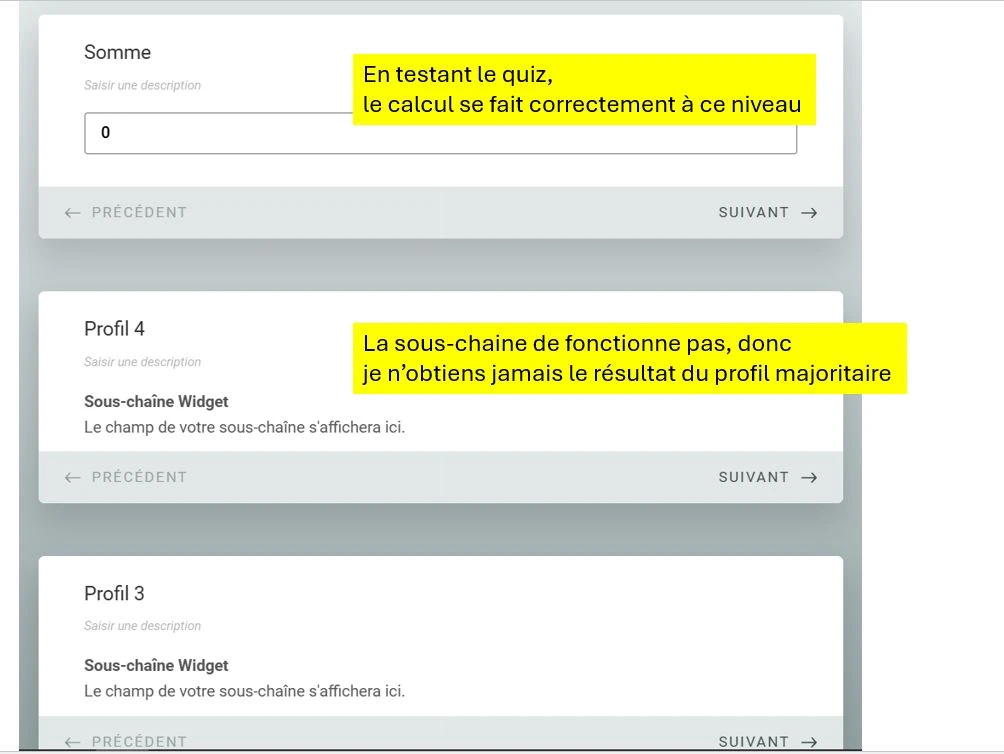
Il semble que ce soit un problème avec le du widget de sous chaine. Mon premier calcul se fait bien, mais pas la suite.
J'ai aussi essayé de cloner le formulaire indiqué en modèle dans le lien ci-dessous (quiz Harry Potter) pour le modifier avec mes contenus, mais le résultat ne s'affiche jamais (le formulaire est soumis, sans donner la réponse du profil).
Ca fait des heures que je tourne en rond, pouvez-vous m'aider sil vous plait ?
Merci.
Marie

-
 Berk
BerkHi Marie,
Thanks for reaching out to Jotform Support. Our French Support agents are busy helping other Jotform users right now, so I'll try to help you in English using Google Translate, but you can reply in whichever language you feel comfortable using. Or, if you'd rather have support in French, let us know and we can have them do that. But, it might take a while until they're available again.
I understand you want to create a personality quiz where the result shows the profile based on the majority of answers, similar to the example you mentioned with the "petit carré" profile. You also mentioned issues with the substring widget and the result not displaying after cloning the Harry Potter quiz form.
I’ve checked your form and found the issue causing the results not to display correctly. The Substring widget’s Source ID field was set incorrectly. It should be set to: #input_25
Once you update the Source ID to #input_25, please make sure to re-enter the Field Titles in the widget, as they may need to be refreshed after this change. After applying these updates, the personality quiz should correctly display the profile result based on the majority of answers.
Give it a try and let us know how it goes. -
mariehelenevialauditeur
Hi Berk,
Thanks for your quick answer. It is almost perfect now.I still have 2 questions :
1/ if the number of points is tied between different profiles, no result is shown after calculation. I understand why this is normal. But I would prefer to show something (like a new message saying : "you are a unicorn, [...... ]". Is there a simple hack ?
2/ how / where did you find the #input_25 ID ? Very mysterious to me !! If I have to do it all over next time, will it be the same ID ?
Thanks again.
Marie
-
 Zeynep
Hi Marie,
Thanks for reaching out to Jotform Support.
I understand that you’re building a personality quiz where the result should show the profile based on the majority of answers (for example, if most answers correspond to “square”, the form should display the “Square Profile”), and that you also tried cloning an example quiz but the result wasn’t displaying.
Here’s how to make sure your quiz shows the correct profile result:
- In Form Builder, locate the widget or calculation that determines the quiz score or result (e.g., the Substring or Form Calculation widget).
- Make sure the Source ID or field used in that widget matches the correct input field on your form. In your case, updating the Source ID to #input_25 resolved the issue for the result not displaying. This ensures the widget reads the correct answer data.
- After updating the Source ID, re-enter or refresh the field titles in the widget settings if needed. This helps the widget correctly reference the fields again.
- Use Show/Hide Conditions based on the calculated score to control which profile result is shown to the user after submission, so the correct profile appears based on the majority result.
If two or more profile scores are tied and no result is shown:
- You can create an additional conditional result that covers tie situations. For example:
- IF Score A = Score B → THEN Show “Unicorn Profile” (or another message).
- This uses the existing conditional logic feature to check for equal values and display a fallback result.
The field IDs (like #input_25) are unique to each form and may change if the form is significantly modified (for example, fields added or removed). To find the correct field ID for your widgets in future:
- In Form Builder, click on the field you want to reference.
- Click the gear icon to open field settings.
- Go to the Advanced tab.
- Under Field Details, you’ll see the Unique Name (ID) you can use in widgets or conditional logic.
With the correct Source ID and conditions set up, your personality quiz should correctly display the profile result based on the majority of responses.
Give it a try and let us know how it goes.
-
mariehelenevialauditeur
Ok, it works, but....
Now that I added a tied result condition, I'm getting a new problem. I just wanted to get this option for the case where the 2 higher profils where tied. Now, if the answers are :
- Profile 1 = 1 answer
- Profile 2 = 1 answer
- Profile 3 = 0 answer
- Profile 4 = 5 answers
Then the quiz result should be = profile 4.
But, as I now have the tied results condition, what I get is 2 results : "unicorn" + Profile 4.
What I wanted was to cover the case where I have no clear majority. Is there a way to fix it ?
-
mariehelenevialauditeur
Sorry, I shoud have told you, I am now using this form to test the new developments mentioned :
-
 Eliza Enterprise Support
Hi Marie,
To keep the conversation organized, I moved your other question to its own thread, and someone from our Support Team will help you with it here.
Let us know if you need any more help.