-
 gabrielifrancesca41
Non riesco a inerire il metodo di pagamento sull'abbonamento

-
 Podo: Addetto all'assistenza
Hi Francesca,
To help you insert the payment method for your subscription, here’s how to do it:
1. On your Workspace page, click on your Avatar/Profile Image on the top-right side of the page.
2. In the window that opens, click on Settings.
3. Under the Billing tab on the left and beside the My Plan section, click on Change Plan.
4. Click on the Downgrade button to switch to the Starter (Free) Plan if you want to change your payment method from PayPal to credit card.
5. After downgrading, go to the Pricing page and click on Upgrade under the subscription plan you want.
6. Select your payment schedule and enter your billing details.
7. Choose your payment method (Credit/Debit Card or PayPal) and complete the payment.
If you are trying to add a payment method to a form for collecting payments, you need to integrate a payment gateway in your form. Let me know if you need guidance on that as well.
Give it a try and let us know how it goes.
-
 Kyle Jotform Support
Hi Francesca,
Thanks for reaching out to Jotform Support. Our Italian Support agents are busy helping other Jotform users right now, so I'll try to help you in English using Google Translate, but you can reply in whichever language you feel comfortable using. Or, if you'd rather have support in Italian, let us know and we can have them do that. But, it might take a while until they're available again.
Now, coming back to your question, can you try to clear your browsing cache and cookies and see how it goes? Also, try to use a different network as well.
Try that out and get back to us if you have any issues.
-
gabrielifrancesca41
Hi, thanks for your help. I've been experiencing this problem since yesterday evening. The "product list" is grayed out. The payment method shows an orange asterisk. I've tried everything.
-
gabrielifrancesca41
I cleared the cache but nothing changed. I also tried from the settings under "manage connections" but it won't let me enter anything.
-
gabrielifrancesca41From the attached photo you can see that the payment methods appear faded to me
-
 Vincenzo Jotform Support
Salve Francesca,
Ho clonato il suo modulo e ho potuto notare che funziona correttamente. Dia un'occhiata alla registrazione video sottostante:
Inoltre, dallo screenshot da lei inviato sembra che il processore di pagamento non sia connesso. Quindi provi a creare una nuova connessione facendo clic sul pulsante Aggiungi Nuova Connessione e ci faccia sapere come va:
Restiamo a sua disposizione per ulteriori chiarimenti. -
gabrielifrancesca41
Ho visto il video, ma a lei non appare il mio punto esclamativo. A me continua ad apparire e continuo a vedere le barre sbiadite.
-
gabrielifrancesca41
-
gabrielifrancesca41
Ho clonato anche io il modulo ma esce sempre la stessa cosa
-
Vincenzo Jotform Support
Salve Francesca,
Per comprendere meglio il problema, avremmo bisogno di accedere al suo account. Non si preoccupi, potrà disabilitarlo di nuovo dopo che avremo finito di fare le verifiche. Le spiego come fare:
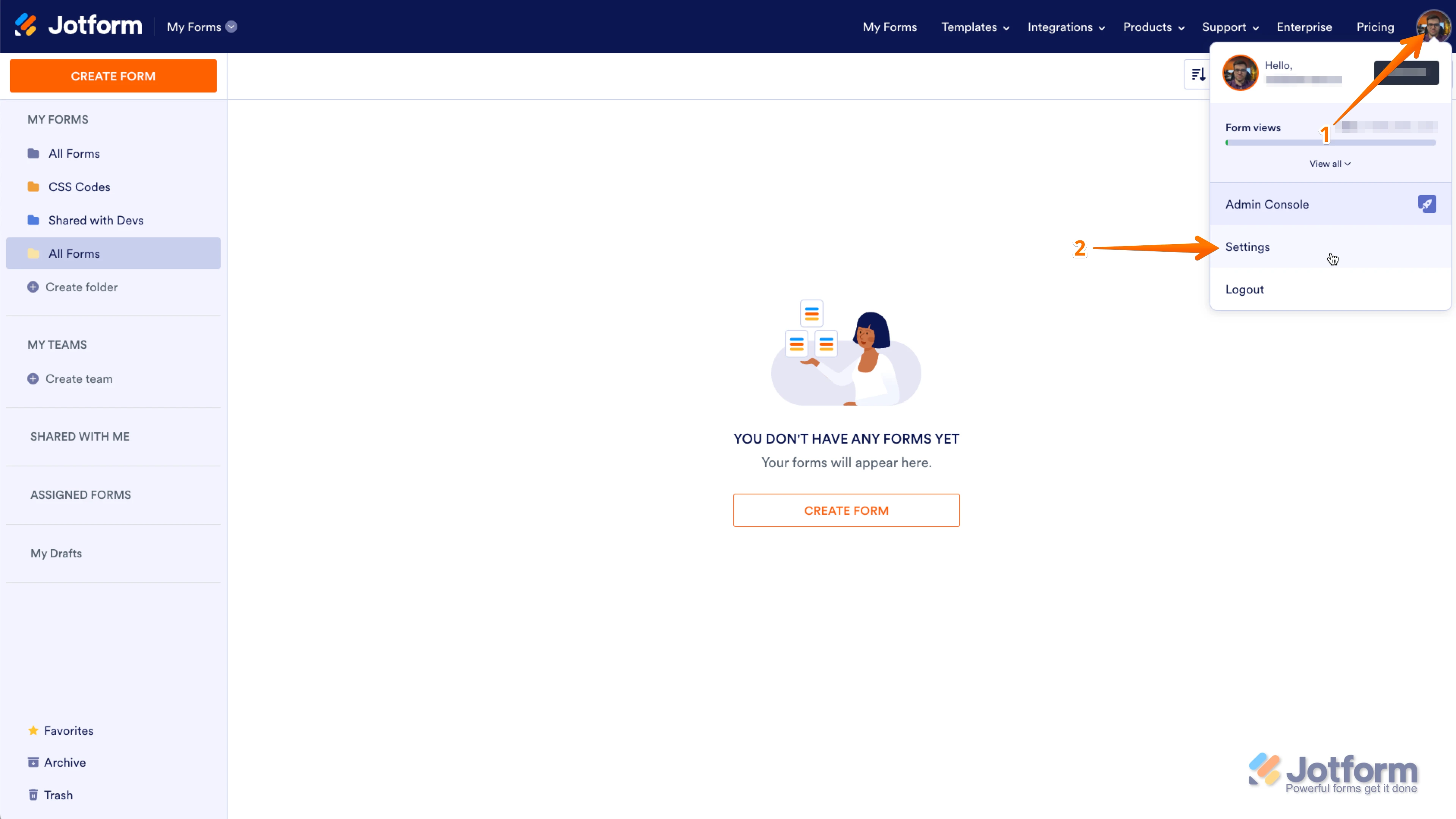
1. Le mostro come fare:S. Nell'angolo superiore destro della pagina I Miei Moduli, fare clic sull'Immagine del profilo.
2. Nel menu a tendina fare clic su Impostazioni.
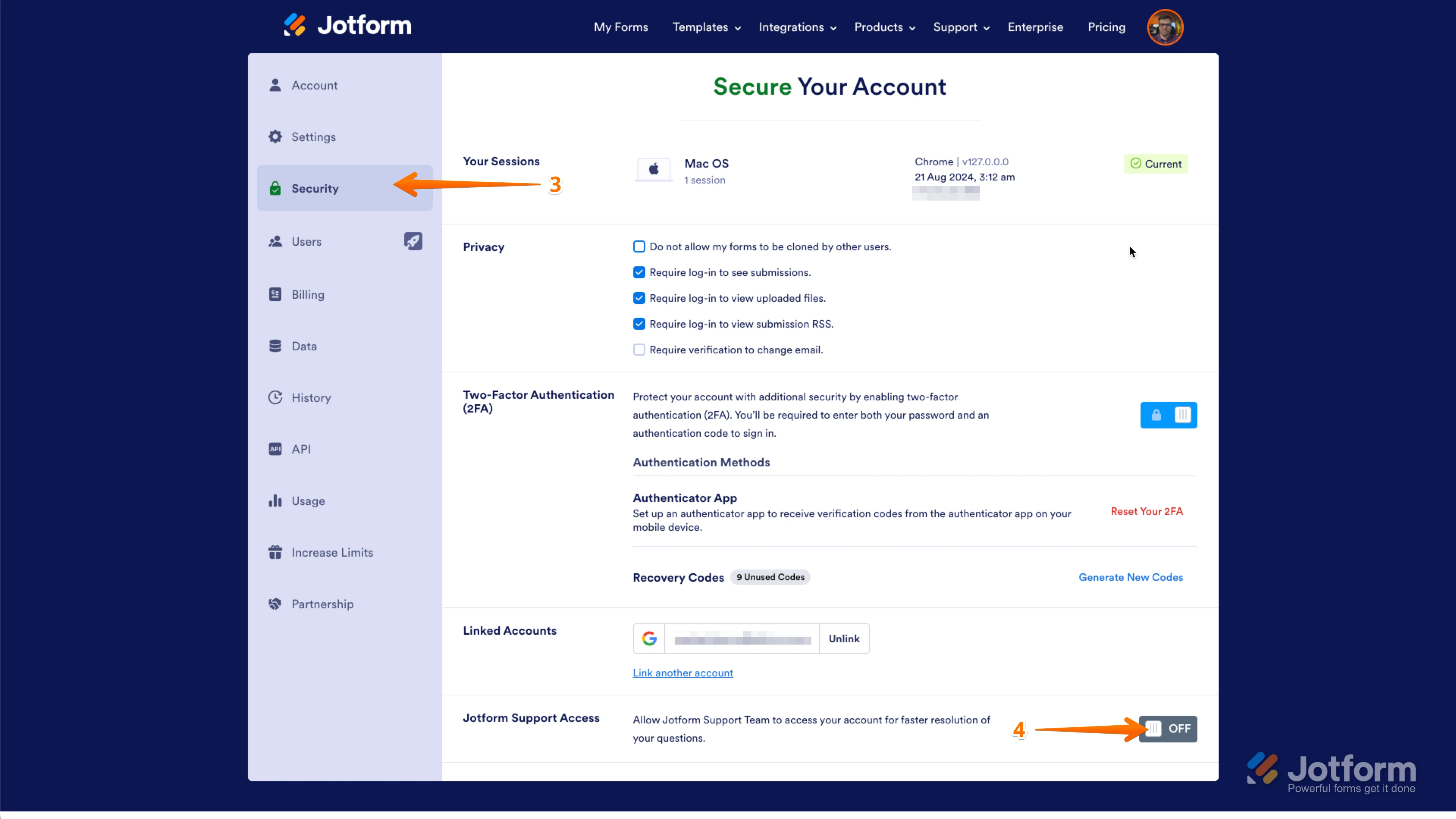
3. Nel pannello a sinistra, fare clic sulla scheda Sicurezza.
4. Quindi, in basso a destra della pagina, impostare l'accesso al supporto Jotform su On.
Ecco, una volta fatto ciò, ci faccia sapere che l'accesso è abilitato, così potremo verificare le sue tabelle.
Le daremo una soluzione non appena riceveremo una sua risposta.
-
gabrielifrancesca41
Salve Vincenzo, ho fatto quello che mi ha detto
-
Kyle Jotform Support
Hello Francesca,
The reason you can’t complete the PayPal integration is that the PayPal login window isn’t popping up as expected. This usually happens when browser permissions block pop‑ups or when the PayPal login window is opening but is hidden behind your current browser window.
Can you try connecting again and check if the PayPal login window appears? Also, make sure your browser allows pop‑ups and permissions for PayPal so the setup can be completed successfully. Check out my screenshot below:
Give it a try and reach out again if you have any other questions.
-
gabrielifrancesca41
I tried but it always gives me the exclamation point
-
gabrielifrancesca41
I just can't enter a payment method
-
Kyle Jotform Support
Hi Francesca,
Can you capture a video of what’s going on and share it? Loom works great, or you can upload it to Google Drive or Dropbox. Also, share a screenshot of the console log error as well. Our guide on How to Post Screenshots to Our Help Center shows you how.
As soon as we hear back from you, we can work on getting you a solution for this.
-
gabrielifrancesca41
I tried to create another form, but it just doesn't work
-
gabrielifrancesca41
https://drive.google.com/file/d/1O8BEDBonosArFCBFIqld0sOjt1WX4snL/view?usp=sharing. As you can see it's not working at all.
-
Kyle Jotform Support
Hi Francesca,
Can you change the privacy settings of the Google link so we can access it publicly?
After we hear back from you, we’ll know what’s going on and how to help.
-
gabrielifrancesca41
sorry you can see it now
-
Kyle Jotform Support
Hi Francesca,
That helps a lot. In your video, the PayPal login window isn't popping out like in the screencast that I shared above this thread. Can you try using a different browser and device and see how it goes? Also, confirm that your browser isn’t blocking pop‑ups and that PayPal has permission to open, so the setup can proceed smoothly.
Give it a go and let us know if anything else comes up.
-
I tried from Chrome on my phone and it doesn't work at all
-
 Joeni Jotform Support
Hi Francesca,
Can you try connect your PayPal account in a test mode first to see if it works? Let me show you how:
- In Form Builder, click on the Credit Card icon of the Product field and click on the Add Payment Connection button.
- Then, click on the Add New Connection button in the window prompt, and select the PayPal option.
- Finally, click on the Next button, select the Test Mode option as your payment mode.
Give it a try and let us know how it goes.
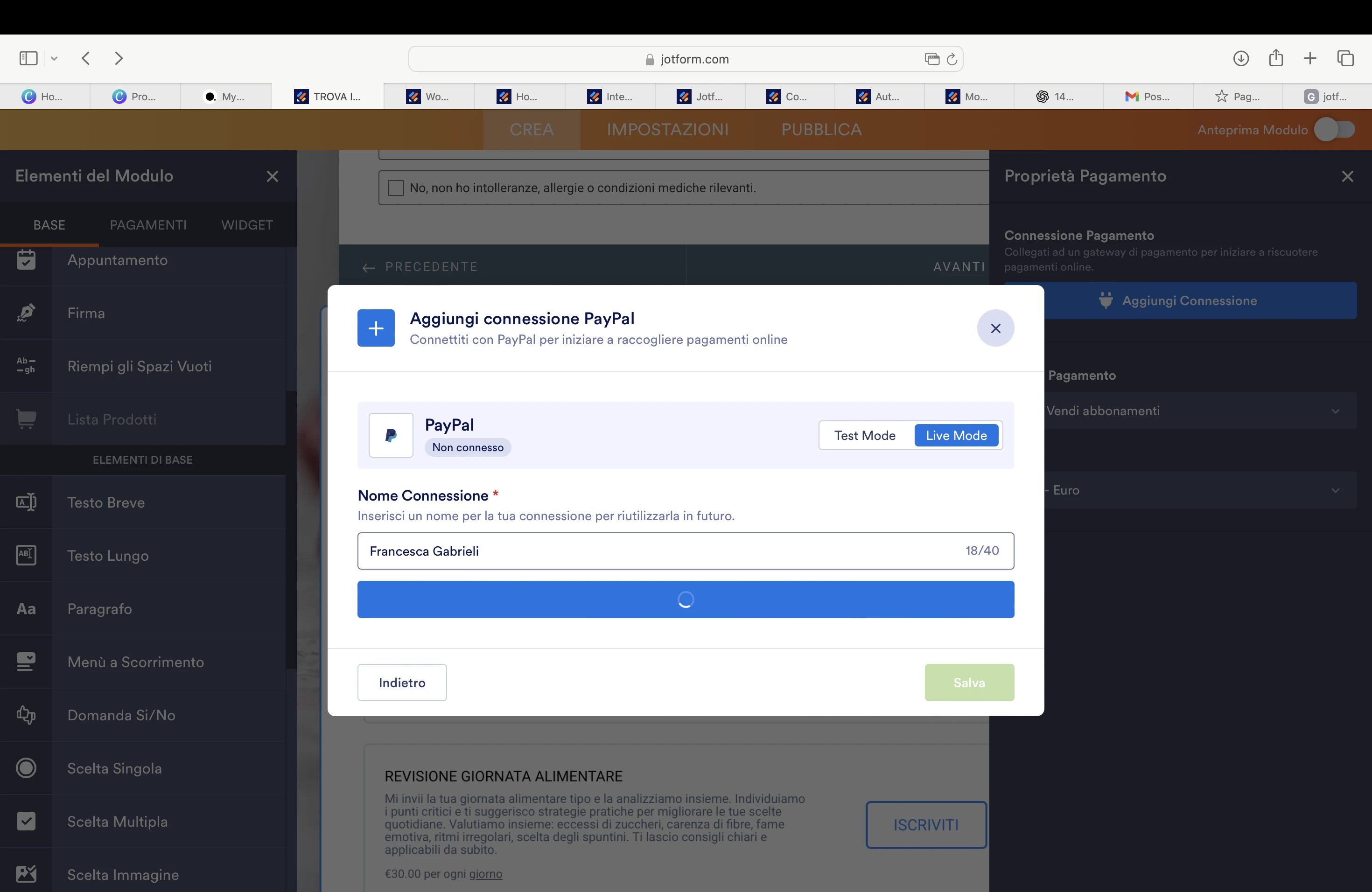
 From the attached photo you can see that the payment methods appear faded to me
 Restiamo a sua disposizione per ulteriori chiarimenti.