Korte tekst
Store quick responses, manage labels, and track essential details in a format that's easy to read, filter, and sort.
Basic Columns
Explore basic column types in Jotform Tables, including text, numbers, dates, selections, and more. Customize fields to organize and manage your data with ease.
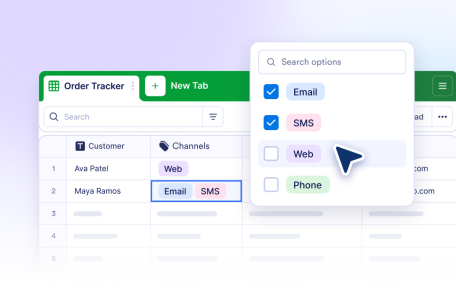
Add Multiple Selection columns to Jotform Tables to choose several options from a predefined list. Organize tags, categories, and other values with customizable, color-coded choices.
Manage multiple values in one column with flexible selection options. Create custom choices, assign colors, or connect options to existing form and table data for easier organization.
Create predefined lists that allow multiple selections per entry. Customize options with colors or populate them from connected forms and tables to keep your data structured.
Define custom choices for tags, skills, departments, or categories and assign colors to each option. Make multiple selections easier to identify and review at a glance.
Populate selection options using data from connected forms or tables instead of creating them manually. Keep available choices consistent across related datasets.
A Multiple Selection column lets you choose more than one value from a predefined list of options. It's ideal for managing tags, categories, skills, or entries with multiple attributes.
Yes. You can create your own list of options and assign different colors to each choice, making it easier to identify and organize multiple values within your table.
Yes. You can connect a Multiple Selection column to existing form or table data to populate its options dynamically, helping maintain consistency across related records.