

Sanità

Modello di Cartella Clinica
Una Modello di Cartella Clinica viene utilizzato per registrare informazioni mediche sui pazienti come dettagli di contatto, prescrizioni, anamnesi e altro. Con questo Modello di Cartella Clinica professionale, puoi registrare e gestire facilmente le informazioni sui pazienti e i documenti di supporto per la tua pratica medica online! Basta compilare il modulo allegato con le informazioni del paziente, inserire le informazioni manualmente o impostare un modulo di registrazione in modo che i tuoi pazienti possano inserire le loro informazioni autonomamente e da qualsiasi dispositivo. Ogni risposta aggiornerà automaticamente il foglio di calcolo. Jotform ti consente di optare per piani compatibili con HIPAA che offrono un contratto di società in affari (BAA) firmato, così puoi mantenere al sicuro i dati sanitari dei tuoi pazienti più facilmente. Puoi anche personalizzare questo Modello di Cartella Clinica aggiungendo nuove righe, colonne e schede, aggiornando nomi e colori delle etichette e persino collegando il modulo con oltre 100 integrazioni per sincronizzare automaticamente i dati con gli altri tuoi account! Gestisci in modo professionale i dati dei pazienti online con il Modello di Cartella Clinica di Jotform, disponibile in formato foglio di calcolo, calendario o visualizzazione a cartolina.
Vai alla Categoria:Sanità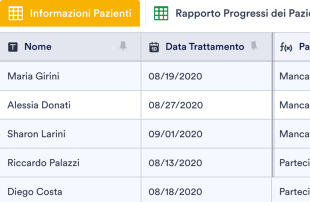
Template per il Monitoraggio dei Pazienti
Il template per il monitoraggio del paziente funziona come una cartella clinica digitale che permette ai medici di monitorare i progressi del paziente mentre riceve un trattamento. Che tu sia un medico di base, un fisioterapista, uno psichiatra o un medico specialista, il nostro template ti aiuterà a tenere traccia della salute dei tuoi pazienti. Per iniziare, ti basterà semplicemente inserire nel relativo database le informazioni sul paziente e i dettagli dell'appuntamento, come nome, data e partecipazione al trattamento, ed eventuali note sui progressi del paziente. Potrai ricevere e consultare i dati di ogni paziente da qualsiasi dispositivo, ovunque ti trovi, condividendo le informazioni importanti con gli stessi pazienti o altro personale medico se necessario, e tutto con un semplice clic. Se desideri personalizzare il tuo Template per il Monitoraggio dei Pazienti, aggiungere nuove colonne, righe, schede ed etichette sarà un gioco da ragazzi. Non dovrai scrivere alcuna riga di codice, ne complicate formule di calcolo: ti basteranno pochi semplici click per rendere il template perfetto per le tue esigenze. E se lo desideri, potrai abilitare la conformità HIPAA sul tuo account, aggiungendo un ulteriore livello di protezione ai dati sanitari dei tuoi pazienti, secondo gli standard HIPAA. Tieni traccia dei progressi dei tuoi pazienti e seguili nel loro percorso di riabilitazione grazie al nostro Template per il Monitoraggio dei Pazienti online. Aggiungi un nuovo potente strumento al tuo kit medico!
Vai alla Categoria:SanitàInformazioni su Sanità
Se hai bisogno di monitorare i progressi del paziente, programmare i tempi dei farmaci, registrare i livelli di zucchero nel sangue o trovare un CRM sanitario che fa tutto, mantieni il tuo studio privato organizzato con i fogli di calcolo sanitari gratuiti di Jotform! Per iniziare, scegli il modello di foglio di calcolo sanitario di seguito più adatto alle tue esigenze, personalizzalo e inserisci le informazioni sul paziente o sul farmaco direttamente nel foglio di calcolo. Puoi anche chiedere ai pazienti di compilare il modulo allegato al foglio di calcolo e guardare gli invii apparire automaticamente nel foglio di calcolo!
Jotform Tables is the central hub where submissions from connected Jotform Forms automatically appear, transforming individual responses into structured data entries. Each form submission becomes an entry in the connected table, easily accessible in Table View or Detail View for thorough review. Users can organize and scrutinize submissions using various features, such as search, filters, grouping, and different column types. Additional views like Calendar View or Uploads View offer specialized perspectives for managing data. While manual entry and CSV or Excel import are available, the focus remains on the seamless form-to-table workflow that ensures efficiency and accuracy in data management.
Why Use Healthcare Templates?
- By using Healthcare Templates, form owners can eliminate the need for manual data transfer, as all responses from Jotform Forms automatically populate their connected tables. This automation reduces human error and saves time significantly.
- These tables keep all form submissions together in a centralized location, making it easier to access and manage patient records, appointment requests, or other data without sifting through various documents or emails.
- With features such as search and filters, form owners can quickly locate specific entries, which is particularly useful for retrieving patient information or reviewing medical histories when needed.
- The templates allow for a comprehensive review of submission details, including uploads and additional notes, enabling healthcare professionals to make informed decisions based on complete information.
- Healthcare Templates facilitate efficient follow-up and coordination with patients or team members by keeping all necessary data and actions in one place, streamlining communication and task management.
- Tracking changes and reporting on collected data becomes seamless, as the templates provide a clear audit trail and the ability to generate reports that summarize key metrics and insights.
Common Problems Solved by Healthcare Templates
- Manually copying form submissions into spreadsheets can lead to errors and inefficiencies. Healthcare Templates solve this by auto-populating tables with form responses, ensuring data accuracy and time savings.
- Scattered responses across various platforms make it difficult to maintain a cohesive record. By centralizing submissions in one table, these templates provide a single source of truth for all healthcare-related data.
- Locating specific records among numerous submissions can be challenging. With features like search and filters, finding the right information is quick and easy, enhancing productivity and response times.
- Inconsistent review processes can lead to missed information or incorrect conclusions. The structured format of these templates ensures that all submissions are reviewed systematically, maintaining consistency and reliability.
- Managing uploads such as medical images or documents can be cumbersome. The Uploads View in Jotform Tables allows for easy access and review of such files, ensuring critical information is always at hand.
Matching Form Submission Use Cases to Jotform Tables Features
- When form owners collect patient intake forms or appointment requests, these responses automatically appear in the connected Healthcare Template. This feature ensures that all new submissions are promptly available for review and action.
- Reviewing patient data becomes efficient with Table View and Detail View, where form owners can examine each entry thoroughly, ensuring that all necessary information is captured and evaluated.
- For managing team collaboration, access settings and assignees can be used to designate responsibilities and maintain control over who can view or edit the data, fostering a secure and organized workflow.
- Reporting capabilities, such as Report View, allow healthcare managers to generate detailed insights into patient demographics, appointment trends, or service feedback, aiding in strategic decision-making.
- The use of column types and data grouping facilitates the categorization of submissions, enabling form owners to segment data by patient type, service required, or appointment urgency for more targeted analysis.
How to Use Healthcare Templates with Jotform Forms
- Start by selecting a relevant Jotform Tables template or creating a new table connected to an existing Jotform Form. As the form collects healthcare-specific information, each new response automatically appears in the connected table, ensuring all data is promptly available for management.
- Configure the table to suit your review needs by naming columns appropriately, selecting relevant column types, and choosing views such as Table View, Detail View, or Uploads View to enhance data organization and accessibility.
- Manage submissions by employing search, filters, and data grouping to organize records. Utilize access settings and assignees for collaborative efforts, and apply action buttons or linked tables to streamline processes and improve efficiency.
Top Use Cases for Healthcare Templates
- For Form Owners: Form owners who create or manage the connected Jotform Forms benefit from using Healthcare Templates by having a streamlined process for reviewing incoming responses. They can edit submission data, check details or uploads, and keep records organized in a structured manner. This ensures that all collected information is up-to-date and accurate, allowing healthcare professionals to focus on providing quality care.
- For Teams: Authorized team members use these templates to find submissions easily and maintain entries with efficiency. By coordinating responsibilities with assignees, they ensure that tasks are completed on time. Access settings and revision history support shared work, allowing team members to collaborate effectively without compromising data integrity or security.
- For Managers: Managers leverage Healthcare Templates to monitor collected data and review patterns specific to the healthcare industry. They can check progress or ownership of tasks and use Report View to gain insights into operational performance. This oversight capability helps managers make informed decisions and improve overall efficiency within the healthcare facility.
Summarizing Healthcare Templates
Personalizzare il tuo Modello di Foglio di Calcolo per la Sanità non richiede alcuna codifica né molto del tuo prezioso tempo: basta trascinare e rilasciare per riorganizzare rapidamente righe e colonne, separare le informazioni in nuove schede, cambiare i nomi delle etichette e i colori, e altro ancora. Puoi persino passare dalla visualizzazione a foglio di calcolo a quella a calendario, a schede o a report per vedere le informazioni nel modo che preferisci! E se ti preoccupa la sicurezza, niente paura: per aiutare a proteggere i dati sensibili PHI, Jotform offre BAA firmati e funzionalità di conformità HIPAA per gli utenti Oro. Tieni traccia delle informazioni importanti sui pazienti in un unico posto facilmente accessibile e sicuro con i Fogli di Calcolo per la Sanità di Jotform!
Domande Frequenti
1) Is it free to use Healthcare Templates with Jotform Tables?
Jotform offers a Starter plan that allows users to access and utilize Healthcare Templates. This plan provides basic capabilities to manage form submissions and connected tables effectively. While certain advanced features may require a subscription, the Starter plan offers a good entry point for individuals and small teams.
2) How do submissions from Jotform Forms appear in Healthcare Templates?
When a respondent submits a Jotform Form, the response is automatically transferred to the connected Healthcare Template. Each submission becomes an entry, typically appearing as a row in the table. This automatic process ensures that all future responses are captured and ready for review without manual intervention.
3) Can I edit, search, filter, group, and calculate data in Healthcare Templates?
Yes, Healthcare Templates allow you to edit submission data, search for specific entries, and apply filters to narrow down records. You can also group data based on various criteria and perform calculations using formulas. These capabilities provide robust tools for managing and analyzing your healthcare data.
Utilizzi dei fogli di budget
Absolutely, you can export data from Healthcare Templates in CSV or Excel format. This feature allows you to complement your connected-form submissions with external data sources. It also provides flexibility in sharing data with other systems or stakeholders who may require specific formats.
5) Which Jotform Tables views can I use with Healthcare Templates?
You can utilize several views such as Table View, Detail View, Calendar View, Uploads View, and Report View with Healthcare Templates. Table View offers a straightforward look at all entries, while Detail View provides in-depth information on each submission. Calendar View is useful for tracking appointments, and Uploads View helps manage files. Report View offers insights for data analysis and reporting.
6) Can teams collaborate on submissions in Healthcare Templates?
Yes, teams can effectively collaborate on submissions using Healthcare Templates. With customizable access settings, you can control who views or edits the data. Assigning team members to specific tasks and using real-time tracking and revision history also enhances collaborative efforts, ensuring that all team activities are transparent and coordinated.
7) Can I connect Healthcare Templates to related data or other applications?
Healthcare Templates support integration with related data through linked tables and action buttons. These features allow you to connect with other applications without the need for complex setups. This connectivity helps streamline processes and ensures that all data works in harmony across different platforms.
8) Can I create reports, PDFs, and manage files from Healthcare Templates?
Yes, Healthcare Templates enable you to generate reports using Report View, which can be tailored to meet specific analytical needs. You can also produce PDFs for documentation purposes and manage files through Uploads View, ensuring that all related documents are stored and accessible from within the table.