

Modelli di Fogli per l'Iscrizione al Pranzo Condiviso

Foglio di Iscrizione alla Cena di Natale
È il periodo più bello dell’anno! Se stai organizzando la tua festa di Natale annuale o pianificando le festività natalizie per l'ufficio, inizia con il nostro Foglio di Iscrizione alla Cena di Natale gratuito. Tutto quello che devi fare è condividere il modulo di iscrizione con gli ospiti e attendere la ricezione delle risposte. Utilizzando qualsiasi dispositivo, gli ospiti possono compilare il modulo con il loro nome e gli alimenti che porteranno alla festa. Potrai visualizzare il tuo foglio di calcolo dal tuo desktop, tablet o smartphone e potrai anche stamparlo o condividerlo con un solo clic. Ti offriamo il dono della personalizzazione in modo che tu possa fare in modo che questo Foglio di Iscrizione alla Cena di Natale soddisfi ogni tua esigenza. Senza bisogno di programmare. Basta trascinare e rilasciare per aggiungere righe e colonne, creare etichette con codice colore e inserire schede per informazioni aggiuntive come ingredienti o allergie alimentari. Quando avrai finito di personalizzare il tuo foglio di calcolo, sembrerà così bello da poterlo infiocchettare! Organizza la tua festa di Natale quest'anno utilizzando un Foglio di Iscrizione alla Cena di Natale!
Vai alla Categoria:Fogli di Iscrizione Potluck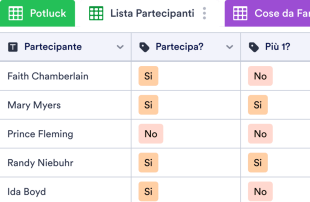
Foglio di Registrazione Potluck
Che tu stia organizzando un pranzo potluck o un picnic, scopri quali deliziosi piatti porteranno i tuoi ospiti con questo Foglio di Registrazione Potluck online gratuito! Tutto quello che devi fare è condividere il modulo di iscrizione creato automaticamente da questo modello di foglio e iniziare a ricevere le risposte! Gli ospiti possono inserire il loro nome, che tipo di piatto intendono portare e i suoi ingredienti e se porteranno qualcuno con loro compilando il modulo da qualsiasi dispositivo. Crea un Foglio di Registrazione Potluck personalizzato senza bisogno di programmare, basta trascinare e rilasciare per aggiungere più righe e colonne, creare etichette colorate, inserire schede per informazioni aggiuntive e persino visualizzare il foglio di calcolo in formato cartolina. Una volta ricevute le risposte tramite il modulo, sarai in grado di visualizzare il tuo foglio di calcolo da qualsiasi dispositivo, stamparlo o condividerlo con gli ospiti con un solo clic. Utilizzando un efficiente Foglio di Registrazione Potluck per il tuo prossimo evento potluck, ti puoi assicurare che nessuno arrivi a mani vuote o se ne vada affamato.
Vai alla Categoria:Fogli di Iscrizione PotluckInformazioni su Modelli di Fogli per l'Iscrizione al Pranzo Condiviso
Niente avvicina le persone del buon cibo. Sia che tu stia organizzando una cena in ufficio, una raccolta fondi per il cibo per la tua chiesa o una festa, i nostri fogli di iscrizione gratuiti per la cena ti aiuteranno a organizzare la migliore festa di sempre! Basta selezionare uno dei modelli di seguito, personalizzare il modulo di iscrizione corrispondente, inviarlo a tutti nell'elenco degli ospiti e guardare il foglio di iscrizione potluck riempirsi di nomi, piatti e informazioni sugli ingredienti. Il tuo foglio di iscrizione al potluck sarà accessibile su qualsiasi dispositivo, quindi puoi facilmente usare il tuo telefono per controllare chi sta portando cosa.
Diventa più produttivo personalizzando il tuo foglio di iscrizione potluck per soddisfare le tue esigenze. Senza alcuna codifica, puoi creare più righe, colonne, etichette e schede per tenere traccia della tua lista di cose da fare, informazioni sugli ospiti, forniture per feste e altro ancora. Sarai anche in grado di visualizzare le informazioni in un formato scheda di facile lettura, perfetto per le ricette! Diventa più produttivo con un foglio di iscrizione al potluck che renderà sicuramente il tuo prossimo evento un successo.
Why Use Potluck Sign Up Sheet Templates?
- Potluck Sign Up Sheet Templates eliminate the tedious task of manually transferring data from forms to spreadsheets, ensuring all responses are automatically organized in one place. This automation reduces errors and saves time, allowing event planners to focus on other critical aspects of organizing.
- By using these templates, event coordinators can easily keep track of who is bringing what, which helps prevent duplicate items and ensures a diverse menu for the event. This results in a well-organized and enjoyable potluck experience for all attendees.
- With all submissions stored together, locating specific entries becomes a breeze. Using the search and filter features, form owners can swiftly retrieve information about individual participants or specific items, enhancing their ability to manage the event effectively.
- Reviewing complete submission details is simplified, as the templates offer a comprehensive view of each entry. This means coordinators can quickly verify all necessary information, such as contact details and dietary restrictions, ensuring nothing is overlooked.
- Coordinating follow-up actions, such as reminders or confirmations, becomes straightforward with the use of Jotform Tables' capabilities. Form owners can track changes, monitor participant responses, and generate reports to keep everyone informed and on schedule.
Common Problems Solved by Potluck Sign Up Sheet Templates
- Event planners often face the challenge of scattered responses, which can lead to confusion and miscommunication. Potluck Sign Up Sheet Templates centralize all submissions, making it easier to manage and review data efficiently.
- Manually copying responses into traditional spreadsheets can result in errors and inconsistencies. These templates automatically organize incoming data, ensuring accuracy and consistency across all entries.
- Locating specific records in a sea of responses can be time-consuming and frustrating. With advanced search and filter capabilities, these templates allow for quick retrieval of necessary data, streamlining the management process.
- Inconsistencies in reviewing submissions can lead to duplicated efforts or missed details. By using Jotform Tables' structured views, form owners can maintain a consistent review process, ensuring all entries are evaluated thoroughly.
- Uploads such as images or documents can be hard to manage without a dedicated system. The Uploads View in Jotform Tables makes it easy to store and review these attachments, providing context to each submission.
Matching Form Submission Use Cases to Jotform Tables Features
- When participants submit their potluck contributions via Jotform Forms, the responses are automatically populated into the connected table. This seamless integration allows form owners to have immediate access to all the necessary details for event planning.
- Reviewing submissions is made easy with Table View, where form owners can see all entries at a glance. By using filters and search functions, they can quickly sort and find specific entries, improving efficiency and organization.
- Team management is enhanced with features like access settings and assignees. This allows different team members to access, review, and manage assigned tasks or submissions, ensuring collaborative and coordinated efforts.
- Reporting is simplified with the use of Report View, which provides visual insights into the collected data. This helps form owners identify trends, such as popular dishes or common dietary restrictions, to better accommodate participants.
- Utilizing action buttons, form owners can quickly send out reminders or confirmations to participants, ensuring everyone is informed and prepared for the event. This enhances communication and keeps the planning process running smoothly.
How to Use Potluck Sign Up Sheet Templates with Jotform Forms
- Start by selecting a relevant Potluck Sign Up Sheet Template, a blank table, or the table connected to an existing Jotform Form. The form collects all the category-specific information, and as participants submit their responses, these automatically appear in the connected table.
- Configure the table to review submissions effectively by naming columns and choosing appropriate column types. Select relevant views such as Table View, Detail View, or Uploads View to ensure all necessary information is easily accessible and organized.
- Manage the submissions using search, filters, and data grouping to find specific entries quickly. Utilize access settings, assign tasks, and track changes with revision history to maintain collaborative efforts. Use features such as linked tables and action buttons to streamline follow-up actions and generate reports.
Top Use Cases for Potluck Sign Up Sheet Templates
- For Form Owners: Form owners, such as event coordinators, use Potluck Sign Up Sheet Templates to efficiently review and manage incoming responses. They can easily edit submission data to correct any errors or update information as needed. By checking the details or uploads associated with each entry, they ensure that all necessary information is complete. These templates help keep records organized within Jotform Tables, where they can easily track participation and manage event logistics.
- For Teams: Authorized team members benefit from Potluck Sign Up Sheet Templates by having a centralized system to find and maintain entries. They can coordinate responsibility with assignees, ensuring that each task is accounted for. With access settings and revision history, teams can support shared work by tracking who made changes and when, promoting a collaborative and transparent planning process.
- For Managers: Managers leverage Potluck Sign Up Sheet Templates to monitor collected data and identify patterns relevant to the event. They can review progress and ownership of tasks, ensuring that everything is on track. By utilizing Report View or other relevant views, managers gain insights into the overall planning process, which aids in making informed decisions and adjustments as needed.
Summarizing Potluck Sign Up Sheet Templates
Potluck Sign Up Sheet Templates offer a valuable solution for collecting and managing potluck-related information through Jotform Forms. By automatically integrating submissions into Jotform Tables, these templates streamline the event planning process, ensuring all data is organized and accessible. With capabilities for reviewing, organizing, and collaborating on entries, form owners and teams can efficiently manage every aspect of their potluck events, leading to successful and well-coordinated gatherings.
Domande Frequenti
1) Is it free to use Potluck Sign Up Sheet Templates with Jotform Tables?
Jotform offers a Starter plan, which allows users to access and utilize Potluck Sign Up Sheet Templates. While the plan provides free access, it's important to explore the specific features available under this plan. The Starter plan is a great way to begin using Jotform Tables, although users should be aware of any limitations it may have.
2) How do submissions from Jotform Forms appear in Potluck Sign Up Sheet Templates?
Submissions from Jotform Forms automatically appear in Potluck Sign Up Sheet Templates once a respondent completes and submits the form. The connected form ensures that each response becomes an entry in the linked table, usually as a row. This auto-population feature allows for seamless integration of new responses, providing an efficient and organized way to manage submissions.
3) Can I edit, search, filter, group, and calculate data in Potluck Sign Up Sheet Templates?
Yes, Potluck Sign Up Sheet Templates allow for a variety of data management capabilities. You can edit submissions directly within the table and utilize search and filter functions to locate specific entries. Additionally, you can group data by different criteria and perform calculations using formulas, enhancing your ability to analyze and organize the collected information effectively.
Utilizzi dei fogli di budget
Absolutely, the data within Potluck Sign Up Sheet Templates can be exported as CSV or Excel files. This feature allows you to add existing information alongside connected-form submissions or to share data externally. It provides a flexible way to integrate or distribute your collected data as needed.
5) Which Jotform Tables views can I use with Potluck Sign Up Sheet Templates?
Potluck Sign Up Sheet Templates offer various views, including Table View, Detail View, Calendar View, and Report View. Table View provides a comprehensive overview of all entries, while Detail View focuses on individual submissions. Calendar View is useful for event scheduling, and Report View helps in analyzing trends and summarizing data, supporting different aspects of event management.
6) Can teams collaborate on submissions in Potluck Sign Up Sheet Templates?
Yes, teams can collaborate effectively using Potluck Sign Up Sheet Templates. With access settings, you can control who can view or edit the data, ensuring secure and organized collaboration. Assignees and real-time tracking features help coordinate responsibilities, while revision history provides a log of changes, enhancing transparency and teamwork.
7) Can I connect Potluck Sign Up Sheet Templates to related data or other applications?
You can connect Potluck Sign Up Sheet Templates to related data using linked tables and integrations. Action buttons make it possible to perform tasks and interact with other applications, streamlining your workflow. This connectivity enhances the functionality of the templates, allowing for a more integrated and efficient event planning process.
8) Can I create reports, PDFs, and manage files from Potluck Sign Up Sheet Templates?
Yes, you can create reports using Report View, which is useful for summarizing data and identifying trends. PDF generation is available for creating document copies of your data, while Uploads View helps manage any files associated with submissions. These capabilities ensure that you have all the tools necessary for comprehensive data management and documentation.