-
 mando793
AIでウィジェットを作成したが、性能が希望通りでないため削除するか作り直したい。
-
 Podo: サポートスペシャリスト
こんにちは 安藤美也 様,
Jotformにサポートのお問い合わせをいただきありがとうございます。私は人工知能アシスタントで、Jotformの操作についてお手伝いするために対応しています。
AIで作成したウィジェットも、アプリ内では通常のウィジェットと同じ扱いになるため、不要であれば削除できますし、一度削除してから新しく作り直すことも可能です。ここでは、フォームやアプリからウィジェット(フィールド)を削除する一般的な方法と、「見つからないウィジェット」を削除する方法をご案内します。
それでは、削除と作り直しの手順をご説明します。
1.フォームやアプリ上でウィジェット(フィールド)を削除する方法
- JotformのMy Workspace(マイワークスペース)を開きます。
- 上部のTypeやFilterでFormsまたはAppsだけが表示されるように絞り込み、対象のフォーム/アプリにマウスを乗せてEdit(編集)をクリックします。
- フォームビルダー(またはApp Builder)が開いたら、削除したいAIウィジェットの要素をクリックして選択します。
- 要素の右上付近に表示されるゴミ箱アイコン(Trash icon)や削除ボタンをクリックします。
- 確認ダイアログが出た場合は、内容を確認して削除を確定します。
この操作で、AIで生成されたウィジェットも含め、その要素自体をフォーム/アプリから削除できます。
2.フォームビルダー上で見つけにくいウィジェットを削除する方法
「送信データや条件には残っているのに、ビルダー画面でそのウィジェットが見つからない」という場合は、次の方法をお試しください。
- フォームをForm Builderで開き、どれか1つフィールドをクリックして選択します。
- キーボードの↑ / ↓(上下矢印キー)を押して、フォーム内の要素を順番に選択していき、目的のウィジェットが選択されるか確認します。
- 見つかったら、その状態でゴミ箱アイコンから削除します。
- それでも見つからない場合は、JotformのField Managerツールを使います。
- ブラウザで Field Manager を開き、Jotformアカウントでログインします。
- Manage Fields をクリックし、表示されるウィンドウでAllowを選択します。
- Open a Form to Begin をクリックし、対象のフォームを選択します。
- 一覧から不要なフィールド/ウィジェットを探し、その行のXアイコンをクリックしてDelete Fieldを選択します。
- 削除すると、そのフィールドに紐づく送信データも失われるため、必要であれば事前に送信データをエクスポートしておきます。
3.AIウィジェットを作り直す(再生成する)場合の基本的な流れ
- 不要なAIウィジェットを上記の手順で削除します。
- App BuilderやAI App Builderで、アプリを開きます。
- 画面上部のCreateやAI用の入力欄から、実現したい機能やユーザー体験を日本語で具体的にプロンプトとして入力します(例:「ユーザーの入力内容に基づいておすすめプランを提案するウィジェットを作成して」など)。
- AIが新しいウィジェット(AI Widget)を生成したら、動作をテストし、必要に応じて追加の指示や修正プロンプトで調整します。
- 期待どおりに動作することを確認したら、アプリを保存・公開します。
もし可能であれば、どの画面で作成したAIウィジェットか(App Builderなのか、フォーム内のAI Agentなのかなど)と、現在どのように表示されているかを教えていただければ、より具体的な削除・再作成の手順をお伝えできます。
ご案内した手順をお試しいただき、うまくいくかどうか教えていただけますでしょうか。
-
mando793
しめされた方法でフォーム上のウィジェットは削除できますが、画面左側にあるフォーム要素にあるウィジェットは削除できません。
-
Podo: サポートスペシャリスト
こんにちは 安藤美也 様,
ご説明ありがとうございます。フォーム上のウィジェットは削除できている一方で、左側のフォーム要素パネル(Form Elements → Widgetsタブ)に表示されるウィジェット一覧からは、個別のウィジェットを削除したり非表示にしたりする設定は用意されていません。
フォーム要素パネルに表示されるウィジェットは、利用可能なウィジェットのカタログとして固定されており、フォームから削除しても、この一覧自体から消えることはありません。そのため、現在の仕様では、左側パネルのウィジェットをリストから取り除く・削除することはできない状態です。
もし「作成したAIウィジェット」自体を完全に使わないようにしたい場合は、次のような整理方法が現状の対応策になります。
- フォーム上からは削除しておき、今後そのウィジェットをフォームに追加しない。
- 同じ機能を別の構成で作り直したい場合は、新しいAIウィジェットを生成し、不要になった旧ウィジェットはフォーム上から削除したままにしておく。
左側パネルの一覧自体をカスタマイズする機能がないため、期待されている動きと異なってしまい恐縮ですが、現時点では上記のような運用での回避となります。
ほかにAIウィジェットの挙動や作り直しでお困りの点があれば、具体的なウィジェット名や用途を教えていただければ、こちらで分かる範囲で設定方法をご案内いたします。
引き続きご不明な点があれば、いつでもお知らせください。
-
 Raymond Jotform Support
Hi 安藤美也,
While we do offer Support in many foreign languages, and we're working hard to add more every day, we don't currently have Japanese Support agents who can help you. So I'll try to help you in English using Google Translate, but you can reply in whichever language you feel comfortable using.
Now, coming back to your question, AI created widgets in Form Builder can be deleted from your account through the My Form Widgets page. Let me show you how:
- On the My Form Widgets page, hover your mouse over your custom widget.
- Next, click on the Trash can icon.
- Then confirm the deletion by clicking on the Yes, delete button.

Reach out again if you need any help.
-
mando793
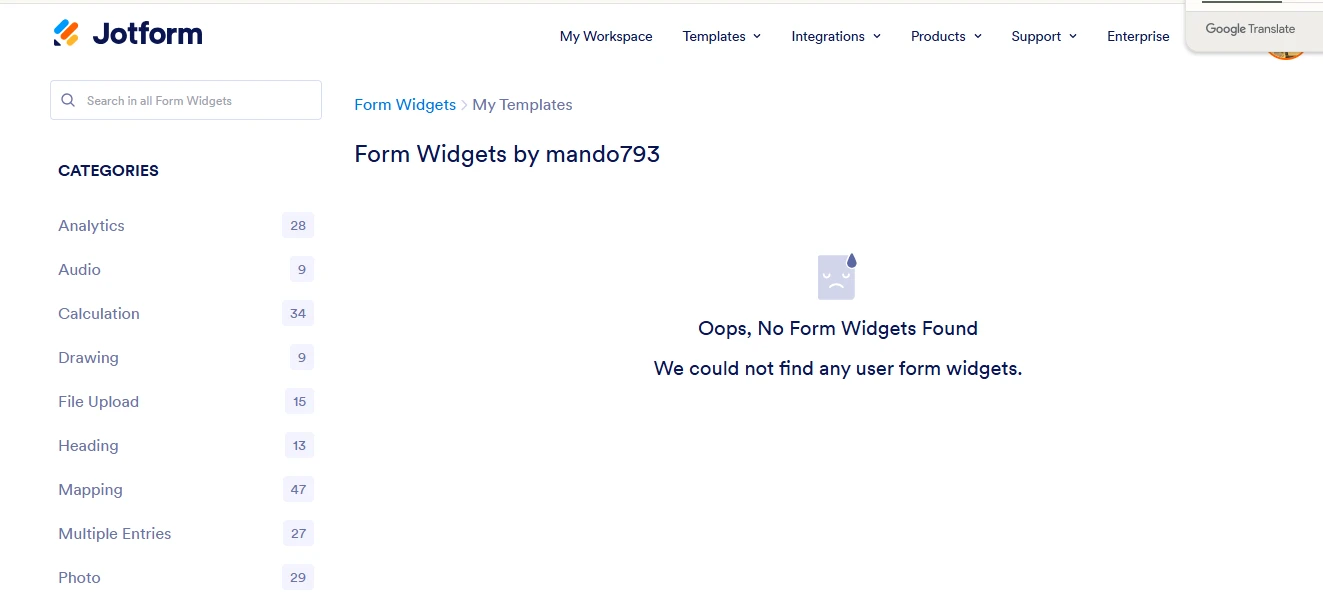
貼り付けた画像にあるように、何もウィジェットがないと表示されます。
-
 Aravir Enterprise Support
Hi 安藤美也,
Since you created the widget using AI, you can delete it just like any other field or widget. Can you share a screenshot of the widget you'd like to delete? Let me show you how to post a screenshot to our Help Center:
1. On the Help Center page, scroll down to the Your Answer section and click on the Image icon.
2. Drag and drop your image into the Upload box, or click on it and select your file.
3. Then, click on the Add button in the bottom-right corner of the window.
4. To resize it, click on your screenshot and then click on one of the boxes in the corners, and drag it inward.
5. Once you're finished, click on the Post Answer button at the bottom right of the Your Answer section.
That's it. Once we hear back from you, we'll be able to help you with this.
-
mando793
これら5つのウィジェットを削除したいです。
-
 Jotform Support Former Jotform Support
Hi 安藤美也,
Let us take a look at this for you. To do that, we’ll need your permission to access your account. Don’t worry, you can turn it off again once we’re done. Let me show you how to do it:
1. In the top-right corner of your Workspace page, click on your Avatar/Profile Image icon.
2. Then, in the Dropdown menu that opens, click on Settings.
3. Next, in the panel on the left, click on the Security tab.
4. If you haven’t opened your Security page in a while, it’ll ask you to verify. To do that, click on Send Verification Code.
5. Then, enter the Verification Code you receive in your email.
6. Finally, at the bottom of the page, toggle on Jotform Support Access.
After we hear back from you, we’ll have a better idea of what’s going on and how to help. -
mando793
サポートアクセスをオンにしました。
-
Raymond Jotform Support
Hi 安藤美也,
After checking further, it looks like widgets created through the Form Builder using the Create your Element with AI can't be deleted yet. The page I previously shared is for widgets created through the developer's Widgets page.
While the feature you're looking for isn't available at Jotform right now, we've gone ahead and escalated your request to our developers. Exactly when or if it's developed depends on their workload, how viable it is, and how many other users also request it. If there are any updates, we’ll circle back to this thread and let you know.
Thanks for your patience and understanding, we appreciate it.


 After we hear back from you, we’ll have a better idea of what’s going on and how to help.
Your Reply
Something Went Wrong
An error occurred while generating the AI response. Please try again!