-
Guten Tag,
wir verwenden ein Jotform-Formular, das über Canva in unsere Website eingebettet wird.
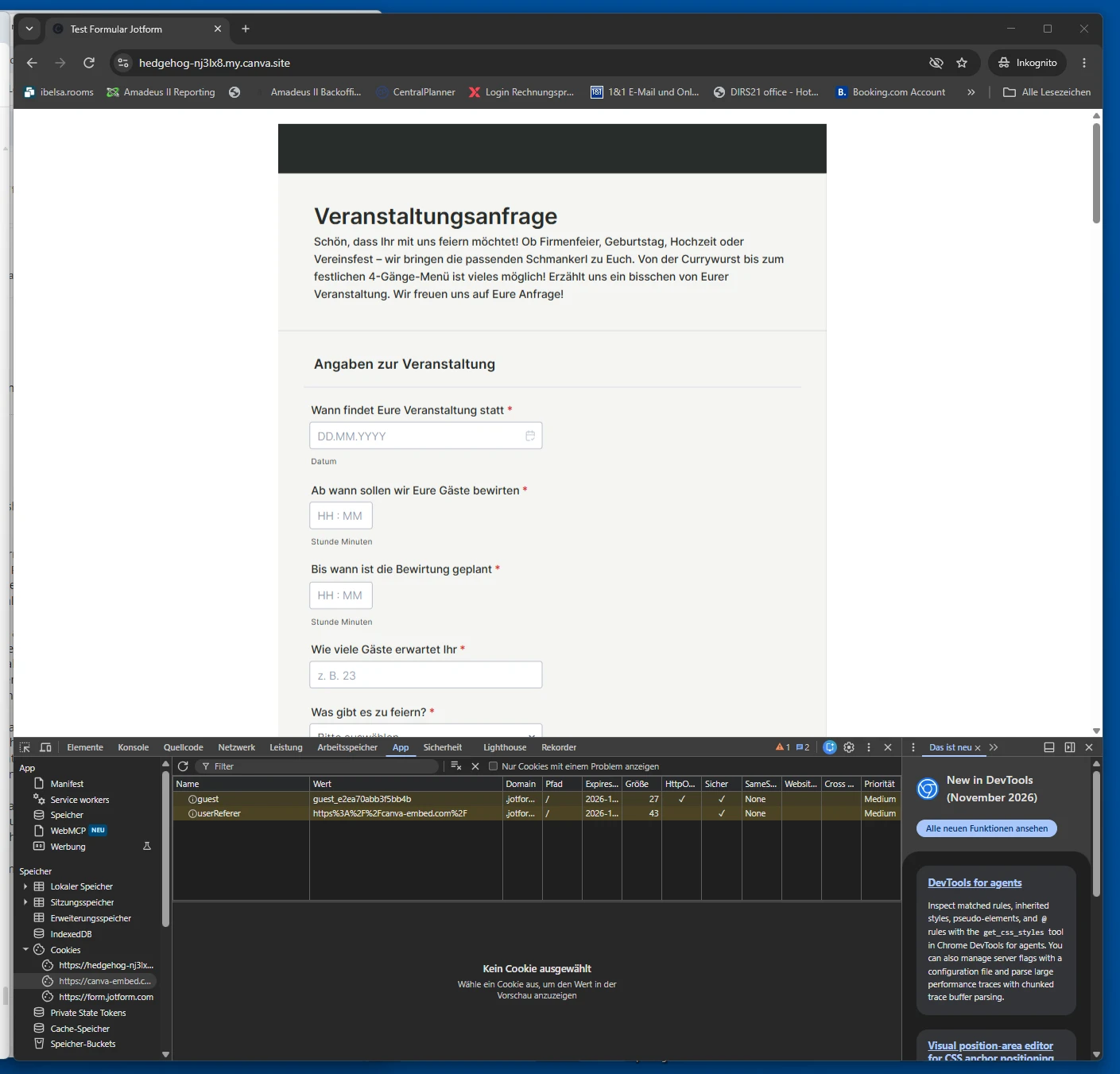
Bei einem Test unserer veröffentlichten Canva-Testwebsite im Chrome-Inkognitomodus haben wir festgestellt, dass bereits beim Laden des Formulars – ohne Eingaben oder Absenden – folgende Cookies von form.jotform.com erscheinen:
- guest
- userReferer
Zusätzlich wird auf der Canva-Testwebsite der Cookie _cf_bm angezeigt.
Wir möchten gerne wissen:
- Welchen genauen Zweck erfüllen die Cookies guest und userReferer?
- Sind beide für die technische Funktion des eingebetteten Formulars unbedingt erforderlich?
- Werden diese Cookies für Tracking, Analyse oder Marketing verwendet?
- Können sie gegebenenfalls deaktiviert werden, ohne die Formularfunktion einzuschränken?
- Gibt es eine Möglichkeit, das Formular erst nach Einwilligung des Websitebesuchers zu laden?
Wir möchten die Einbettung datenschutzkonform nach DSGVO und § 25 TDDDG gestalten und benötigen dafür eine möglichst konkrete technische Auskunft.
Vielen Dank für Ihre Unterstützung.
Mit freundlichen Grüßen
A. Schneider
 Page URL: https://form.jotform.com/262882206311048
-
 Kyle Jotform Support
Hi Andrea,
Thanks for reaching out to Jotform Support. While we do offer Support in many foreign languages, and we're working hard to add more every day, we don't currently have Deutsch Support agents who can help you. So I'll try to help you in English using Google Translate, but you can reply in whichever language you feel comfortable using.
Now, coming back to your question, the guest and userReferer cookies are technical cookies used to support the proper operation of Jotform forms. The guest cookie helps maintain a temporary anonymous session, while userReferer stores the referring page URL from which the form was accessed. These cookies are used for functional and security-related purposes and are not intended for advertising or marketing activities.
Because these cookies are part of the core functionality of embedded forms, there is currently no option to disable them individually without potentially affecting the form's behavior. The _cf_bm cookie you observed is set by Cloudflare, our security provider, and is used for bot management and traffic protection. It is also not used for marketing purposes.
If you would like the form to load only after a visitor has provided consent, this can generally be achieved through your website's consent management platform by blocking the Jotform embed until consent has been granted. The exact implementation depends on the website platform and cookie consent solution being used. For more details, check out our Privacy Policy and Cookie Policy pages.
Note that Jotform cannot provide legal advice regarding GDPR or TDDDG compliance. As compliance requirements may vary depending on your specific implementation and use case, we recommend consulting a qualified legal or data protection professional if you require formal guidance.
Reach out again if there’s anything else we can do for you.
Ihre Antwort
Something Went Wrong
An error occurred while generating the AI response. Please try again!