-
 Taptapcocktail
Bonjour,
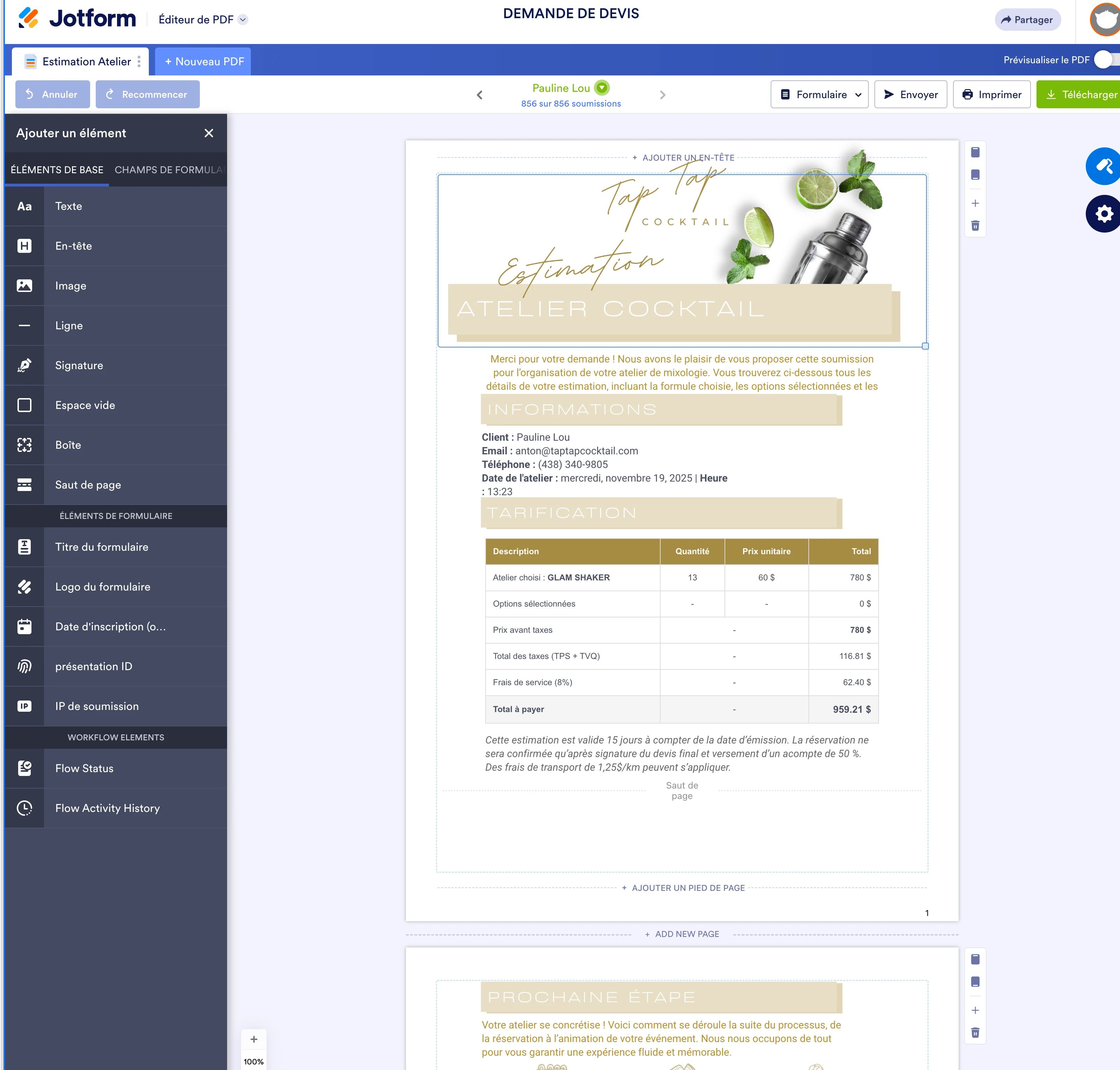
J’ai un problème avec l’un de mes formulaires sur Jotform. Il s’agit du formulaire « DEMANDE DE DEVIS », auquel est associé un PDF généré automatiquement via le générateur de PDF.
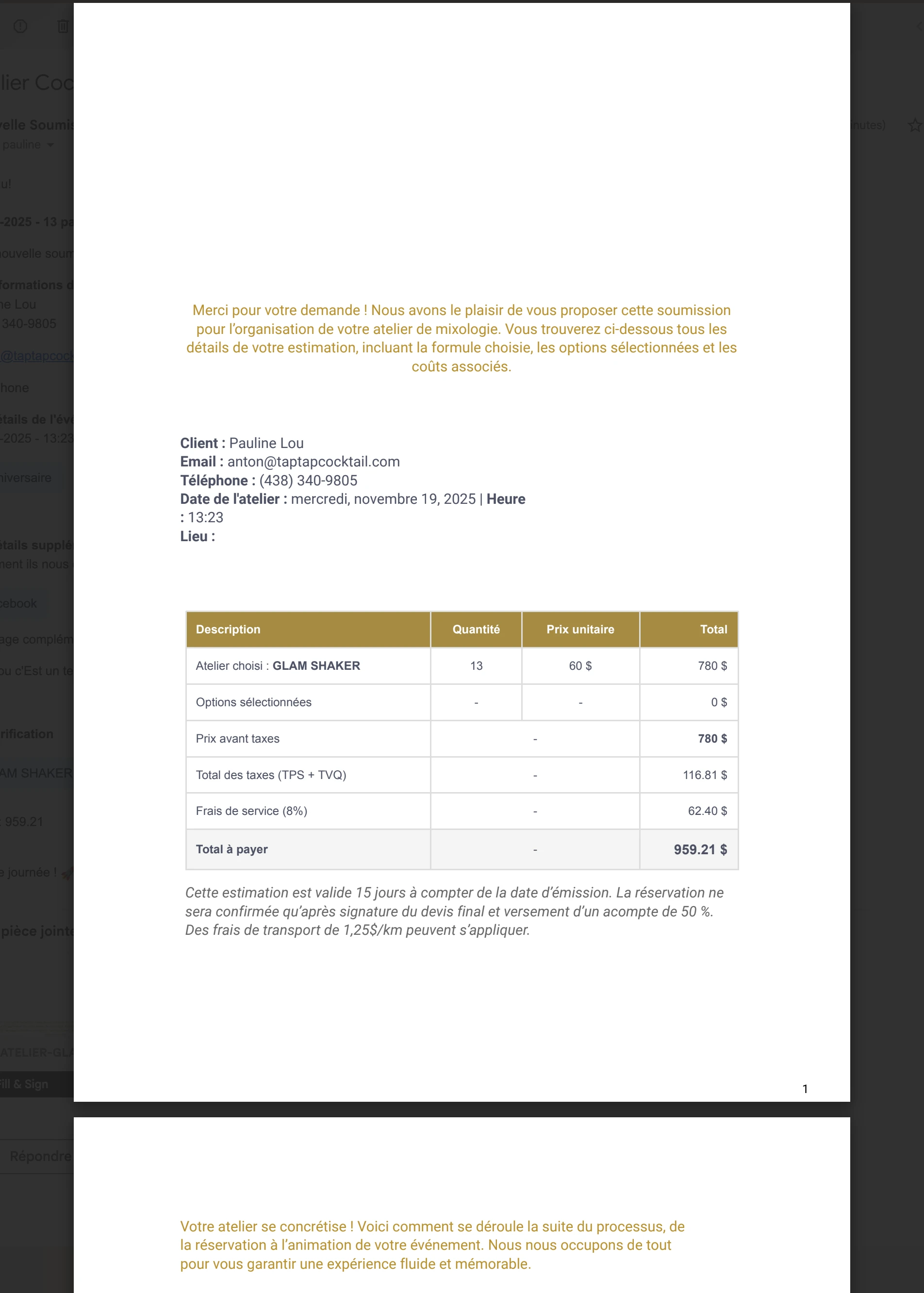
Dans ce PDF, j’ai ajouté plusieurs images directement depuis l’éditeur (logos, entêtes de section, etc.). Ces images s’affichent correctement dans l’éditeur, mais disparaissent complètement lorsque :
- je télécharge le PDF, ou
- le PDF est automatiquement envoyé à nos clients après la soumission du formulaire.
Le problème est apparu soudainement depuis 2 ou 3 jours, alors que tout fonctionnait parfaitement depuis plusieurs mois.
Je joins des captures d’écran du générateur de PDF (où les images sont visibles) et des PDF téléchargés (où elles ne s’affichent plus), afin d’illustrer clairement le problème.
Merci de votre aide pour résoudre ce bug rapidement.
Cordialement,

-
 Reymae Jotform Support
Hi Anton,
Thanks for reaching out to Jotform Support. Our French Support agents are busy helping other Jotform users right now, so I'll try to help you in English using Google Translate, but you can reply in whichever language you feel comfortable using. Or, if you'd rather have support in French, let us know and we can have them do that. But, it might take a while until they're available again.
Now, coming back to your question, I cloned your form to test it, and I easily replicated the issue. There’s an easy fix for this. We just need to use the Image field in the PDF instead of the Box field to display an image. Here’s how to do it:
First, we will remove the Box field from the PDF:
1. In PDF Editor, click on the Box field.
2. Click on Trash can icon below the field.
Now, we will add the Image field:
1. In PDF Editor, click on Add Element on the left side of the page.
2. In the Add Elements menu, under the Basic Element tab, choose the Image field.
3. Now, just drag and drop it to your form.
4. Click on the Gear icon below the added field and upload the image by clicking the Upload field button.
Give it a try and reach out again if you have any other questions.
-
Taptapcocktail
Remplacer une boîte texte par une boîte image ne donne malheureusement pas le même rendu visuel. L’image apparaît plus petite, centrée, et ne remplit pas toute la page, contrairement à une boîte texte avec une image en arrière-plan.
Cela dit, ce qui nous étonne surtout, c’est que tout fonctionnait très bien avec les boîtes texte depuis plusieurs mois. Du jour au lendemain, sans changement de notre part (ni sur le PDF ni sur le formulaire).
-
Reymae Jotform Support
Hi Anton,
Since this was working earlier, it’s likely just a layout or cache hiccup. You can try clearing your form cache so the PDF elements can reload cleanly. If the header still disappears after downloading, you can recreate the Box field that contains your image and text. And if the issue continues, rebuilding the entire PDF template is the most reliable way to reset everything so it exports correctly again.
Give it a try and reach out again if you have any other questions.
-
Taptapcocktail
Merci de la réponse
J’ai vidé le cache tel qu’indiqué dans le tutoriel.
J’ai ensuite dupliqué le document PDF, aucun changement.
J’ai téléchargé une nouvelle image pour l’intégrer sans passer par celle enregistrée dans mon profil, aucun changement.
J’ai créé un nouveau PDF, ajouté une nouvelle boîte et téléchargé une nouvelle image, même problème
Les images ne se placent toujours pas en arrière-plan de ma boîte lors du téléchargement.
Merci
-
Taptapcocktail
J’ai également essayé sur différents navigateurs et le problème persiste.
-
 Frédéric Jotform Support
Hi Anton,
With a clone of your form, everything is showing as expected in the downloaded PDF, as shown below:
So I cleared your form caches, this usually fixeds such an issue. If the issues stills when downloading again a submission PDF, can you tell us if you download it from the Inob, or from the Tables, or any other way?
In that case, A screenshot or recording of what’s happening would help us figure this out. You can use Loom or upload to Google Drive or Dropbox, then send us the link. We’ve also got a guide explaining how to send us a screenshot.
Give it a try and let us know how it's going.