-
 kiyomodai01
テンプレートを探しています。
申込者が複数記入できて、
各申込者毎に、氏名、ふりがな、住所、性別、過去の受講歴(回数)、最後の受講年月
が記入できれば有難い
申込者はぜいぜい4人程度まで記入可能
申込がおわれば、特定のメールアドレスに内容を通知する
-
 Podo: サポートスペシャリスト
Hi 小松大輝,
申込者が最大4人まで記入でき、それぞれの氏名、ふりがな、住所、性別、過去の受講歴(回数)、最後の受講年月を入力できるテンプレートについてご案内します。
こちらの要件に合うテンプレートは、Jotformの複数申込者対応申込フォームのテンプレート一覧からご覧いただけます。
また、申込が完了すると特定のメールアドレスに内容を通知する設定もフォームの通知機能で可能です。
ご参考にしていただければ幸いです。
Give it a try and let us know how it goes.
-
 Jotform Support Former Jotform Support
Hi there!
I'll continue in English, but please feel free to reply any language you prefer.
In addition to Podo's answer, to limit the number of applicants, you can follow these steps:
- Go to Form Settings
- Open Form Status
- Enable Disable Form at Submission Limit
- Set the submission limit to 4
This will ensure that the form only accepts up to 4 submissions.
Once the form is submitted, all the entered information can be sent to a specific email address using a notification email.
Let me know if you need help sitting this up.
-
kiyomodai01
Jotformの複数申込者対応申込フォームのテンプレート一覧は全て、一人参加用のテンプレートで、複数人参加、入力用は見当たらないようです。複数人入力用のテンプレートなどあれば是非紹介して下さい。
-
Jotform Support Former Jotform Support
Hi 小松,
While we do offer Support in many foreign languages, and we're working hard to add more every day, we don't currently have Japanese Support agents who can help you. So I'll try to help you in English using Google Translate, but you can reply in whichever language you feel comfortable using.
Now, coming back to your question, unfortunately, it is not possible for multiple user to fill up the form at the same time. As a workaround, you can create a workflow wherein, once the first person done with his part, he will submit the form and the edit form link will be send to the second person, until the form reached the fourth person. If that’s not quite what you’re looking for, can you share a bit more info so I can help you better?
Once we hear back from you, we'll be able to move forward with a solution.
-
kiyomodai01
一人の回答者が、複数人の参加情報を入力するフォームを探しています。例:家族の代表者が、他の家族の分まで入力する、この場合、入力する情報は、一人分の繰り返しです。
-
Jotform Support Former Jotform Support
Hi 小松,
You can do this by adding form elements depending on what information you need from the submitter. Let me show you how:
- In Form Builder, click on Add Element on the left side of the page.
- Under Basic tab, you can drag and drop the elements you need to your form.

This information can be filled out by a single person, regardless if it's a family member's information.
Give it a try and let us know how it goes.
-
kiyomodai01
うまくいきましたが、入力の複数項目を簡単に一度で追加ができれば有難いですが、可能でしょうか。
-
 Kris Ann Jotform Support
Hi 小松,
Unfortunately, it's not possible to add multiple form elements at the same time. But if you want to add the same set of fields, you can go ahead and duplicate it instead. Let me show you how:
- In Form Builder, click on the field that you want to duplicate.
- Then, right-click on it and select Duplicate in the dropdown menu that opens.
- While in Form Builder, hold the CTRL/Command key and click on the fields you want to duplicate.
- After you select the fields, in the orange navigation bar at the top of the page, click on Duplicate.
- Select where you want to duplicate and that's it.
Give it a try and let us know if you have any other questions.
-
kiyomodai01
複数項目を簡単に一度で追加は自己解決できましたが、項目名が同じになりあとから項目名の変更が必要になります。複写した場合に項目名が連番がついて違った項目名になれば有難いですが?
-
 Bowie Jotform Support
Hi 小松,
You can easily change the names of the field labels. Let me show you how:
- While in Form Builder, click on the field you want to edit.
- Then, click on the Gear icon on the right side of it to open Properties panel.
- In the menu that opens, under the General tab, you can edit the name from the Field Label section. That's it. The changes are automatically saved
- In Form Builder, click on the Add Element menu on the left side of the page.
- Under the Widgets tab, drag and drop the Configurable List widget into your form.
- In the menu that opens on the right side of the page, set up the widget settings according to your liking.
- Now, click on Update at the bottom, and you’re all set.
- While in Form Builder, click on the Configurable List widget, and then click on the Wand icon next to it.
- In the menu that opens on the right side of the page, under the General tab, set the Maximum number of rows to 4.
- Now, click on Update at the bottom, and you’re all set.
-
kiyomodai01
ご回答の Configurable List widgetとそのdemoを見て、自分の希望の合っていることは確認できました。
しかし肝心の widgetには、Configurable List が見つかりません。 widgetが一部日本語交じりで、希望する widgetの選択ができない状況です。このほしい Configurable List widgetを上手に見つける方法はありますか?
-
Kris Ann Jotform Support
Hi 小松,
You can determine the Configurable List widget by looking at the widget icon on the left side. Take a look at the screenshot below:
Give it a try and let us know if you have any other questions. -
kiyomodai01
有難うございました。全て解決しました。
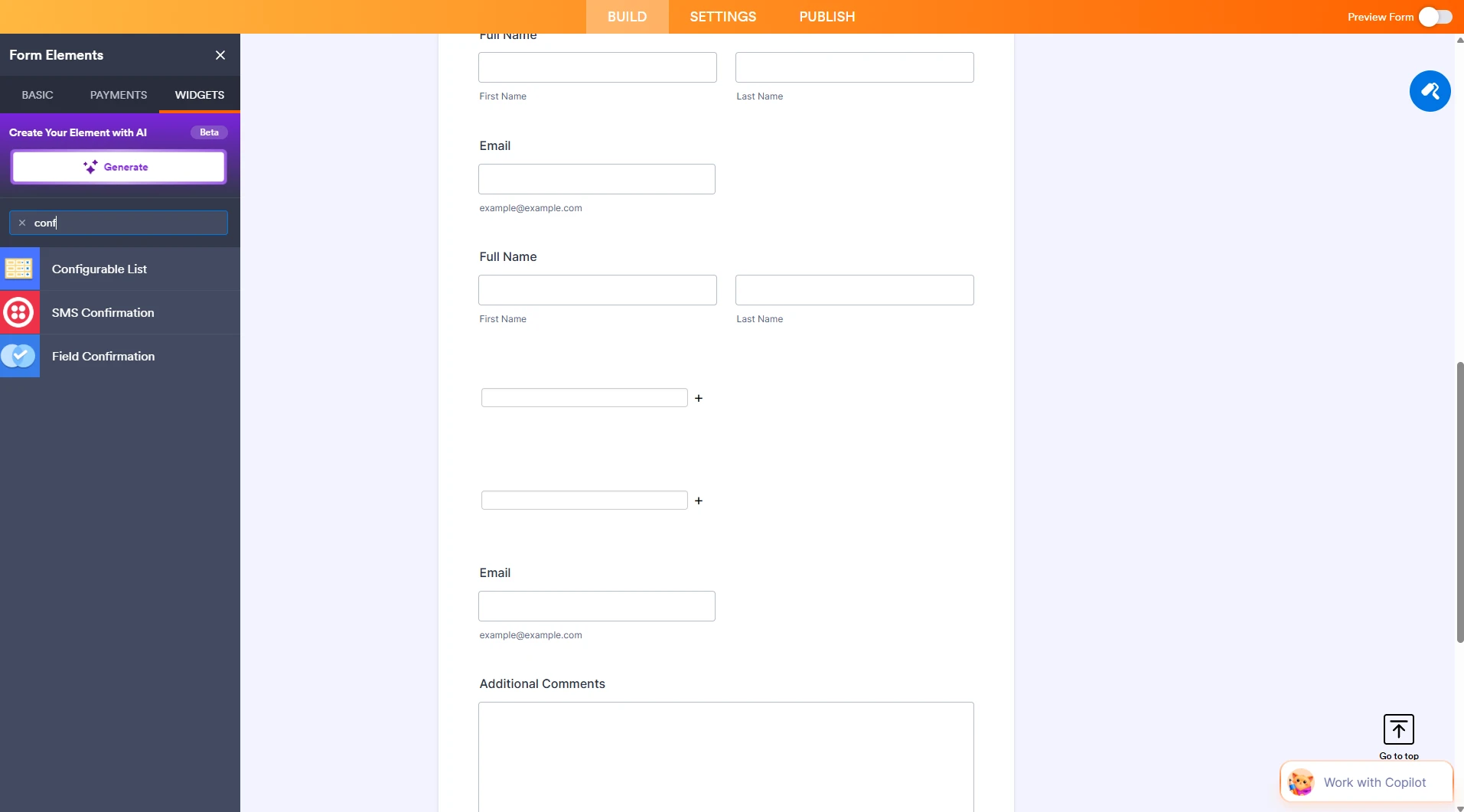 Give it a try and let us know if you have any other questions.