-
 mando793
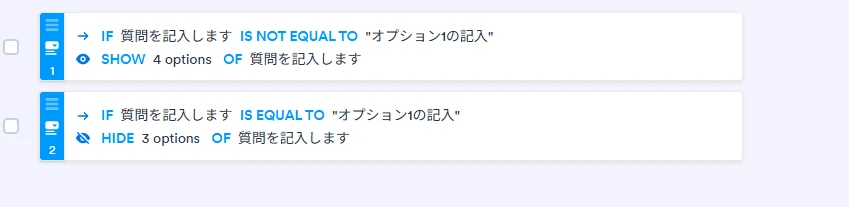
下記の図に示すように、4つある選択肢で1つを選んだ時に他の選択肢を選べないようにしたいと考えています。

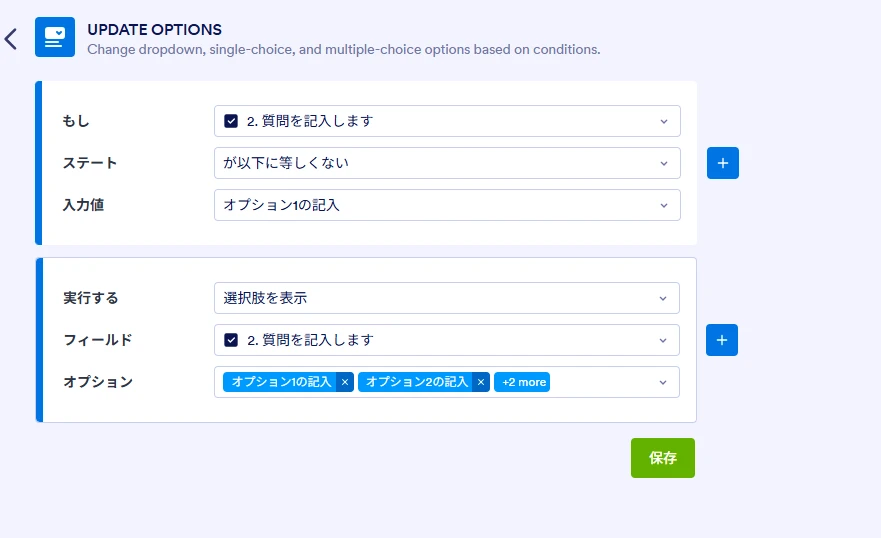
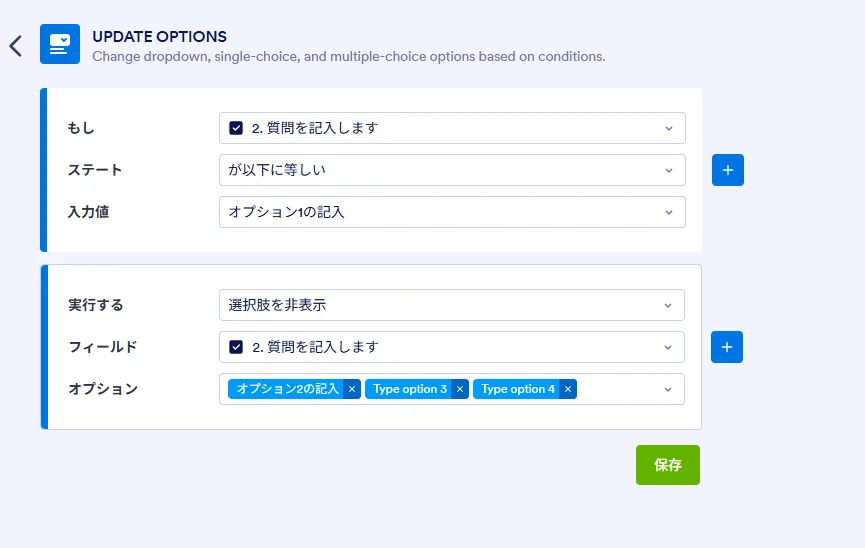
そこで、以下のように設定したところ、すべての選択肢が選択不可となってしまいます。
どのように設定するのが正しいですか?
-
 Podo: サポートスペシャリスト
こんにちは 安藤美也 様,
Jotform へのサポートお問い合わせありがとうございます。私は人工知能アシスタントとして、フォーム設定のお手伝いをいたします。
ご質問のケースでは、「4) 協議会等や意見を聴取する体制等は構築していない」を選んだときだけ、1)〜3) を選択不可にしたい一方で、4) を選んでいないときは 1)〜3) を自由に選べる必要があります。この場合、1つの Update Options 条件だけで完結させようとすると、条件が発動した後に他の選択ができなくなり、結果として「すべて選択不可」に見えてしまうことがあります。
そのため、次のように条件を分けて設定する方法をおすすめします。
やり方は次のとおりです。
- Multiple Choice フィールド側の設定
対象の質問(44. (1)〜)はそのまま Multiple Choice のままで構いません。Entry Limits などは特に変更不要です。 - 条件1:4) を選んだら 1)〜3) を非表示にする
1) フォーム上部の Settings を開きます。
2) 左メニューから Conditions を選びます。
3) Update Options(または「Update Options Field」)を新規追加します。
4) IF/STATE/VALUE を次のように設定します。
・IF:44. (1) の質問フィールド
・STATE:Is Equal To(が次と等しい)
・VALUE:4) 協議会等や意見を聴取する体制等は構築していない
5) DO 側を次のように設定します。
・DO:Hide Options(選択肢を非表示)
・Field:同じ 44. (1) の質問フィールド
・Options:1)、2)、3) だけにチェックを入れ、4) はチェックしないようにします。
→ これで「4) が選択されている間だけ、1)〜3) が隠れる(選べなくなる)」状態になります。 - 条件2:4) を外したら 1)〜3) を再表示する
1) もう一つ Update Options 条件を追加します。
2) IF/STATE/VALUE を次のように設定します。
・IF:44. (1) の質問フィールド
・STATE:Is Not Equal To(が次と等しくない)
・VALUE:4) 協議会等や意見を聴取する体制等は構築していない
3) DO 側を次のように設定します。
・DO:Show Options(選択肢を表示)
・Field:同じ 44. (1) の質問フィールド
・Options:1)〜4) すべてにチェックを入れます。
→ これにより、4) のチェックを外した瞬間に 1)〜3) が再び表示され、通常どおり複数選択できるようになります。 - プレビューで動作確認する
1) フォーム右上のプレビューボタンからテストします。
2) まず 1)〜3) を選択できることを確認します。
3) 次に 4) を選択したときに 1)〜3) が消えて選べなくなることを確認します。
4) 最後に 4) のチェックを外したときに 1)〜3) が再表示されることを確認します。
もし、現在設定されている Update Options 条件が「Hide Options」で 1)〜3)・4) すべてにチェックされている場合は、4) まで隠してしまうため、結果的に何も選べない状態になりますので、上記のように「隠す対象は 1)〜3) のみ」「4) は隠さない」ように修正してみてください。
上記の手順をお試しいただき、うまく動作しない場合は、現在の条件設定のスクリーンショットを共有していただければ、こちらでさらに詳しく確認いたします。
何か追加でご不明な点があれば、遠慮なくお知らせください。
- Multiple Choice フィールド側の設定
-
mando793
上記の通りに設定しましたが、今度はいずれのチェックボックスもチェックができなくなってしまいました。(選択肢はすべて表示されています)
-
Podo: サポートスペシャリスト
こんにちは 安藤美也 様,
状況を共有いただきありがとうございます。選択肢は見えているのにチェック自体ができない場合は、Update Options とは別に「Enable/Disable(有効化/無効化)」系の条件が同じフィールドにかかっていて、フィールド全体が読み取り専用(Disable)になっている可能性が高いです。
次の点をご確認ください。
- 該当フィールドに Disable 条件がかかっていないか確認
1) フォーム上部の Settings を開きます。
2) 左メニューから Conditions を選びます。
3) 一覧の中で、Enable/Require/Mask Field タイプの条件がないか確認します。
4) あれば内容を開き、DO が「Disable」になっていて、対象フィールドに今回のチェックボックス(44.(1) の質問)が含まれていないかを確認します。
5) 含まれている場合は、そのフィールドを対象から外すか、一旦その条件を無効化して保存し、プレビューで再度チェックできるか確認してください。 - 他の条件で同じフィールドが Disable されていないか全体を確認
1) Conditions 一覧で、Show/Hide Field 以外の条件(特に Enable/Require/Mask Field)を一つずつ開きます。
2) DO の部分に Disable が含まれている条件があれば、その対象フィールドに今回のチェックボックスが入っていないか確認します。
3) 入っている場合は、対象から外すか条件を調整して保存します。 - Update Options 条件自体はそのままで問題ないか再確認
1) 先ほど作成いただいた 2 つの Update Options 条件を開きます。
2) どちらも DO が Show Options / Hide Options になっていることを確認します(Enable/Disable ではないこと)。
3) Field が正しく 44.(1) の質問を指しているか、Options のチェックが意図どおり(1〜3 のみ、または 1〜4 すべて)になっているかを確認します。
上記を確認してもまだチェックできない場合は、Conditions 画面全体のスクリーンショット(特に Enable/Require/Mask Field 条件が分かる部分)を共有していただけると、どの条件がブロックしているかこちらで具体的にお伝えできます。
お手数ですが一度ご確認いただき、結果を教えていただけますでしょうか。
- 該当フィールドに Disable 条件がかかっていないか確認
-
mando793
確認しましたが、該当する制御はないようでした。
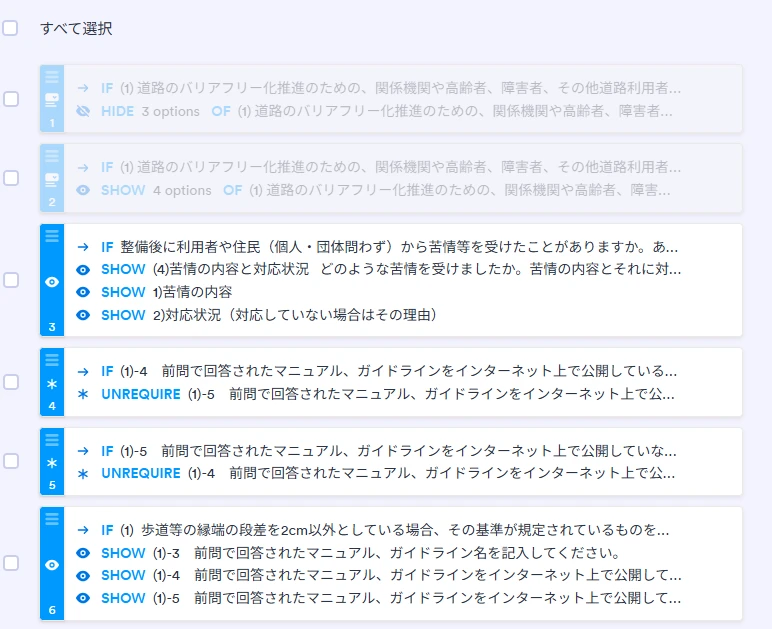
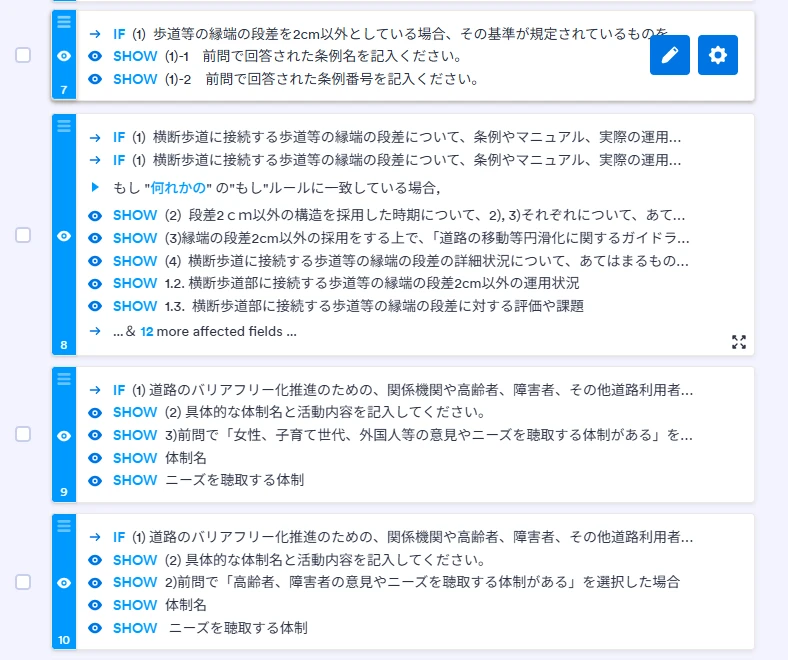
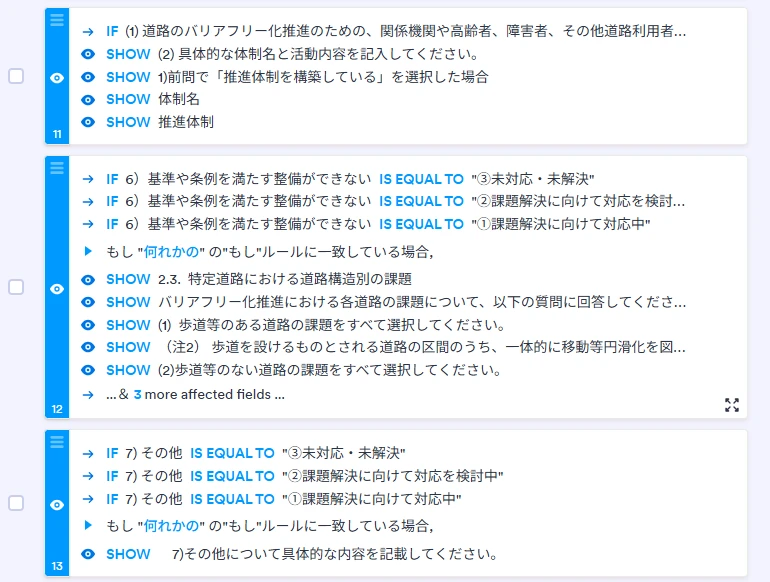
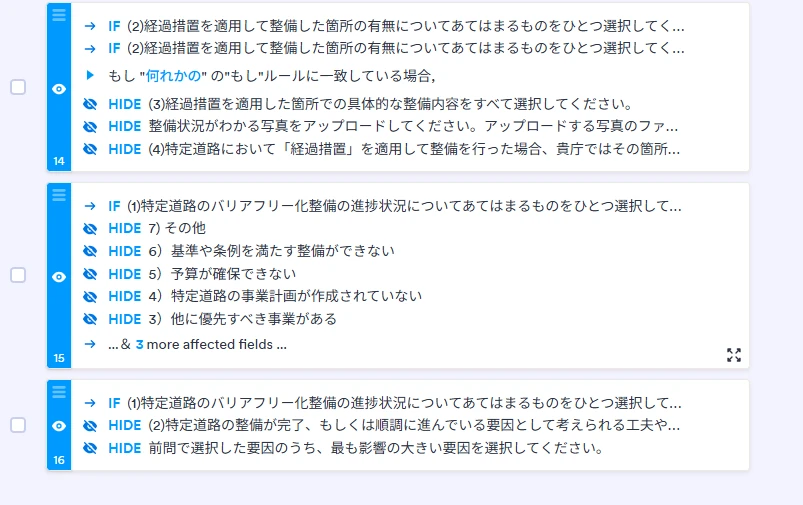
すべての画面ショットを送ります。
-
mando793
別のテスト用フォームを作成して試してみましたが、同じような不具合がでます。
https://form.jotform.com/262577689978083 -
 Rica Support Team Lead
Hi mando793,
While we do offer Support in many foreign languages, and we're working hard to add more every day, we don't currently have Japanese Support agents who can help you. So I'll try to help you in English using Google Translate, but you can reply in whichever language you feel comfortable using.
Now, coming back to your question, you can achieve this by using a separate Multiple Choice element for Option 4 and adding an Enable/Required/Mask Field condition and an Update/Calculate Field condition. We can also add custom CSS code to move the new Multiple Choice element so it looks like part of the original field. Let me first show you how to delete the option from the original field:
1. In Form Builder, click on the (1) 道路のバリアフリー化推進のための、関係機関や高齢者、障害者、その他道路利用者等で構成する協議会等の体制状況(令和8年9月現在)について、あてはまるものをすべて選択してください。(1), 2), 3)を同時に選択可)field to highlight it, then click on the Gear icon next to it.
2. Next, in the Multiple Choice Properties on the right, click on the Options tab, scroll down through the Options, and then delete Option 4.
Now, let's add the new Multiple Choice element. Here's how:
1. While still in Form Builder, click on Add Element on the left side of the page.
2. Under the Basic tab, scroll down to Multiple Choice and drag it into your form.
3. Click on the Gear icon next to the new field, then in the Multiple Choice Properties on the right, under the General tab, delete the Field Label.
4. Then, click on the Options tab, then in the Options section, remove the existing options and add Option 4.
Next, let's add the conditions. Here's how:
1. While still in Form Builder, in the orange navigation bar at the top of the page, click on Settings.
2. In the menu on the left side of the page, click on Conditions.
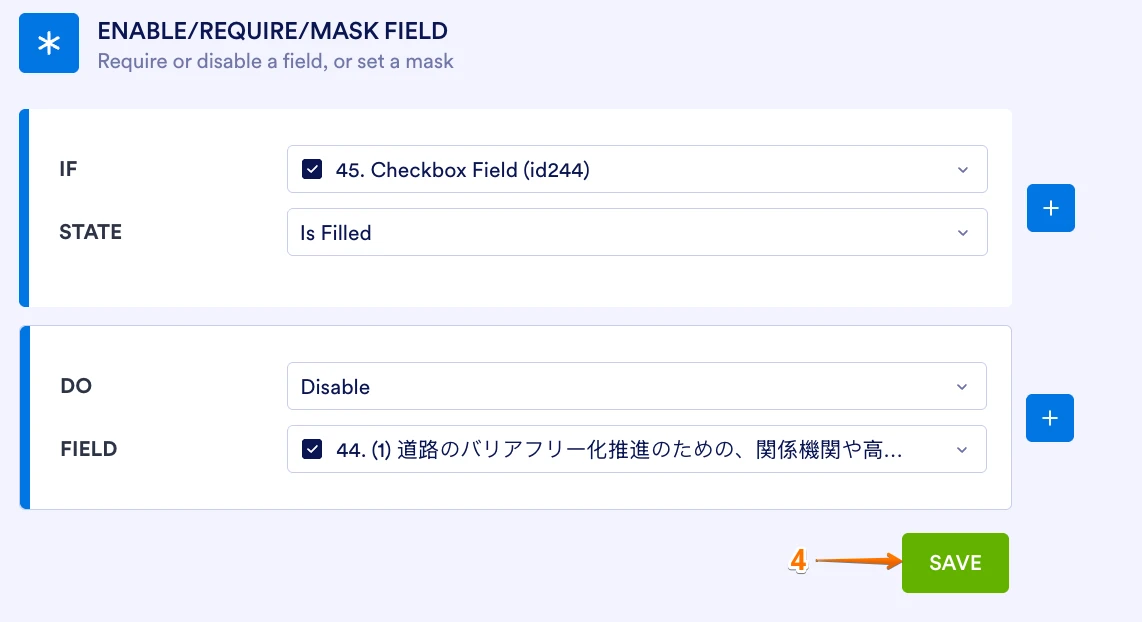
3. Then, click on Add Condition, then select Enable/Require/Mask Field.
4. Set the condition like you see below, and click on Save.
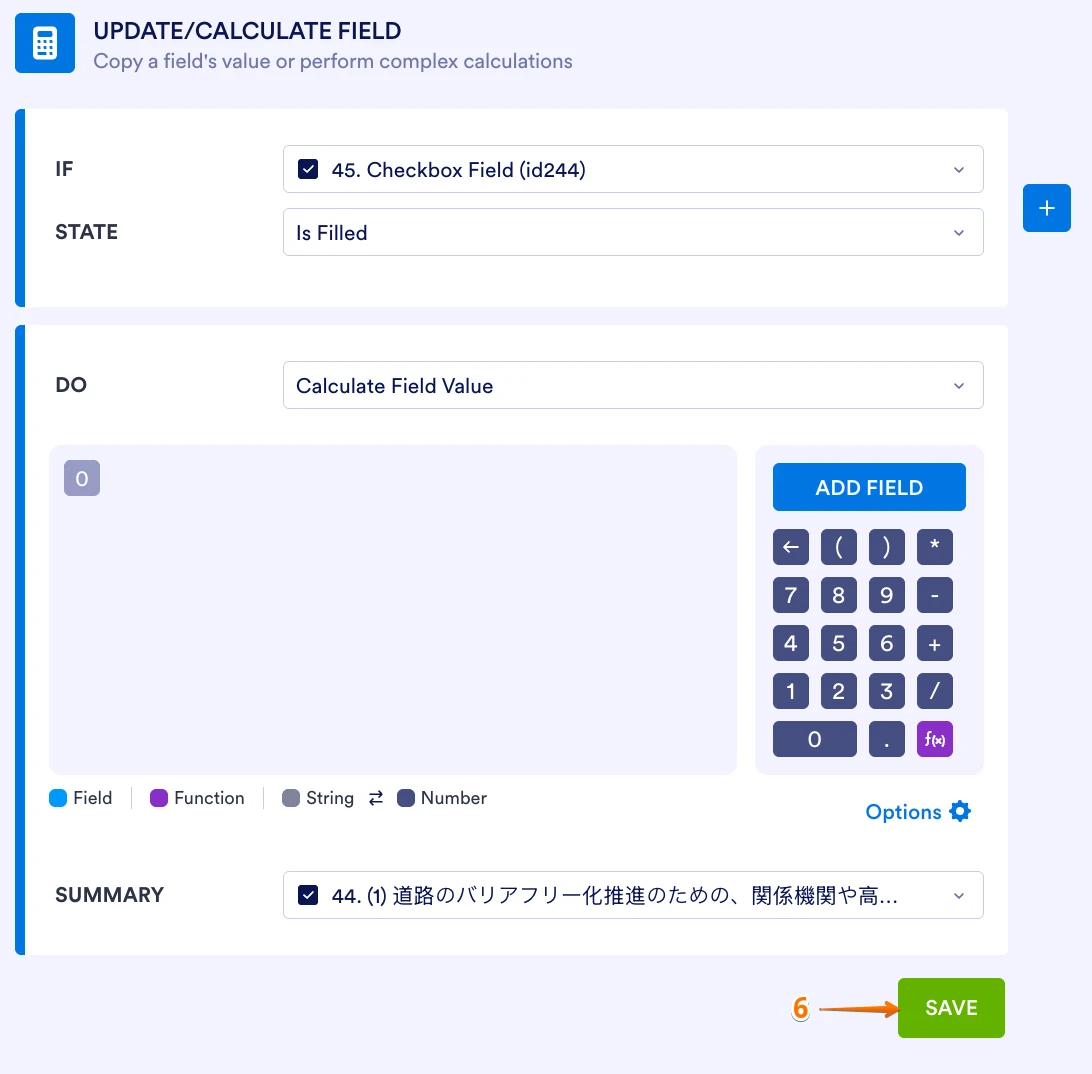
5. Still in the Conditions page, click on Add Condition, then select Update/Calculate Field.
6. Set the condition like you see below, and click on Save.
Finally, let's inject the Custom CSS code to move Option 4. Here's how:
1. First, copy this code:
#id_244 {
  margin-top:-10px;
  padding-top:0px;
}
#id_22 {
  margin-bottom:0px !important;
  padding-bottom:0px !important;
}
2. Then, in Form Builder, click on the Paint Roller icon in the upper right of the page.
3. In the Form Designer menu that shows on the right, go to the Styles tab.
4. Scroll down and paste the code into the Inject Custom CSS field.
Let us know if there’s anything else we can help you with.
-
mando793
これはUPDATEOPTIONSの不具合ということでしょうか?
-
 Kevin Jotform Support
Hi mando793,
This behavior does not necessarily indicate a bug with Update Options. The issue is that the desired behavior cannot be reliably achieved by controlling Option 4 within the same Multiple Choice field. That is why the recommended workaround is to place Option 4 in a separate Multiple Choice field and use Enable/Require/Mask Field together with Update/Calculate Field conditions.
This setup allows Option 4 to control whether the other options can be selected while keeping the form visually consistent with the original layout.
Give it a try and let us know if you have any other questions.
-
mando793
ありがとうございました。
-
Podo: サポートスペシャリスト
Hi 安藤美也,
ご質問への回答が完了しましたので、このスレッドを終了いたします。
If you have another question or need more help, feel free to reply here and we'll assist you right away.