

Templat Tiket

Templat Tiket Pesawat
Gunakan Template Tiket Pesawat gratis kami untuk membuat tiket pesawat domestik atau internasional yang disesuaikan dengan cepat. Unduh, cetak, atau kirim sebagai PDF hanya dengan satu klik.
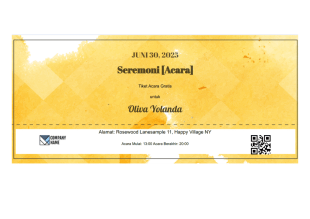
Templat Tiket Acara Gratis
Buat tiket acara Anda sendiri menggunakan Templat Tiket Acara Gratis Jotform. Templat tiket acara dari Jotform ini dirancang dengan cara yang sederhana, tetapi jelas dan mudah disajikan.
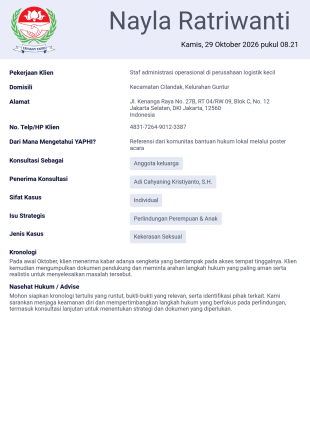
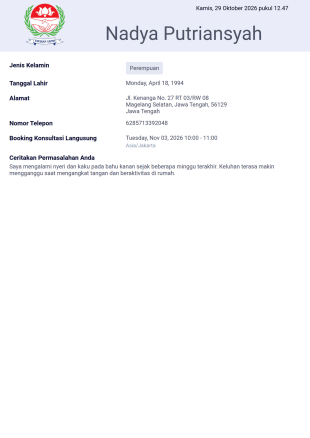
Tentang Templat Tiket
Jika Anda perlu membuat tiket untuk sebuah acara, Jotform siap membantu Anda. Baik jika Anda mengatur konser, mengadakan undian, atau memesan transportasi, Template Tiket PDF gratis kami secara otomatis menghasilkan tiket untuk dikirimkan ke pelanggan Anda pada hari itu. Pilih template yang cocok dengan formulir pemesanan, formulir pembayaran, atau formulir pendaftaran acara yang ada, dan Anda akan mendapatkan tiket PDF yang dipersonalisasi untuk setiap pemesanan. Anda kemudian dapat mengunduh, melihat, atau membagikan tiket di perangkat apa pun.
Sesuaikan Template Tiket PDF dengan mudah agar sesuai dengan kebutuhan Anda, apa pun industri atau acaranya. Dengan Editor PDF Jotform, Anda dapat menambahkan logo perusahaan Anda, mengubah warna agar sesuai dengan merek Anda, atau menyeret dan melepaskan kotak teks untuk menyertakan informasi acara, informasi pembayaran, atau pengaturan tempat duduk. Hasilnya adalah tiket yang dipersonalisasi untuk setiap pelanggan, membuat proses check-in cepat dan lancar bagi peserta dan penyelenggara.
Why Use Ticket Templates?
- Ticket Templates offer unparalleled accuracy in capturing and presenting essential ticket details, minimizing the risk of errors that could disrupt events or customer interactions. This ensures that all necessary information is consistently displayed, supporting smooth operational processes.
- Speed is a significant advantage, as templates allow for the rapid generation of tickets without starting from scratch each time. This efficiency is particularly beneficial when handling high volumes of tickets, such as during large events or busy seasons.
- Professional data handling is another compelling reason to use Ticket Templates. These templates ensure that all collected data is organized and stored systematically, facilitating easy retrieval and analysis. This is crucial for maintaining high standards of customer service and operational efficiency.
- Customizability is a key feature, enabling businesses to personalize templates to reflect their brand identity. This includes incorporating logos, specific color schemes, and unique design elements, ensuring that each ticket aligns with the company’s branding efforts.
- Using Ticket Templates also promotes consistency across all tickets issued by an organization, ensuring that each ticket upholds the same quality and information standards. This consistency helps build trust with clients and attendees, as they receive a reliable and uniform experience.
Common Problems Solved by Ticket Templates
- Manual paperwork and data entry can lead to significant inefficiencies and errors. Ticket Templates alleviate these issues by automating data input, reducing the potential for human error, and speeding up the ticketing process.
- Lost data is a frequent problem in traditional ticketing methods, where physical tickets or paper forms are prone to misplacement. With digital Ticket Templates, data is securely stored and easily retrievable, minimizing the risk of lost information.
- Time constraints are a common challenge in ticket management, especially during peak periods. Ticket Templates streamline the process, enabling quick ticket issuance and distribution, thus saving valuable time for both the issuer and the recipient.
- Inconsistent presentation of information can confuse customers and disrupt operations. Ticket Templates ensure uniformity in design and information, providing clarity and maintaining professional standards across all issued tickets.
Matching Use Cases to Features
- For event organizers, the Drag-and-Drop Form Builder allows for easy customization of Ticket Templates to include all necessary event details, ensuring attendees receive comprehensive and accurate tickets.
- Conditional Logic can be employed to tailor ticket content based on specific user inputs, providing a personalized experience that enhances customer satisfaction and engagement.
- The Electronic Signatures feature (Jotform Sign) enables organizers to include digital signatures on tickets, adding an extra layer of verification and authenticity to the ticketing process.
- Automated PDF Generation via the PDF Editor ensures that once a ticket is submitted, a PDF version is instantly created and ready for distribution, eliminating delays and improving operational efficiency.
- The Report Builder feature provides insightful data analysis by compiling ticket sales and distribution statistics, aiding in performance assessment and strategic planning.
- Approval Workflows streamline internal processes by automating ticket approval stages, ensuring that all tickets meet necessary criteria before distribution, thus maintaining quality control.
- Secure Data Management with Jotform Tables ensures that all ticketing data is stored safely and organized for easy access, supporting effective data management and retrieval.
How to Create a Ticket Template
- Browse the Template List for a Ticket template or start from a blank Template.
- Departemen komunikasi perusahaan
- Memungkinkan restock tepat waktu dan pencegahan kerugian
Top Use Cases for Ticket Templates
- For Managers: Managers benefit from Ticket Templates by gaining a streamlined method to oversee ticketing operations. They can easily track ticket distribution, monitor sales data, and ensure that all ticketing processes align with organizational standards. By utilizing centralized data systems like Jotform Tables, managers can maintain a bird’s eye view of all ticket-related activities, allowing for better decision-making and strategic planning.
- For Teams: Teams tasked with ticket distribution and management find Ticket Templates invaluable for maintaining consistency and efficiency. With the ability to quickly generate and distribute tickets, team members can handle high volumes without compromising accuracy or quality. The collaborative features of Jotform allow teams to work together seamlessly, sharing access to templates and data, which supports cohesive and coordinated efforts across departments.
- For Customers: Customers benefit from the clarity and professionalism of Ticket Templates. Receiving a well-designed, accurate ticket enhances their experience, providing them with all necessary information in a clear format. This reliability builds trust and satisfaction, as customers feel assured that they are dealing with a competent and organized entity. The ease of receiving digital tickets also adds convenience, as customers can access their tickets from any device without hassle.
Summarizing Ticket Templates
Mengapa tidak menggunakan beberapa widget dan integrasi menarik dari Jotform untuk meningkatkan tiket Anda? Siapkan formulir Anda dengan penjawab otomatis untuk segera mengirimkan tiket kepada pelanggan setelah memesan, atau mengintegrasikan Template Tiket PDF Anda dengan Google Spreadsheet untuk secara otomatis menghasilkan daftar tamu terperinci. Dengan begitu banyak kemungkinan untuk penyesuaian dengan platform Jotform yang mudah digunakan, Anda akan dapat membuat tiket yang menakjubkan untuk acara Anda dalam waktu singkat.
Tanya Jawab
1) Is it free to create Ticket Templates on Jotform?
Yes, Jotform offers a range of free templates and allows users to create Ticket Templates at no cost, although certain advanced features may require a paid plan.
2. Siapa yang biasanya menggunakan templat laporan kemajuan?
Jotform ensures that all templates and submitted data are secure, employing encryption and secure data management practices to protect user information.
3) Do I need coding knowledge to build a Ticket template?
No, you do not need any coding knowledge. Jotform's Drag-and-Drop Form Builder makes it easy to create and customize Ticket Templates without technical expertise.
4) What is Field Mapping in the context of Ticket Templates?
Field Mapping involves connecting input fields on a web form to specific positions on a Ticket Template, ensuring that submitted data appears correctly on the final PDF.
5. Dapatkah laporan kemajuan disetujui atau diakui secara digital?
Yes, Ticket Templates can be accessed and used on mobile devices, providing flexibility and convenience for both issuers and recipients.
6) How does the Autoresponder PDF Attachment feature work with Ticket Templates?
The Autoresponder PDF Attachment feature automatically sends a PDF version of the ticket to the submitter via email upon form submission, streamlining distribution.
7) What does the Hide Empty Fields setting do in Ticket Templates?
The Hide Empty Fields setting removes unanswered questions from the final PDF, ensuring the document is concise and free from unnecessary blanks.
8) Can Ticket Templates be password-protected?
Yes, Ticket Templates can be password-protected to restrict access, ensuring only authorized individuals can view the ticket details.