

Templat Rencana Perjalanan

Templat Tiket Pesawat
Gunakan Template Tiket Pesawat gratis kami untuk membuat tiket pesawat domestik atau internasional yang disesuaikan dengan cepat. Unduh, cetak, atau kirim sebagai PDF hanya dengan satu klik.
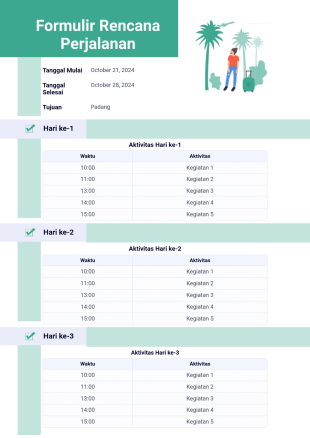
Templat Rencana Perjalanan
Contoh templat rencana perjalanan ini berisi durasi perjalanan, tujuan, waktu, dan aktivitas untuk setiap hari. Templat PDF ini hanya menampilkan 3 hari, tetapi Anda dapat menggunakan PDF Editor untuk menggandakan elemen-elemen tersebut dan menambahkan lebih banyak hari.
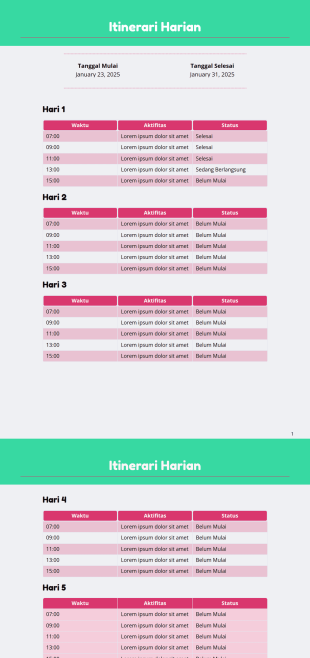
Templat Itinerari Harian
Template Itinerari Harian adalah dokumen yang akan membantu Anda mengatur tugas-tugas harian dengan merencanakannya terlebih dahulu.
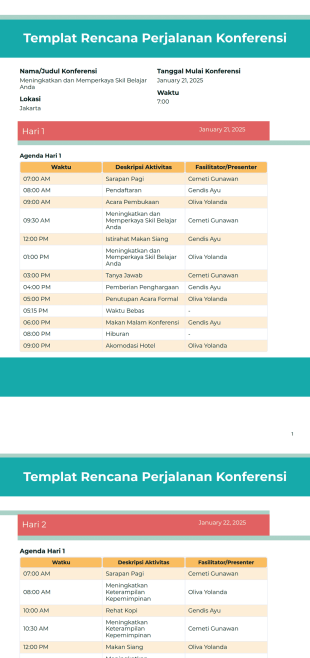
Templat Rencana Perjalanan Konferensi
Atur konferensi perusahaan atau pendidikan profesional dengan menggunakan Template Rencana Perjalanan Konferensi ini. Template PDF sederhana ini mudah digunakan dan dapat disesuaikan berdasarkan acara Anda.
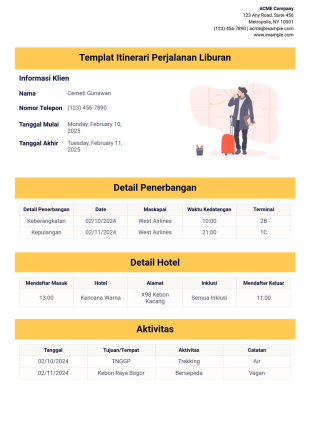
Templat Itinerari Perjalanan Liburan
Cobalah contoh Templat Itinerari Perjalanan Liburan dari Jotform ini. Contoh ini dirancang untuk berbagai jenis liburan, tetapi Anda bebas mengubahnya. Templat ini berisi informasi dasar seperti tujuan, tanggal, dan waktu kedatangan.
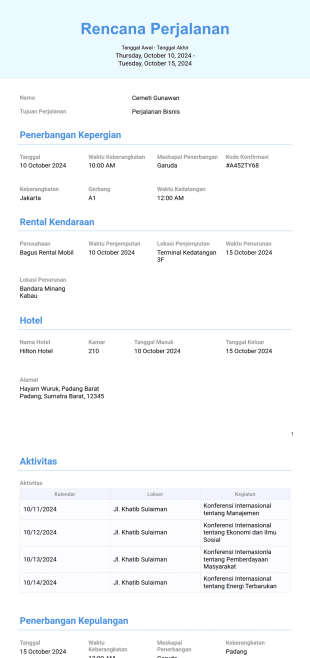
Templat Rencana Perjalanan Bisnis
Merencanakan perjalanan bisnis? Bantu karyawan dan eksekutif melacak pengaturan perjalanan dan janji temu dengan Templat Rencana Perjalanan Bisnis PDF dari Jotform. Dengan menggunakan Editor PDF Jotform, Anda dapat mengedit contoh ini.
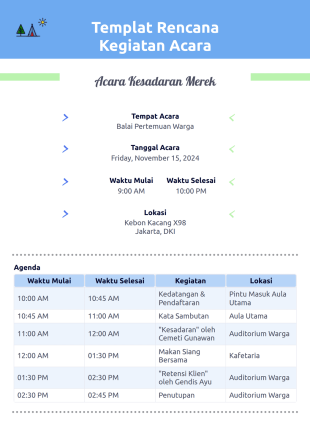
Templat Rencana Kegiatan Acara
Buat PDF rencana kegiatan acara yang dapat diunduh dan dicetak dengan Templat Rencana Kegiatan Acara gratis kami. Kustomisasi yang mudah dengan seret dan lepas. Kirim rencana perjalanan melalui penjawab otomatis!
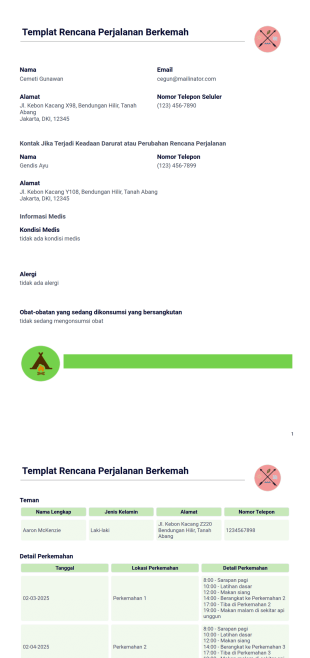
Templat Rencana Perjalanan Berkemah
Buat Rencana Perjalanan Berkemah Anda langsung dari Jotform dengan menggunakan Templat Rencana Perjalanan Berkemah ini! Berhentilah mencari tahu cara memulai dokumen rencana perjalanan berkemah Anda. Gunakan Templat PDF Rencana Perjalanan Berkemah ini sebagai gantinya!
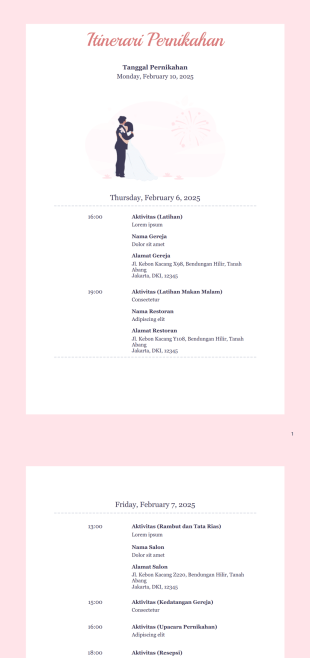
Templat Itinerari Pernikahan
Anda akan memiliki pilihan untuk mengubah elemen grafis apa pun, mencantumkan aktivitas tambahan, menyertakan informasi tempat, dan bahkan menambahkan foto pasangan yang bahagia.
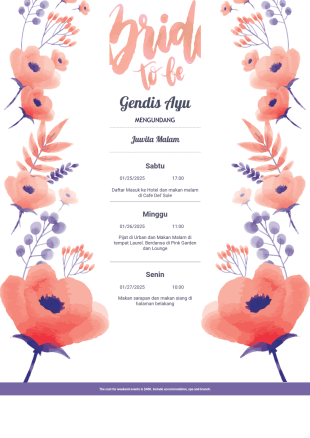
Templat Itinerai Lajang
Langsung buat rencana perjalanan dalam format PDF untuk pesta lajang. Mudah disesuaikan dengan tema apa pun. Unduh, cetak, dan bagikan hanya dengan satu klik. Tidak perlu pengodean!
Tentang Templat Rencana Perjalanan
Perjalanan seribu mil dimulai dengan satu langkah — atau satu rencana perjalanan yang dipikirkan dengan matang. Baik jika Anda adalah seorang agen perjalanan, koordinator acara, perencana pernikahan, atau seseorang yang mengatur perjalanan keluarga tahunan, Anda dapat langsung membuat jadwal terperinci untuk acara mendatang dengan Template PDF Rencana Perjalanan Jotform.
Dengan menggunakan Editor PDF seret-dan-lepas kami, Anda dapat mengatur ulang tata letak template rencana perjalanan dan menyertakan kolom aktivitas tambahan untuk membantu Anda merencanakan setiap saat. Ketika pengguna mengisi formulir rencana perjalanan Anda yang disesuaikan, informasi mereka akan secara otomatis disimpan sebagai PDF yang dapat dengan mudah dicetak atau dikirim secara elektronik ke semua orang di daftar tamu. Setelah diunduh, rencana perjalanan PDF yang ramah seluler ini dapat diakses dengan cepat di ponsel, jadi meskipun internet tidak tersedia, semuanya tetap dapat berjalan sesuai rencana.
Why Use Itinerary Templates?
- Itinerary Templates provide a structured framework that enhances accuracy in travel planning by ensuring all necessary details are meticulously documented and presented. This precision minimizes the risk of miscommunication or oversight, which is crucial for maintaining professionalism in business travel.
- Utilizing these templates significantly speeds up the process of itinerary creation, allowing for rapid assembly and distribution to relevant parties. This efficiency is invaluable in fast-paced environments where time-sensitive decisions and updates are common.
- The professional presentation of data is another key advantage of using Itinerary Templates. With customizable design elements, businesses can incorporate branding elements such as logos and color schemes, ensuring that all communications maintain a cohesive brand image.
- These templates also enhance data handling by providing a consistent format for information entry and retrieval. This consistency facilitates easy updates and modifications, reducing the likelihood of errors that can occur with manual data entry and management.
- In addition to improving speed and accuracy, Itinerary Templates support secure data management practices. By leveraging Jotform's secure data management capabilities, sensitive travel information is protected, giving businesses peace of mind when sharing documents with stakeholders.
Common Problems Solved by Itinerary Templates
- One of the primary challenges in the travel and event planning industry is the extensive paperwork involved, which can be prone to errors and misplacement. Itinerary Templates simplify this process by digitizing travel documents, ensuring all information is centralized and easily accessible.
- Manual entry of itinerary details often leads to inaccuracies and inconsistencies, which can disrupt travel plans. By using Itinerary Templates, businesses can automate data entry processes, minimizing human error and ensuring that all details are captured correctly and efficiently.
- Lost data is a common issue that can lead to significant disruptions in travel arrangements. By storing all itinerary information within Jotform's platform, users can prevent data loss and ensure that all relevant details are readily available and securely backed up.
- The process of updating and distributing itinerary changes can be cumbersome and inefficient when done manually. Itinerary Templates streamline these tasks by allowing for quick updates and automated notifications, ensuring all stakeholders are informed in real time about any changes.
Matching Use Cases to Features
- For travel agencies that need to quickly generate itineraries for clients, the Drag-and-Drop Form Builder allows for rapid customization of templates, resulting in a highly personalized travel plan that meets specific client needs.
- Event planners can leverage Conditional Logic to create dynamic itineraries that adjust based on attendee responses, ensuring that each participant receives a tailored schedule that reflects their individual preferences and requirements.
- Businesses requiring signed contracts or agreements as part of their travel documentation can utilize Electronic Signatures (Jotform Sign) to incorporate legally-binding signatures directly within the itinerary, streamlining the approval process.
- The PDF Editor feature enables automated PDF generation, which is particularly useful for companies that need to provide clients with polished, professional itineraries that are ready for immediate distribution.
- Approval Workflows can be integrated to facilitate the internal review and approval of itineraries before they are finalized and shared with clients, ensuring that all details have been verified and approved by relevant stakeholders.
- The Report Builder can be used to create comprehensive travel reports based on itinerary data, providing businesses with valuable insights into travel patterns and expenses, which can inform future planning and budgeting decisions.
- Jotform Tables offer a secure platform for storing and managing itinerary data, allowing for easy access and collaboration between team members, which is essential for maintaining up-to-date travel schedules and details.
How to Create a Itinerary Template
- Browse the Template List for an Itinerary template or start from a blank Template.
- Departemen komunikasi perusahaan
- Memungkinkan restock tepat waktu dan pencegahan kerugian
Top Use Cases for Itinerary Templates
- For Managers: Managers benefit from Itinerary Templates as these documents provide a centralized view of all travel-related activities, allowing for efficient oversight and coordination of travel plans. They can easily track employee movements, manage approvals, and ensure that all arrangements align with company policies and budgets. This transparency and control help in optimizing travel resources and minimizing unnecessary expenses.
- For Teams: For teams, Itinerary Templates serve as a crucial tool for organizing group travel. They ensure that every team member has access to the same information, reducing the potential for miscommunications or logistical errors. The ability to quickly update and distribute itineraries ensures that everyone is kept in the loop, fostering better collaboration and coordination during trips.
- For Customers: Clients and customers receive significant value from Itinerary Templates as they provide a clear, detailed outline of their travel plans. This level of detail and organization helps in setting expectations and ensures that clients are well-prepared for their journey. Moreover, the professional presentation of itineraries reflects positively on the service provider, enhancing customer satisfaction and trust.
Summarizing Itinerary Templates
Itinerary Templates are an indispensable asset for businesses involved in travel planning and management, offering a structured and efficient method for organizing and presenting travel details. By leveraging Jotform's comprehensive suite of features, businesses can enhance the accuracy, speed, and professionalism of their itinerary communications. The ability to automate data collection and securely manage information ensures that all stakeholders remain informed and prepared, ultimately contributing to smoother travel experiences and heightened client satisfaction.
Tanya Jawab
1) Is it free to create Itinerary Templates on Jotform?
Yes, Jotform offers a variety of Itinerary Templates that can be accessed and customized for free, although certain advanced features may require a paid subscription.
2. Siapa yang biasanya menggunakan templat laporan kemajuan?
Jotform prioritizes data security, utilizing encryption and other security measures to protect both templates and submitted data from unauthorized access.
3) Do I need coding knowledge to build a Itinerary template?
No, Jotform's Drag-and-Drop Form Builder is designed to be user-friendly, allowing you to create and customize Itinerary Templates without any coding knowledge.
4) What is Field Mapping in the context of Itinerary Templates?
Field Mapping involves linking web form input fields directly to specific locations within the PDF layout, ensuring that data collected through forms is accurately reflected in the final itinerary document.
5. Dapatkah laporan kemajuan disetujui atau diakui secara digital?
Yes, Jotform's Itinerary Templates can be accessed and utilized on mobile devices through Jotform Mobile Forms, allowing for offline data collection and management.
6) How does Autoresponder PDF Attachment work with Itinerary Templates?
This feature allows the generated itinerary PDF to be automatically attached to confirmation emails sent to the form submitter, ensuring timely delivery of travel documents.
7) What is the benefit of using the Submission Table Widget in an itinerary?
The Submission Table Widget formats complex data into a clear, organized table within the PDF, enhancing the readability and presentation of detailed itinerary information.
8) How does Password Protection enhance the security of an Itinerary Template?
By enabling Password Protection, users can require a password to view or open the itinerary PDF, adding an additional layer of security to sensitive travel information.