

Template Perintah Kerja

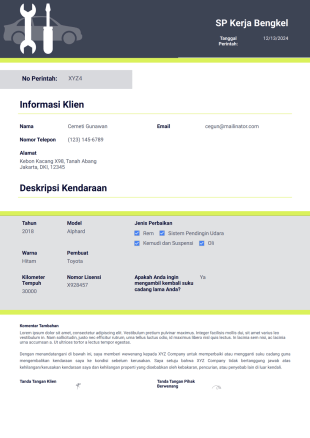
Surat Perintah Kerja Bengkel Otomotif
Mekanik dapat langsung membuat pesanan kerja otomotif menggunakan Templat Pesanan Kerja Perbaikan Mobil gratis kami. Sesuaikan, unduh, dan cetak pesanan kerja dalam format PDF dengan cepat!
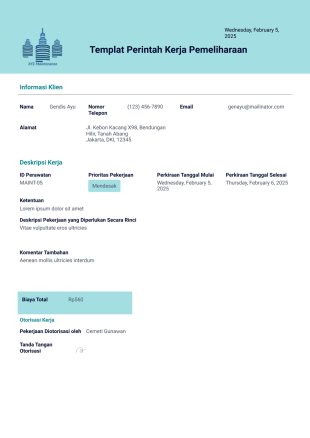
Templat Perintah Kerja Pemeliharaan
Sederhanakan alur kerja Anda dengan Templat Perintah Kerja Pemeliharaan gratis ini. Buat perintah kerja PDF secara online dengan cepat. Unduh, cetak, atau bagikan dalam hitungan detik.
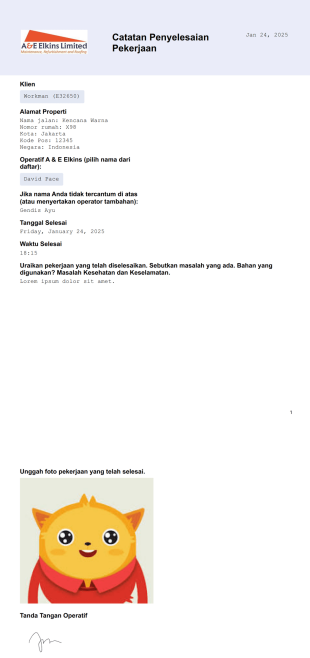
Templat Catatan Penyelesaian Pekerjaan
Mencari cara yang terorganisasi untuk mengumpulkan catatan pekerjaan yang telah selesai? Templat catatan penyelesaian pekerjaan ini berisi rincian spesifik seperti nama klien, alamat properti, nama operator, tanggal dan waktu penyelesaian dengan bidang tempat Anda dapat menyatakan masalah, masalah kesehatan, dan keselamatan.
Tentang Perintah Kerja
Perintah kerja memberikan perincian untuk setiap layanan mendatang yang belum dilakukan dan ditagih, menjadikannya sebagai pendahulu faktur. Paling sering digunakan oleh bisnis jasa dan dapat dikirim secara eksternal dari pelanggan atau secara internal untuk melaporkan masalah ke departemen lain. Selain memberikan ringkasan layanan yang diminta kepada pelanggan, perintah kerja membantu bisnis melacak proyek mendatang dengan lebih baik dan oleh karena itu sangat penting dalam mengoptimalkan alur kerja.
Jotform memberi Anda pilihan untuk menyimpan semua perintah kerja yang dikirimkan ke dalam PDF yang dapat Anda akses, unduh, dan bagikan dengan mudah. Baik jika Anda menyediakan layanan kreatif, layanan pemeliharaan, atau apa pun di antaranya, template PDF perintah kerja ini sangat cocok untuk usaha kecil dan pekerja lepas yang tidak memiliki anggaran atau beban kerja untuk menginstal perangkat lunak manajemen perintah kerja.
Why Use Work Order Templates?
- Work Order Templates provide a structured format that ensures all necessary details are captured accurately, reducing the risk of errors and omissions. This means that key information such as task descriptions, deadlines, and responsible personnel are clearly documented, facilitating smooth project execution and accountability.
- Using these templates speeds up the work order creation process, as predefined fields and layouts eliminate the need for repetitive manual entry. This not only saves time but also allows staff to focus on more critical tasks, ultimately increasing overall productivity.
- Work Order Templates enhance professional data handling by standardizing the way information is recorded and shared. This consistency is crucial for maintaining quality and reliability in business operations, ensuring that every work order meets the organization's standards.
- These templates allow for easy customization to fit specific business needs, enabling organizations to tailor them according to different projects or client requirements. This flexibility ensures that every work order is relevant and precise, regardless of the industry or task complexity.
- By automating data collection and organization, Work Order Templates help in maintaining an orderly system where all work orders are stored and can be retrieved quickly. This ensures that teams always have access to the latest information, thus supporting informed decision-making and effective communication.
Common Problems Solved by Work Order Templates
- The cumbersome process of paperwork and manual data entry is greatly minimized with Work Order Templates, as these digital formats replace the need for physical documents, thus reducing clutter and the likelihood of lost paperwork.
- Templates help in addressing the issue of inconsistent data entry, which often leads to errors and miscommunication. By providing a standardized format, these templates ensure that all critical information is captured uniformly, enhancing data accuracy and reliability.
- Work Order Templates mitigate the risk of lost or misplaced data by storing all submissions electronically, ensuring that information is easily accessible and secure. This electronic storage also aids in compliance with record-keeping standards and facilitates easy auditing.
- The inefficiency of manual approval processes is resolved by integrating these templates with automated workflows, allowing for quicker review and authorization of work orders. This not only speeds up project initiation but also improves collaboration among team members.
- Templates simplify the tracking and reporting of work order statuses, enabling managers to monitor progress and identify bottlenecks in real-time. This transparency helps in optimizing resource allocation and ensuring timely completion of tasks.
Matching Use Cases to Features
- The Drag-and-Drop Form Builder feature is ideal for businesses that require a high degree of customization in their work order forms. This feature allows users to easily add, remove, or modify fields, ensuring that each template meets the unique requirements of specific projects or industries.
- Conditional Logic can be employed to create dynamic templates that adapt based on user inputs. This is particularly useful for complex work orders that need to change or expand based on certain criteria, ensuring that only relevant fields are displayed to the user.
- The Electronic Signatures feature, powered by Jotform Sign, facilitates the capture of approvals and confirmations directly on the work order, streamlining the authorization process and providing a secure, verifiable record of sign-offs.
- By using the PDF Editor for Automated PDF Generation, businesses can automatically convert completed work orders into finalized PDF documents that are easy to distribute and archive. This ensures that all stakeholders receive consistent, professional-looking records.
- The Report Builder enables the creation of detailed reports from collected data, offering insights into work order trends, completion rates, and resource utilization. Managers can use these insights to make informed decisions and optimize operational strategies.
- Approval Workflows can be integrated with Work Order Templates to automate the routing and approval process, ensuring that work orders are reviewed and authorized quickly and efficiently. This reduces delays and enhances collaboration among departments.
- Secure Data Management with Jotform Tables ensures that all submitted data is stored safely in a centralized location, where it can be easily accessed, filtered, and analyzed. This secure storage solution supports compliance with data handling standards while enhancing data accessibility.
How to Create a Work Order Template
- Browse the Template List for a Work Order template or start from a blank Template to initiate the process. This step involves selecting a base layout that best fits the organizational requirements or creating a new one from scratch.
- Customize the design and fields using the Drag-and-Drop Form Builder. This step allows for the addition of specific elements such as logos, headers, and form fields that capture all necessary details related to the work order.
- Publish and share via Direct Link, Email, or Website Embed, making it easy for team members, clients, or contractors to access and complete the work order. This ensures that the template is widely available and ready for immediate use.
Top Use Cases for Work Order Templates
- For Managers: Work Order Templates provide managers with a streamlined method for overseeing project assignments and progress. By using these templates, managers can easily distribute tasks, set deadlines, and monitor completion statuses, ensuring that all team members are aligned with project goals. This centralized management approach not only improves organization but also facilitates effective communication and accountability, ultimately leading to enhanced project outcomes.
- For Teams: Teams benefit from Work Order Templates by having a clear and consistent framework for executing tasks. These templates outline all necessary steps and requirements, reducing ambiguity and confusion among team members. By providing a unified format for task documentation, teams can collaborate more effectively, track their progress, and adjust workflows as needed to meet project objectives. This coordination is essential for delivering high-quality results within specified timelines.
- For Customers: Customers experience improved service delivery when businesses utilize Work Order Templates. These templates ensure that all customer requests and specifications are documented accurately and addressed in a timely manner. By maintaining a professional and organized approach to work orders, businesses can enhance customer satisfaction and build trust, as clients receive consistent updates and confirmations regarding the status of their orders and projects.
Summarizing Work Order Templates
Anda tidak perlu menjadi desainer atau developer profesional untuk menggunakan Editor PDF Jotform — tetapi jika ya, Anda tetap tidak perlu menghabiskan keterampilan teknis Anda. Setelah memilih template perintah kerja terbaik untuk bisnis Anda, gunakan sistem seret-dan-lepas sederhana kami untuk menulis ulang kolom formulir, mengatur ulang elemen formulir, dan menambahkan logo agar sesuai dengan kebutuhan bisnis Anda. Anda akan mendapatkan template perintah kerja yang dipersonalisasi yang secara otomatis mentransfer perintah kerja ke dalam PDF, sehingga lebih mudah untuk mengelola data dan produktivitas pada saat yang bersamaan.
Template ini hanya formulir yang disarankan. Jika Anda menggunakan formulir sebagai kontrak, atau untuk mengumpulkan informasi pribadi (atau kesehatan pribadi), atau untuk tujuan lain dengan implikasi hukum, kami menyarankan Anda untuk memastikan secara pribadi bahwa formulir Anda telah mematuhi hukum yang berlaku dan bahwa Anda telah berkonsultasi dengan seorang pengacara sebelum mengandalkan formulir tertentu.
Tanya Jawab
1) Is it free to create Work Order Templates on Jotform?
Yes, Jotform offers a free plan that allows users to create and customize Work Order Templates. While there are premium plans available with additional features, the free plan provides essential functionalities for building and using templates effectively.
2. Siapa yang biasanya menggunakan templat laporan kemajuan?
Jotform prioritizes the security of its users' data by implementing robust encryption and secure data storage solutions. Submitted data is protected and can be accessed only by authorized users, ensuring that sensitive information remains confidential and secure.
3) Do I need coding knowledge to build a Work Order template?
No, you do not need any coding knowledge to build a Work Order template on Jotform. The intuitive drag-and-drop interface allows you to customize templates easily without any technical expertise.
4) What is Field Mapping in the context of Work Order Templates?
Field Mapping is the process of connecting individual web form input fields to specific locations on a PDF Document layout. This ensures that the information collected through the Work Order Template is accurately reflected in the generated PDF, maintaining consistency and precision.
5. Dapatkah laporan kemajuan disetujui atau diakui secara digital?
Yes, Jotform's Work Order Templates are fully compatible with mobile devices. Users can fill out and submit work orders using their smartphones or tablets, enhancing flexibility and accessibility for remote teams and field workers.
6) How does the Autoresponder PDF Attachment work with Work Order Templates?
The Autoresponder PDF Attachment feature automatically sends a completed PDF version of the work order to the form submitter's email. This ensures that all parties have a record of the transaction and can access the document for future reference.
7) What is the purpose of the Submission Table Widget in Work Order Templates?
The Submission Table Widget formats complex form data into a neat tabular layout on the PDF, making it easier to read and analyze. This is particularly useful for work orders that involve detailed lists or itemized tasks, as it organizes information clearly for stakeholders.
8) Can Work Order Templates be password-protected?
Yes, Jotform allows you to enable password protection for PDFs generated from Work Order Templates. This feature ensures that only users with the correct password can view or access the document, adding an extra layer of security to sensitive data.