

Veterinary Record Keeping Templates

Templat Rekam Medis Hewan Peliharaan
Templat rekam medis hewan peliharaan ini dapat digunakan oleh klinik hewan, dokter hewan, dan pemilik hewan peliharaan. Contoh ini mencakup informasi hewan peliharaan, detail kontak pemilik, riwayat imunisasi, dan riwayat medis.
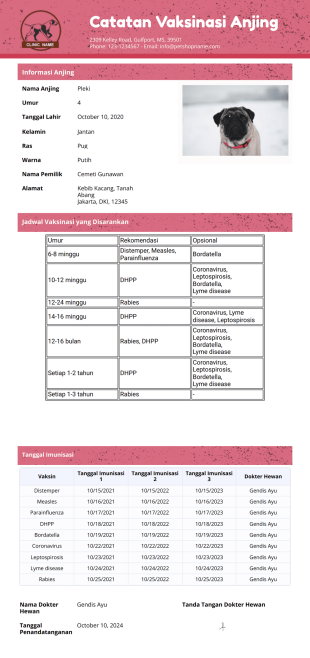
Templat Catatan Vaksinasi Anjing
Sample Catatan Vaksinasi Anjing yang dibuat dengan baik ini dapat digunakan oleh klinik hewan, dokter hewan, atau pemilik hewan peliharaan. Template Catatan Vaksinasi Anjing ini mencakup profil anjing, jadwal imunisasi yang direkomendasikan, serta vaksin yang telah diterima oleh anjing tersebut.
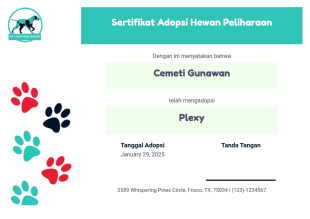
Templat Sertifikat Adopsi Hewan Peliharaan
Contoh Sertifikat Adopsi Hewan Peliharaan Gratis ini berisi nama pengadopsi, nama hewan peliharaan, tanggal, dan tanda tangan. Anda dapat mencetak Templat Sertifikat Adopsi Hewan Peliharaan ini dan memberikannya kepada pengadopsi.
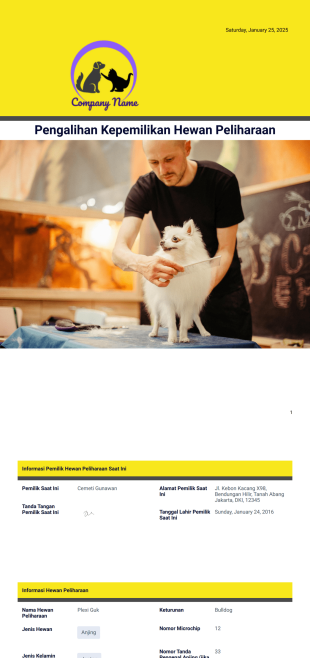
Templat Pengalihan Kepemilikan Hewan Peliharaan
Templat ini berisi informasi dasar yang Anda perlukan untuk mengalihkan kepemilikan hewan peliharaan Anda. Informasi seperti nama pemilik saat ini, nama pemilik baru, deskripsi hewan atau hewan peliharaan, dan ketentuan perjanjian. Anda dapat dengan mudah mengedit informasi ini, menghapus atau menambahkan lebih banyak jika perlu. Templat ini juga memungkinkan Anda menambahkan gambar atau logo untuk penyesuaian.
Tentang Veterinary Record Keeping Templates
Veterinary Record Keeping PDF Templates are specialized digital templates designed to streamline the documentation process within veterinary practices. These templates serve as a critical component in managing patient records, treatment histories, and other essential data required for efficient veterinary operations. By utilizing these templates, veterinary clinics can ensure consistent documentation, which is crucial for accurate record keeping and compliance with industry standards. Common operational use cases include maintaining detailed medical histories, tracking vaccination schedules, and recording treatment plans. Real-world workflows often involve the automated generation of invoices, consent forms, and discharge instructions, which are integral to the seamless functioning of any veterinary service provider.
Saat pemilik hewan peliharaan atau pengasuh hewan mengisi formulir online Anda, template PDF Anda akan langsung mengubah tanggapan mereka menjadi PDF yang dapat Anda bagikan dengan mudah kepada staf, diakses dari perangkat apa pun, dan cetak untuk catatan Anda. Gunakan Editor PDF seret dan lepas kami untuk mengubah tata letak template Anda, menulis ulang teks yang disediakan, mengubah font dan warna, dan menambahkan logo organisasi Anda. Template khusus Anda akan mentransfer informasi hewan dan tanda tangan manusia ke dalam satu PDF aman, dimana anjing tidak bisa makan kertas-kertas Anda lagi!
Why Use Veterinary Record Keeping Templates?
- Veterinary Record Keeping templates enhance accuracy by standardizing data entry, ensuring that all patient records are consistently documented and errors due to manual entry are minimized. This standardization is particularly important for maintaining the integrity of medical histories and treatment logs, which are essential for ongoing patient care.
- Speed is a significant advantage, as these templates allow for rapid documentation and retrieval of patient information. By automating routine paperwork, veterinary staff can reduce time spent on administrative tasks and dedicate more attention to direct animal care and client interactions.
- These templates facilitate professional data handling by incorporating features such as dynamic form fields, which automatically populate with submission data. This functionality ensures that each generated PDF reflects the most current information, thereby maintaining up-to-date records effortlessly.
- Jotform's templates support secure data management, providing peace of mind that sensitive client and patient information is protected. With options for password protection and encryption, these templates help maintain confidentiality and secure access to records.
- The flexibility of customization offered by Jotform allows veterinary clinics to tailor templates to specific needs, whether that involves adding unique fields, adjusting layout designs, or integrating specific branding elements, ensuring that all documentation aligns with the clinic's operational requirements.
Common Problems Solved by Veterinary Record Keeping Templates
- Mengurangi dokumen manual dan kesalahan administratif.
- Manual data entry errors, a common issue in paper-based systems, are minimized with the use of standardized templates. By automating form filling and data collection, the likelihood of inaccuracies is reduced, enhancing the reliability of patient records.
- Lost data, often a consequence of misplaced or damaged paper records, is no longer a concern with digital templates. Secure storage solutions provided by Jotform ensure that all records are easily accessible and retrievable, safeguarding critical information against loss.
- Time-consuming administrative processes are streamlined, allowing veterinary staff to focus on core clinical duties. The automation of routine tasks such as generating invoices or consent forms reduces the administrative workload, improving overall clinic efficiency.
Matching Use Cases to Features
- Veterinary clinics can benefit from the Drag-and-Drop Form Builder when customizing templates for specific data collection needs, such as creating detailed treatment logs or vaccination schedules. This feature simplifies the design process, allowing for quick adjustments and updates to templates as required.
- Conditional Logic is particularly useful for creating dynamic forms that adapt to user input, ensuring that only relevant fields are displayed. This capability enhances the user experience by simplifying form completion and ensuring that all necessary data is captured accurately.
- Electronic Signatures (Jotform Sign) are essential for securing client consent on treatment plans and procedures. By integrating digital signature functionality, clinics can expedite the approval process and maintain a digital record of signed documents.
- The PDF Editor enables Automated PDF Generation, allowing clinics to produce organized, professional-quality documents such as discharge summaries or appointment confirmations instantly after data submission. This automation saves time and enhances the presentation of clinic documentation.
- With Jotform's Report Builder, clinics can effortlessly compile data into comprehensive reports for analysis, aiding in the assessment of clinic performance or patient outcomes. These reports provide valuable insights that can drive improvements and strategic decision-making.
- Approval Workflows automate the review and authorization of critical documents, streamlining processes like treatment approvals and reducing bottlenecks in clinic operations. This automation ensures that documents move through necessary channels without unnecessary delays.
- Offline Data Collection, available through Jotform Mobile Forms, allows veterinary staff to gather information in environments without reliable internet access, ensuring uninterrupted data entry during field visits or emergency situations.
How to Create a Veterinary Record Keeping Template
- Browse the Template List for a Veterinary Record Keeping template or start from a blank Template. This step provides the foundation for building a customized document that meets the specific needs of your veterinary practice.
- Customize the design and fields using the Drag-and-Drop Form Builder. This intuitive interface allows you to personalize the template, ensuring it includes all necessary fields and adheres to your clinic's branding guidelines.
- Publish and share via Direct Link, Email, or Website Embed. Once your template is ready, you can distribute it to clients and staff through various channels, facilitating easy access and completion.
Top Use Cases for Veterinary Record Keeping Templates
- For Managers: Veterinary Record Keeping templates offer managers a streamlined way to oversee clinic operations by providing them with real-time access to patient records and administrative documents. With centralized data management, managers can efficiently monitor workflow, ensure compliance with industry standards, and make informed decisions based on up-to-date information, ultimately enhancing the clinic's operational efficiency.
- For Teams: The use of Veterinary Record Keeping templates enables team members to collaborate effectively by providing a unified platform for data entry and document management. By reducing the time spent on paperwork and minimizing data entry errors, teams can focus on delivering high-quality care and improving client interactions. The ability to automate routine tasks further enhances team productivity and job satisfaction.
- For Customers: Clients benefit from Veterinary Record Keeping templates through improved communication and transparency. By receiving professional, well-organized documents such as invoices and treatment summaries, customers gain a clearer understanding of their pet's health status and the services rendered. This clarity fosters trust and strengthens the client-veterinarian relationship, encouraging repeat visits and positive referrals.
Summarizing Veterinary Record Keeping Templates
Veterinary Record Keeping templates serve as a vital component for modernizing veterinary practice operations. By leveraging digital templates, clinics can enhance the accuracy, speed, and professionalism of their documentation processes. Jotform’s versatile platform supports comprehensive customization and automation, allowing clinics to tailor templates to their specific needs while maintaining secure and organized data management. Ultimately, these templates not only improve operational efficiency but also enhance client satisfaction and trust, driving long-term success for veterinary practices.
Template ini hanya formulir yang disarankan. Jika Anda menggunakan formulir sebagai kontrak, atau untuk mengumpulkan informasi pribadi (atau kesehatan pribadi), atau untuk tujuan lain dengan implikasi hukum, kami menyarankan Anda untuk memastikan secara pribadi bahwa formulir Anda telah mematuhi hukum yang berlaku dan bahwa Anda telah berkonsultasi dengan seorang pengacara sebelum mengandalkan formulir tertentu.
Tanya Jawab
1) Is it free to create Veterinary Record Keeping Templates on Jotform?
Yes, Jotform offers a free tier that allows users to create and customize Veterinary Record Keeping Templates. However, advanced features and higher usage limits may require a paid subscription plan.
2. Siapa yang biasanya menggunakan templat laporan kemajuan?
Jotform places a strong emphasis on data security. All templates and submitted data are protected with industry-standard encryption, ensuring that sensitive information remains confidential and secure.
3) Do I need coding knowledge to build a Veterinary Record Keeping template?
No, Jotform's intuitive drag-and-drop interface enables users to create and customize templates without any coding knowledge, making it accessible to users of all technical levels.
4. Apakah surat konfirmasi dapat dikirim secara otomatis setelah tanggapan formulir?
Field Mapping refers to the process of connecting individual web form input fields to specific positions on a Smart PDF or PDF Document layout. This ensures that data collected through the form is accurately reflected on the final PDF.
5. Dapatkah laporan kemajuan disetujui atau diakui secara digital?
Yes, Jotform's templates are fully compatible with mobile devices, allowing users to access, fill, and submit forms on the go, ensuring flexibility and convenience in data collection.
6) How does Autoresponder PDF Attachment work?
The Autoresponder PDF Attachment feature enables automatic sending of generated PDFs as email attachments to form submitters, providing them with instant access to submitted data in a professional format.
7) Can I password protect the PDFs generated from these templates?
Yes, Jotform offers a password protection feature that allows you to secure PDFs, requiring the recipient to enter a password before they can open or view the document.