

Modelli di biglietti

Modulo di acquisto del biglietto aereo
Sei un agente di viaggio, una compagnia di prenotazione o una compagnia aerea alla ricerca di un modo per vendere biglietti online? Il nostro modello di biglietto aereo gratuito è il modo perfetto per creare biglietti aerei per i tuoi clienti. Basta inserire il volo di ogni viaggiatore e i dettagli personali e questo biglietto aereo di esempio genererà automaticamente biglietti aerei in PDF personalizzati, ideali per viaggi nazionali o internazionali. Scaricateli o stampateli per il vostro archivio o inviateli via e-mail ai clienti come itinerario o documento di viaggio da portare in giornata.Partirai alla grande con il nostro modello di biglietto aereo già pronto, ma se desideri personalizzare il modello, puoi usare il costruttore di moduli drag-and-drop di JotForm. È sufficiente trascinare gli elementi per aggiungere il logo, delineare i dettagli del volo e aggiornare i termini e le condizioni. Perché non integrare il modulo allegato con uno dei nostri gateway di pagamento per accettare pagamenti online sicuri? Prova oggi il nostro modello di biglietto aereo per generare istantaneamente biglietti aerei professionali e uniformi: può farti risparmiare tempo, organizzare i tuoi record e aiutare la tua attività di viaggio a raggiungere nuove vette.
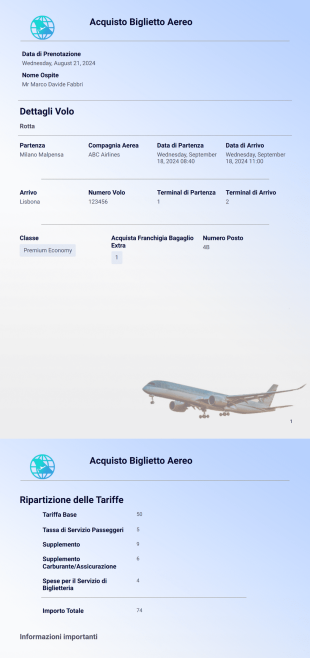
Modello di Biglietto Aereo
Un Modello di Biglietto Aereo viene utilizzato dalle compagnie aeree per prenotare biglietti per i propri clienti online. Sei un agente di viaggio, una società di prenotazione o una compagnia aerea alla ricerca di un modo per vendere biglietti online? Il nostro Modello di Biglietto Aereo gratuito è il modo perfetto per creare biglietti aerei raffinati per i tuoi clienti. Inserisci semplicemente i dati del volo e personali di ogni viaggiatore e questo modello genererà automaticamente biglietti aerei PDF personalizzati, ideali per viaggi nazionali o internazionali. Scaricali o stampali per i tuoi archivi o inviali via e-mail ai clienti come itinerario o documento di viaggio da portare il giorno del viaggio.Con il nostro Modello di Biglietto Aereo pronto all'uso, potrai partire alla grande, ma se desideri personalizzare questo modello, il Costruttore di Moduli trascina e rilascia di Jotform ti permetterà di farlo in modo semplice e intuitivo. Trascina e rilascia gli elementi per aggiungere il tuo logo, delineare i dettagli del volo e aggiornare i termini e le condizioni. Perché non integrare il modulo allegato con uno dei nostri gateway di pagamento per accettare pagamenti sicuri online? Prova oggi stesso il nostro Modello di Biglietto Aereo per generare immediatamente biglietti aerei professionali e uniformi: può farti risparmiare tempo, organizzare i tuoi archivi e aiutare la tua attività di organizzazione viaggi a raggiungere nuove vette.
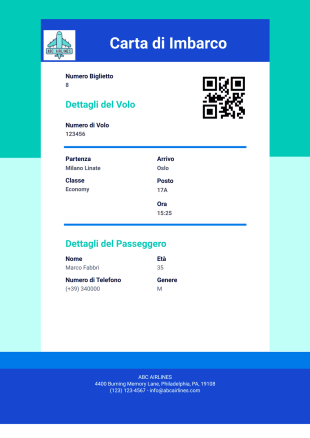
Modello Carta di Imbarco
Una carta d'imbarco viene rilasciata da una compagnia aerea o da un'agenzia di viaggi come autorizzazione per il check-in o l'imbarco su un aereo. Con questo Modello Carta di Imbarco, puoi creare carte d'imbarco vere per la tua agenzia di viaggi o compagnia aerea, oppure creare carte d'imbarco non ufficiali da regalare ad amici o familiari. Fornisci semplicemente le informazioni sul volo e i dettagli dei passeggeri e il tuo modello personalizzato genererà immediatamente carte d'imbarco sbalorditive in formato PDF. Scarica i PDF per i tuoi archivi o stampali affinché i passeggeri li conservino come ricordo dei loro viaggi.Che tu stia utilizzando il nostro Modello Carta di Imbarco per carte d'imbarco vere o non ufficiali, l'Editor PDF di Jotform ti consente di personalizzare l'aspetto del modello per un design professionale. Aggiungi il logo della tua azienda, includi foto della destinazione o cambia font e colori per un aspetto unico. Se gestisci una compagnia aerea o un'agenzia di viaggi, il nostro widget ID Univoco può generare automaticamente un numero di biglietto per ogni prenotazione, per farti risparmiare tempo e semplificare il processo di imbarco. Con le tue carte d'imbarco tutte sistemate, non ti resta che una cosa da fare: prepararti al decollo!
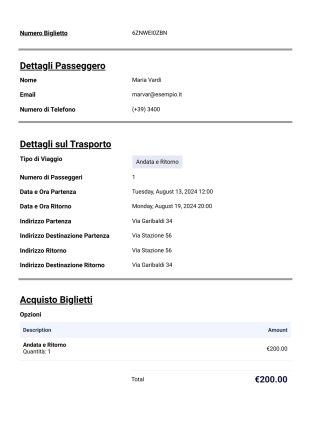
Modello di Biglietto per Trasporto Turistico
Non devi perdere molto tempo per preparare i biglietti per i tuoi eventi! Questo Modello di Biglietto per Trasporto Turistico PDF ti aiuterà a trasformare le registrazioni dei tuoi eventi in biglietti fisici che puoi stampare e inviare ai partecipanti o in PDF digitali che puoi inviare loro via e-mail.Utilizzare Jotform per raccogliere le registrazioni e accettare i pagamenti è facile e con il nostro nuovo Editor PDF trasformarle in biglietti è semplicissimo. Per raccogliere le registrazioni, puoi utilizzare subito questo esempio di modulo già pronto! Questo esempio di modulo include informazioni personali come nome, telefono di contatto, e-mail e informazioni di viaggio, ad esempio data del viaggio, città di partenza e destinazione.Aggiungi il tuo marchio nel PDF tramite l'Editor PDF di Jotform. Apporta tutte le modifiche o i cambiamenti di formattazione necessari e il tuo PDF è pronto per essere stampato o inviato via e-mail.
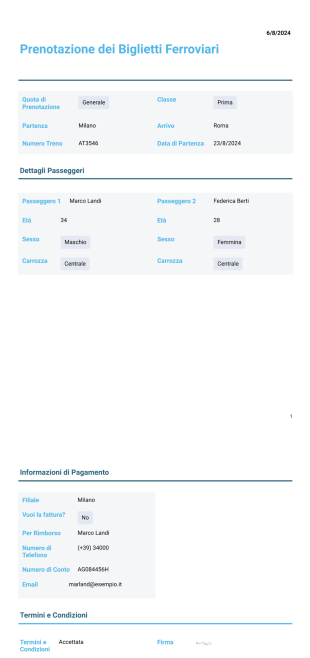
Modello di Prenotazione dei Biglietti Ferroviari
Stai cercando persone avventurose che amano viaggiare in treno? Questo modello di biglietto PDF aiuterà sicuramente i tuoi clienti a prenotare i loro biglietti senza difficoltà e senza perdere tempo a cercare i biglietti del treno.
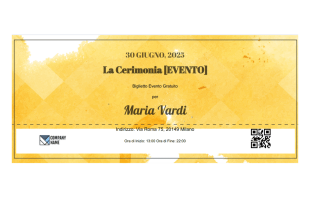
Modello di Biglietto per Evento Gratuito
Hai bisogno di un modo rapido per creare biglietti per il tuo prossimo evento? Utilizzando il nostro Modello di Biglietto per Evento Gratuito, ti basterà compilare un breve modulo con i dettagli dei partecipanti e dell'evento per dare inizio alla festa. Il modello genera immediatamente bellissimi biglietti PDF, facili da scaricare, stampare o inviare automaticamente via e-mail ai tuoi ospiti. Genererai rapidamente biglietti già pronti, dandoti più tempo per concentrarti sulle cose importanti, come caricarti per il più grande evento dell'anno! Con l'Editor PDF di Jotform, personalizzare il tuo modello è semplice: trascina e rilascia i campi del modulo per creare un biglietto con il design desideri. Aggiungi il logo della tua azienda, carica foto o usa un codice QR per codificare un messaggio segreto: le possibilità sono infinite! Che tu stia organizzando un concerto, una raccolta fondi o una festa di compleanno, il nostro Modello di Biglietto per Evento Gratuito è il modo più semplice per creare biglietti personalizzati per il tuo prossimo evento.
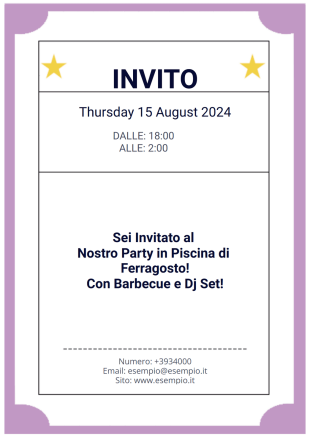
Modello di Biglietto di Invito
Un biglietto è un pezzo di carta o un piccolo documento che rappresenta una prova di acquisto che dà diritto ad un individuo di entrare ad un evento. Può anche essere un buono che un partecipante può utilizzare per richiedere omaggi, un invito o un pass esclusivo per partecipare ad una cerimonia.Questo Modello di Biglietto di Invito PDF è un documento stampabile che puoi usare in modo variabile per qualsiasi occasione. Il Modello di Biglietto di Invito può essere per un invito ad una cerimonia speciale, per una celebrazione, un biglietto o un pass per un evento o un buono per una promozione.
Informazioni sui Modelli di biglietti
Se devi creare dei biglietti per un evento, Jotform ti aiuta. Che tu stia organizzando un concerto, una lotteria o la prenotazione di mezzi di trasporto, i nostri Modelli di Biglietti PDF gratuiti generano automaticamente biglietti per i tuoi clienti da presentare per l'occasione. Scegli un modello da abbinare al modulo di prenotazione esistente, al modulo di pagamento o al modulo di registrazione dell'evento e riceverai un biglietto PDF personalizzato per ogni prenotazione. È quindi possibile scaricare, visualizzare o condividere i biglietti su qualsiasi dispositivo.
Personalizza facilmente un Modello di Biglietto PDF in base alle tue esigenze, indipendentemente dal settore o dall'evento. Con Jotform PDF Editor, puoi aggiungere il logo della tua azienda, cambiare i colori per abbinarlo al tuo Brand o trascinare e rilasciare caselle di testo per includere informazioni sull'evento, informazioni sul pagamento o la disposizione dei posti a sedere. Il risultato è un biglietto personalizzato per ogni cliente, che rende il processo di accettazione rapido e semplice sia per i partecipanti che per gli organizzatori.
Why Use Ticket Templates?
- Biglietti per eventi: per concerti, seminari, workshop o festival, gli organizzatori possono emettere biglietti digitali e raccogliere informazioni sui partecipanti.
- Ticket di supporto: le aziende e i reparti IT possono utilizzare modelli per gestire le richieste di assistenza clienti o di supporto tecnico.
- Partecipazioni a concorsi o lotterie: le organizzazioni e le non profit possono raccogliere partecipazioni a lotterie o estrazioni a premi per le raccolte fondi.
- Permessi di parcheggio o di accesso: le istituzioni possono emettere biglietti di parcheggio o di accesso per l'ingresso controllato.
- Sistemi di prenotazione: i ristoranti o i locali possono gestire le prenotazioni e le liste d'attesa.
Common Problems Solved by Ticket Templates
- Automatizza l'emissione e il monitoraggio dei biglietti, riducendo gli errori manuali.
- Centralizza la raccolta dei dati per una facile gestione e reporting.
- Abilita notifiche e aggiornamenti in tempo reale sia per gli utenti che per gli amministratori.
- Si integra con i gateway di pagamento per eventi o servizi a pagamento.
Funzionalità per ogni utilizzo
- Organizzatori di eventi, gestori di locali e promoter.
- Team di assistenza clienti e helpdesk IT.
- Organizzazioni non profit e coordinatori di raccolte fondi.
- Responsabili delle strutture e personale amministrativo.
- The Report Builder feature provides insightful data analysis by compiling ticket sales and distribution statistics, aiding in performance assessment and strategic planning.
- Approval Workflows streamline internal processes by automating ticket approval stages, ensuring that all tickets meet necessary criteria before distribution, thus maintaining quality control.
- Secure Data Management with Jotform Tables ensures that all ticketing data is stored safely and organized for easy access, supporting effective data management and retrieval.
How to Create a Ticket Template
- Browse the Template List for a Ticket template or start from a blank Template.
- Dipartimenti di comunicazione aziendale
- Consentono un rifornimento tempestivo e la prevenzione delle perdite
Top Use Cases for Ticket Templates
- For Managers: Managers benefit from Ticket Templates by gaining a streamlined method to oversee ticketing operations. They can easily track ticket distribution, monitor sales data, and ensure that all ticketing processes align with organizational standards. By utilizing centralized data systems like Jotform Tables, managers can maintain a bird’s eye view of all ticket-related activities, allowing for better decision-making and strategic planning.
- For Teams: Teams tasked with ticket distribution and management find Ticket Templates invaluable for maintaining consistency and efficiency. With the ability to quickly generate and distribute tickets, team members can handle high volumes without compromising accuracy or quality. The collaborative features of Jotform allow teams to work together seamlessly, sharing access to templates and data, which supports cohesive and coordinated efforts across departments.
- For Customers: Customers benefit from the clarity and professionalism of Ticket Templates. Receiving a well-designed, accurate ticket enhances their experience, providing them with all necessary information in a clear format. This reliability builds trust and satisfaction, as customers feel assured that they are dealing with a competent and organized entity. The ease of receiving digital tickets also adds convenience, as customers can access their tickets from any device without hassle.
Summarizing Ticket Templates
Perché non utilizzare i fantastici widget e le integrazioni Jotform per rendere i tuoi biglietti davvero unici? Imposta una risposta automatica sui tuoi moduli per inviare ai clienti i loro biglietti non appena effettuano la prenotazione, oppure aggiungi l'integrazione con i Fogli Google per generare automaticamente la lista dettagliata degli invitati. Grazie alla facilità e alle infinite possibilità di personalizzazione offerte da Jotform, riuscirai a creare fantastici biglietti per il tuo evento in pochi minuti.
Domande Frequenti
1. Cosa sono i modelli di ticket?
I modelli di biglietti sono documenti PDF predefiniti utilizzati per creare biglietti per concerti, conferenze, workshop, eventi sportivi, festival e raduni privati. Aiutano a standardizzare i dettagli dei biglietti, come nome dell'evento, data, ora, luogo e informazioni sui partecipanti.
2. Per quali tipi di eventi si possono utilizzare i modelli di biglietti?
I modelli di biglietti sono adatti per eventi in presenza, virtuali e ibridi, tra cui conferenze aziendali, webinar, eventi di beneficenza, funzioni scolastiche, concerti, spettacoli teatrali e feste private.
3. Come funzionano i modelli di ticket con i moduli online?
I dettagli dell'evento e le informazioni sui partecipanti raccolti tramite un modulo online possono compilare automaticamente un modello di biglietto, generando un biglietto PDF personalizzato per ogni invio.
4. Posso personalizzare i modelli dei biglietti con lo stile del mio evento?
Sì. Utilizzando il PDF Editor Jotform puoi aggiornare layout, font, colori, loghi, immagini di sfondo e sezioni dei biglietti per allinearli allo stile e al tema del tuo evento.
5. In che modo Jotform Sign supporta i modelli di ticket?
Jotform Sign consente di firmare digitalmente i biglietti o i documenti correlati all'evento quando è richiesta una conferma o un riconoscimento, contribuendo a semplificare le approvazioni e i flussi di lavoro dei partecipanti.
6. I modelli di biglietti sono adatti sia per eventi gratuiti che a pagamento?
Sì. I modelli di biglietti possono essere utilizzati per registrazioni gratuite, vendite di biglietti a pagamento, pass di accesso VIP, ingressi anticipati ed eventi solo su invito.
7. Come vengono consegnati i biglietti generati ai partecipanti?
I biglietti possono essere inviati automaticamente via e-mail come allegati PDF, scaricati direttamente dopo l'invio del modulo o condivisi per l'accesso tramite dispositivi mobili e la stampa.
8. I modelli di biglietti possono includere QR code o numeri di riferimento?
Sì. I modelli possono includere numeri di biglietto univoci, codici a barre o QR code per supportare il check-in, la convalida dell'ingresso e il monitoraggio delle presenze.