

Modelli PDF di Tecnologia dell'Informazione

Modulo di proposta per lo sviluppo di APP mobili
Convinci i tuoi clienti a usufruire dei tuoi servizi software inviando un eccezionale PDF di proposta di sviluppo di app mobili. Questa meravigliosa proposta ha una copertina, introduzione, panoramica dell'azienda, processo di sviluppo, servizi offerti, dettagli del progetto e termini. In questa proposta, il tuo potenziale cliente valuterà sicuramente la tua proposta perché contiene la missione e la visione della tua azienda. Illustra inoltre il processo di sviluppo su come creare un'app mobile da proposta, riunione, approvazione, test e lancio.Questo sensazionale modello di proposta per app mobile mostra anche la descrizione del progetto e il prezzo indicato. Infine, i termini e le condizioni specificano l'ambito dei servizi dell'azienda.
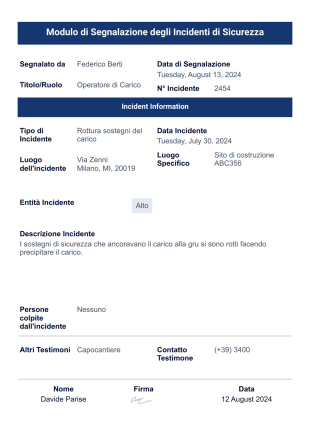
Rapporto sugli Incidenti di Sicurezza
Un Rapporto sugli Incidenti di Sicurezza è un documento utilizzato da un imprenditore o da un agente di polizia per segnalare e documentare un incidente. Se lavori nelle forze dell'ordine, in un'università o in un college, o semplicemente gestisci una piccola attività, un rapporto sugli incidenti di sicurezza è un modo per assicurarti che la tua azienda sia protetta. Utilizza questo modello di Rapporto sugli Incidenti di Sicurezza per documentare i dettagli di un incidente di sicurezza e assicurarti che la tua proprietà sia sicura e protetta.Compila il modello di Rapporto sugli Incidenti di Sicurezza sul tuo computer e invialo alla polizia. Oppure puoi utilizzare Jotform per raccogliere informazioni di contatto dai testimoni, come nome, numero di telefono e indirizzo e-mail, e quindi inoltrarle al dipartimento o all'autorità di polizia appropriata. Personalizza completamente questo modello, aggiungi altri campi di domanda e modifica i caratteri, i colori, i margini e gli sfondi senza che sia richiesta una sola riga di codice. Puoi persino stampare i rapporti creati per le vittime di un crimine o archiviarli negli altri tuoi account. Mantieni protetta la tua azienda con un modello di Rapporto sugli Incidenti di Sicurezza gratuito.
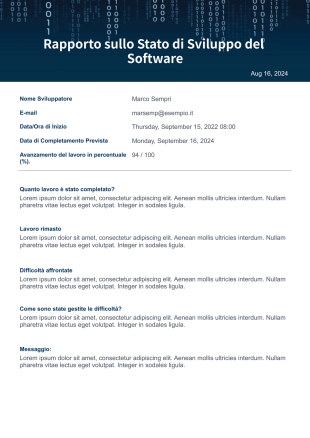
Rapporto sullo Stato di Sviluppo del Software
Ci sono molte ragioni per cui sviluppare un software è un progetto impegnativo. Che tu stia lavorando come singolo o come parte di un team, è importante monitorare i tuoi progressi. Questo modello ti aiuterà a identificare a quali attività, problemi o compiti devi dare la priorità. Questo servirà anche come promemoria e coordinazione del progetto.Abbiamo un modello PDF che puoi usare per i tuoi progetti di sviluppo software. Questo modello PDF di Rapporto sullo Stato di Sviluppo del Software contiene le informazioni dello sviluppatore, la data di completamento prevista, il tempo impiegato per ogni attività, lo stato di avanzamento del lavoro in percentuale, le attività completate, le attività incomplete, le difficoltà e i commenti.
Informazioni su Modelli PDF di Tecnologia dell'Informazione
È raro vedere aziende e attività in questi giorni che non abbiano ancora alcuna presenza online. Solo pochi anni fa, il consolidamento di un inventario sarebbe stato fatto manualmente con ore e ore di lavoro manuale coinvolto. La vendita di prodotti e l'offerta di servizi avrebbero richiesto che gli agenti di vendita andassero porta a porta, distribuendo volantini o gestendo negozi. I sondaggi venivano effettuati di persona o tramite l'utilizzo di moduli cartacei. Oppure, immagina di metterti ora in fila per ore solo per registrarti a un evento.
La tecnologia dell'informazione ha davvero rivoluzionato il modo in cui viviamo. La qualità della vita continua a migliorare attraverso le innovazioni. La vita è diventata più facile sia per le aziende che per i consumatori. Possiamo dire che questo è paragonabile alla Rivoluzione industriale quando i nostri processi di produzione furono trasferiti dalle case alle fabbriche.
Why Use Information Technology PDF Templates?
- Segnalazione di incidenti e problemi
- Monitoraggio delle risorse IT e gestione dell'inventario
- Documenti di richiesta software e hardware
- Richieste di modifica dell'accesso e delle autorizzazioni degli utenti
- Registri di manutenzione e controllo del sistema
Common Problems Solved by Information Technology PDF Templates
- Liste di controllo per l'onboarding e l'offboarding IT
- Documentazione degli incidenti di sicurezza
- Standardizzano la raccolta dati per i processi IT
- Riducono il lavoro manuale e le spese amministrative
Utilizzi e funzionalità
- Garantiscono la conformità ai requisiti organizzativi e normativi
- Migliorano i tempi di risposta e la responsabilità nel supporto IT
- Responsabili IT e personale di supporto
- Amministratori di sistema
- Dipartimenti delle risorse umane (per onboarding/off-boarding)
How to Create a Information Technology PDF Template
- Dipendenti che inviano richieste IT
- Team di conformità e audit
- Consentono un rifornimento tempestivo e la prevenzione delle perdite
Top Use Cases for Information Technology PDF Templates
- For Managers: Information Technology PDF Templates offer managers a streamlined way to oversee project documentation and reporting. By utilizing these templates, managers can ensure that all project-related information is consistently documented and easily accessible. This facilitates better decision-making and enhances project oversight.
- For Teams: IT teams can benefit from these templates by using them to standardize technical reports and documentation. This ensures that all team members are aligned and that documentation is consistently maintained, which is crucial for the successful execution of IT projects.
- For Customers: Customers receive clear, professionally formatted documents that enhance their understanding of the IT services being provided. This clarity fosters trust and improves communication between the service provider and the client, ensuring that customer needs are effectively addressed.
Summarizing Information Technology PDF Templates
Ora quasi tutto è connesso e online. Se vuoi gestire il tuo inventario, c'è un software per questo. Se devi vendere prodotti e servizi online, puoi utilizzare un sito web per questo. Se hai bisogno di raccogliere sondaggi, questionari o provvedere alle registrazioni di un evento, puoi utilizzare un modulo. Naturalmente, Jotform non fa eccezione. Comprendiamo che non tutti sono designer o hanno un designer che lavora per loro. Sappiamo quanto sia difficile iniziare a progettare layout da soli e anche realizzare progetti che siano accattivanti. Ecco perché abbiamo creato un nuovo Editor PDF, insieme a questa vasta raccolta di modelli PDF che chiunque può utilizzare nel settore della Tecnologia dell'Informazione.
Domande Frequenti
1. Cosa sono i modelli PDF per Information Technology?
I modelli PDF per Information Technology sono documenti personalizzabili che i team IT utilizzano per creare PDF strutturati per attività quali gestione dei dispositivi, ticket di supporto, checklist di sicurezza e documenti di accesso al sistema utilizzando Jotform PDF Editor o Jotform Sign.
2. In che modo i team IT possono utilizzare questi modelli per semplificare i flussi di lavoro?
Questi modelli aiutano ad automatizzare l'invio dei ticket, standardizzare i trasferimenti dei dispositivi e creare una documentazione coerente per l'onboarding, l'installazione del software e la segnalazione degli incidenti.
3. Posso raccogliere firme utilizzando Jotform Sign per i processi di approvazione IT?
Sì. I reparti IT possono richiedere firme per approvazioni di accesso, assegnazioni di hardware, riconoscimenti di sicurezza informatica e accordi con i fornitori tramite Jotform Sign.
4. Quali tipi di documenti IT possono essere creati con questi modelli?
È possibile generare PDF di inventario delle risorse, riepiloghi dei ticket di supporto, approvazioni di accesso alla rete, registri di manutenzione e documenti di conformità alla sicurezza informatica.
5. Questi modelli sono completamente personalizzabili per diverse policy IT?
Sì. Jotform PDF Editor consente una personalizzazione completa, inclusi il branding, i campi dei moduli, i requisiti del flusso di lavoro e le esigenze di documentazione tecnica.
6. Questi modelli aiutano a mantenere la conformità e l'accuratezza della documentazione?
Supportano la conformità interna garantendo una documentazione coerente per gli audit, i requisiti di governance IT e gli standard di sicurezza informatica.
7. Questi modelli possono essere integrati nei flussi di lavoro IT automatizzati?
Sì. I PDF possono essere generati automaticamente dai moduli inviati e inoltrati per l'approvazione, la firma o l'archiviazione nel cloud per supportare i processi IT automatizzati.
8. Questi modelli sono adatti sia ai team IT di piccole dimensioni che a quelli aziendali?
Certamente. Si adattano a reparti IT di qualsiasi dimensione, contribuendo a standardizzare la documentazione, ridurre il lavoro manuale e migliorare l'efficienza operativa.