

Modelli di Record dei Dipendenti

Modello di Registro di Formazione
Tieni traccia della formazione dei dipendenti. Genera automaticamente i registri di formazione in formato PDF. Raccogli informazioni e firme elettroniche. Facile da personalizzare. Senza bisogno di programmare.
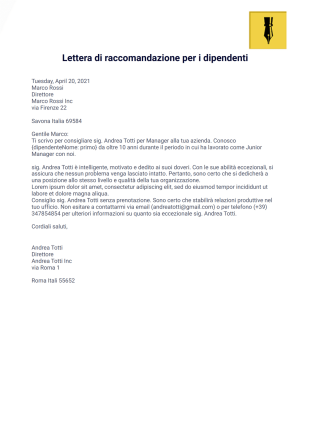
Lettera di raccomandazione per i dipendenti
Una lettera di raccomandazione per il dipendente è una lettera che può essere utilizzata per diversi scopi. Può essere per una raccomandazione per la promozione, per un trasferimento in una filiale o divisione diversa o per qualsiasi altro scopo di cui il dipendente ha bisogno come riferimento che possa sostenere la sua domanda di ammissione. Il più comune tuttavia è per l'occupazione. Il richiedente chiederebbe al suo ex datore di lavoro una raccomandazione che può aiutarlo ad essere accettato per una nuova posizione di lavoro. Questa lettera deve quindi includere informazioni che forniscano buone caratteristiche del dipendente.Questo modello PDF di lettera di raccomandazione per i dipendenti è la tua semplice lettera per le persone che vorresti raccomandare per un impiego a un'altra azienda. Se sei il proprietario di un'azienda o di un'azienda, un supervisore o un manager, questo modello PDF potrebbe tornare utile. Tutto ciò di cui hai bisogno è compilare i campi del modulo e, una volta inviata, la tua lettera di raccomandazione per il modello PDF dei dipendenti è pronta per la stampa.
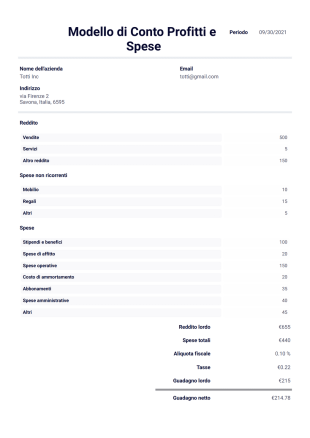
Modello di Conto Profitti e Spese
Un conto profitti e spese, noto anche come conto economico, è un riepilogo del rapporto finanziario durante un determinato periodo i costi, le spese, i ricavi sostenuti dall'azienda. Le informazioni attraverso questo riepilogo aiutano a determinare se l'azienda o l'organizzazione sta generando profitti, perdendo denaro o raggiungendo il pareggio. Questo rapporto può essere utilizzato per vari scopi, ad esempio conoscere il problema in cui l'azienda sta perdendo denaro e affrontarlo, oppure utilizzarlo per possibili investitori per invogliarli a far parte dell'azienda.Questo modello PDF del conto profitti e perdite ti consente di avere un PDF stampabile dai record provenienti dal database. Questo aiuta a risparmiare tempo durante i calcoli e tutto ciò che devi fare è inserire il valore o l'importo. Questo modello può essere facilmente modificato anche utilizzando il generatore di moduli e l'editor PDF di Jotform per personalizzarlo secondo le tue preferenze. Copia questo modello sul tuo account Jotform gratuitamente!
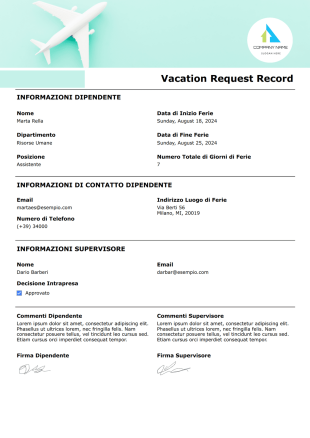
Modello di Richiesta Ferie
Ogni persona ha bisogno di una pausa. Se i tuoi dipendenti ti chiedono di andare in vacanza, puoi tenere traccia dei programmi delle ferie utilizzando questo Modello di Richiesta Ferie PDF.Una volta raccolte le informazioni necessarie dai tuoi dipendenti tramite il tuo modulo, vedrai tutti i dati come documento PDF. Questo Modello di Richiesta Ferie include informazioni sui dipendenti come nome, reparto, posizione, data di inizio ferie, data di fine ferie, numero totale di giorni di ferie, alcune informazioni di contatto, firme e commenti. Pertanto, puoi visualizzare tutti i dati di invio in una pagina. Puoi scaricare e stampare il PDF e conservarlo come documento.È tempo di conservare i dati di invio in una pagina ben progettata! L'Editor PDF Jotform ti aiuterà a personalizzare il tuo PDF.
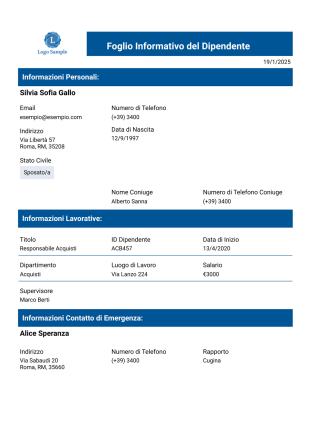
Modello Professionale di Registro dei Dipendenti
Il Modello Professionale di Registro dei Dipendenti semplificherà notevolmente il tuo lavoro, poiché potrai visualizzare le informazioni di ciascun dipendente in un'unica interfaccia se gestisci un'azienda o lavori in un reparto di risorse umane.
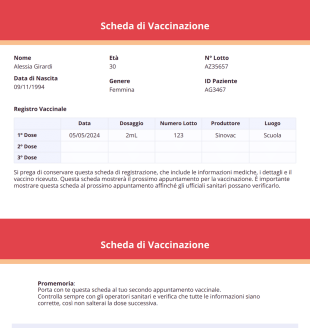
Scheda di Vaccinazione
Una Scheda di Vaccinazione è un documento che serve come prova che un individuo ha già ricevuto un vaccino da una struttura sanitaria. A causa della pandemia di COVID-19, il governo richiede ai cittadini di ricevere i vaccini il prima possibile in base al programma fornito. Se il cittadino ha ricevuto un vaccino, c'è la possibilità che ciò riduca al minimo la diffusione del virus o impedisca che l'individuo venga ricoverato in ospedale.Questo modello di Scheda di Vaccinazione PDF mostra il nome dell'individuo, età, data di nascita, sesso, numero di lotto, numero del paziente, tabella della registrazione delle vaccinazioni, promemoria, data e ora di ritorno e altre informazioni importanti. Questo modello PDF utilizza il formato carta A5 e il layout orizzontale in modo che sia più presentabile e facile da leggere. Questo modello PDF utilizza lo strumento Tabella di Input per visualizzare la data di vaccinazione, il dosaggio, il numero di lotto, il produttore e il luogo in cui il paziente ha ricevuto il vaccino. Personalizza liberamente questo modello PDF tramite l'Editor PDF, uno strumento semplice e intuitivo da usare.
Informazioni su Modelli di Record dei Dipendenti
La gestione delle informazioni sui dipendenti è importante, ma è facile perdersi tra le scartoffie. Organizza meglio il tuo dipartimento HR e risparmia tempo con Jotform! Abbina semplicemente il tuo modulo online a uno dei nostri modelli PDF di Registrazione dei Dipendenti per raccogliere digitalmente le informazioni sui dipendenti, le richieste di permessi, le valutazioni del personale e altro ancora. Gli invii vengono convertiti istantaneamente in PDF protetti, che puoi quindi scaricare, stampare o condividere su qualsiasi dispositivo; puoi visualizzare le informazioni dei dipendenti ovunque tu sia.
Se lavori nel settore dell'ospitalità, della salute, dell'istruzione o in qualsiasi altro settore, mettiamo a disposizione modelli di firme per i record dei dipendenti adatti alle esigenze della tua azienda. Con pochi clic, puoi visualizzare i dettagli di contatto, le richieste e i feedback dei dipendenti. Le risposte vengono salvate in eleganti PDF, che puoi facilmente personalizzare per rispecchiare l'immagine del tuo marchio. Perché non aggiungere il logo e i colori della tua azienda utilizzando il nostro semplice Editor PDF con funzione trascina e rilascia? I tuoi record non saranno solo meglio organizzati, ma avranno anche un aspetto accattivante.
Why Use Employee Record Templates?
- Inserimento di nuovi dipendenti e raccolta di informazioni
- Aggiornamento dei record dei dipendenti esistenti
- Monitoraggio di certificazioni, formazione e conformità
- Registrazione delle valutazioni delle prestazioni e delle azioni disciplinari
- Gestione dei contatti di emergenza e delle informazioni sanitarie
Common Problems Solved by Employee Record Templates
- Documentazione di promozioni, trasferimenti o cambi di ruolo
- Manual data entry is prone to errors, leading to potential inaccuracies in employee records. Employee Record Templates address this by automating data collection and entry, ensuring that information is captured accurately and consistently. This automation not only reduces errors but also enhances the overall reliability of employee data.
- Assicurano che tutti i dati necessari dei dipendenti siano raccolti e aggiornati
- Facilitano il rapido recupero delle informazioni sui dipendenti per audit o reporting
Utilizzi e funzionalità
- Migliorano la sicurezza dei dati e la conformità alla privacy
- Responsabili delle risorse umane e personale
- Capi dipartimento e supervisori
- The PDF Editor facilitates automated PDF generation, creating a standardized and professional document for each employee record. This automation ensures that all employee records are consistent in appearance and format, enhancing the professionalism of the HR department.
- Responsabili della contabilità e della conformità
- Offline data collection through Jotform Mobile Forms is particularly useful for remote or field-based employees who may not have immediate internet access. This capability allows employees to fill out forms offline, with data being automatically synced once a connection is reestablished.
How to Create a Employee Record Template
- Browse the Template List for an Employee Record template or start from a blank Template.
- Dipartimenti di comunicazione aziendale
- Consentono un rifornimento tempestivo e la prevenzione delle perdite
Top Use Cases for Employee Record Templates
- For Managers: Employee Record Templates provide managers with a reliable way to access and update employee information as needed. This access is crucial for performance evaluations and making informed decisions regarding promotions or reassignments. Managers can quickly retrieve employee data to ensure that team goals are aligned with individual capabilities and qualifications.
- For Teams: These templates facilitate seamless collaboration among team members by providing a centralized repository of employee information. Team members can access relevant data to coordinate work schedules, share responsibilities, and ensure that team objectives are met. This centralized approach fosters a collaborative work environment where information is readily available to those who need it.
- For Customers: While primarily used internally, Employee Record Templates can also indirectly benefit customers by ensuring that the company employs qualified and well-managed staff. By maintaining accurate employee records, businesses can ensure that only the most suitable employees interact with customers, enhancing service quality and customer satisfaction.
Summarizing Employee Record Templates
Employee Record Templates are a vital component in modern HR operations, providing a structured, efficient, and secure way to manage employee data. By leveraging the capabilities of Jotform, businesses can automate data collection, improve accuracy, and ensure that employee information is easily accessible and well-organized. This not only enhances the overall efficiency of HR processes but also contributes to better decision-making and improved employee management. As businesses continue to evolve, Employee Record Templates will remain an indispensable asset in maintaining streamlined and effective HR operations.
Questi templates sono solamente dei moduli consigliati che potrebbero fare al caso vostro, risparmiandovi un po' di lavoro. Tuttavia, se state realizzando un modulo per stipulare contratti o raccogliere informazioni personali, dati sanitari, etc. o per qualsiasi altro scopo che abbia implicazioni legali, assicuratevi di rendere il vostro modulo conforme alle leggi vigenti, e consultate uno studio legale prima di pubblicare il vostro modulo.
Domande Frequenti
1. Cosa sono i modelli di record dei dipendenti?
I Modelli di Record dei Dipendenti sono documenti personalizzabili che i team delle risorse umane utilizzano per organizzare e gestire le informazioni essenziali sui dipendenti, come dati personali, cronologia lavorativa, note sulle prestazioni, dati sulle presenze e documentazione di onboarding.
2. Quali informazioni sono solitamente incluse nei registri di un dipendente?
Gli elementi comuni includono dati di contatto, posizione e reparto, date di inizio, contatti di emergenza, cronologia della formazione, valutazioni, certificazioni e aggiornamenti relativi alle risorse umane. È possibile modificare i campi in base alla struttura aziendale o ai requisiti di conformità.
3. In che modo il PDF Editor Jotform può aiutare i team delle risorse umane a gestire i record dei dipendenti?
Il PDF Editor Jotform consente ai team delle risorse umane di progettare layout strutturati, aggiungere nuovi campi, organizzare sezioni e generare automaticamente PDF dai moduli inviati. Ciò supporta una documentazione coerente durante le fasi di assunzione, onboarding e gestione continua dei dipendenti.
4. I registri dei dipendenti possono includere firme?
Sì. Quando i flussi di lavoro delle risorse umane richiedono conferma o approvazione, le firme possono essere incorporate nei documenti e raccolte digitalmente tramite Jotform Sign. Questa funzionalità è utile per la conferma di policy, formazione e gli accordi di onboarding.
5. In che modo i Modelli di Record dei Dipendenti migliorano l'efficienza delle risorse umane?
Semplificano la raccolta dati, riducono il lavoro manuale e creano automaticamente file dei dipendenti ben formattati. L'abbinamento dei moduli online con la generazione di PDF aiuta le Risorse Umane a gestire archivi centralizzati e organizzati con il minimo sforzo.
6. Questi modelli sono utili per l'inserimento di nuovi dipendenti?
Sì. I team delle risorse umane possono utilizzare modelli per documentare le fasi di onboarding, le checklist di formazione, le assegnazioni dei lavori e i dettagli dei dipendenti. I materiali firmati possono essere archiviati insieme ai documenti digitali per una facile consultazione.
7. Le aziende possono personalizzare i record dei dipendenti per i diversi reparti?
Certamente. Dipartimenti come finanza, operazioni o IT possono avere versioni personalizzate dei registri dei dipendenti che raccolgono dati specifici per ruolo, mantenendo al contempo la struttura generale coerente.
8. I PDF dei registri dei dipendenti sono adatti alle esigenze di audit e conformità?
Sì. Mantenere i file dei dipendenti ben organizzati e con data e ora aiuta le aziende a prepararsi per revisioni interne, valutazioni di conformità o audit di terze parti. Jotform Sign e Jotform PDF Editor insieme supportano una documentazione completa.