

Formularios para contabilidad

Formulario De Recibo De Caja
Registra y emite comprobantes de cobro con el Formulario de Recibo de Pago en Efectivo, ideal para negocios y profesionales que necesitan documentar pagos en efectivo y organizar la recopilación de datos con Jotform.
Ir a la categoría:Formularios de pago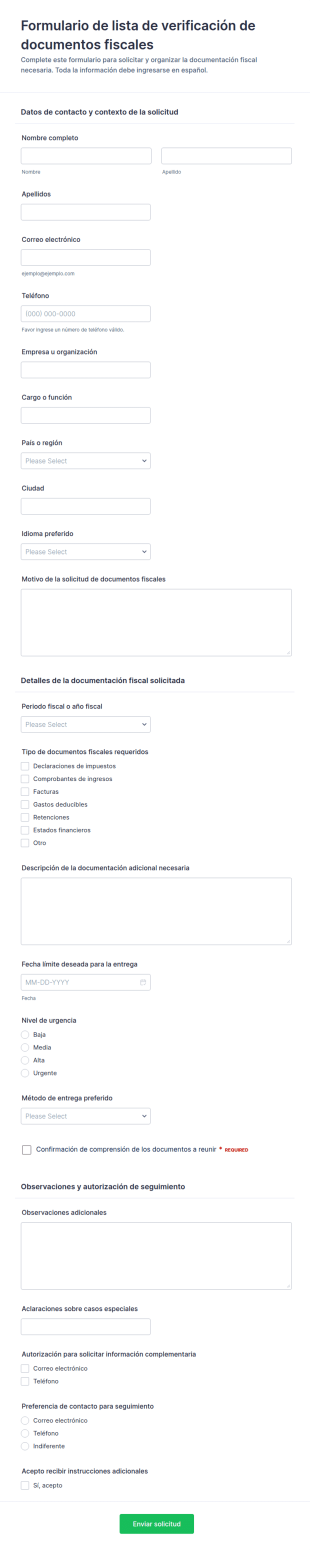
Solicitud De Lista De Documentos Fiscales
Centralice solicitudes de documentación con el Formulario de lista de verificación de documentos fiscales en Jotform, ideal para despachos contables y empresas que necesitan recopilar datos y coordinar la entrega de documentos por periodo fiscal.
Ir a la categoría:Formularios de impuestoAcerca de Formularios para contabilidad
Accountant Forms are specialized digital forms designed to streamline the operations of accounting professionals by automating and simplifying various data collection tasks. These forms cater to a wide range of accounting activities, from client onboarding and financial reporting to tax documentation and invoicing. By leveraging Accountant Forms, professionals in the accounting industry can efficiently manage client data, track financial transactions, and ensure compliance with regulatory requirements. This digital transformation not only enhances productivity but also minimizes the risk of errors commonly associated with manual data entry and paperwork-heavy processes.
Jotform se destaca como el principal creador de formularios en línea para la creación y gestión de formularios para contabilidad, ya que brinda una facilidad de uso y una personalización sin igual. Gracias a la intuitiva interfaz de Jotform dearrastrar y soltar , los contadores pueden adaptar sin esfuerzo los formularios a sus necesidades concretas, lo que permite automatizar a la perfección los procesos de recopilación de datos. La integración con Jotform Tablas permite una gestión centralizada de los datos, proporcionando una plataforma segura y organizada para almacenar, analizar y recuperar información financiera. Este enfoque integral asegura que los profesionales de la contabilidad puedan centrarse en ofrecer servicios de alta calidad a sus clientes, al tiempo que mantienen la precisión y la efectividad en sus flujos de trabajo.
¿Por qué utilizar formularios para contabilidad?
- Los formularios para contabilidad son fundamentales para garantizar la exactitud de los datos financieros, ya que eliminan los errores habituales asociados a la introducción manual de datos. Al automatizar la recopilación de datos, los contadores pueden reducir la probabilidad de que se produzcan discrepancias y garantizar que los registros financieros sean precisos y fiables.
- La rapidez con la que los formularios para contabilidad pueden procesar datos constituye una ventaja significativa para los profesionales con una agenda apretada. Estos formularios reducen los tiempos de trabajo, lo que permite a los contadores recopilar y analizar información rápidamente, lo que, en última instancia, ahorra tiempo y aumenta la productividad.
- La gestión profesional de los datos es uno de los puntos fuertes de los formularios para contabilidad, ya que proporcionan un marco estructurado para recopilar y organizar la información financiera. Esto asegura que todos los datos se almacenen de forma sistemática y sean de fácil acceso, lo que facilita la realización de auditorías y revisiones eficientes.
- Gracias a la integración de las firmas electrónicas a través de Jotform Firmas, los contadores pueden mejorar la seguridad y la autenticidad de los documentos. Esta función permite a los clientes firmar los formularios de forma digital, lo que asegura que todas las transacciones y acuerdos sean legalmente vinculantes y verificables.
- Los formularios para contabilidad se pueden personalizar con facilidad para adaptarlos a las necesidades específicas de distintos clientes y proyectos. Esta flexibilidad permite a los contadores adecuar los formularios a diferentes situaciones, ya sea para la documentación fiscal, la facturación o la presentación de reportes financieros.
Problemas comunes resueltos por los formularios para contabilidad
- Uno de los principales retos a los que se enfrentan los contadores es gestionar el exceso de papeleo, que puede resultar pesado y propenso a errores. Los formularios para contabilidad digitalizan estos documentos, lo que minimiza la necesidad de almacenamiento físico y mejora la eficiencia en la recuperación de la información.
- La introducción manual de datos requiere mucho tiempo y con frecuencia da lugar a errores humanos, lo que afecta a la precisión de los registros financieros. Los formularios para contabilidad resuelven este problema automatizando los procesos de introducción de datos, lo que asegura que la información se registre de forma precisa y coherente.
- La pérdida o extravío de datos constituye una preocupación importante en el sector de la contabilidad, sobre todo durante las auditorías o los controles de cumplimiento. El uso de los formularios para contabilidad garantiza que todos los datos se almacenen de forma segura y se puedan recuperar fácilmente, lo que minimiza el riesgo de pérdida de datos.
- Realizar un seguimiento de las comunicaciones y las aprobaciones de los clientes puede resultar complicado con los métodos tradicionales. Los formularios para contabilidad optimizan este proceso gracias a funciones como las condiciones lógicas y las notificaciones automáticas por correo electrónico, lo que garantiza que se obtengan y documenten todas las aprobaciones necesarias.
- Los contadores a menudo se enfrentan a cálculos complejos y análisis de datos, lo que puede resultar dificultoso de realizar manualmente. Estos formularios pueden incorporar cálculos integrados e integraciones con aplicaciones de terceros, lo que simplifica los análisis financieros complejos y la elaboración de reportes.
Funciones según el caso de uso
- Para la incorporación de clientes, el generador de formularios de arrastrar y soltar permite a los contadores personalizar los formularios para recopilar toda la información necesaria del cliente de forma eficaz. Esta personalización asegura un proceso de incorporación fluido, completo y fácil de usar.
- Las condiciones lógicas son especialmente útiles para la documentación fiscal, ya que permiten que los formularios se adapten dinámicamente en función de la información introducida por el usuario. Esta función garantiza que a los clientes solo se les planteen las preguntas pertinentes, lo que simplifica el proceso de recopilación de datos y reduce la confusión.
- The availability of 30+ payment gateways, including Stripe and PayPal, facilitates the collection of payments directly through forms. This feature is crucial for invoicing and billing, allowing accountants to streamline financial transactions and improve cash flow management.
- El Editor de PDF Jotform permite generar automáticamente documentos PDF profesionales basados en los datos enviados a través de los formularios. Esto resulta sumamente beneficioso para la elaboración de informes financieros, ya que permite a los contables crear y compartir fácilmente informes bien presentados con los clientes y las partes interesadas.
- La gestión segura de los datos es una prioridad para los contables, y Jotform Tablas ofrece una solución sólida para almacenar y organizar la información confidencial. Esta función garantiza que todos los datos de los clientes y los datos financieros estén protegidos y cumplan con la normativa del sector.
- La función de creación de reportes permite a los contadores generar reportes detallados y visualizaciones a partir de los datos recopilados. Esto facilita los procesos de toma de decisiones al proporcionar información clara sobre el rendimiento financiero y las tendencias.
- Los flujos de trabajo de aprobación reducen los trámites internos al automatizar la aprobación de documentos y transacciones. Esta función garantiza que se realicen de forma eficaz todas las comprobaciones necesarias, lo que reduce los cuellos de botella y mejora la rendición de cuentas.
Cómo crear un formulario para contabilidad
- Comience por buscar en la lista de plantillas una plantilla para contables o inicie el proceso a partir de un formulario en blanco. Este paso le permite aprovechar las plantillas prediseñadas o crear desde cero un formulario que se adapte a sus necesidades contables específicas.
- Personalice el diseño y los campos mediante el generador de formularios de arrastrar y soltar. Esta herramienta intuitiva le permite agregar, eliminar o modificar campos sin esfuerzo, lo que le garantiza que el formulario se adapte totalmente a sus necesidades operativas.
- Publique y comparta el formulario mediante un enlace directo, por correo electrónico o mediante la integración en una página web. Esta flexibilidad permite que los clientes y compañeros de trabajo puedan acceder al formulario a través de múltiples canales, lo que facilita una comunicación fluida y la recopilación de datos.
Principales casos de uso de los formularios para contabilidad
- Para directivos: Los formularios para contabilidad son de gran utilidad para los directivos que desean supervisar las operaciones financieras y asegurar el cumplimiento de las normativas internas y externas. Al utilizar estos formularios, los directivos pueden optimizar los procesos de aprobación, realizar un seguimiento de los datos financieros en tiempo real y generar reportes completos sobre el rendimiento financiero. Este enfoque centralizado no solo mejora la transparencia, sino que también permite a los directivos tomar decisiones fundamentadas que impulsan el éxito de la organización.
- Para equipos: Los equipos de contabilidad pueden beneficiarse de las funciones colaborativas de los formularios de contabilidad, que facilitan el intercambio efectivo de datos y la comunicación. Estos formularios permiten a los miembros del equipo recopilar, analizar y elaborar reportes sobre datos financieros de forma colaborativa, lo que asegura que todos los miembros del equipo estén coordinados e informados. La integración con aplicaciones de terceros mejora aún más la productividad del equipo al automatizar las tareas rutinarias y disminuir el tiempo dedicado a la introducción manual de datos.
- Para clientes: Para los clientes, los formularios de contabilidad ofrecen una forma sencilla y fácil de usar para enviar la información y los documentos financieros necesarios. Estos formularios se pueden personalizar para guiar a los clientes a lo largo de procesos complejos, como la presentación de declaraciones fiscales o la divulgación de información financiera, lo que garantiza que toda la información requerida se recopile con precisión. El uso de firmas electrónicas también proporciona a los clientes un método seguro para autorizar transacciones y acuerdos, lo que fomenta la confianza en los servicios de contabilidad prestados.
Resumen de los formularios para contabilidad
Los formularios para contabilidad desempeñan un papel crucial en la modernización del flujo de trabajo de los profesionales de la contabilidad, al digitalizar la recopilación de datos y optimizar los procesos financieros. Mejoran la precisión y la eficiencia, disminuyen el riesgo de errores y ofrecen un enfoque estructurado para la gestión de datos. Con el creador de formularios en línea de Jotform, los contadores pueden crear y personalizar fácilmente estos formularios para que se adapten a sus necesidades específicas, garantizando así que los datos financieros se recopilen y gestionen de manera eficaz. Al integrar funciones avanzadas como las firmas electrónicas, las pasarelas de pago y los flujos de trabajo de aprobación, Jotform permite a los contadores ofrecer servicios de alta calidad sin descuidar el cumplimiento normativo ni la seguridad.
Preguntas Frecuentes
1) ¿Es gratis crear formularios para contabilidad en Jotform?
Crear formularios para contabilidad en Jotform es gratuito, aunque existe la opción de pasar a planes de pago para disfrutar de funciones adicionales y límites de envío más altos.
2) ¿Son seguros los formularios y los datos enviados?
Sí, Jotform se asegura de que todos los formularios y los datos enviados estén protegidos, utilizando cifrado conforme a los estándares del sector y cumpliendo con la normativa de protección de datos.
3) ¿Necesito conocimientos de programación para crear un formulario para contabilidad?
No se necesitan conocimientos de programación para crear un formulario para contabilidad, ya que el Creador de formularios Jotform de arrastrar y soltar, está pensado para ser intuitivo y fácil de usar.
4) ¿Puedo cobrar los pagos directamente a través de mis formularios?
Sí, puede cobrar los pagos directamente a través de sus formularios gracias a la integración con más de 30 pasarelas de pago, entre las que se incluyen Stripe, PayPal y Square.
5) ¿Se pueden utilizar estos formularios en dispositivos móviles?
Sí, los formularios de Jotform se ajustan a los dispositivos móviles y se puede acceder a ellos y enviarlos desde cualquier dispositivo, lo que garantiza flexibilidad y comodidad a los usuarios que están fuera de casa.
6) ¿Puedo transformar formularios enviados en documentos PDF profesionales?
Sí, con el Editor de PDF Jotform puede convertir automáticamente los formularios enviados en documentos PDF profesionales para compartirlos y archivarlos con facilidad.
7) ¿Se puede integrar los formularios para contabilidad con mi software actual?
Los formularios para contabilidad se puede integrar con más de 100 aplicaciones de terceros, entre las que se incluyen programas tan populares como Google Sheets, Salesforce y Slack, mejorando así su flujo de trabajo y sus capacidades de gestión de datos.
8. ¿Qué medidas de privacidad deben considerarse al usar formularios para contabilidad?
Los formularios para contabilidad se pueden personalizar para que incluyan los controles de cumplimiento y las reglas de validación de datos necesarios, lo que asegura que toda la información recopilada se ajuste a la normativa financiera y a las normas pertinentes.