

Formularios K-12

Cuestionario De Vocabulario
Un cuestionario de vocabulario es una plantilla de formulario diseñada para evaluar los conocimientos de vocabulario de los alumnos y registrar los resultados de sus cuestionarios.
Ir a la categoría:Formularios de educación
Formulario De Inscripción Escolar
El formulario de inscripción escolar es un documento utilizado por el alumno o sus padres para inscribirse en un centro escolar. Este formulario es importante porque verifica información importante sobre el nuevo alumno que incluye sus antecedentes, comportamiento, actitud y estado de salud actual. Este formulario de inscripción escolar contiene campos en los que se pide el nombre, la edad, el sexo, los datos de contacto, la dirección, el curso escolar y el nombre del último alumno. También se piden los datos de los padres o tutores para poder contactar con ellos en caso de emergencia. En este formulario también se pide el historial médico del alumno, que incluye alergias, medicamentos, antecedentes quirúrgicos, hospitalizaciones previas o cualquier problema médico actual que la escuela deba conocer. Esta plantilla de formulario también tiene una sección para los detalles de inmunización y vacunación. En esta sección se verifica si el alumno ha recibido o no una vacuna específica. Esta plantilla utiliza la herramienta Firma para capturar la firma digital del padre o tutor.
Ir a la categoría:Formularios de educación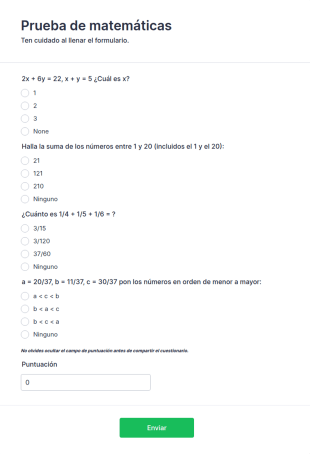
Prueba De Matemáticas
Realice cuestionarios en línea y califíquelos automáticamente con nuestra plantilla gratuita de cuestionarios de matemáticas. Ideal para el aprendizaje a distancia. Los estudiantes pueden completarla en cualquier dispositivo.
Ir a la categoría:Formularios de educación
Formulario De Recogida De Datos Del Estudiante
Un formulario de recogida de datos del estudiante es un documento que utilizan los profesores para recopilar datos sobre sus alumnos. Recopile la información que necesita de un alumno que se matricula en la escuela, en una clase o en un programa. Tanto si es profesor como si trabaja para un centro escolar, obtenga la plantilla en línea del formulario de recogida de datos del estudiante para estar al día de la información de sus alumnos. Solo tiene que personalizar el formulario para que se adapte a sus necesidades utilizando nuestro Creador de formularios gratuito y, luego compartirlo con sus alumnos asignándoselo en su software de gestión del aula, o compartiéndolo con un enlace. Así de sencillo. Sincronice este Formulario de recogida de datos del estudiante con sus otras cuentas utilizando las más de 100 potentes integraciones de aplicaciones de Jotform, como Google Drive o Dropbox, para ser más eficiente y mantener sus datos organizados. Incluso puede añadir su logo y representar a su centro educativo con estilo gracias al tema personalizable del formulario. Con el formulario gratuito de recogida de datos del estudiante de Jotform, estará preparado para el nuevo curso escolar.
Ir a la categoría:Formularios de educación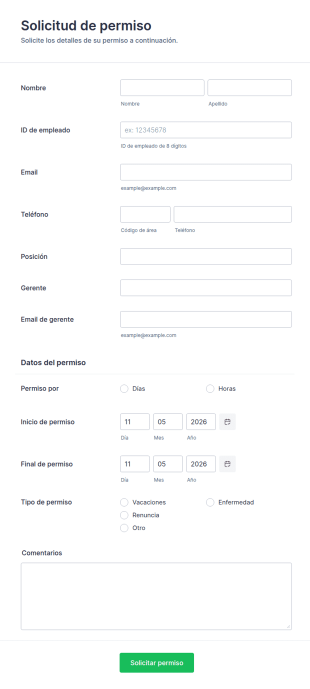
Formulario De Solicitud De Permiso
La plantilla permite obtener solicitudes de vacaciones instantáneas de los empleados con toda la información relevante que se necesita. Puedes añadir más campos personalizados con Jotform.
Ir a la categoría:Formas recursos humanos
Formulario De Inscripción Para Escuelas
Un formulario de inscripción escolar permite a los estudiantes inscribirse en clases en línea. Si eres educador o administrador, utiliza este formulario de inscripción escolar gratuito para recopilar rápidamente la información de los estudiantes en línea.
Ir a la categoría:Formularios de educación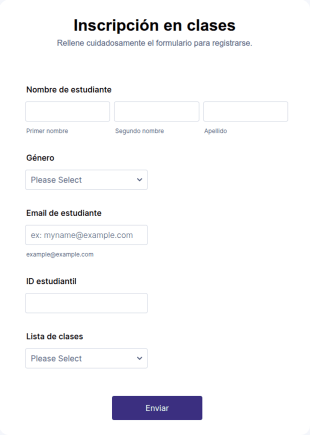
Inscripción En Clases
Optimice la inscripción de los estudiantes con el formulario plantilla que proporciona la información de contacto del estudiante, su identificación y la selección de cursos, que se puede utilizar para organizar las clases en consecuencia. Personalícelo añadiendo nuevos campos según sus necesidades.
Ir a la categoría:Formularios de educaciónAcerca de Formularios K-12
Los formularios K-12 son formularios digitales diseñados especialmente para satisfacer las diversas necesidades de los centros educativos de primaria y secundaria. Estos formularios son esenciales para optimizar diversos procesos operativos, como la matriculación de estudiantes, los formularios de consentimiento para excursiones y la recopilación de opiniones de padres y alumnos. En los flujos de trabajo reales, los formularios K-12 pueden emplearse para automatizar tareas administrativas, reducir el papeleo manual y mejorar la comunicación entre profesores, padres y alumnos. Al digitalizar estos procesos, los centros educativos pueden asegurar que la información se recopile de forma eficaz y segura, minimizando los errores y el tiempo necesario para procesar los datos.
Jotform sobresale como el principal creador de formularios en línea para la educación primaria y secundaria, y ofrece una experiencia fluida a la hora de crear y gestionar formularios. Con Jotform, los docentes y los administradores pueden personalizar fácilmente los formularios para adaptarlos a sus necesidades específicas, gracias a la interfaz intuitiva de arrastrar y soltar de la plataforma. La capacidad de automatizar la recopilación de datos mejora notablemente la eficiencia operativa, lo que permite a las instituciones centrarse más en los resultados educativos que en las cargas administrativas. Asimismo, Jotform Tablas ofrece una gestión centralizada de los datos, lo que permite un almacenamiento seguro y un fácil acceso a los datos recopilados, asegurando que los responsables de la toma de decisiones tengan a su alcance la información que necesitan.
Why Use K-12 Forms?
- K-12 Forms offer unparalleled accuracy in data collection, reducing the likelihood of errors that commonly occur with manual data entry. By automating the data entry process, schools can ensure that information is recorded correctly and efficiently.
- Speed is another critical advantage, as these forms allow for rapid dissemination and collection of information. This is particularly useful during peak times, such as enrollment periods, where timely data handling is crucial.
- Professional data handling is ensured through secure data management practices. Jotform provides robust security measures that protect sensitive student and staff information, maintaining privacy and compliance with educational regulations.
- The ease of use in creating and deploying these forms means that even those with minimal technical skills can design professional-grade forms. The intuitive design interface allows educators to focus on form content rather than technical complexities.
- K-12 Forms can be integrated with over 100 third-party applications, such as Google Sheets and Salesforce, facilitating seamless data flow between systems. This integration capability enables schools to manage data across multiple platforms efficiently.
Common Problems Solved by K-12 Forms
- One of the most common issues in educational institutions is the cumbersome nature of paperwork. K-12 Forms replace traditional paper forms, drastically reducing the physical space required for storage and the time needed for processing.
- Manual data entry is prone to human error, which can lead to inaccuracies in student records. By utilizing digital forms, schools can automate data entry, ensuring that records are accurate and up-to-date.
- Lost data is a significant concern, especially with paper-based systems. Digital forms offer a secure and reliable way to store and back up data, minimizing the risk of information loss.
- Communication barriers between parents and schools can hinder effective engagement. K-12 Forms facilitate better communication by allowing parents to easily submit feedback, consent, and other necessary information online.
- Processing times for approvals and administrative tasks can be lengthy. With features such as approval workflows, K-12 Forms streamline these processes, allowing for quicker decision-making and action.
Funciones según el caso de uso
- The Drag-and-Drop Form Builder is perfect for creating customized forms quickly and efficiently, allowing educators to tailor forms to specific needs without requiring technical expertise.
- Conditional Logic can be employed to simplify complex forms by showing or hiding fields based on user responses, making forms more intuitive and easier to complete.
- Electronic Signatures (Jotform Sign) are ideal for consent forms, enabling parents and guardians to sign documents digitally, thus speeding up the approval process.
- Integrating with 30+ Payment Gateways, such as PayPal and Stripe, allows schools to collect payments for events, fees, or donations directly through the forms, enhancing convenience for both the institution and the payers.
- The Report Builder feature empowers schools to analyze data collected through forms, generating insights that can inform strategic decisions and improve educational outcomes.
- Jotform's Approval Workflows streamline processes that require multiple sign-offs, such as administrative approvals, by automating the routing and notification of pending tasks.
- Secure Data Management with Jotform Tables ensures that all collected data is stored safely and can be accessed easily by authorized personnel, reducing the risk of data breaches.
How to Create a K-12 Form
- Begin by browsing the Template List for a suitable K-12s template or start from scratch with a blank form to meet specific needs.
- Customize your form's design and fields using the intuitive Drag-and-Drop Form Builder, which requires no coding knowledge.
- Once your form is ready, publish and share it via Direct Link, Email, or Website Embed to ensure it reaches the intended audience efficiently.
Top Use Cases for K-12 Forms
- For Managers: K-12 Forms are invaluable for managers looking to streamline administrative processes and enhance operational efficiency. By digitizing workflows, managers can reduce the workload associated with manual paperwork, freeing up time to focus on strategic initiatives. Furthermore, the centralized data management offered by Jotform enables managers to access real-time data, facilitating informed decision-making.
- For Teams: Teams within educational institutions benefit significantly from the collaborative capabilities of K-12 Forms. The integration with third-party applications allows teams to share and analyze data seamlessly, fostering a more connected and informed working environment. Additionally, the use of approval workflows ensures that team members can efficiently manage tasks that require multiple levels of authorization.
- For Customers: For parents and students, the use of K-12 Forms translates to a more engaging and efficient interaction with the school. Parents can easily submit necessary information, such as enrollment details or consent forms, online, reducing the need for physical visits to the school. Students benefit from streamlined processes that free up administrative resources, allowing schools to focus more on delivering quality education.
Summarizing K-12 Forms
Los formularios para la educación primaria y secundaria proporcionan una solución integral para las instituciones educativas que desean mejorar su eficiencia operativa y sus capacidades de gestión de datos. Al implementar formularios digitales, los centros educativos pueden optimizar los procesos administrativos, reducir el riesgo de pérdida de datos y mejorar la comunicación con los padres y los alumnos. Las sólidas funciones de Jotform, como la lógica condicional y la gestión segura de datos, aseguran que estos formularios no solo sean fáciles de usar, sino también muy eficaces para satisfacer las necesidades específicas del sector de la educación primaria y secundaria.
Preguntas Frecuentes
1) Is it free to create K-12 Forms on Jotform?
Un formulario K-12 es un documento digital empleado por las escuelas para recopilar información relacionada con estudiantes, padres, personal y actividades escolares dentro del sistema educativo de jardín infantil a 12.º grado.
2. ¿Por qué son importantes los formularios de TI para las organizaciones?
Absolutely, Jotform employs industry-standard security measures to protect both forms and submitted data, ensuring compliance with privacy regulations.
3) Do I need coding knowledge to build a K-12 Form?
No, Jotform's Drag-and-Drop Form Builder is designed for ease of use, allowing you to create forms without any coding experience.
4. ¿Existen diferentes tipos de formularios de TI?
Yes, Jotform integrates with over 30 payment gateways, enabling you to collect payments directly through your K-12 Forms.
5. ¿Quién debe usar formularios de TI?
Indeed, Jotform's forms are mobile-friendly and can be accessed, completed, and submitted on any mobile device.
6. ¿Cómo mejoran los formularios de TI la eficiencia del flujo de trabajo?
Centralizan la recopilación de datos, automatizan las notificaciones y proporcionan una forma estructurada de monitorear la participación de los influencers, los entregables y los resultados.
7. ¿Se pueden personalizar los formularios K-12 para diferentes niveles de grado o escuelas?
Por supuesto. Cada formulario se puede adaptar a niveles de grado específicos, políticas escolares o requisitos únicos de eventos.
8) How can K-12 Forms improve parent-teacher communication?
K-12 Forms facilitate efficient communication by allowing parents to easily provide feedback, submit forms, and engage with the school online, reducing the need for in-person interactions.