

نماذج الاجتماعات

نموذج تقرير الاجتماع
نموذج تقرير الاجتماع هو مستند مصمم لجمع تفاصيل الاجتماع. ولتسهيل الأمر على القارئ، تم تصميم النموذج بطريقة سهلة الفهم مع عناوين رئيسية وفرعية منظمة، مما يجعله سهل الاستيعاب. يمكن استخدام نموذج تقرير الاجتماع في أي مؤسسة، بغض النظر عن مجال نشاطها.يوفر نموذج تقرير الاجتماع المصمم بشكل صحيح فهماً واضحاً لما جرى في الاجتماع، ويقدم وصفاً تفصيلياً لما حدث وما يجب القيام به. كما يتضمن قائمة بالأشخاص الحاضرين في الاجتماع ودورهم، بالإضافة إلى جدول الأعمال، وبنود العمل التي تم الاتفاق عليها خلال الاجتماع.استخدم هذا النموذج المجاني لتقرير الاجتماع مع رأس خطاب رسمي وتصميم إشعارات الاجتماعات الشائعة. فقط خصّص النموذج وفقاً لاحتياجاتك الخاصة، وأضف حقولاً جديدة لجمع معلومات أكثر تفصيلاً، وغيّر الخطوط والألوان والخلفيات حسب رغبتك.يمكن تعبئة النموذج من أي جهاز محمول وفي أي مكان. فقط افتح الرابط، املأ النموذج، وشاهد تقارير الاجتماعات تُضاف تلقائيًا إلى حسابك.
انتقل إلى الفئة:نماذج الاجتماعات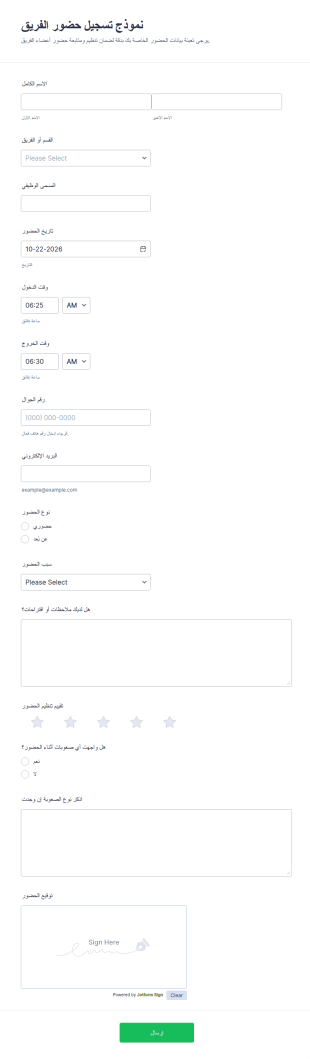
نموذج تسجيل الحضور الجماعي
يساعد نموذج تسجيل حضور الفريق على توثيق حضور الموظفين للقاءات الداخلية والتدريبات بدقة، مع دعم الحضور الحضوري وعن بُعد، ويعد مناسبًا للشركات والجهات التي تحتاج سجلات حضور قابلة للرجوع.
انتقل إلى الفئة:نماذج الحضور
استبيان ما قبل الاجتماع
تساعد استمارة ما قبل الاجتماع على جمع البيانات الأساسية وترتيبات الموعد ومحاور النقاش قبل اللقاءات المهنية، وهي مناسبة للمنظمين والمستشارين وفرق العمل التي تريد تحضيرًا أفضل عبر Jotform.
انتقل إلى الفئة:نماذج الاجتماعاتحول نماذج الاجتماعات
تُعد نماذج الاجتماعات نماذج رقمية مصممة خصيصًا لتبسيط وتعزيز كفاءة تنظيم وجدولة وإدارة الاجتماعات. تُستخدم هذه النماذج في مختلف الصناعات لجمع التفاصيل المهمة مثل معلومات المشاركين، وبنود جدول الأعمال، وأهداف الاجتماع، والملاحظات. ومن خلال استخدام نماذج الاجتماعات، يمكن للشركات ضمان جمع جميع المعلومات ذات الصلة بطريقة منظمة، مما يسهل سير العمليات بشكل أكثر سلاسة. غالبًا ما تتضمن سير العمل الواقعية استخدام هذه النماذج لتخطيط اجتماعات الشركات، أو استشارات العملاء، أو إحاطات الفريق، حيث يكون جمع البيانات في الوقت المناسب وبدقة أمرًا بالغ الأهمية.
يتميز Jotform بكونه منشئ النماذج الرائد عبر الإنترنت لإنشاء نماذج الاجتماعات، حيث يوفر منصة متعددة الاستخدامات وسهلة الاستخدام. باستخدام Jotform، يمكن للمستخدمين تخصيص نماذجهم بسهولة لتناسب الاحتياجات المحددة، وذلك بفضل واجهته البديهية التي تعتمد على السحب والإفلات. كما تتيح المنصة أتمتة عمليات جمع البيانات، مما يقلل من أعباء العمل اليدوية ويحد من الأخطاء. بالإضافة إلى ذلك، تتم إدارة جميع البيانات التي تم جمعها بشكل مركزي من خلال جداول Jotform، والتي توفر طريقة آمنة ومنظمة لتخزين المعلومات والوصول إليها، مما يعزز قدرات إدارة البيانات بشكل عام.
لماذا تستخدم نماذج الاجتماعات؟
- توفر نماذج الاجتماعات نهجًا منظمًا لجمع المعلومات الأساسية، مما يضمن عدم إغفال أي شيء أثناء عملية التخطيط. وتُعد هذه الدقة أمرًا بالغ الأهمية للإعداد الفعّال للاجتماعات وتنفيذها، مما يقلل من احتمالية إغفال التفاصيل المهمة.
- تُعد السرعة التي يمكن بها جمع البيانات والوصول إليها باستخدام نماذج الاجتماعات ميزة كبيرة. إذ يتيح الوصول الفوري إلى البيانات اتخاذ قرارات سريعة وإجراء التعديلات اللازمة، مما يحافظ على كفاءة الاجتماعات وسيرها وفق الخطة.
- تُحسّن نماذج الاجتماعات إدارة البيانات بشكل احترافي، حيث توفر وسائل آمنة لجمع المعلومات الحساسة وتخزينها. ويُعد ذلك أمرًا ضروريًا للحفاظ على السرية والامتثال للوائح حماية البيانات.
- من خلال رقمنة عملية جمع المعلومات، تلغي نماذج الاجتماعات الحاجة إلى النماذج الورقية التي قد تكون مرهقة وسهلة الفقدان. ولا يقتصر ذلك على تبسيط العمليات فحسب، بل يدعم أيضًا الاستدامة البيئية من خلال تقليل استهلاك الورق.
- توفر مهام سير العمل المؤتمتة المدمجة مع نماذج الاجتماعات الوقت من خلال تقليل المهام المتكررة، مما يسمح للموظفين بالتركيز على الأنشطة الأكثر استراتيجية. ويؤدي ذلك إلى زيادة الإنتاجية وتحسين توزيع الموارد داخل المؤسسة.
المشكلات الشائعة التي تحلها نماذج الاجتماعات
- تتمثل إحدى أبرز المشكلات التي تعالجها نماذج الاجتماعات في صعوبة إدارة الأعمال الورقية. فمن خلال التحول إلى النماذج الرقمية، يمكن للشركات تقليل الوقت المستغرق في إدارة المستندات الورقية بشكل كبير وتقليل خطر فقدان المعلومات المهمة.
- يُعد إدخال البيانات يدويًا تحديًا آخر تعالجه نماذج الاجتماعات. إذ تتيح عملية جمع البيانات المؤتمتة تقليل احتمالية الأخطاء البشرية، مما يؤدي إلى معلومات أكثر دقة وموثوقية لاتخاذ القرارات.
- تقلل نماذج الاجتماعات من خطر فقدان البيانات، حيث توفر خيارات تخزين آمنة. ويضمن ذلك الحفاظ على جميع البيانات المجمعة وسهولة استرجاعها، مما يحمي المعلومات المهمة المتعلقة بالاجتماعات.
- تعالج نماذج الاجتماعات أيضًا مشكلة الإدارة غير المنظمة للبيانات. فمن خلال جمع البيانات وتخزينها في مكان مركزي، يمكن للشركات الاحتفاظ بنظرة شاملة لجميع المعلومات المتعلقة بالاجتماعات، مما يسهل التحليل واتخاذ إجراءات المتابعة.
مطابقة حالات الاستخدام مع الميزات
- بالنسبة للفرق التي تسعى إلى تبسيط جدولة الاجتماعات، يتيح منشئ النماذج بالسحب والإفلات تخصيص النماذج بسهولة لتشمل جميع حقول الجدولة المطلوبة. وتتيح هذه الميزة إعداد نماذج الاجتماعات وتعديلها بسرعة، مع ضمان جمع جميع التفاصيل ذات الصلة بسهولة.
- يمكن أن يؤدي استخدام المنطق الشرطي في نماذج الاجتماعات إلى تحسين النتائج التشغيلية بشكل كبير من خلال عرض الأسئلة ذات الصلة فقط للمستجيبين بناءً على إجاباتهم السابقة. وينتج عن ذلك نماذج أكثر اختصارًا وتجربة مستخدم أفضل.
- مع أكثر من 30 بوابة دفع مثل Stripe وPayPal، يصبح تحصيل المدفوعات الخاصة بالفعاليات أو الاستشارات المدفوعة مباشرةً من خلال نماذج الاجتماعات أمرًا سلسًا. ويعمل هذا التكامل على تبسيط عملية الدفع وضمان تنفيذ المعاملات بأمان وفي الوقت المناسب.
- يمكن استخدام التوقيعات الإلكترونية عبر Jotform Sign لجمع الموافقات أو الاعتمادات، مما يضمن أن جميع الاتفاقيات موثقة وملزمة قانونيًا. وتُعد هذه الميزة ضرورية للاجتماعات التي تتضمن عقودًا أو اتفاقيات حساسة.
- يسهّل محرر PDF من Jotform إنشاء ملفات PDF تلقائيًا، مما يتيح تحويل عمليات إرسال النماذج إلى مستندات احترافية. ويُعد ذلك مفيدًا بشكل خاص لمشاركة محاضر الاجتماعات أو ملخصاتها مع أصحاب المصلحة.
- For organizations using multiple platforms, the 100+ Third-party Integrations, such as Google Sheets and Salesforce, enable seamless data flow between systems. This connectivity enhances data consistency and accessibility across different departments.
- تضمن إدارة البيانات الآمنة باستخدام Jotform Tables تخزين جميع بيانات الاجتماعات بأمان، مما يحميها من الوصول غير المصرح به ويضمن الامتثال للوائح حماية البيانات.
كيفية إنشاء نموذج اجتماع
- ابدأ بتصفح قائمة القوالب للعثور على قالب اجتماعات يناسب احتياجاتك، أو ابدأ من نموذج فارغ لإنشاء حل مخصص.
- قم بتخصيص تصميم النموذج وحقوله باستخدام منشئ النماذج بالسحب والإفلات، مع التأكد من أنه يلبي جميع المتطلبات الخاصة باجتماعاتك.
- بمجرد أن يصبح النموذج جاهزًا، انشره وشاركه مع المشاركين عبر الرابط المباشر أو البريد الإلكتروني أو تضمينه في موقعك الإلكتروني لبدء جمع الردود.
أهم حالات استخدام نماذج الاجتماعات
- للمديرين: تُمكّن نماذج الاجتماعات المديرين من تنسيق الاجتماعات بكفاءة من خلال توفير إطار عمل منظم لجمع التفاصيل اللازمة مثل جداول الأعمال، وقوائم المشاركين، والأهداف. ويساعد هذا التنظيم على وضع توقعات واضحة وضمان استعداد جميع المشاركين، مما يؤدي إلى اجتماعات أكثر إنتاجية. بالإضافة إلى ذلك، تتيح إمكانية جمع الملاحظات بعد الاجتماع للمديرين تقييم فعالية الاجتماع وإجراء تحسينات للجلسات المستقبلية.
- للفرق: تستفيد الفرق من نماذج الاجتماعات من خلال وجود نظام مركزي لجدولة الاجتماعات وإدارتها، مما يضمن توافق جميع أعضاء الفريق واطلاعهم على المستجدات. كما تسهّل مشاركة البيانات والتكامل مع المنصات الأخرى التواصل والتعاون بسلاسة، مما يعزز إنتاجية الفريق. علاوة على ذلك، تساعد إمكانية توثيق نتائج الاجتماعات والإجراءات المطلوبة على تعزيز المساءلة وضمان تنفيذ ما تم الاتفاق عليه.
- للعملاء: يحصل العملاء على تجربة أكثر سلاسة عند استخدام نماذج الاجتماعات لجدولة الاستشارات أو اجتماعات الخدمات. إذ تتيح النماذج إرسال الطلبات والتفضيلات بسهولة، مما يضمن تخصيص الاجتماعات بما يلبي احتياجات العملاء. ويسهم هذا المستوى من التخصيص في تحسين رضا العملاء وبناء علاقات أقوى. بالإضافة إلى ذلك، فإن التعامل الآمن مع البيانات الشخصية يمنح العملاء الثقة في حماية خصوصيتهم.
تلخيص نماذج الاجتماعات
تُعد نماذج الاجتماعات أداة لا غنى عنها للشركات التي تسعى إلى تحسين عمليات إدارة الاجتماعات. فمن خلال الاستفادة من إمكانيات منشئ النماذج الإلكتروني من Jotform، يمكن للمؤسسات إنشاء نماذج مخصصة وعالية الكفاءة تُبسط عملية جمع البيانات وتحسن الإنتاجية العامة للاجتماعات. ولا تقتصر مزايا الإدارة المركزية للبيانات وميزات الأتمتة على توفير الوقت فحسب، بل تضمن أيضًا تسجيل جميع المعلومات المتعلقة بالاجتماعات بدقة وتخزينها بأمان. وفي النهاية، تسهم نماذج الاجتماعات في تنظيم الاجتماعات وجعلها أكثر فعالية وتأثيرًا.
الأسئلة الشائعة
1) هل إنشاء نماذج الاجتماعات على Jotform مجاني؟
نعم، يوفر Jotform خطة مجانية تتيح للمستخدمين إنشاء وتخصيص نماذج الاجتماعات دون أي تكلفة. ومع ذلك، تتوفر بعض الميزات المتقدمة وحدود إرسال أعلى من خلال الخطط المدفوعة.
2) هل النماذج والبيانات المقدمة آمنة؟
بالتأكيد، يعطي Jotform الأولوية لأمان البيانات ويستخدم إجراءات متوافقة مع معايير الصناعة لحماية كل من النماذج والبيانات المقدمة. ويشمل ذلك استخدام خوادم آمنة، وتشفير SSL، والامتثال للوائح حماية البيانات.
3) هل أحتاج إلى معرفة بالبرمجة لإنشاء نموذج اجتماع؟
لا، لا تحتاج إلى أي معرفة بالبرمجة لإنشاء نموذج اجتماع. تم تصميم منشئ النماذج بالسحب والإفلات من Jotform ليكون سهل الاستخدام، مما يمكّن أي شخص من إنشاء نموذج بسهولة.
4) هل يمكنني جمع المدفوعات مباشرة من خلال نماذجي؟
نعم، يمكنك جمع المدفوعات مباشرة من خلال نماذج الاجتماعات الخاصة بك باستخدام إحدى بوابات الدفع المتكاملة التي يزيد عددها عن 30 بوابة، مثل Stripe أو PayPal أو Square. تسهل هذه الميزة إجراء المعاملات بسلاسة وأمان.
5. هل يمكن استخدام هذه النماذج على الأجهزة المحمولة؟
نعم، يمكن الوصول إلى نماذج الاجتماعات وإرسالها على الأجهزة المحمولة، مما يضمن المرونة والراحة للمستخدمين أثناء التنقل. كما يدعم تطبيق Jotform Mobile Forms جمع البيانات دون اتصال بالإنترنت، مما يجعل من الممكن جمع المعلومات دون الحاجة إلى اتصال بالإنترنت.
6) هل يمكنني تحويل عمليات إرسال النماذج إلى مستندات PDF احترافية؟
بالفعل، يتيح محرر PDF من Jotform تحويل عمليات إرسال النماذج تلقائيًا إلى مستندات PDF احترافية. ويُعد ذلك مفيدًا بشكل خاص لأغراض التوثيق، مثل مشاركة محاضر الاجتماعات أو التقارير.
7) كيف يمكن لنماذج الاجتماعات تحسين تفاعلات العملاء؟
يمكن لنماذج الاجتماعات تحسين تفاعلات العملاء من خلال توفير طريقة منظمة لجدولة وإدارة الاجتماعات، مما يضمن تسجيل جميع احتياجات العملاء وتفضيلاتهم بدقة. ويؤدي ذلك إلى تقديم خدمات أكثر تخصيصًا وكفاءة، مما يحسن رضا العملاء.
8) هل يمكنني دمج نماذج الاجتماعات مع نظام إدارة علاقات العملاء الحالي لدي؟
نعم، يدعم Jotform التكامل مع أكثر من 100 تطبيق تابع لجهات خارجية، بما في ذلك أنظمة CRM الشائعة مثل Salesforce. يضمن هذا التكامل نقل البيانات التي تم جمعها من خلال نماذج الاجتماعات بسلاسة إلى نظام CRM الخاص بك، مما يعزز إدارة البيانات وإمكانية الوصول إليها.