

نماذج K-12

نموذج جمع معلومات الطلاب
نموذج جمع معلومات الطالب هي وثيقة تُستخدم من قبل المعلمين لجمع البيانات عن طلابهم. اجمع المعلومات التي تحتاجها من الطالب الذي يسجل في المدرسة أو الصف أو البرنامج. سواء كنت معلمًا في مدرسة أو تعمل لصالح مدرسة، احصل على نموذج جمع معلومات الطالب عبر الإنترنت لتبقى على اطلاع بمعلومات طلابك! قم ببساطة بتخصيص النموذج ليناسب احتياجاتك باستخدام أداة إنشاء النماذج المجانية لدينا، ثم شاركه مع طلابك عن طريق تعيينه لهم عبر برنامج إدارة الفصول الدراسية أو عن طريق مشاركة الرابط. الأمر بهذه البساطة!يمكنك مزامنة نموذج جمع معلومات الطالب مع حساباتك الأخرى باستخدام أكثر من ١٠٠ تكامل قوي للتطبيقات من Jotform، مثل Google Drive أو Dropbox، لتكون أكثر كفاءة وتحافظ على تنظيم بياناتك. يمكنك حتى إضافة شعارك لتمثيل مدرستك بأسلوب مميز من خلال التصميم القابل للتخصيص للنموذج. باستخدام نموذج جمع معلومات الطالب المجاني من Jotform، ستكون مستعدًا لاستقبال العام الدراسي الجديد بكل كفاءة.
انتقل إلى الفئة:نماذج التعليم
نموذج التقديم للمدرسة
نموذج التقديم المدرسي يستخدم من قبل الطالب أو ولي الأمر عند التقديم للالتحاق بمدرسة. هذا النموذج مهم لأنه يتحقق من المعلومات الأساسية عن الطالب الجديد، بما في ذلك خلفيته، سلوكه، موقفه، وحالته الصحية الحالية. يحتوي هذا النموذج على حقول تطلب اسم الطالب، عمره، جنسه، بيانات الاتصال، العنوان، المستوى الدراسي، واسم المدرسة التي التحق بها آخر مرة.كما يطلب النموذج معلومات عن الوالد أو ولي الأمر ليتم الاتصال بهم عند الحاجة، خاصة في حالات الطوارئ. يتضمن النموذج أيضًا قسم لتاريخ الحالة الصحية للطالب، مثل الحساسية، الأدوية، العمليات الجراحية السابقة، حالات الدخول للمستشفى، أو أي حالات طبية حالية يجب أن تكون المدرسة على علم بها.يحتوي النموذج كذلك على قسم لتفاصيل التطعيم والتحصينات، للتحقق مما إذا كان الطالب قد تلقى لقاحات معينة أم لا. ويستخدم هذا النموذج أداة التوقيع لرصد التوقيع الرقمي للوالد أو الوصي.
انتقل إلى الفئة:نماذج التعليم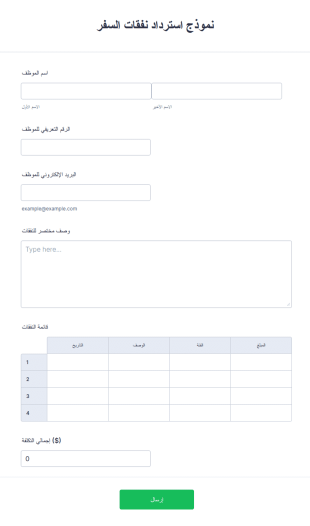
نموذج استرداد نفقات السفر
نموذج استرداد نفقات السفر هو نموذج تستخدمه المؤسسات لتعويض الموظفين عن المصاريف المتعلقة بالسفر. سواء كان الموظفون في رحلة عمل أو يعملون من المنزل، يمكن لشركتك مساعدتهم في تتبع المصاريف خارج المكتب من خلال نموذج تعويض مصاريف السفر المجاني.ببساطة، يمكنك تخصيص النموذج بما يتناسب مع طبيعة عملك، ثم تضمينه في موقعك الإلكتروني أو مشاركته عبر البريد الإلكتروني أو رابط مباشر أو رمز QR. بعد ذلك، يستطيع الموظفون تقديم طلبات التعويض عن الوجبات وتكاليف المواصلات، سواء من خلال المطالبة بمبلغ يومي أو تقديم الفواتير.هذا النموذج مثالي أيضًا لوكلاء السفر الذين يساعدون عملاءهم في حجز المؤتمرات أو الندوات أو باقات العطلات، حيث يتيح لهم استرداد التكاليف المتعلقة بالسفر بسرعة وسهولة، كما يُسهم في تسهيل عملية الحجز. ومن خلال تطبيق الهاتف المحمول الخاص بـ Jotform، يمكن للموظفين تتبع مصاريفهم بكل سهولة عن طريق رفع صور الفواتير مباشرة إلى النموذج.بعد تعبئة النموذج، يمكنهم إرساله إلى مدير السفر أو المصاريف للموافقة، أو تحميل نسخة PDF من المصاريف لتقديمها إلى المحاسب. قم بتبسيط إدارة رحلات العمل في شركتك باستخدام نموذج تعويض مصاريف السفر الإلكتروني المجاني.
انتقل إلى الفئة:نماذج الأعمالحول نماذج K-12
نماذج التعليم من مرحلة رياض الأطفال حتى الصف الثاني عشر (K-12) هي نماذج رقمية مصممة خصيصًا لتلبية الاحتياجات المتنوعة للمؤسسات التعليمية من مرحلة رياض الأطفال حتى الصف الثاني عشر. تُعد هذه النماذج جزءًا أساسيًا من تبسيط مختلف العمليات التشغيلية، مثل تسجيل الطلاب، ونماذج الموافقة على الرحلات الميدانية، وجمع الملاحظات من أولياء الأمور والطلاب. في سير العمل الواقعي، يمكن استخدام نماذج K-12 لأتمتة المهام الإدارية، وتقليل الأعمال الورقية اليدوية، وتعزيز التواصل بين المعلمين وأولياء الأمور والطلاب. ومن خلال رقمنة هذه العمليات، يمكن للمدارس ضمان جمع المعلومات بكفاءة وأمان، وتقليل الأخطاء والوقت اللازم لمعالجة البيانات.
يُعد Jotform منشئ النماذج الإلكتروني الرائد لنماذج التعليم من مرحلة رياض الأطفال حتى الصف الثاني عشر (K-12)، حيث يوفر تجربة سلسة في إنشاء النماذج وإدارتها. من خلال Jotform، يمكن للمعلمين والإداريين تخصيص النماذج بسهولة لتناسب احتياجاتهم الخاصة، مع الاستفادة من واجهة المنصة سهلة الاستخدام القائمة على السحب والإفلات. تعمل إمكانية أتمتة جمع البيانات على تعزيز الكفاءة التشغيلية بشكل كبير، مما يسمح للمؤسسات بالتركيز بشكل أكبر على النتائج التعليمية بدلًا من الأعباء الإدارية. بالإضافة إلى ذلك، توفر جداول Jotform إدارة مركزية للبيانات، مما يتيح تخزين البيانات التي تم جمعها بشكل آمن والوصول إليها بسهولة، ويضمن حصول صانعي القرار على المعلومات التي يحتاجون إليها في متناول أيديهم.
لماذا تستخدم نماذج K-12؟
- توفر نماذج K-12 دقة لا مثيل لها في جمع البيانات، مما يقلل من احتمالية حدوث الأخطاء الشائعة أثناء إدخال البيانات يدويًا. ومن خلال أتمتة عملية إدخال البيانات، يمكن للمدارس ضمان تسجيل المعلومات بشكل صحيح وفعال.
- تُعد السرعة ميزة مهمة أخرى، إذ تتيح هذه النماذج نشر المعلومات وجمعها بسرعة. ويكون ذلك مفيدًا بشكل خاص خلال الفترات المزدحمة، مثل فترات التسجيل، حيث تُعد معالجة البيانات في الوقت المناسب أمرًا بالغ الأهمية.
- يتم ضمان التعامل الاحترافي مع البيانات من خلال ممارسات إدارة البيانات الآمنة. توفر Jotform إجراءات أمنية قوية تحمي معلومات الطلاب والموظفين الحساسة، وتحافظ على الخصوصية والامتثال للوائح التعليمية.
- تعني سهولة إنشاء هذه النماذج ونشرها أنه حتى الأشخاص الذين يمتلكون الحد الأدنى من المهارات التقنية يمكنهم تصميم نماذج احترافية. وتتيح واجهة التصميم البديهية للمعلمين التركيز على محتوى النموذج بدلًا من التعقيدات التقنية.
- يمكن دمج نماذج K-12 مع أكثر من 100 تطبيق تابع لجهات خارجية، مثل Google Sheets وSalesforce، مما يسهل تدفق البيانات بسلاسة بين الأنظمة. وتتيح هذه القدرة على التكامل للمدارس إدارة البيانات بكفاءة عبر منصات متعددة.
المشكلات الشائعة التي تحلها نماذج K-12
- تعد الطبيعة المرهقة للأعمال الورقية إحدى أكثر المشكلات شيوعًا في المؤسسات التعليمية. وتحل نماذج K-12 محل النماذج الورقية التقليدية، مما يقلل بشكل كبير من المساحة المادية اللازمة للتخزين والوقت المطلوب للمعالجة.
- يعد الإدخال اليدوي للبيانات عرضة للأخطاء البشرية، مما قد يؤدي إلى وجود أخطاء في سجلات الطلاب. ومن خلال استخدام النماذج الرقمية، يمكن للمدارس أتمتة عملية إدخال البيانات، مما يضمن دقة السجلات وتحديثها باستمرار.
- يُعد فقدان البيانات مصدر قلق كبير، لا سيما في الأنظمة الورقية. وتوفر النماذج الرقمية طريقة آمنة وموثوقة لتخزين البيانات ونسخها احتياطيًا، مما يقلل من مخاطر فقدان المعلومات إلى أدنى حد.
- يمكن أن تعيق حواجز التواصل بين أولياء الأمور والمدارس المشاركة الفعالة. وتسهل نماذج K-12 تحسين التواصل من خلال السماح لأولياء الأمور بإرسال الملاحظات والموافقات وغيرها من المعلومات الضرورية بسهولة عبر الإنترنت.
- قد تستغرق عمليات الموافقة والمهام الإدارية وقتًا طويلًا. ومن خلال ميزات مثل سير عمل الموافقات، تعمل نماذج K-12 على تبسيط هذه العمليات، مما يتيح اتخاذ القرارات والإجراءات بشكل أسرع.
مطابقة حالات الاستخدام مع الميزات
- يُعد منشئ النماذج بالسحب والإفلات مثاليًا لإنشاء نماذج مخصصة بسرعة وكفاءة، مما يتيح للمعلمين تكييف النماذج وفقًا لاحتياجات محددة دون الحاجة إلى خبرة تقنية.
- يمكن استخدام المنطق الشرطي لتبسيط النماذج المعقدة من خلال إظهار الحقول أو إخفائها بناءً على إجابات المستخدم، مما يجعل النماذج أكثر سهولة وبساطة في الإكمال.
- تُعد التوقيعات الإلكترونية (Jotform Sign) مثالية لنماذج الموافقة، حيث تتيح لأولياء الأمور والأوصياء توقيع المستندات رقميًا، مما يسرّع عملية الموافقة.
- Integrating with 30+ Payment Gateways, such as PayPal and Stripe, allows schools to collect payments for events, fees, or donations directly through the forms, enhancing convenience for both the institution and the payers.
- تمكّن ميزة منشئ التقارير المدارس من تحليل البيانات التي يتم جمعها من خلال النماذج، وإنشاء رؤى يمكن أن تساعد في اتخاذ القرارات الاستراتيجية وتحسين النتائج التعليمية.
- تعمل «مسارات عمل الموافقة» من Jotform على تبسيط العمليات التي تتطلب موافقات متعددة، مثل الموافقات الإدارية، من خلال أتمتة توجيه المهام المعلقة وإرسال الإشعارات المتعلقة بها.
- تضمن «إدارة البيانات الآمنة» مع جداول Jotform تخزين جميع البيانات التي يتم جمعها بأمان وإمكانية وصول الموظفين المصرح لهم إليها بسهولة، مما يقلل من مخاطر اختراق البيانات.
كيفية إنشاء نموذج K-12
- ابدأ بتصفح «قائمة القوالب» للبحث عن قالب مناسب لمرحلة التعليم الأساسي (K-12)، أو ابدأ من الصفر باستخدام نموذج فارغ لتلبية احتياجاتك المحددة.
- قم بتخصيص تصميم النموذج وحقوله باستخدام أداة إنشاء النماذج سهلة الاستخدام التي تعمل بنظام السحب والإفلات، والتي لا تتطلب أي معرفة بالبرمجة.
- بمجرد أن يصبح النموذج جاهزًا، قم بنشره ومشاركته عبر «الرابط المباشر» أو «البريد الإلكتروني» أو «التضمين في موقع الويب» لضمان وصوله إلى الجمهور المستهدف بكفاءة.
أهم حالات استخدام نماذج K-12
- للمديرين: تُعد نماذج K-12 ذات قيمة لا تُقدَّر بثمن للمديرين الذين يسعون إلى تبسيط العمليات الإدارية وتعزيز الكفاءة التشغيلية. ومن خلال رقمنة سير العمل، يمكن للمديرين تقليل عبء العمل المرتبط بالأعمال الورقية اليدوية، مما يوفر لهم الوقت للتركيز على المبادرات الاستراتيجية. وعلاوة على ذلك، تتيح إدارة البيانات المركزية التي توفرها Jotform للمديرين الوصول إلى البيانات في الوقت الفعلي، مما يسهل اتخاذ قرارات مستنيرة.
- للفرق: تستفيد الفرق داخل المؤسسات التعليمية بشكل كبير من إمكانيات التعاون التي توفرها نماذج K-12. ويتيح التكامل مع تطبيقات الجهات الخارجية للفرق مشاركة البيانات وتحليلها بسلاسة، مما يعزز بيئة عمل أكثر ترابطًا واستنارة. وبالإضافة إلى ذلك، يضمن استخدام مسارات عمل الموافقة قدرة أعضاء الفريق على إدارة المهام التي تتطلب مستويات متعددة من التفويض بكفاءة.
- للعملاء: بالنسبة لأولياء الأمور والطلاب، يتيح استخدام «K-12 Forms» تفاعلًا أكثر جاذبية وكفاءة مع المدرسة. ويمكن لأولياء الأمور تقديم المعلومات الضرورية، مثل تفاصيل التسجيل أو نماذج الموافقة، بسهولة عبر الإنترنت، مما يقلل من الحاجة إلى الزيارات الميدانية للمدرسة. ويستفيد الطلاب من الإجراءات المبسطة التي توفر الموارد الإدارية، مما يتيح للمدارس التركيز بشكل أكبر على تقديم تعليم عالي الجودة.
تلخيص نماذج K-12
توفر نماذج K-12 حلًا شاملًا للمؤسسات التعليمية التي تتطلع إلى تعزيز كفاءتها التشغيلية وقدراتها على إدارة البيانات. ومن خلال اعتماد النماذج الرقمية، يمكن للمدارس تبسيط العمليات الإدارية، وتقليل مخاطر فقدان البيانات، وتحسين التواصل مع أولياء الأمور والطلاب. وتضمن الميزات القوية التي توفرها Jotform، مثل المنطق الشرطي وإدارة البيانات الآمنة، أن تكون هذه النماذج سهلة الاستخدام وفعالة للغاية في تلبية الاحتياجات الفريدة لقطاع التعليم من مرحلة رياض الأطفال حتى الصف الثاني عشر.
الأسئلة الشائعة
1) Is it free to create K-12 Forms on Jotform?
نعم، يوفر Jotform خطة مجانية تتيح للمستخدمين إنشاء ونشر نماذج K-12، على الرغم من أن بعض الميزات المتقدمة قد تتطلب اشتراكًا مدفوعًا.
2) هل النماذج والبيانات المُرسلة آمنة؟
Absolutely, Jotform employs industry-standard security measures to protect both forms and submitted data, ensuring compliance with privacy regulations.
3) Do I need coding knowledge to build a K-12 Form?
No, Jotform's Drag-and-Drop Form Builder is designed for ease of use, allowing you to create forms without any coding experience.
4) هل يمكنني تحصيل المدفوعات مباشرةً من خلال النماذج؟
Yes, Jotform integrates with over 30 payment gateways, enabling you to collect payments directly through your K-12 Forms.
5) هل يمكن استخدام هذه النماذج على الأجهزة المحمولة؟
Indeed, Jotform's forms are mobile-friendly and can be accessed, completed, and submitted on any mobile device.
6) هل يمكنني تحويل البيانات المُرسلة عبر النماذج إلى مستندات PDF احترافية؟
نعم، يتيح محرر ملفات PDF في Jotform إنشاء مستندات PDF احترافية تلقائيًا من بيانات استجابات النماذج.
7) هل يمكنني دمج نماذج K-12 مع أنظمة أخرى؟
نعم، يوفر Jotform أكثر من 100 تكامل مع جهات خارجية، مما يتيح لك ربط نماذجك بسلاسة مع أنظمة أخرى مثل Google Sheets وSalesforce.
8) كيف يمكن لنماذج K-12 تحسين التواصل بين أولياء الأمور والمعلمين؟
K-12 Forms facilitate efficient communication by allowing parents to easily provide feedback, submit forms, and engage with the school online, reducing the need for in-person interactions.