

نماذج تقنية المعلومات

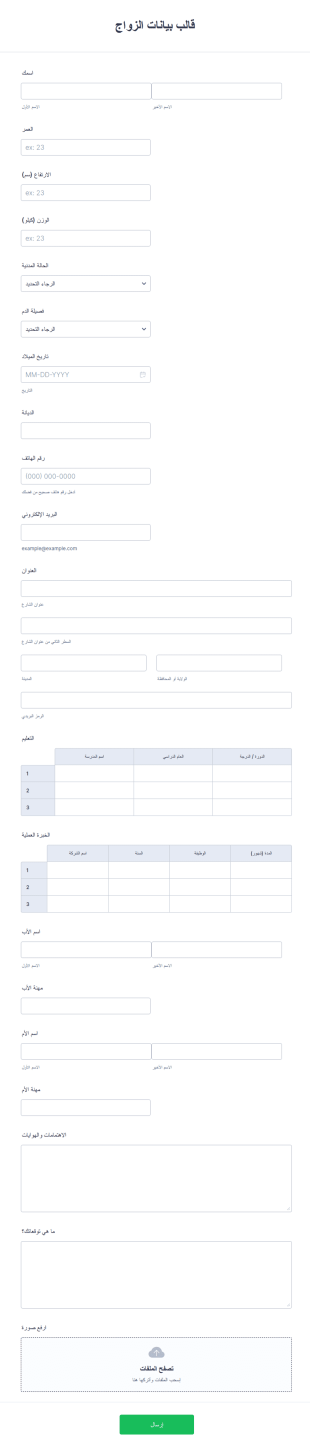
قالب بيانات الزواج
نموذج بيانات الزواج هو مستند يمكن استخدامه عندما يبحث الفرد عن علاقة زواج مناسبة. يمكن أيضًا استخدام هذه الوثيقة في ترتيبات الزواج من شخص آخر. تلخص هذه الوثيقة مِلَفّ تعريف الفرد ووضعه / وضعها الحالي في المجتمع. باستخدام هذه المعلومات، يمكن لشركة التعارف أن تحدد تتطابقك مع الشخص المثالي والمتوافق بالنسبة لك. يُظهر نموذج بيانات الزواج الأساسية هذا اسم الفرد، والعمر، وفصيلة الدَّم، والدين، والطول، والوزن، والحالة المدنية، والعنوان، وبيانات الاتصال، والاهتمامات، والهوايات، والتوقعات. يستخدم قالب بيانات السيرة الذاتية للزواج هذا جدول الإدخال لعرض التعليم والخبرة العملية للمرشح. يتكون التعليم من ثلاث أعمدة وهي اسم المدرسة والسنة الدراسية والشهادة. في حين أن خبرة العمل بها أربع أعمدة وهي اسم الشركة، العام الذي بدأ فيه العمل، والمنصب، ومدى استمراره في الشركة. إذا كنت ترغب في تخصيص هذا القالب وتعديله، يمكنك القيام بذلك عبر محرر PDF.
انتقل إلى الفئة:نماذج تقنية المعلومات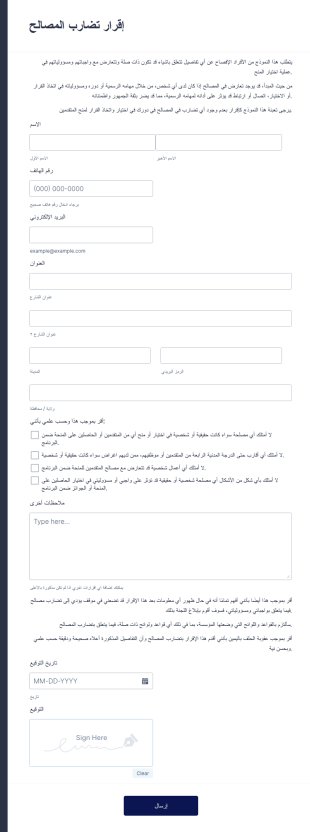
نموذج إقرار تضارب المصالح
قالب نموذج إقرار تضارب المصالح هو نموذج بسيط يتيح الإقرار بعدم وجود تضارب، مع استثناءات محددة. يُعتبر هذا النموذج سهل الاستخدام وسريع التعبئة، ويمكن استخدامه من قِبل المنظمات أو الشركات أو المؤسسات.على سجية النماذج الإلكترونية، لا حاجة لتقديم مستندات ورقية أو الذهاب إلى المكتب لتقديم الإقرار رسميًا. يكفي ملء الاستمارة بسهولة وفي أي وقت يناسب المُعلن. يمكن طباعة نسخة ورقية عند الحاجة، دون الحاجة لتراكم الأوراق. كما أن الحفظ والتخزين يصبحان سهلين وآمنين، حيث يتم تخزين السجلات في قاعدة بيانات مؤمنة.يمكنك تضمين هذا النموذج في أي مكان على موقعك الإلكتروني طالما توفرت خدمة الإنترنت.
انتقل إلى الفئة:النماذج القانونية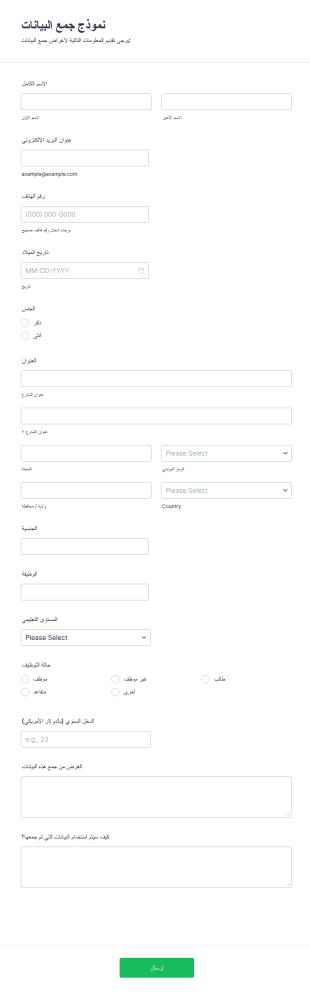
نموذج جمع البيانات
نموذج جمع البيانات هو قالب مصمم لجمع معلومات أو بيانات محددة بشكل منظم من الأفراد، المنظمات، أو المواضيع المختلفة لأغراض التحليل، البحث، التقييم، أو اتخاذ القرارات. يوفر هذا النموذج طريقة منظمة لجمع البيانات ويضمن تسجيل جميع المعلومات اللازمة بكفاءة. يمكن استخدام هذا النموذج من قبل أفراد أو منظمات أو فرق بحثية وفقًا للسياق والغرض من جمع البيانات. سواء كنت تجري استطلاعات رأي، تجمع ملاحظات العملاء، أو تجمع بيانات بحثية، فإن هذا النموذج يبسط العملية ويسهل جمع البيانات. تقدم Jotform، وهي أداة سهلة الاستخدام لإنشاء النماذج عبر الإنترنت باستخدام السحب والإفلات، حلاً سلسًا لإنشاء وتخصيص نماذج جمع البيانات. باستخدام "منشئ النماذج" من Jotform، يمكنك بسهولة تصميم وتخصيص النموذج لتلبية احتياجاتك الخاصة. بالإضافة إلى ذلك، توفر جداول Jotform وهي مساحة عمل تشبه الجداول، إمكانية تنظيم وتحليل البيانات المجمعة من النماذج، حيث يمكنك عرض البيانات وتصفيتها وترتيبها بشكل فعال.كما أن تكامل Jotform مع التطبيقات والخدمات الشائعة مثل Google Drive، Salesforce، Dropbox وغيرها يضمن نقل البيانات بسلاسة وأتمتة العمليات. علاوة على ذلك، تقدم مكتبة الأدوات الواسعة من Jotform ميزات إضافية مثل معالجة المدفوعات، الجداول الزمنية، رفع الملفات، والتوقيعات الإلكترونية لتعزيز قدرات نموذج جمع البيانات الخاص بك. مع Jotform، يمكنك تبسيط عملية جمع البيانات وتخصيص النماذج لتتناسب مع هوية علامتك التجارية بكل سهولة.
انتقل إلى الفئة:نماذج تقنية المعلومات
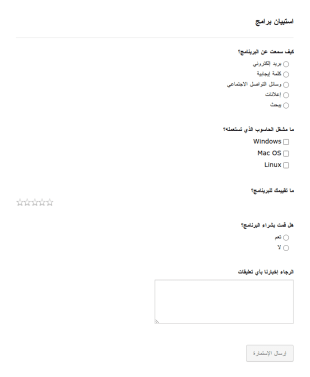
استبيان برامج
استمارة استبيان برامج يمكن استعمالها من شركات البرمجيات لسماع آراء عملائهم ببرامجهم.
انتقل إلى الفئة:نماذج تقنية المعلومات
نموذج اتصال لمحل هدايا
نموذج تواصل من أجل عملائك. يمكن لعملائك ملئ النموذج حتى تتمكن من الحصول على بيانات التواصل معهم
انتقل إلى الفئة:نماذج تقنية المعلومات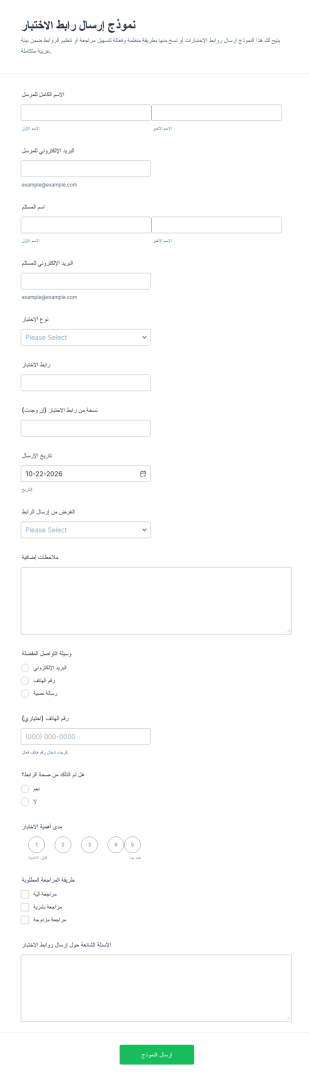
نموذج تقديم رابط الاختبار
يساعد نموذج إرسال رابط الاختبار على توثيق ومتابعة إرسال روابط الاختبارات بين المعلمين والطلاب أو فرق التدريب، مع جمع البيانات في Jotform وإدارة الإرسالات بسهولة عبر قالب نموذج جاهز.
انتقل إلى الفئة:نماذج التعليم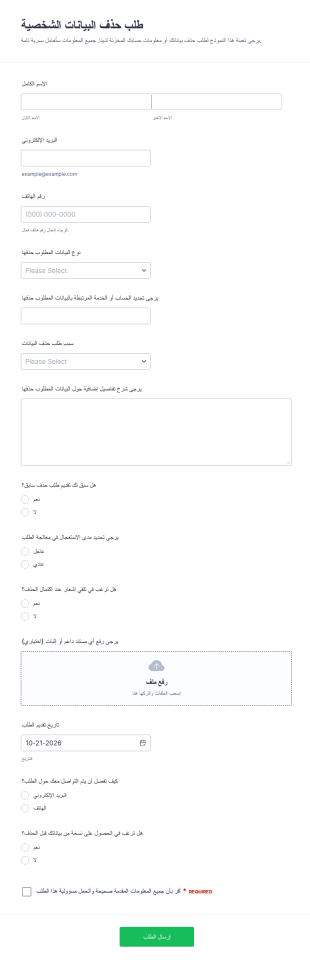
طلب حذف البيانات
يساعد نموذج طلب حذف البيانات الشخصية الجهات الخدمية والمنصات الرقمية على جمع طلبات حذف البيانات وتتبعها عبر Jotform، مع إدارة ردود النموذج وإرسال إشعارات للمتابعة دون برمجة.
انتقل إلى الفئة:نماذج الطلباتحول نماذج تقنية المعلومات
نماذج تكنولوجيا المعلومات هي نماذج رقمية متخصصة مصممة لتبسيط وتحسين مختلف العمليات داخل قطاع تكنولوجيا المعلومات. وتُستخدم هذه النماذج في مجموعة واسعة من حالات الاستخدام التشغيلية، مثل إدارة طلبات خدمات تكنولوجيا المعلومات، وتتبع مخزون المعدات، وتسهيل عمليات تدقيق الأنظمة. وفي سير العمل الفعلي، تمكّن نماذج تكنولوجيا المعلومات أقسام تكنولوجيا المعلومات من جمع البيانات المهمة ومعالجتها بكفاءة، وضمان الامتثال للسياسات التنظيمية، والحفاظ على سجلات دقيقة لجميع الأنشطة المتعلقة بتكنولوجيا المعلومات. وينتج عن ذلك تحسين الكفاءة التشغيلية ومساعدة فرق تكنولوجيا المعلومات على التركيز على تقديم قيمة استراتيجية أكبر لمؤسساتهم.
يقف Jotform كأفضل منشئ نماذج عبر الإنترنت لنماذج تكنولوجيا المعلومات، حيث يقدم منصة قوية تلبي الاحتياجات الفريدة لمحترفي تكنولوجيا المعلومات. مع Jotform، يمكن للمستخدمين بسهولة تخصيص النماذج لتناسب متطلبات محددة وأتمتة عملية جمع البيانات لتقليل الجهود اليدوية. علاوة على ذلك، يتيح نظام إدارة البيانات المركزي في Jotform، الذي يتم من خلال Jotform Tables، لفرق تكنولوجيا المعلومات تنظيم بياناتهم والوصول إليها بسلاسة، مما يضمن أن تكون المعلومات محدثة دائمًا ومتاحة بسهولة. هذا المزيج من التخصيص والأتمتة وإدارة البيانات يجعل Jotform أداة لا غنى عنها لأقسام تكنولوجيا المعلومات التي تتطلع إلى تحسين سير عملها.
لماذا تستخدم نماذج تكنولوجيا المعلومات؟
- توفر نماذج تكنولوجيا المعلومات دقة لا مثيل لها في جمع البيانات، مما يقلل من مخاطر الأخطاء التي تحدث غالبًا عند إدخال البيانات يدويًا. ومن خلال الاستفادة من النماذج الرقمية، يمكن لأقسام تكنولوجيا المعلومات ضمان أن تكون المعلومات التي يتم جمعها كاملة ودقيقة، مما يؤدي إلى اتخاذ قرارات أكثر موثوقية تستند إلى البيانات.
- تُعد السرعة عاملًا بالغ الأهمية في قطاع تكنولوجيا المعلومات، وتعمل نماذج تكنولوجيا المعلومات على تعزيز سرعة جمع البيانات ومعالجتها بشكل كبير. وبفضل ميزات مثل المنطق الشرطي، يمكن للنماذج التكيف ديناميكيًا مع مدخلات المستخدم، مما يبسط عملية الإكمال ويقلل الوقت اللازم لجمع المعلومات.
- يُعد التعامل الاحترافي مع البيانات أمرًا بالغ الأهمية في عمليات تكنولوجيا المعلومات، وتوفر نماذج تكنولوجيا المعلومات طريقة آمنة ومنظمة لإدارة المعلومات الحساسة. ومن خلال استخدام ممارسات إدارة البيانات الآمنة، مثل تلك المتاحة عبر Jotform Tables، يمكن لفرق تكنولوجيا المعلومات حماية سلامة البيانات وسريتها.
- تضمن القدرة على التكامل مع أكثر من 100 تطبيق تابع لجهات خارجية إمكانية دمج نماذج تكنولوجيا المعلومات بسلاسة في سير العمل الحالي. سواء كان الأمر يتعلق بتحديث قاعدة بيانات في Salesforce أو إرسال إشعار عبر Slack، فإن عمليات التكامل هذه تعزز الاتصال والكفاءة التشغيلية.
- التخصيص أمر أساسي في تلبية المتطلبات المحددة لعمليات تكنولوجيا المعلومات، ويتيح منشئ النماذج بالسحب والإفلات من Jotform إمكانية تخصيص نماذج تكنولوجيا المعلومات على نطاق واسع. ويمكن للمستخدمين تكييف النماذج لتتناسب مع عمليات مؤسساتهم، مما يضمن أن يخدم كل نموذج الغرض المقصود منه دون عناصر غير ضرورية.
المشكلات الشائعة التي تحلها نماذج تكنولوجيا المعلومات
- يمكن أن تكون الأعمال الورقية اليدوية مرهقة وعرضة للأخطاء، ولكن نماذج تكنولوجيا المعلومات تلغي الحاجة إلى المستندات المادية من خلال توفير بديل رقمي. ولا يؤدي هذا الانتقال إلى تقليل هدر الورق فحسب، بل يضمن أيضًا التقاط البيانات بدقة وتخزينها بكفاءة.
- تُعد أخطاء إدخال البيانات مشكلة شائعة في عمليات تكنولوجيا المعلومات، وغالبًا ما تؤدي إلى معلومات غير صحيحة وأوجه قصور في العمليات. وتعالج نماذج تكنولوجيا المعلومات هذه المشكلة من خلال استخدام التقاط البيانات إلكترونيًا، مما يقلل من الخطأ البشري ويضمن دقة أعلى للبيانات.
- تشكل البيانات المفقودة أو الموضوعة في غير مكانها تحديات كبيرة، لا سيما عند التعامل مع معلومات تكنولوجيا المعلومات المهمة. ومن خلال مركزة تخزين البيانات داخل Jotform Tables، تضمن نماذج تكنولوجيا المعلومات سهولة استرجاع جميع البيانات التي تم جمعها وحمايتها من الفقدان.
- يمكن أن تعيق الطبيعة المستهلكة للوقت لأساليب جمع البيانات التقليدية إنتاجية تكنولوجيا المعلومات. وتعمل نماذج تكنولوجيا المعلومات على تبسيط هذه العملية من خلال أتمتة إدخال البيانات ومعالجتها، مما يسمح لفرق تكنولوجيا المعلومات بالتركيز على المهام الأكثر استراتيجية بدلًا من المهام الإدارية.
مطابقة حالات الاستخدام مع الميزات
- بالنسبة لإدارة طلبات خدمات تكنولوجيا المعلومات، يمكن استخدام ميزة المنطق الشرطي لإنشاء نماذج ديناميكية تتكيف بناءً على مدخلات المستخدم، مما يضمن عرض الأسئلة ذات الصلة فقط، وبالتالي تسريع العملية وتحسين تجربة المستخدم.
- The need for secure transactions in IT procurement can be addressed by integrating one of the 30+ Payment Gateways such as Stripe or PayPal, allowing for direct and secure payments through the forms.
- عند إجراء عمليات تدقيق لمعدات تكنولوجيا المعلومات، يمكن استخدام منشئ التقارير من Jotform لإنشاء تقارير شاملة من البيانات التي تم جمعها، مما يوفر رؤى ويساعد في الحفاظ على سجلات دقيقة للمخزون.
- تُعد التوقيعات الإلكترونية، التي يتم توفيرها من خلال Jotform Sign، ضرورية لاعتماد المستندات المتعلقة بتكنولوجيا المعلومات، مما يضمن تسجيل جميع الموافقات اللازمة رقميًا وتخزينها بأمان.
- يُعد جمع البيانات دون اتصال بالإنترنت، المتاح من خلال نماذج Jotform للأجهزة المحمولة، أمرًا بالغ الأهمية لفرق تكنولوجيا المعلومات التي تعمل في بيئات ذات اتصال محدود بالإنترنت، مما يتيح لها جمع البيانات ميدانيًا ومزامنتها بمجرد الاتصال بالإنترنت.
- يمكن لميزة محرر PDF أتمتة إنشاء مستندات PDF منسقة من عمليات إرسال النماذج، وتحويل البيانات الأولية إلى تقارير أو سجلات احترافية يمكن مشاركتها وأرشفتها بسهولة.
- يساعد التكامل مع جداول بيانات Google في الحفاظ على تحديثات فورية لعمليات إرسال النماذج، مما يضمن وصول فرق تكنولوجيا المعلومات إلى أحدث البيانات دون إدخال يدوي، وبالتالي تعزيز دقة البيانات وإمكانية الوصول إليها.
كيفية إنشاء نموذج لتكنولوجيا المعلومات
- ابدأ بتصفح قائمة القوالب بحثًا عن قالب لتكنولوجيا المعلومات أو ابدأ بنموذج فارغ لتخصيصه وفقًا لاحتياجاتك المحددة.
- قم بتخصيص تصميم وحقول النموذج باستخدام منشئ النماذج بالسحب والإفلات البديهي لضمان توافقه مع متطلباتك التشغيلية.
- انشر نموذجك وشاركه عبر رابط مباشر أو البريد الإلكتروني أو تضمينه في موقع الويب للوصول إلى جمهورك المستهدف والبدء في جمع البيانات فورًا.
أهم حالات استخدام نماذج تكنولوجيا المعلومات
- للمديرين: تُعد نماذج تكنولوجيا المعلومات ذات قيمة كبيرة للمديرين الذين يسعون إلى تبسيط العمليات وتعزيز الإشراف داخل أقسامهم. ومن خلال توفير منصة مركزية لجمع البيانات وتحليلها، يمكن للمديرين بسهولة مراقبة عمليات تكنولوجيا المعلومات، وتتبع مؤشرات الأداء، وضمان الامتثال للسياسات التنظيمية. وهذا يمكنهم من اتخاذ قرارات مستنيرة وتنفيذ تحسينات استراتيجية تعزز الكفاءة والإنتاجية.
- للفرق: بالنسبة لفرق تكنولوجيا المعلومات، تعمل هذه النماذج على تبسيط المهام اليومية من خلال أتمتة إدخال البيانات ومعالجتها بشكل روتيني. وسواء كان الأمر يتعلق بتقديم طلبات الخدمة، أو الإبلاغ عن المشكلات، أو إجراء عمليات تدقيق للمعدات، فإن نماذج تكنولوجيا المعلومات تقلل العبء الإداري على أعضاء الفريق، مما يسمح لهم بالتركيز على المبادرات الأكثر تقنية واستراتيجية. ولا يؤدي هذا إلى تحسين كفاءة سير العمل فحسب، بل يعزز أيضًا معنويات الفريق من خلال التخلص من المهام المتكررة.
- للعملاء: يستفيد العملاء من نماذج تكنولوجيا المعلومات من خلال تحسين تقديم الخدمات والتواصل. وباستخدام النماذج الرقمية لطلبات الخدمة أو الملاحظات أو استكشاف الأخطاء وإصلاحها، يختبر العملاء عملية مبسطة وسهلة الاستخدام وفعالة في الوقت نفسه. وهذا يعزز رضا العملاء ويساعد على بناء الثقة في قدرة قسم تكنولوجيا المعلومات على الاستجابة بسرعة وفعالية لاحتياجاتهم.
تلخيص نماذج تكنولوجيا المعلومات
باختصار، توفر نماذج تكنولوجيا المعلومات، التي تم إنشاؤها باستخدام Jotform، حلاً شاملاً لتحسين جمع البيانات وإدارتها داخل قطاع تكنولوجيا المعلومات. ومن خلال تسهيل التعامل مع البيانات بدقة وكفاءة وأمان، تمكّن هذه النماذج أقسام تكنولوجيا المعلومات من تحسين سير عملياتها التشغيلية وتقديم خدمة أفضل. وبفضل ميزات مثل التخصيص والأتمتة والتكامل، توفر نماذج تكنولوجيا المعلومات المرونة اللازمة للتعامل مع حالات الاستخدام المتنوعة، مما يجعلها مكونًا أساسيًا من استراتيجيات تكنولوجيا المعلومات الحديثة.
الأسئلة الشائعة
1) هل إنشاء نماذج تكنولوجيا المعلومات على Jotform مجاني؟
نعم، توفر Jotform خطة مجانية تتيح للمستخدمين إنشاء نماذج تكنولوجيا المعلومات واستخدامها. ومع ذلك، تتوفر أيضًا خطط مدفوعة توفر ميزات إضافية وحدودًا أعلى لعمليات إرسال النماذج.
2) هل النماذج والبيانات المُرسلة آمنة؟
بالتأكيد، تعطي Jotform الأولوية لأمن البيانات من خلال استخدام معايير التشفير وإجراءات الامتثال المعتمدة في المجال، مما يضمن حماية جميع عمليات إرسال النماذج والبيانات.
3) هل أحتاج إلى معرفة بالبرمجة لإنشاء نموذج لتقنية المعلومات ؟
No coding knowledge is required to build an IT Form with Jotform. The platform's Drag-and-Drop Form Builder makes it easy for anyone to create and customize forms without technical expertise.
4) هل يمكنني تحصيل المدفوعات مباشرةً من خلال نماذجي؟
نعم، يمكنك تحصيل المدفوعات مباشرة من خلال نماذج تكنولوجيا المعلومات الخاصة بك عن طريق التكامل مع أكثر من 30 بوابة دفع من Jotform، مثل Stripe أو PayPal أو Square.
5) هل يمكن استخدام هذه النماذج على الأجهزة المحمولة؟
بالفعل، يمكن استخدام نماذج تكنولوجيا المعلومات على الأجهزة المحمولة. تتيح نماذج Jotform للأجهزة المحمولة للمستخدمين ملء النماذج وإرسالها حتى في وضع عدم الاتصال بالإنترنت، مع مزامنة البيانات بمجرد توفر اتصال بالإنترنت.
6) هل يمكنني تحويل عمليات إرسال النماذج إلى مستندات PDF احترافية؟
نعم، يتيح محرر PDF من Jotform إنشاء مستندات PDF احترافية تلقائيًا من عمليات إرسال النماذج، والتي يمكن بعد ذلك مشاركتها أو أرشفتها حسب الحاجة.
7) هل نماذج تكنولوجيا المعلومات آمنة وسرية؟
Certainly, IT Forms can be integrated with existing IT infrastructure through Jotform's 100+ third-party integrations, including platforms like Google Sheets, Salesforce, and Slack.
8) هل يمكن دمج نماذج تكنولوجيا المعلومات مع أدوات أخرى؟
تعمل نماذج تكنولوجيا المعلومات على تحسين كفاءة إدارة خدمات تكنولوجيا المعلومات من خلال أتمتة جمع البيانات ومعالجتها، وتقليل الجهود اليدوية، وضمان تدفق المعلومات الدقيقة وفي الوقت المناسب داخل المؤسسة.