

نماذج تقييم الموظفين
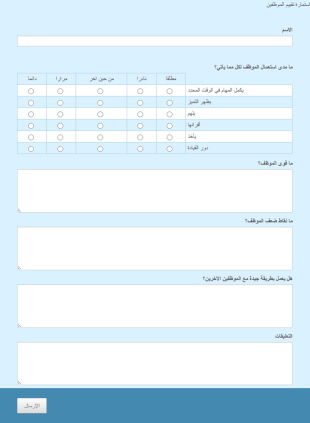
تقييم الأفراد
هل تريد أن تجمع الآراء عن شخص ما؟ باستعمال هذه الاستمارة يمكنك سماع آراء الموظفين عن زملائهم بسهولة.
انتقل إلى الفئة:نماذج تقييم الموظفين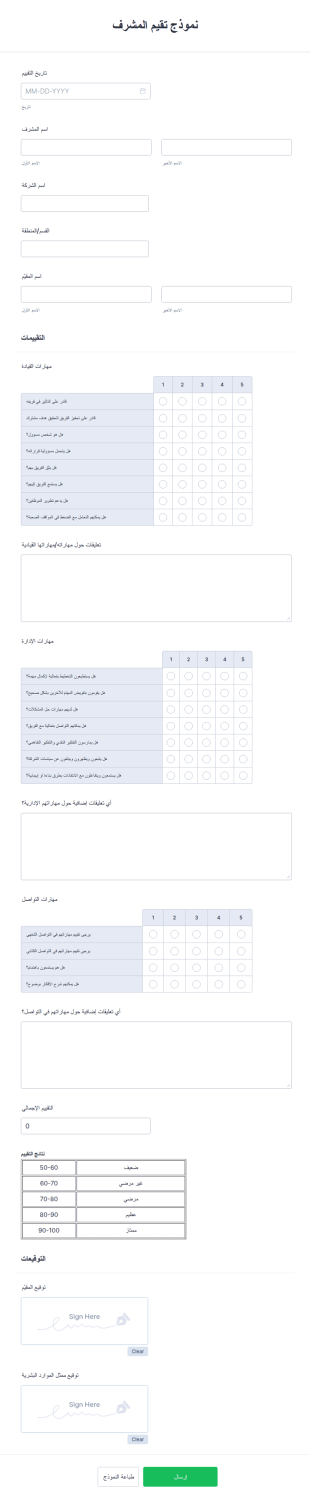
نموذج تقيم المشرف
نموذج تقييم المشرف يستخدم لتقييم أداء المشرف في العمل. يُعتبر دور المشرف أساسيًا في الشركة لأنه يُعد المسؤول الأول الذي يمكن للموظفين الرجوع إليه عند الحاجة إلى المساعدة. يجب أن يتمتع المشرف بقدرة على تحفيز الفريق والتأثير فيه بشكل فعّال لتحقيق الأهداف المشتركة.يتضمن نموذج تقييم المشرف حقولًا لجمع معلومات المشرف ومهاراته في القيادة والإدارة والتواصل. يتم تقييم كل سؤال متعلق بالمهارات باستخدام مقياس من (١) وهو الأقل إلى (٥) وهو الأعلى. كما يحتوي النموذج على حقول نصوص طويلة للإجابة على الأسئلة المفتوحة المتعلقة بكل مهارة.باستخدام أداة حساب النماذج، يقوم هذا النموذج بحساب التقييم العام لأداء المشرف. بالإضافة إلى ذلك، يعرض النصوص التوضيحية التي توضح وصف التقييم لكل درجة.وأخيرًا، باستخدام أداة التوقيع الإلكتروني، يمكن للنموذج تسجيل التوقيع الإلكتروني للمسؤولين المعتمدين.
انتقل إلى الفئة:نماذج الموارد البشرية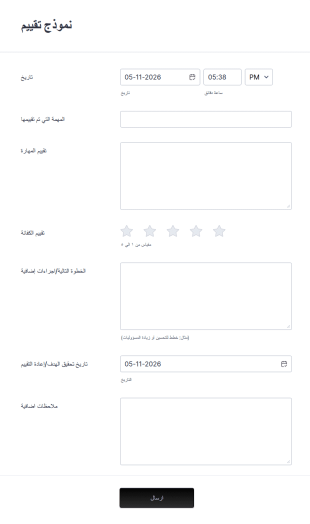
نموذج تقييم
نموذج التقييم هو استبيان يستخدمه أصحاب العمل لتقييم أداء الموظف. سواء كنت تدير شركة أو تشرف على عمل الموظفين، استخدم نموذج التقييم الخاص بنا لمعرفة كيف يؤدي الموظفون العمل. يمكنك تخصيص نموذج التقييم الخاص بك بشعار وألوان شركتك أو تحديث الأسئلة لتتناسب مع احتياجاتك. يمكنك أيضًا استخدام هذا النموذج لتقييم طلابك أو أعضاء فريقك وتكييف الأسئلة وفقًا لذلك. مع أداة إنشاء النماذج من Jotform، يمكنك بسهولة تحديث صيغة وترتيب الأسئلة، وإضافة شريط تقدم لتتبع الإجابات، وإضافة حقل توقيع لجعل التقديم اونلاين أكثر أمانًا، وحتى إلغاء تحديد الحقول عندما لا يكون هناك حاجة لجمع المعلومات أو عندما تود جعل النموذج أقصر! إذا لم تكن بحاجة إلى استخدام نموذج ورقي، وتملك نموذج تقييم اونلاين، فتخلص من الورقيات واجمع التقييمات اونلاين- ماذا تنتظر؟
انتقل إلى الفئة:نماذج تقييم الموظفين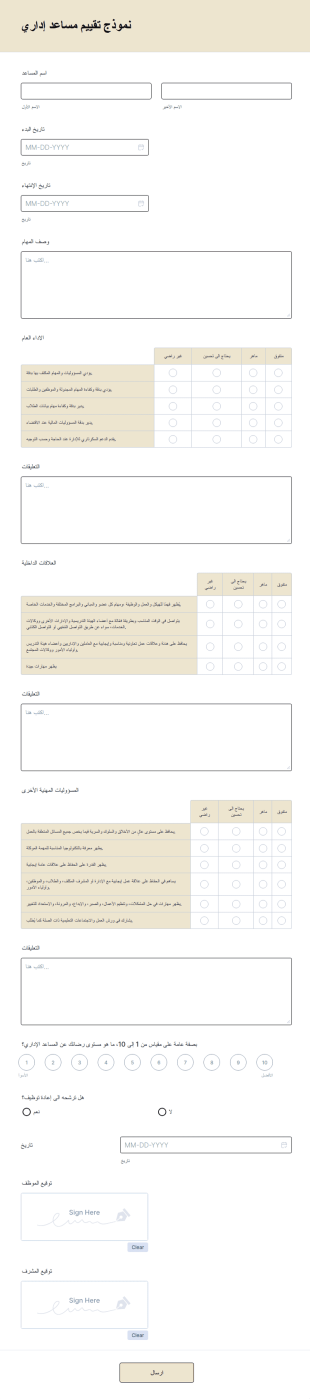
نموذج تقييم مساعد إداري
نموذج تقييم مساعد إداري هو استبيان يستخدم لإجراء مراجعة الأداء لمساعد إداري، مع توثيق خصائص المساعد للرجوع إليها فيما بعد. يعتبر نموذج تقييم مساعد إداري المجاني هذا مثاليًا لأي شركة صغيرة تستخدم مساعد إداري. بالإضافة إلى تخصيص الحقول لتتناسب مع احتياجاتك، يمكنك أيضًا تحديث تصميم هذا النموذج. لا تتردد في تخصيص قالب النموذج هذا باستخدام أداة السحب والإفلات الخاصة بنا، بما في ذلك إضافة شعارك، وتنويع الأسئلة لتتوافق بشكل أفضل مع الإجابات التي تبحث عنها، واختيار ألوان أو خطوط جديدة حسب رغبتك الشخصية. لن يكون هناك حاجة للاستخدام الفوضوي لنماذج الورق - انتقل إلى النماذج الإلكترونية ووفر الوقت باستخدام Jotform. يمكن تحقيق كل ذلك بدون برمجة.
انتقل إلى الفئة:نماذج تقييم الموظفين
نموذج تقييم موظف المطعم
بغض النظر عن جودة الطعام الذي تقدمه، فإن خدمة العملاء يمكن أن تؤثر بشكل كبير على نجاح مطعمك. احرص على الحفاظ على سمعة عملك من خلال تتبع أداء الموظفين باستخدام نموذج تقييم موظفي المطعم المجاني. بمجرد تخصيصه ونشره، يمكن للمشرفين بسهولة تقديم ملاحظاتهم عبر تعبئة نموذج تقييم موظفي المطعم. سيتم تخزين جميع الإدخالات في حسابك الآمن على Jotform، حيث يمكنك الوصول إليها بسهولة وتحميلها وطباعتها ومشاركتها مع فريقك.تمامًا كما تهتم بتقديم كل طبق بأفضل شكل، فلماذا لا تفعل الشيء نفسه مع نموذج تقييم الموظفين؟ دون الحاجة إلى أي مهارات برمجية، يمكنك تخصيص النموذج بسهولة باستخدام أداة السحب والإفلات. يمكنك إعادة ترتيب التصميم، وضبطه ليتماشى مع هوية مطعمك، وإضافة المزيد من الصور أو الأسئلة، واستبدال شريط التقييم الرقمي بتقييم بالنجوم أو مقياس تقييم آخر يناسبك. بعد ذلك، يمكنك نشر النموذج عن طريق تضمينه في موقعك الإلكتروني أو مشاركة رابط خاص به ليتمكن المشرفون من تعبئته من أي جهاز. باستخدام نموذج تقييم موظفي المطعم عبر الإنترنت، ستحصل على ملاحظات قيمة حول أداء الموظفين بكل سهولة، مما يساعدك على الاستمرار في تقديم طعام لذيذ وخدمة عملاء متميزة!
انتقل إلى الفئة:نماذج الموارد البشريةحول نماذج تقييم الموظفين
نماذج تقييم الموظفين هي نماذج رقمية أساسية تستخدمها المؤسسات لتقييم أداء موظفيها واحتياجاتهم التطويرية. يمكن أن تتضمن هذه النماذج مقاييس مختلفة لتقييم الكفاءات والإنجازات ومجالات التحسين، وغالبًا ما تشكل الأساس لجلسات التغذية الراجعة وخطط التطوير. في سير العمل الواقعي، تعمل هذه النماذج على تبسيط عملية جمع البيانات المتسقة عبر الأقسام، مما يضمن أن تكون التقييمات عادلة وشفافة ومتوافقة مع أهداف الشركة. كما يمكن استخدامها لتسهيل عمليات التغذية الراجعة بزاوية 360 درجة، والتقييمات الذاتية، ومراجعات الزملاء، مما يساهم في تكوين فهم شامل لأداء الموظفين.
يُعد Jotform خيارًا رائدًا لإنشاء نماذج تقييم الموظفين، حيث يوفر أداة قوية لإنشاء النماذج عبر الإنترنت تُبسّط عملية التخصيص. باستخدام Jotform، يمكن للمؤسسات تصميم نماذج بسهولة تُؤتمت جمع بيانات التقييم وتحليلها، مما يعزز الكفاءة والدقة. كما أن سهولة استخدام المنصة، إلى جانب إدارة البيانات المركزية من خلال جداول Jotform، تتيح للشركات الاحتفاظ بمستودع آمن ومنظم لسجلات أداء الموظفين. ولا يقتصر هذا النهج المركزي على توفير الوقت فحسب، بل يمكّن المؤسسات أيضًا من اتخاذ قرارات قائمة على البيانات تدعم نمو الموظفين ونجاح المؤسسة.
لماذا تستخدم نماذج تقييم الموظفين؟
- تضمن نماذج تقييم الموظفين دقة تسجيل مؤشرات أداء الموظفين من خلال توفير حقول وتنسيقات موحدة، مما يقلل من احتمالية حدوث الأخطاء أو التباينات. ويُعد هذا الاتساق ضروريًا للحفاظ على العدالة والموضوعية في عمليات التقييم على مستوى المؤسسة.
- تسهم السرعة التي يمكن بها ملء نماذج تقييم الموظفين ومعالجتها في تعزيز كفاءة دورة التقييم بشكل كبير. ومن خلال رقمنة هذه العملية، تلغي هذه النماذج الحاجة إلى الإدخال اليدوي للبيانات الذي يستغرق وقتًا طويلاً، مما يتيح لفرق الموارد البشرية التركيز على مهام أكثر استراتيجية.
- تعد المعالجة الاحترافية للبيانات سمة مميزة لنماذج تقييم الموظفين، حيث إنها تسهل عملية جمع بيانات الأداء الحساسة وتخزينها وتحليلها بشكل آمن. وبفضل ميزات مثل الإرسال المشفر وضوابط الوصول، يمكن للمؤسسات ضمان حماية معلومات الموظفين.
- تُعزز استمارات تقييم الموظفين الشفافية من خلال تمكين الموظفين من الاطلاع على المعايير التي يتم تقييمهم على أساسها. ويشجع هذا الانفتاح على الحوار بين المديرين وأعضاء الفريق، مما يسهم في تهيئة بيئة تسودها الثقة والتحسين المستمر.
- تدعم هذه النماذج قابلية التوسع، مما يسهل على المؤسسات توسيع نطاق عمليات التقييم الخاصة بها مع نموها. وسواء كان عدد موظفي الشركة 50 موظفًا أو 5,000 موظف، يمكن تكييف نماذج تقييم الموظفين لتلبية الاحتياجات المتغيرة دون أي عوائق.
المشكلات الشائعة التي تساعد نماذج تقييم الموظفين في حلها
- تتعرض عمليات التقييم التقليدية التي تعتمد على الأوراق لخطر الضياع أو الخطأ في وضعها، مما يؤدي إلى سجلات غير مكتملة ونزاعات محتملة. وتقلل نماذج تقييم الموظفين من هذا الخطر من خلال تخزين جميع البيانات رقميًّا، مما يضمن سهولة الوصول إلى السجلات وتنظيمها بشكل جيد.
- قد يؤدي الإدخال اليدوي للبيانات ومعالجتها إلى حدوث أخطاء وتناقضات، مما قد يؤدي إلى تشويه نتائج الأداء. ومن خلال استخدام نماذج تقييم الموظفين، يمكن للمؤسسات أتمتة عملية جمع البيانات، مما يقلل من الأخطاء البشرية ويضمن دقة وموثوقية التقييمات.
- قد تؤدي الطبيعة التي تستغرق وقتًا طويلاً لعمليات التقييم التقليدية إلى تأخير تقديم الملاحظات وإعاقة تطوير الموظفين. وتسهم النماذج الرقمية في تسريع هذه العملية، مما يتيح إنجازها في وقت أقصر وتقديم الملاحظات في الوقت المناسب، وهو أمر بالغ الأهمية لتحفيز الموظفين ونموهم.
- قد يؤدي عدم اتساق معايير التقييم بين الإدارات إلى تقييمات غير عادلة. وتسهم نماذج تقييم الموظفين في توحيد عملية التقييم، مما يضمن تقييم جميع الموظفين باستخدام نفس المعايير والمقاييس المرجعية، وبالتالي تعزيز المساواة والإنصاف.
مطابقة حالات الاستخدام مع الميزات
- بالنسبة للمؤسسات التي ترغب في تخصيص معايير التقييم الخاصة بها، تتيح أداة Jotform لإنشاء النماذج بالسحب والإفلات تعديل حقول النموذج بسهولة، مما يمكّن فرق الموارد البشرية من تخصيص التقييمات بما يتناسب مع أدوار أو أقسام محددة. وتضمن هذه الميزة أن تكون النماذج ملائمة ومتوافقة مع أهداف العمل.
- يمكن استخدام المنطق الشرطي لإنشاء نماذج ديناميكية تتكيف مع مدخلات المستخدم، مما يبسّط عملية التقييم من خلال عرض الأسئلة ذات الصلة فقط. ويؤدي ذلك إلى تجربة أكثر كفاءة عند تعبئة النماذج ويقلل من إدخال البيانات غير الضرورية.
- باستخدام ميزة التوقيعات الإلكترونية في Jotform، يمكن للمؤسسات جمع الموافقات الموثقة من المديرين والموظفين، مما يضمن الإقرار الرسمي بنتائج التقييم والموافقة عليها. وتضيف هذه الميزة مستوى إضافيًا من المساءلة والطابع الرسمي إلى عملية التقييم.
- يتيح التكامل مع أكثر من 100 منصة خارجية، مثل Google Sheets وSalesforce، نقل البيانات ومزامنتها بسلاسة. ويضمن هذا التكامل إمكانية مشاركة بيانات التقييم وتحليلها بسهولة إلى جانب مؤشرات الأعمال الأخرى.
- تتيح ميزة إنشاء مستندات PDF تلقائيًا في منصة Jotform لأقسام الموارد البشرية تحويل النماذج المكتملة تلقائيًا إلى ملفات PDF احترافية، مما يسهل حفظها، أو مشاركتها، أو طباعتها حسب الحاجة. وتُعد هذه الميزة ذات قيمة كبيرة جدًا للحفاظ على اتساق عمليات التوثيق وحفظ السجلات.
كيفية إنشاء نموذج لتقييم الموظفين
- تصفح قائمة القوالب للعثور على قالب تقييم الموظفين، أو ابدأ باستخدام نموذج فارغ.
- قم بتخصيص التصميم والحقول باستخدام أداة إنشاء النماذج بالسحب والإفلات.
- انشر وشارك عبر الرابط المباشر أو البريد الإلكتروني أو التضمين في موقع الويب.
أبرز حالات استخدام نماذج تقييم الموظفين
- للمدراء: تتيح نماذج تقييم الموظفين للمديرين أسلوبًا منهجيًا لتقييم أداء فريق العمل حيث تضمن هذه النماذج إجراء تقييمات موضوعية ومتسقة تتوافق مع أهداف الإدارة. كما تُسهم في إدارة حوارات مثمرة أثناء جلسات مراجعة الأداء، مما يسمح للمديرين بتقديم ملاحظات إيجابية وتحديد توقعات واضحة للأداء المستقبلي.
- للفرق: يمكن للفرق استخدام نماذج تقييم الموظفين لجمع ملاحظات الزملاء والتقييمات الذاتية، مما يسهم في تكوين صورة أكثر شمولًا عن الأداء. ويشجع هذا النهج التعاوني أعضاء الفريق على دعم تطور بعضهم البعض، ويعزز ثقافة التحسين المستمر. كما يمكن أن تساعد الملاحظات التي يتم جمعها في تحديد نقاط القوة ومجالات التطوير، مما يسهم في تحسين تفاعل الفريق وزيادة الإنتاجية.
- للعملاء: على الرغم من نماذج تقييم الموظفين تُستخدم في المقام الأول داخليًا، إلا أنه يمكن أيضًا تكييفها لجمع ملاحظات العملاء حول تعاملات الموظفين معهم، ولا سيما في القطاعات الخدمية. ويمكن لهذه الملاحظات الخارجية أن تقدم رؤى قيّمة حول أداء الموظفين من منظور العملاء، مما يساعد المؤسسات على تعزيز رضا العملاء وتحسين جودة الخدمة.
تلخيص نماذج تقييم الموظفين
تُعد نماذج تقييم الموظفين عنصرًا أساسيًا في الإدارة الفعّالة للموارد البشرية، إذ توفر طريقة مبسطة وموحدة لتقييم أداء الموظفين. ومن خلال الاستفادة من أداة Jotform لإنشاء النماذج أونلاين، يمكن للمؤسسات إنشاء نماذج مخصصة تُسهّل جمع البيانات وتحليلها وتقديم الملاحظات بدقة وكفاءة. كما أن إمكانية التكامل مع الأنظمة الحالية وأتمتة عملية التقييم تضمن تمكين الشركات من التركيز على اتخاذ القرارات الاستراتيجية وتطوير الموظفين. وبشكل عام، تؤدي هذه النماذج دورًا محوريًا في تعزيز نجاح المؤسسات وترسيخ ثقافة التحسين المستمر.
الأسئلة الشائعة
1) Is it free to create Employee Evaluation Forms on Jotform?
نعم، يوفّر Jotform خطة مجانية تتيح للمستخدمين إنشاء نماذج تقييم الموظفين وتخصيصها واستخدامها مع بعض القيود. كما تتوفر ميزات إضافية وحدود إرسال أعلى ضمن الخطط المدفوعة.
2) هل النماذج والبيانات المُرسلة آمنة؟
بالتأكيد. يولي Jotform أولوية لأمن البيانات من خلال ميزات مثل تشفير SSL، والامتثال للائحة العامة لحماية البيانات وعناصر التحكم المتقدمة في الوصول، لضمان بقاء جميع النماذج والبيانات المُرسلة سرية ومحمية.
3) Do I need coding knowledge to build a Employee Evaluation Form?
لا، لست بحاجة إلى أي معرفة بالبرمجة لإنشاء نموذج تقييم موظفين على Jotform. تتيح أداة إنشاء النماذج بالسحب والإفلات سهلة الاستخدام في المنصة لأي شخص إنشاء النماذج وتخصيصها بسهولة دون الحاجة إلى خبرة تقنية.
4) هل يمكنني تحصيل المدفوعات مباشرةً من خلال النماذج؟
نعم، يدعم Jotform التكامل مع أكثر من 30 بوابة دفع، بما في ذلك Stripe وPayPal وSquare، مما يتيح لك تحصيل المدفوعات مباشرةً من خلال نماذجك عند الحاجة.
5) هل يمكن استخدام هذه النماذج على الأجهزة المحمولة؟
نعم، تتميز نماذج Jotform بأنها متجاوبة بالكامل، ويمكن الوصول إليها وتعبئتها على أي جهاز محمول، مما يضمن سهولة الاستخدام والراحة للمستخدمين أثناء التنقل.
6) هل يمكنني تحويل البيانات المُرسلة عبر النماذج إلى مستندات PDF احترافية؟
نعم، يوفر Jotform ميزة إنشاء ملفات PDF تلقائيًا، والتي تقوم تلقائيًا بتحويل عمليات إرسال النماذج إلى مستندات PDF منسقة باحترافية، ويمكن تنزيلها أو طباعتها أو مشاركتها حسب الحاجة.
7) هل يمكن دمج نماذج تقييم الموظفين مع أنظمة الموارد البشرية؟
نعم، يوفّر Jotform إمكانيات التكامل مع العديد من منصات الجهات الخارجية، مما يتيح لك ربط نماذج تقييم الموظفين الخاصة بك بأنظمة الموارد البشرية الحالية لضمان نقل البيانات وإدارتها بسلاسة.
8) كيف يمكن لنماذج تقييم الموظفين دعم فرق العمل عن بُعد؟
يمكن مشاركة نماذج تقييم الموظفين والوصول إليها بسهولة عبر الإنترنت، مما يجعلها مثالية للفرق العاملة عن بُعد. فهي تسهّل إجراء تقييمات أداء متسقة بغض النظر عن الموقع، مما يضمن حصول جميع أعضاء الفريق على الملاحظات اللازمة لتطويرهم المهني.