

Belastingformulier Sjablonen
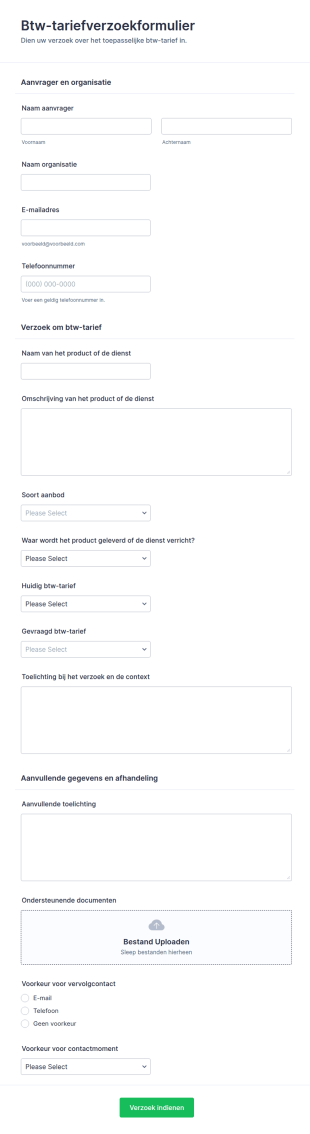
Aanvraag Btw Tarief Form
Leg btw-tariefvragen eenduidig vast met het Btw-tariefverzoekformulier, ideaal voor accountants en organisaties die btw-keuzes willen onderbouwen en opvolgen met centrale gegevensverzameling via Jotform.
Ga naar categorie:Accountant formulierenOver Belastingformulieren
Of je nu een overheidsinstantie bent die officiële belastingformulieren verzamelt of een accountant die informatie verzamelt van je cliënten, ontvang belastinginformatie veilig online met Jotform's Belastingformulieren! Begin met het selecteren van een formuliersjabloon hieronder en pas het aan om te voldoen aan je behoeften en branding. Deel vervolgens het formulier of embed het op je website om ingevuld te worden op elke smartphone, tablet of computer. Inzendingen worden opgeslagen in je beveiligde Jotform-account en kunnen automatisch worden omgezet in professionele PDF-documenten.
Kies hieronder een sjabloon voor het belastingformulier en pas deze binnen enkele seconden aan met onze drag-and-drop Formulier Bouwer. Upload uw bedrijfslogo, voeg meer formuliervelden toe om documenten of e-handtekeningen te verzamelen, betalingen te ontvangen via meer dan 30 populaire betalingsverwerkers, en meer. Zodra u begint met het verzamelen van inzendingen, kunt u deze op deskundige wijze volgen in het Postvak In van Jotform of in Jotform tabellen, of synchroniseren met uw andere accounts met meer dan 100 integraties, waaronder Google Drive, Dropbox en meer. Stroomlijn de manier waarop u belastingdocumenten verzamelt met de beveiligde online belastingformulieren van Jotform.
Why Use Tax Forms?
- Tax Forms ensure accuracy by eliminating manual entry errors commonly associated with paper forms. Utilizing digital forms allows for real-time data validation, ensuring that the information submitted meets predefined criteria and reduces the risk of errors.
- Speed is a critical advantage of using Tax Forms. By digitizing the tax documentation process, users can significantly reduce the time spent on collecting and processing information, which in turn accelerates the overall workflow and improves productivity.
- Professional data handling is guaranteed with Tax Forms as they support robust data management practices. Digital forms enable secure data collection, storage, and retrieval, ensuring compliance with data protection regulations and maintaining client confidentiality.
- Tax Forms facilitate seamless collaboration among team members. By providing a centralized platform for data submission and review, these forms enhance communication and coordination, leading to more efficient tax processing and decision-making.
- The versatility of Tax Forms allows for easy integration with existing systems. Whether it's syncing with accounting software or exporting data to spreadsheets, these forms provide flexibility and adaptability to meet diverse business needs.
Common Problems Solved by Tax Forms
- Paperwork overload is a significant challenge in tax documentation, often leading to inefficiencies and lost data. Tax Forms tackle this issue by transitioning from paper to digital, streamlining document handling and reducing physical storage needs.
- Manual data entry is prone to errors and can be time-consuming. By using digital forms, organizations can automate data capture processes, minimizing the chances of errors and freeing up valuable time for staff to focus on more critical tasks.
- Lost data can be a nightmare for businesses, especially during tax season. Tax Forms ensure that all collected data is stored securely and can be retrieved easily, reducing the risk of lost or misplaced information.
- Compliance with tax regulations is a constant concern for businesses. Tax Forms help ensure that all required fields are completed and that the data complies with current legal requirements, thereby reducing the risk of penalties and audits.
Matching Use Cases to Features
- Tax professionals can leverage the Drag-and-Drop Form Builder to quickly create customized Tax Forms tailored to specific client needs, enhancing the client service experience.
- Conditional Logic allows for dynamic form behavior, enabling users to show or hide fields based on responses, which streamlines the form-filling process and ensures that only relevant information is captured.
- With over 30 Payment Gateways, Tax Forms can facilitate the collection of taxes and fees directly through the form, providing a convenient and secure payment option for clients.
- Jotform Sign offers Electronic Signatures, enabling users to obtain legally binding signatures on Tax Forms, thereby accelerating approval processes and ensuring compliance.
- The PDF Editor allows for Automated PDF Generation, transforming form submissions into professionally formatted documents that can be easily shared with clients or filed for record-keeping.
- The Report Builder enables users to analyze form data, generating insights and summaries that support strategic decision-making and tax planning.
- With 100+ Third-party Integrations, Tax Forms can seamlessly connect with platforms like Google Sheets and Salesforce, enhancing data flow and operational efficiency.
How to Create a Tax Form
- Start by browsing the Template List for a Taxs template or begin from a blank form to suit your specific requirements.
- Customize the design and fields using the Drag-and-Drop Form Builder, ensuring that the form meets your operational needs and captures all necessary information.
- Publish and share your form via Direct Link, Email, or Website Embed to reach your intended audience quickly and efficiently.
Top Use Cases for Tax Forms
- For Managers: Tax Forms offer managers a streamlined approach to overseeing tax documentation processes. With centralized data collection and real-time access to information, managers can monitor progress, ensure compliance, and make informed decisions with confidence. The ability to customize forms and automate workflows reduces administrative burdens and enhances operational efficiency.
- For Teams: Teams benefit from Tax Forms by improving collaboration and communication across departments. Digital forms provide a unified platform where team members can access, review, and process tax information collectively. This fosters a more cohesive work environment, reduces errors, and ensures that all team members are aligned with current tax objectives and deadlines.
- For Customers: Customers experience a more seamless and efficient service when interacting with Tax Forms. These forms simplify the process of submitting tax information, providing a user-friendly interface and clear guidance on required documentation. The integration of secure payment gateways and electronic signatures further enhances the customer experience by offering convenience and assurance.
Summarizing Tax Forms
Tax Forms represent a significant advancement in how tax documentation is handled, offering a powerful solution for businesses seeking to improve accuracy, speed, and compliance. By digitizing tax processes, these forms reduce the burden of paperwork and minimize the risk of errors, while also ensuring that data is managed securely and efficiently. With Jotform's robust features and integrations, Tax Forms not only streamline operations but also enhance the overall client experience, making them an invaluable asset in the realm of tax management.
Veelgestelde vragen
1. Wat is een bedrijfsbelastingformulier?
Ja, Jotform biedt een gratis abonnement waarmee gebruikers belastingformulieren kunnen maken en gebruiken. De beschikbare functies en formulierlimieten kunnen variëren op basis van het gekozen abonnement.
2. Waarom zijn IT-formulieren belangrijk voor organisaties?
Belastingformulieren voor bedrijven zijn essentieel voor het handhaven van compliance, het nauwkeurig rapporteren van inkomsten en uitgaven, en het vermijden van boetes of controles. Ze stroomlijnen ook het proces van het verzamelen van de nodige informatie voor belastingaangifte.
3. Welke informatie is doorgaans vereist op een belastingformulier?
Nee, het platform van Jotform is zeer gebruiksvriendelijk, waardoor je geen kennis van coderen nodig hebt. Dankzij de overzichtelijke drag-and-drop formulierbouwer kun je eenvoudig belastingformulieren maken.
4. Zijn er verschillende soorten IT-formulieren?
Ja, je kunt rechtstreeks via je formulieren betalingen ontvangen door ze te integreren met een van de meer dan 30 betalingsgateways die Jotform ondersteunt, zoals Stripe, PayPal of Square.
5) Kan ik deze formulieren op mobiele apparaten gebruiken?
Ja, Jotform-formulieren zijn volledig responsief en kunnen op elk mobiel apparaat worden geopend en verstuurd. Dit zorgt voor optimale gebruiksvriendelijkheid voor mobiele gebruikers.
6. Hoe verbeteren IT-formulieren de efficiëntie van workflows?
Ja, met de Jotform PDF-editor kun je formulierinzendingen automatisch omzetten in professionele PDF-documenten die je vervolgens eenvoudig kunt delen of opslaan.
7. Is de informatie die via Jotform-belastingformulieren wordt ingediend veilig?
Ja, Jotform gebruikt beveiligingsmaatregelen volgens de industriestandaard, waaronder versleuteling en veilige gegevensopslag, om gevoelige belastinginformatie die via zijn formulieren wordt ingediend te beschermen.
8. Kunnen bedrijfsbelastingformulieren worden aangepast voor verschillende rechtsgebieden of belastingwetten?
Absoluut. De templates van Jotform kunnen volledig worden aangepast om velden en vereisten op te nemen die specifiek zijn voor lokale, provinciale of federale belastingvoorschriften, waardoor compliance met de relevante wetgeving wordt gegarandeerd.