

Administratieve formulieren

Notulenopname Form
Leg vergadernotities, besluiten en vervolgacties vast met het Formulier voor vergadernotities, ideaal voor teams, projectgroepen en bestuurders die consistente data collection en duidelijke opvolging willen.
Ga naar categorie:Formulieren voor vergaderingen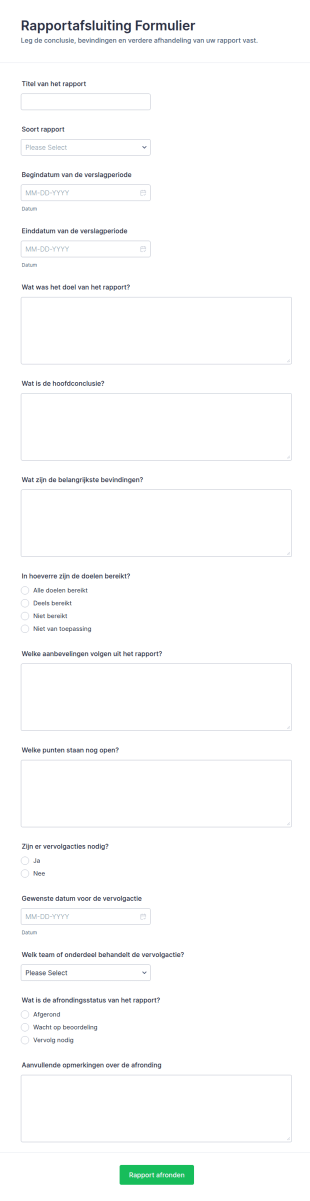
Rapportconclusie Form
Leg rapportconclusies en vervolgafspraken vast met het Rapportafsluiting Formulier, ideaal voor teams die evaluaties en onderzoeken afronden en de opvolging overzichtelijk willen organiseren in Jotform.
Ga naar categorie:RapportformulierenOver Administratieve formulieren
Administratieve formulieren zijn documenten die onderwijsinstellingen gebruiken om informatie over leerlingen, studenten, personeel en dagelijkse activiteiten te verzamelen en te beheren. Met de krachtige online formulieren van Jotform kun je administratieve taken sneller uitvoeren en je administratieproces stroomlijnen. Je kunt eenvoudig aangepaste online aanmeldingsformulieren, inschrijvingsformulieren, evaluaties van lessen en meer maken. Om te beginnen kun je een van de gratis templates voor administratieve formulieren kiezen en aan de huisstijl van je organisatie aanpassen. Vervolgens kun je het formulier delen of naadloos in je website integreren om inzendingen vanaf desktops of mobiele apparaten te verzamelen.
Met de gebruiksvriendelijke online formulierbouwer van Jotform kun je snel en eenvoudig aangepaste administratieve formulieren maken zonder te coderen. Je kunt elementen slepen om het ontwerp van je template aan te passen, de inhoud bijwerken en het logo van je school of velden voor het verzamelen van digitale handtekeningen toevoegen. Bovendien kun je het formulier met handige tools zoals Google Agenda, Dropbox en Slack integreren. Alle ingediende formulieren worden automatisch in je beveiligde Jotform-account opgeslagen en kunnen direct in professionele PDF-bestanden worden omgezet die je kunt downloaden, delen en afdrukken.
Why Use Administrative Forms?
- Administrative forms are crucial for maintaining accuracy in data collection, reducing the risk of errors that often occur with manual entry. By using digital forms, organizations can ensure that data is captured consistently across various departments, fostering uniformity and reliability in information management.
- The speed at which data can be collected and processed is significantly increased with administrative forms. Instead of relying on time-consuming paper processes, digital forms allow for immediate data capture and processing, accelerating decision-making and operational efficiency.
- Professional data handling is enhanced through features like electronic signatures and secure data storage, which are integral to administrative forms. These features ensure that sensitive information is handled with the utmost care, complying with industry regulations and protecting organizational data integrity.
- Administrative forms facilitate seamless integration with existing systems, thanks to over 100 third-party integrations available in Jotform. This connectivity allows organizations to synchronize data across platforms such as Google Sheets, Salesforce, and Slack, creating a cohesive data management ecosystem.
- Automation capabilities in administrative forms, such as conditional logic and approval workflows, enable organizations to minimize manual interventions. This automation reduces the workload on staff, allowing them to focus on more strategic tasks while ensuring that routine processes are handled efficiently.
Common Problems Solved by Administrative Forms
- One of the primary issues addressed by administrative forms is the reduction of paperwork. Traditional paper forms are cumbersome and prone to being misplaced or damaged, whereas digital forms eliminate these risks by providing a durable and easily accessible alternative.
- Manual data entry is often fraught with errors and inefficiencies. Administrative forms solve this problem by automating data input, reducing the likelihood of human error and ensuring that information is captured accurately and swiftly.
- Lost data can be a significant concern for organizations relying on paper-based systems. Digital forms offer a secure solution, with data being stored safely in the cloud, ensuring that important information is never lost and can be retrieved whenever necessary.
- Inefficient workflows can hinder organizational productivity. Administrative forms streamline processes by automating routine tasks, such as approvals and notifications, allowing teams to operate more efficiently and focus on their core responsibilities.
- Communication breakdowns within teams are minimized with the use of administrative forms, which facilitate clear and structured information exchange. By standardizing data collection and dissemination, these forms help maintain clarity and cohesion in organizational communications.
Matching Use Cases to Features
- For organizations requiring seamless data collection, Jotform's drag-and-drop form builder allows users to create customized administrative forms quickly. This feature enables the design of forms that perfectly align with specific operational needs, enhancing data capture efficiency.
- Conditional logic in administrative forms is ideal for businesses that need to tailor form questions based on user responses. This feature ensures that users are only prompted with relevant questions, streamlining the data collection process and improving user experience.
- Organizations processing payments can benefit from Jotform's integration with over 30 payment gateways, including Stripe and PayPal. This capability allows for the secure collection of payments directly through forms, simplifying financial transactions and record-keeping.
- For teams requiring document signing, Jotform Sign offers electronic signature capabilities. This feature is invaluable for ensuring that documents are signed promptly and legally compliant, enhancing the speed and efficiency of administrative processes.
- De Jotform PDF-editor biedt een functie die ideaal is voor organisaties die formulierinzendingen willen omzetten in professionele documenten. Met deze functie kun je eenvoudig verzorgde, gebruiksklare PDF's maken op basis van verzamelde gegevens. Dit maakt het opstellen van rapportages en je administratie een stuk eenvoudiger.
- Jotform Tables provides secure data management, which is crucial for organizations handling sensitive information. This feature ensures that all collected data is stored safely, with easy access for analysis and decision-making, enhancing data security and compliance.
- Approval workflows streamline decision-making processes by automating the routing of forms for approval. This feature is beneficial for organizations looking to reduce administrative delays and ensure that decisions are made swiftly and efficiently.
How to Create a Administrative Form
- Browse the Template List for a Administratives template or start from a blank form.
- Afdelingen voor bedrijfscommunicatie
- Zorgt voor tijdige aanvulling van voorraad en voorkomt verlies
Top Use Cases for Administrative Forms
- For Managers: Administrative forms are indispensable for managers who oversee multiple operational aspects within an organization. These forms allow managers to efficiently collect and analyze data related to team performance, project progress, and resource allocation. By streamlining information gathering and providing real-time insights, administrative forms empower managers to make informed decisions and optimize their teams' productivity. Additionally, they can automate approval processes, reducing the time spent on routine administrative tasks and enabling managers to focus on strategic planning and execution.
- For Teams: Teams benefit greatly from the use of administrative forms as they facilitate seamless collaboration and communication. These forms can be used to coordinate tasks, track project milestones, and gather feedback, ensuring that everyone is aligned and working towards shared goals. By standardizing processes and automating routine data collection, administrative forms help teams operate more efficiently, reducing the potential for errors and miscommunication. Furthermore, the integration of forms with tools like Slack and Google Sheets allows for real-time data sharing, enhancing team collaboration and productivity.
- For Customers: Customers experience improved service quality when organizations utilize administrative forms. These forms enable businesses to streamline customer interactions, from service requests to feedback collection, ensuring that customer needs are addressed promptly and accurately. By providing a structured and user-friendly way for customers to communicate with businesses, administrative forms enhance customer satisfaction and foster loyalty. Moreover, the ability to collect payments and signatures through forms simplifies transactional processes, offering customers a convenient and efficient service experience.
Summarizing Administrative Forms
Administrative forms are a vital component of modern business operations, offering a structured and efficient way to manage data collection and processing. Through the use of Jotform's online form builder, organizations can create highly customizable forms that align with their specific needs and enhance operational efficiency. By automating routine tasks and ensuring data accuracy, administrative forms empower businesses to focus on strategic objectives rather than administrative burdens. The integration of advanced features such as electronic signatures, payment gateways, and approval workflows further enhances the functionality and value of these forms, making them indispensable in any organizational setting.
Veelgestelde vragen
1. Wat zijn administratieve formulieren voor het onderwijs?
Ja, Jotform biedt een gratis abonnement waarmee gebruikers administratieve formulieren kunnen maken en aanpassen. Het gratis abonnement biedt basisfuncties, maar gebruikers kunnen naar een betaald abonnement upgraden voor geavanceerdere functies en hogere limieten.
2. Waarom zijn administratieve formulieren belangrijk in het onderwijs?
Absoluut, Jotform hecht veel waarde aan gegevensbeveiliging en gebruikt versleutelingsprotocollen die aan de geldende normen voldoen om formulieren en ingediende gegevens te beschermen. Gebruikers kunnen erop vertrouwen dat hun informatie veilig en in overeenstemming met de regelgeving voor gegevensbescherming wordt opgeslagen.
3. Welke informatie wordt doorgaans verzameld in administratieve formulieren?
Nee, je hebt geen ervaring met coderen nodig om met Jotform een administratief formulier te maken. Het platform biedt een gebruiksvriendelijke drag-and-drop formulierbouwer waarmee je moeiteloos formulieren kunt maken zonder dat je technische kennis nodig hebt.
4. Zijn er verschillende soorten administratieve formulieren voor scholen?
Ja, formulieren kunnen sterk variëren, waaronder studentinschrijvingen, afwezigheidsverzoeken, incidentmeldingen, faciliteitaanvragen en personeelsevaluaties, elk afgestemd op specifieke administratieve behoeften.
5) Kan ik deze formulieren op mobiele apparaten gebruiken?
Ja, de formulieren van Jotform zijn volledig responsief en kunnen op mobiele apparaten worden gebruikt. Dit zorgt ervoor dat gebruikers de formulieren eenvoudig kunnen openen en invullen, ongeacht het apparaat dat ze gebruiken of waar ze zich bevinden.
6. Hoe helpen administratieve formulieren bij compliance en het bijhouden van gegevens?
Ja, met de Jotform PDF-editor kunnen gebruikers ingevulde formulieren automatisch omzetten in professionele PDF-documenten. Deze functie is ideaal om verzorgde rapporten en documenten op basis van verzamelde gegevens te genereren.
7. Kunnen administratieve formulieren worden aangepast voor verschillende onderwijsniveaus?
Absoluut. Formulieren kunnen worden aangepast voor basis- en voortgezet onderwijs, hoger onderwijs, beroepsopleidingen of gespecialiseerde programma's, waarbij velden en workflows worden afgestemd op elke context.
8. Hoe wordt privacy gewaarborgd bij het gebruik van online administratieve formulieren?
Jotform gebruikt veilige gegevensopslag, versleuteling en toegangscontroles om gevoelige informatie te beschermen en zorgt voor compliance met privacywetten zoals FERPA en GDPR.