

Formulieren voor personeelszaken

Formulier Voor Medewerkerstevredenheidsonderzoeken
Een medewerkerstevredenheidsonderzoek wordt door managers of HR-afdelingen gebruikt om meer inzicht te krijgen in hoe medewerkers hun werkomgeving ervaren. Met het gratis medewerkerstevredenheidsonderzoek van Jotform kun je online enquêteresultaten verzamelen vanaf elk apparaat! Je kunt de formuliertemplate eenvoudig aanpassen, in je interne website insluiten of via een link delen en de antwoorden via je beveiligde Jotform-account bekijken. Vervolgens kun je de Jotform Rapportenbouwer gebruiken om automatisch gedetailleerde rapporten te genereren of ingediende formulieren automatisch in een PDF-bestand om te zetten.Deze template voor een medewerkerstevredenheidsonderzoek bevat al vragen om je medewerkers beter te leren kennen. Je kunt ook eenvoudig meer vragen toevoegen, je logo uploaden of het ontwerp van de enquête wijzigen. Door de Jotform Formulierbouwer te gebruiken, kun je de template binnen een paar klikken volledig op je behoeften afstemmen zonder te coderen. Je kunt uit meer dan 100 gratis integraties kiezen om ingevulde formulieren automatisch met andere accounts, waaronder Airtable, Google Drive, Dropbox, Trello, Slack en meer te synchroniseren. Gebruik deze gratis template om de antwoorden van medewerkers online te verzamelen en tijd te besparen. Je kunt dit kant-en-klare formulier gebruiken om de tevredenheid te meten of vanaf nul beginnen en een geheel nieuwe enquête maken!
Ga naar categorie:Bedrijfsenquêtes
Aanmeldingsformulier Voor Vrijwilligers Van Non Profitorganisaties
Een aanmeldingsformulier voor vrijwilligers van non-profitorganisaties wordt gebruikt om aanmeldingen van vrijwilligers online te verzamelen, zonder dat je papieren formulieren nodig hebt! Met het gratis aanmeldingsformulier voor vrijwilligers van Jotform kun je je workflow stroomlijnen door aanmeldingen van vrijwilligers rechtstreeks in je beveiligde Jotform-account op te slaan, te bekijken en te beheren. Je kunt de template eenvoudig aanpassen, in je website insluiten of via een link delen om aanmeldingen naadloos te beheren. Dankzij onze gratis mobiele app Jotform Mobiele Formulieren kun je de ingediende formulieren eenvoudig op elk apparaat bekijken.Je kunt het online aanmeldingsformulier voor vrijwilligers van non-profitorganisaties volledig aanpassen zonder te coderen. Met slechts een paar klikken kun je het ontwerp wijzigen, het logo van je organisatie toevoegen en vragen personaliseren om sollicitanten beter te leren kennen. Vervolgens kun je krachtige integraties gebruiken om ingediende formulieren automatisch met Google Drive, Trello, Slack, Dropbox en meer te synchroniseren. Gebruik een gratis aanmeldingsformulier voor vrijwilligers van non-profitorganisaties om aanmeldingen van vrijwilligers online te verzamelen, waardoor je geen papieren formulieren nodig hebt.Op deze pagina kun je meer informatie over formulieren voor non-profitorganisaties vinden.
Ga naar categorie:Formulieren voor goede doelen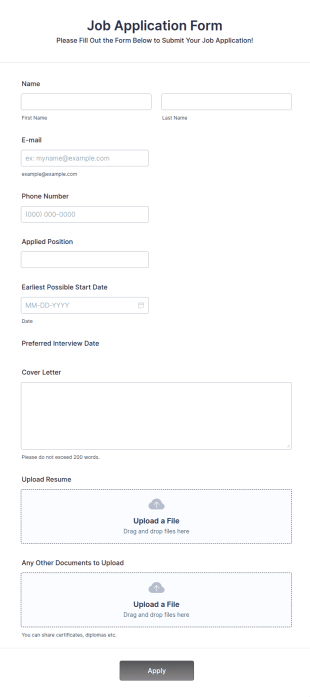
Online Sollicitatieformulier
Een online sollicitatieformulier is een webformulier dat wordt gebruikt om informatie over sollicitanten te verzamelen. Met ons online sollicitatieformulier kun je het sollicitatieproces stroomlijnen, of je nu op zoek naar nieuwe medewerkers of freelancers bent. Je kunt het sollicitatieformulier eenvoudig aanpassen en in je website insluiten om meteen met het verzamelen van informatie te beginnen. Sollicitanten kunnen via het formulier eenvoudig hun cv uploaden, zodat je de meest geschikte kandidaat kunt selecteren.Je kunt het formulier volledig aan je behoeften aanpassen door je logo toe te voegen, de achtergrondafbeelding aan te passen en een ander lettertype te kiezen. Dankzij deze aanpassingen kun je het formulier eenvoudig op het ontwerp van je website afstemmen. Als je op verschillende manieren informatie wilt verzamelen, kun je de Jotform Mobiele Formulieren-app gebruiken om de efficiëntie te verhogen. Met deze app kun je informatie van meerdere kandidaten verzamelen en ingediende formulieren in realtime bijhouden. Voeg dit gratis sollicitatieformulier toe aan je website om je wervingsproces direct te stroomlijnen.
Ga naar categorie:Zakelijke formulierenOver Formulieren voor personeelszaken
Met de krachtige online formulieren voor personeelszaken van Jotform kun je de processen van je HR-afdeling automatiseren. Op deze manier kun je op elk apparaat informatie van werknemers, verlofaanvragen, klachten en verwijzingen verzamelen. Dit voorkomt het uitwisselen van onnodig veel e-mails, waardoor je tijd bespaart die je beter aan belangrijkere zaken kunt besteden. Om te beginnen kun je een template kiezen en deze volledig aan je behoeften aanpassen door onze drag-and-drop bouwer te gebruiken. Vervolgens kun je het formulier in je interne personeelswebsite insluiten of via e-mail delen. Alle ingediende formulieren worden in je beveiligde Jotform-account opgeslagen en kunnen in de spreadsheet- en agendaweergave of als individuele kaarten worden bekeken. Gebruik de gratis formulieren voor personeelszaken van Jotform om het uitwisselen van e-mails te voorkomen en tijd te besparen.
Jotform stands out as the leading online form builder in the industry for creating Staff Forms due to its innovative features and user-friendly interface. With Jotform, businesses can effortlessly customize forms to fit their specific staff management needs, enabling the automation of data collection processes that save time and reduce the risk of human error. Centralized data management is made possible with Jotform Tables, allowing organizations to store, organize, and analyze staff-related data from a single platform, thereby improving operational efficiency and decision-making.
Why Use Staff Forms?
- Staff Forms significantly enhance the accuracy of data collection by minimizing the risk of human errors often associated with manual entry. This accuracy is crucial for maintaining reliable records and ensuring that all staff-related processes are based on correct information, which is essential for effective decision-making.
- The speed at which data can be collected and processed using Staff Forms is unparalleled. By automating many of the steps involved in data gathering, organizations can respond more quickly to staff needs and inquiries, thereby improving overall responsiveness and service levels within the company.
- Professional data handling is a hallmark of Staff Forms, allowing organizations to present a polished image to employees and stakeholders. With customizable templates, businesses can ensure that all forms maintain a consistent and professional look, enhancing the organization's brand and identity.
- Utilizing Staff Forms allows for streamlined workflows, reducing the time spent on administrative tasks. This efficiency frees up valuable time for staff to focus on more strategic tasks, ultimately boosting productivity and morale across the organization.
- The integration capabilities of Staff Forms with other platforms, such as Google Sheets and Salesforce, allow for seamless data transfer and synchronization. This connectivity ensures that all staff-related data is up-to-date and can be accessed by relevant stakeholders without unnecessary delays or duplications.
Common Problems Solved by Staff Forms
- One of the most significant pain points in staff management is the cumbersome paperwork involved in processes such as onboarding and performance reviews. Staff Forms eliminate this burden by digitizing these processes, making it easier to collect, store, and retrieve information.
- Manual data entry often leads to errors and inconsistencies, which can have detrimental effects on staff records and reporting. By using Staff Forms, organizations can automate data entry, ensuring that information is consistent and accurate across all systems.
- Lost or misplaced data is a common issue when dealing with paper forms. With Staff Forms, all data is stored securely in Jotform’s database, making it easily accessible and reducing the risk of data loss.
- The inefficiencies associated with traditional staff management processes can slow down operations and negatively impact productivity. Staff Forms streamline these processes, allowing for quicker completion and turnaround times, which enhances overall operational efficiency.
Matching Use Cases to Features
- The Drag-and-Drop Form Builder is perfect for customizing Staff Forms to suit specific company requirements, such as tailoring an employee feedback form to include unique questions that align with organizational goals. This feature ensures that forms are precisely suited to the task, enhancing data relevance and usability.
- Conditional Logic can be employed in Staff Forms to create dynamic forms that adapt based on user responses, simplifying complex processes like performance evaluations by only showing relevant sections to each staff member. This adaptability ensures a smoother user experience and efficient data collection.
- For organizations requiring secure document handling, Electronic Signatures (Jotform Sign) enable legally binding digital signatures on forms such as employment contracts or policy acknowledgments, ensuring compliance and reducing the need for physical paperwork.
- The use of Jotform’s PDF Editor allows for Automated PDF Generation from form submissions, turning collected data into professional documents that can be easily shared or archived, thus streamlining reporting and documentation processes.
- With 100+ Third-party Integrations, Staff Forms can connect with platforms like Slack and Salesforce, enabling real-time notifications and data synchronization, which ensures that all team members are informed and that data is consistently updated across all systems.
- Approval Workflows are ideal for managing processes that require multiple levels of authorization, such as time-off requests or budget approvals, providing a clear and efficient path for decision-making and ensuring that all necessary stakeholders are involved.
- Secure Data Management with Jotform Tables ensures that sensitive staff information is protected and organized, allowing HR departments to manage employee data with confidence and comply with privacy regulations.
How to Create a Staff Form
- Browse the Template List for a Staffs template or start from a blank form to ensure that the form structure aligns with your organization’s specific needs and goals.
- Customize the design and fields using the Drag-and-Drop Form Builder, allowing for the inclusion of specific data points and ensuring that the form meets the precise requirements of the staff management process.
- Publish and share your form via Direct Link, Email, or Website Embed to ensure that it is easily accessible to all intended users, facilitating smooth data collection and communication.
Top Use Cases for Staff Forms
- For Managers: Staff Forms provide managers with an efficient way to handle administrative tasks such as performance appraisals, leave requests, and team feedback. By automating these processes, managers can focus more on strategic initiatives and less on paperwork, leading to better team management and improved outcomes.
- For Teams: Teams can utilize Staff Forms to coordinate activities, track progress, and communicate effectively with one another. Features like conditional logic and integrations with collaborative platforms ensure that teams have the information they need at their fingertips, fostering a more cohesive and productive work environment.
- For Customers: While primarily used internally, Staff Forms can also enhance customer interactions by ensuring that staff members are better organized and informed. For example, quick access to updated schedules and contact information helps staff serve customers more efficiently, improving customer satisfaction and loyalty.
Summarizing Staff Forms
Staff Forms by Jotform offer a comprehensive solution for managing staff-related processes with greater efficiency and accuracy. By leveraging Jotform’s powerful features, organizations can streamline operations, reduce administrative burdens, and focus on strategic objectives. The ability to customize forms, automate workflows, and securely manage data ensures that Staff Forms are an invaluable asset to any organization seeking to optimize its staff management practices.
Veelgestelde vragen
1. Wat is een personeelsformulier?
Ja, Jotform biedt een gratis abonnement waarmee gebruikers formulieren voor personeelszaken kunnen maken en delen. Er zijn echter ook betaalde abonnementen beschikbaar met extra functies en hogere limieten voor het aantal inzendingen.
2. Waarom zijn personeelsformulieren belangrijk in organisaties?
Absoluut. Jotform hecht veel waarde aan gegevensbeveiliging en biedt functies zoals 256-bits SSL-versleuteling, AVG-compliance en optionele functies voor HIPAA-compliance bij bepaalde abonnementen. Dit zorgt ervoor dat alle formulierinzendingen zijn beschermd.
3. Welke informatie wordt doorgaans verzameld in personeelsformulieren?
Veelvoorkomende velden zijn persoonlijke gegevens, contactgegevens, arbeidsverleden, verlofdata, feedback, prestatiescores en digitale handtekeningen.
4. Zijn er verschillende soorten personeelsformulieren?
Ja, personeelsformulieren kunnen onboardingformulieren, verlofaanvraagformulieren, urenstaten, prestatie-evaluaties, incidentmeldingen, trainingsregistraties en feedbackformulieren bevatten, elk afgestemd op specifieke HR-behoeften.
5) Kan ik deze formulieren op mobiele apparaten gebruiken?
HR-managers, teamleiders, afdelingshoofden, kantooradministrateurs en medewerkers kunnen allemaal personeelsformulieren gebruiken voor verschillende interne processen.
6. Hoe helpen personeelsformulieren bij compliance en administratie?
Digitale personeelsformulieren zorgen ervoor dat alle vereiste informatie consistent wordt verzameld, veilig wordt opgeslagen en gemakkelijk toegankelijk is voor audits of rapportage, ter ondersteuning van compliance met bedrijfsbeleid en wettelijke vereisten.
7. Kunnen personeelsformulieren worden aangepast voor verschillende afdelingen of rollen?
Zeker. Personeelsformulieren kunnen worden aangepast met specifieke velden, goedkeuringsstromen en voorwaardelijke logica om te voldoen aan de unieke behoeften van verschillende afdelingen of functierollen.
8. Zijn personeelsformulierinzendingen privé en veilig?
Ja, Jotform gebruikt veilige gegevensopslag en versleuteling om gevoelige personeelsinformatie te beschermen, waarbij privacy en compliance met gegevensbeschermingsvoorschriften worden gewaarborgd.