Microsoft does not support FrontPage since 2006, but if you are working on this platform and needed to embed an online form there, here are the steps that you should take to achieve your goal.
1. Click the “Publish” button in the toolbar.

2. In the Publish window, go to the “Platforms” tab. In the search box, please search for frontpage. The Frontpage button will show up, please click it.

3. Click the “Copy Code” button.
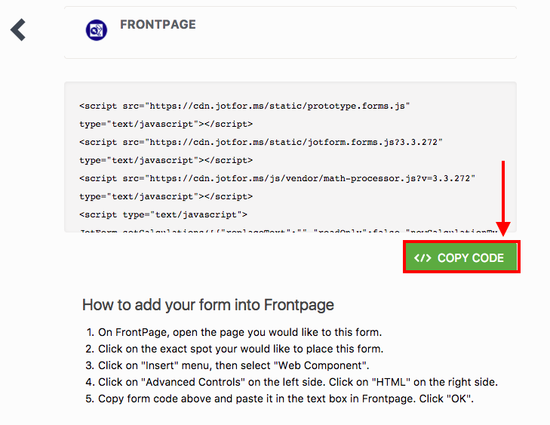
4. Now open FrontPage.
5. On FrontPage, open the page you would like to this form.
6. Click on the exact spot you would like to place this form.
7. Click on “Insert” menu, then select “Web Component“.
8. Click on “Advanced Controls” on the left side.
9. Click on “HTML” on the right side.
10. Copy this form code:
11. Paste it in the text box in FrontPage. Click “OK“.
12. You should now see your form on the page.
13. Save your page and upload to your web site.

Send Comment:
41 Comments:
More than a year ago
I made a form and is trying to add it to a frontpage website. The form has sections however when I add it to the website I can only see the first two pages. Can you help me? The second page that should say Next and Back only says Back
More than a year ago
Can you create a password for each individual entry?
This would be ideal for personal information.
Thank you,
Peter
More than a year ago
Saludos cordiales, Por favor si me pueden ayudar donde encuantro los Informes visuales, estoy utilizando la versión FREE o libre de hasta 100 usuarios.
Cuenca-Ecuador-
More than a year ago
i designed a web page on front page,i want to insert my form on the web page.but i don't want the form to show on my web page i want it to be hiding under my web page.what will i do?thanks
More than a year ago
Trying to show a report on our website - we're a volleyball association. I need to show other players what divisions people have signed up for a particular tournament. I have the divisions identified in the payment wizard - different divisions cost different entry fees to enter. For some reason, the report is showing the payment info for the person that completed the paypal transaction. I only want to show what they paid for not their personal information. Please help.
More than a year ago
support@justhost.com
More than a year ago
Been trying the jotform for the past hour, setting up templates and I LOVE IT! The Free version is very feature rich and the upgrade will be great for our paid forms! I have been searching forever! Happy I found you!
More than a year ago
What are the admin features in Jot form?
More than a year ago
Put the edit submission link to the autoresponder e-mail of your form. that is the only way.
From now on please ask your questions to the forum.
More than a year ago
This is great. Even better would be a way to link to a specific response. For instance, if I want to point someone to a particular submission with a direct link rather than them having to go to the entire directory and find the specific submission. Is that possible?
More than a year ago
@bepicanova: Create grid listing report. Please follow the steps then.
More than a year ago
i would like redirecting to my web page, a list of all submission like appear in your submission page (part above) ,a summary of submission in that moment
i don't understand how
give me a suggestion step by step please tank you
More than a year ago
Having hadafew problems recently these have now been resolved tahanks to your help. Great results appreciated by my users
More than a year ago
Porqué en el reporte gráfico solo me aparecen las 2 primeras respuestas? Cómo puedo solucionarlo?
More than a year ago
It is an image editor. Not for adding form codes etc.. as far as I know. Also it doesn't produce html files so it is not possible to add our code on it. You should use Frontpage.
More than a year ago
I cannot get the source code to operate in MS Photodraw, could you offer any assistance.
More than a year ago
Would be nice to have visual reports span more than 1 page. For a 17 question survey, i have to have 17 different reports?!
More than a year ago
AMAZING PRODUCT! I've been in the Web-business for 17 years (honest) and have seldom seen such a well defined and professional product. You guys did a GREAT job! BIG FAN.
More than a year ago
it's advisable
More than a year ago
cava si ki
More than a year ago
sa
More than a year ago
Can you tell me why this link is not working https://www.jotform.com/?formID=2914010149
More than a year ago
why is my link not working https://www.jotform.com/?formID=2932012376
More than a year ago
How do i draw a single line ?
how do i create auto generate unique id # for each record
More than a year ago
You guys ROCK! Thos JOTFORM Application is the best tool I have seen ever for form creation and implementation. The email delivery or Database entry are tools that are invaluable to me as a webmaster. They save me time and a mind cramp! Thanks for the good work and keep it up!
Chris Thornton
Webmaster