

Evaluatieformulieren voor klanttevredenheid
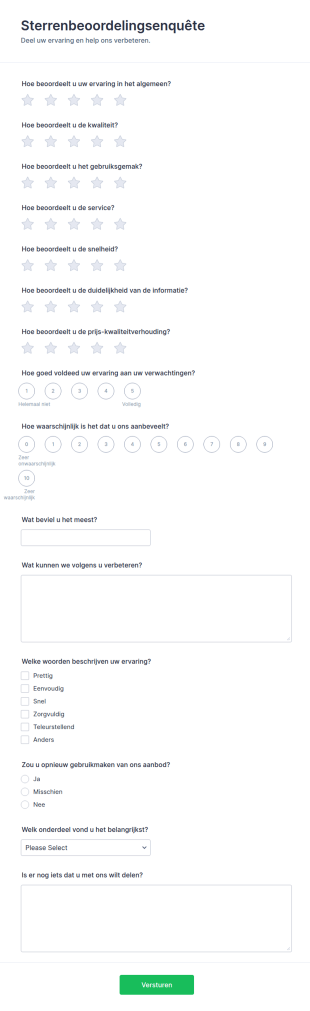
Sterrenbeoordeling Feedbackformulier
Verzamel klantfeedback na een aankoop, servicecontact of evenement met het Sterrenbeoordelingsenquête Formulier in Jotform, zodat teams trends herkennen, prioriteiten bepalen en de beleving doelgericht verbeteren.
Ga naar categorie:Templates voor enquêtesOver Evaluatieformulieren voor klanttevredenheid
Customer Satisfaction Evaluation Forms are essential tools for gathering feedback from clients, customers, or stakeholders about their experiences with a product, service, or interaction. These forms are designed to measure satisfaction levels, identify areas for improvement, and help organizations understand how well they are meeting customer expectations. Common use cases include post-purchase surveys, service feedback forms, event satisfaction questionnaires, and support interaction evaluations. By systematically collecting and analyzing this feedback, businesses can make informed decisions to enhance their offerings, improve customer loyalty, and address any issues promptly.
With Jotform, creating and managing Customer Satisfaction Evaluation Forms becomes a seamless process. Jotform’s intuitive drag-and-drop Form Builder allows users to quickly design custom forms tailored to their specific needs, without any coding knowledge. Users can choose from a wide range of ready-to-use templates, add various question types, and integrate with other tools for efficient data collection and analysis. Jotform also offers features like conditional logic, autoresponder emails, and real-time notifications, making it easy to streamline the feedback process and ensure that valuable insights are captured and acted upon.
Use Cases of Customer Satisfaction Evaluation Forms
Customer Satisfaction Evaluation Forms can be adapted to a variety of scenarios, each with unique requirements and benefits. Here’s how these forms can be utilized across different contexts:
1. Voorbeelden van toepassingen:
- Post-purchase feedback for retail or e-commerce transactions
- Service quality assessments for hospitality, healthcare, or customer support
- Event satisfaction surveys for conferences, workshops, or webinars
- Product experience evaluations for new launches or beta testing
- Internal feedback for employee or team satisfaction
2. Voordelen en verbeteringen:
- Identifying pain points in the customer journey
- Measuring overall satisfaction and loyalty
- Gathering actionable suggestions for improvement
- Detecting trends in customer sentiment over time
- Providing a structured channel for customer complaints or praise
3. Geschikt voor:
- Business owners and managers seeking to improve customer experience
- Customer service and support teams monitoring service quality
- Marketing and product teams collecting feedback on offerings
- Event organizers evaluating attendee satisfaction
- HR departments assessing internal satisfaction
4. Aanpasbaar aan verschillende doeleinden:
- Content and fields may vary based on the use case:
- Retail feedback forms may include order details, product ratings, and delivery experience questions.
- Service evaluation forms might focus on staff professionalism, response time, and issue resolution.
- Event surveys could ask about venue, content quality, and overall organization.
- Internal satisfaction forms may include questions about workplace environment, management, and resources.
In summary, Customer Satisfaction Evaluation Forms are versatile tools that can be tailored to fit a wide range of feedback scenarios, helping organizations of all types to better understand and serve their audiences.
How to Create a Customer Satisfaction Evaluation Form
Creating a Customer Satisfaction Evaluation Form with Jotform is a straightforward process that empowers you to collect valuable feedback efficiently. Whether you’re seeking insights after a purchase, service interaction, or event, Jotform’s flexible platform allows you to design forms that fit your specific needs and use cases.
Je kunt deze stappen volgen om te beginnen:
1. Kies hoe je wilt beginnen:
- Log in to your Jotform account and click on “Create” in your workspace.
- Select “Form” and decide whether to start from scratch or use one of Jotform’s 10,000+ templates. For customer satisfaction, you’ll find templates tailored to retail, service, event, and more.
2. Selecteer de gewenste lay-out:
- Choose between Classic Form (all questions on one page) or Card Form (one question per page) based on your audience and feedback scenario.
3. Essentiële formulierelementen toevoegen:
- Klik op het menu 'Element toevoegen' om velden te slepen en toe te voegen, zoals:
- Naam en contactgegevens (optioneel voor anonieme feedback)
- Waarderingsschalen (bijv. 1-5 sterren of Likertschalen)
- Multiple choice or dropdown questions about specific aspects (e.g., product quality, staff helpfulness)
- Open-ended questions for detailed comments or suggestions
- Date and order/service reference fields for context
4. Aanpassen aan je beoogde doel:
- Tailor questions to your scenario:
- For retail, include product details and delivery experience.
- For service, focus on staff interaction and resolution speed.
- For events, ask about content quality and logistics.
- Gebruik voorwaardelijke logica om deelnemers een gepersonaliseerde ervaring te bieden door vragen op basis van eerdere antwoorden te tonen of te verbergen.
5. Formulier ontwerpen en je huisstijl toevoegen:
- Use the Form Designer to match your brand’s colors, logo, and style.
- Apply a professional theme or adjust fonts and layouts for clarity and engagement.
6. Set Up Notifications and Autoresponders:
- Configure email notifications to alert your team of new submissions.
- Stel automatische antwoorden per e-mail in om respondenten te bedanken voor hun feedback.
7. Publiceer en deel je formulier:
- Click “Publish” to copy the form link or embed it on your website, email, or social media.
- Use QR codes for in-person events or printed materials.
8. Antwoorden testen en controleren:
- Bekijk een voorbeeld van je formulier en dien een testformulier in om te controleren of alles op de juiste manier werkt.
- Monitor submissions in Jotform Tables, filter responses, and export data for analysis.
By following these steps, you can create a Customer Satisfaction Evaluation Form that not only gathers actionable insights but also enhances your relationship with customers. Jotform’s no-code builder, advanced customization, and robust data management features make it easy to adapt your form to any feedback scenario, ensuring you always stay connected to your audience’s needs.
Veelgestelde vragen
1. What is a Customer Satisfaction Evaluation Form?
A Customer Satisfaction Evaluation Form is a survey or questionnaire designed to collect feedback from customers about their experiences with a product, service, or event. It helps organizations measure satisfaction levels and identify areas for improvement.
2. Why are Customer Satisfaction Evaluation Forms important?
These forms provide valuable insights into customer perceptions, highlight strengths and weaknesses, and guide businesses in making data-driven decisions to enhance customer experience and loyalty.
3. What information is typically collected in a Customer Satisfaction Evaluation Form?
Common fields include customer contact details (optional), ratings for various aspects (e.g., quality, service, timeliness), open-ended comments, and specific questions related to the product, service, or event.
4. Are there different types of Customer Satisfaction Evaluation Forms?
Yes, forms can be tailored for different scenarios such as post-purchase feedback, service evaluations, event surveys, and internal satisfaction assessments, each with unique questions and focus areas.
5. Who should use Customer Satisfaction Evaluation Forms?
Business owners, customer service teams, event organizers, product managers, and HR departments can all benefit from using these forms to gather feedback and improve their offerings.
6. How is privacy handled in Customer Satisfaction Evaluation Forms?
Forms can be designed to collect anonymous feedback or require identifiable information, depending on your needs. It’s important to inform respondents about how their data will be used and protected.
7. Can Customer Satisfaction Evaluation Forms be used for internal feedback?
Absolutely. These forms are also effective for gathering feedback from employees or team members about workplace satisfaction, processes, or management.
8. What are the benefits of using online Customer Satisfaction Evaluation Forms over paper forms?
Online forms offer faster distribution, real-time data collection, easier analysis, and greater convenience for both respondents and organizations, leading to higher response rates and more actionable insights.