

Обрасци за основне школе
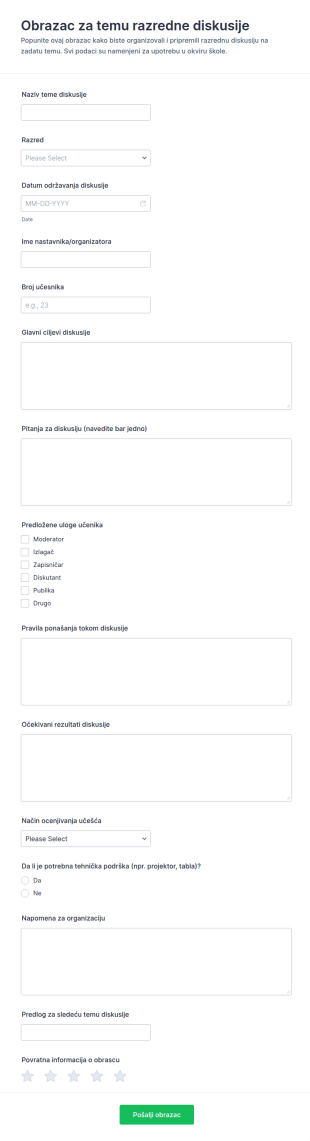
Tema Za Raspravu U Razredu Survey
Obrazac za temu razredne diskusije олакшава наставницима планирање и координацију разредних расправа, од припреме теме до организације улога и ресурса, уз јасно прикупљање података у Jotform-у.
Иди на категорију:Обрасци за образовањеAbout Обрасци за основне школе
K-12 обрасци су посебно дизајнирани дигитални обрасци прилагођени различитим потребама образовних установа од основног до средњег нивоа образовања. Ови обрасци су важан део поједностављивања различитих оперативних процеса, као што су упис ученика, обрасци сагласности за излете и прикупљање повратних информација од родитеља и ученика. У стварним токовима рада, K-12 обрасци могу да се користе за аутоматизацију административних задатака, смањење ручног вођења документације и унапређење комуникације између наставника, родитеља и ученика. Дигитализацијом ових процеса школе могу да обезбеде ефикасно и безбедно прикупљање информација, смањујући грешке и време потребно за обраду података.
Jotform се издваја као водећи онлајн креатор образаца за K-12 обрасце, пружајући једноставно и ефикасно искуство у креирању и управљању обрасцима. Уз Jotform, наставници и администратори могу лако да прилагоде обрасце својим специфичним потребама, користећи једноставан интерфејс заснован на принципу „превуци и пусти“. Могућност аутоматизације прикупљања података значајно побољшава оперативну ефикасност, омогућавајући образовним установама да се више усредсреде на образовне резултате, а мање на административно оптерећење. Поред тога, Jotform Табела омогућава централизовано управљање подацима, сигурно чување и једноставан приступ прикупљеним информацијама, обезбеђујући да доносиоци одлука имају потребне податке надохват руке.
Why Use K-12 Forms?
- K-12 Forms offer unparalleled accuracy in data collection, reducing the likelihood of errors that commonly occur with manual data entry. By automating the data entry process, schools can ensure that information is recorded correctly and efficiently.
- Speed is another critical advantage, as these forms allow for rapid dissemination and collection of information. This is particularly useful during peak times, such as enrollment periods, where timely data handling is crucial.
- Professional data handling is ensured through secure data management practices. Jotform provides robust security measures that protect sensitive student and staff information, maintaining privacy and compliance with educational regulations.
- The ease of use in creating and deploying these forms means that even those with minimal technical skills can design professional-grade forms. The intuitive design interface allows educators to focus on form content rather than technical complexities.
- K-12 Forms can be integrated with over 100 third-party applications, such as Google Sheets and Salesforce, facilitating seamless data flow between systems. This integration capability enables schools to manage data across multiple platforms efficiently.
Common Problems Solved by K-12 Forms
- One of the most common issues in educational institutions is the cumbersome nature of paperwork. K-12 Forms replace traditional paper forms, drastically reducing the physical space required for storage and the time needed for processing.
- Manual data entry is prone to human error, which can lead to inaccuracies in student records. By utilizing digital forms, schools can automate data entry, ensuring that records are accurate and up-to-date.
- Lost data is a significant concern, especially with paper-based systems. Digital forms offer a secure and reliable way to store and back up data, minimizing the risk of information loss.
- Communication barriers between parents and schools can hinder effective engagement. K-12 Forms facilitate better communication by allowing parents to easily submit feedback, consent, and other necessary information online.
- Processing times for approvals and administrative tasks can be lengthy. With features such as approval workflows, K-12 Forms streamline these processes, allowing for quicker decision-making and action.
Matching Use Cases to Features
- The Drag-and-Drop Form Builder is perfect for creating customized forms quickly and efficiently, allowing educators to tailor forms to specific needs without requiring technical expertise.
- Conditional Logic can be employed to simplify complex forms by showing or hiding fields based on user responses, making forms more intuitive and easier to complete.
- Electronic Signatures (Jotform Sign) are ideal for consent forms, enabling parents and guardians to sign documents digitally, thus speeding up the approval process.
- Integrating with 30+ Payment Gateways, such as PayPal and Stripe, allows schools to collect payments for events, fees, or donations directly through the forms, enhancing convenience for both the institution and the payers.
- The Report Builder feature empowers schools to analyze data collected through forms, generating insights that can inform strategic decisions and improve educational outcomes.
- Jotform's Approval Workflows streamline processes that require multiple sign-offs, such as administrative approvals, by automating the routing and notification of pending tasks.
- Secure Data Management with Jotform Tables ensures that all collected data is stored safely and can be accessed easily by authorized personnel, reducing the risk of data breaches.
How to Create a K-12 Form
- Begin by browsing the Template List for a suitable K-12s template or start from scratch with a blank form to meet specific needs.
- Customize your form's design and fields using the intuitive Drag-and-Drop Form Builder, which requires no coding knowledge.
- Once your form is ready, publish and share it via Direct Link, Email, or Website Embed to ensure it reaches the intended audience efficiently.
Top Use Cases for K-12 Forms
- For Managers: K-12 Forms are invaluable for managers looking to streamline administrative processes and enhance operational efficiency. By digitizing workflows, managers can reduce the workload associated with manual paperwork, freeing up time to focus on strategic initiatives. Furthermore, the centralized data management offered by Jotform enables managers to access real-time data, facilitating informed decision-making.
- For Teams: Teams within educational institutions benefit significantly from the collaborative capabilities of K-12 Forms. The integration with third-party applications allows teams to share and analyze data seamlessly, fostering a more connected and informed working environment. Additionally, the use of approval workflows ensures that team members can efficiently manage tasks that require multiple levels of authorization.
- For Customers: For parents and students, the use of K-12 Forms translates to a more engaging and efficient interaction with the school. Parents can easily submit necessary information, such as enrollment details or consent forms, online, reducing the need for physical visits to the school. Students benefit from streamlined processes that free up administrative resources, allowing schools to focus more on delivering quality education.
Summarizing K-12 Forms
K-12 Forms provide a comprehensive solution for educational institutions looking to enhance their operational efficiency and data management capabilities. By embracing digital forms, schools can streamline administrative processes, reduce the risk of data loss, and improve communication with parents and students. Jotform's robust features, such as conditional logic and secure data management, ensure that these forms are not only easy to use but also highly effective in meeting the unique needs of the K-12 education sector.
Често Постављана Питања
1) Is it free to create K-12 Forms on Jotform?
Да, Jotform нуди бесплатан план који омогућава корисницима да креирају и користе K-12 обрасце, иако неке напредне функције могу захтевати плаћену претплату.
2) Да ли су обрасци и послати подаци безбедни?
Absolutely, Jotform employs industry-standard security measures to protect both forms and submitted data, ensuring compliance with privacy regulations.
3) Do I need coding knowledge to build a K-12 Form?
No, Jotform's Drag-and-Drop Form Builder is designed for ease of use, allowing you to create forms without any coding experience.
4) Да ли могу директно да прикупљам уплате путем својих образаца?
Yes, Jotform integrates with over 30 payment gateways, enabling you to collect payments directly through your K-12 Forms.
5) Да ли се ови обрасци могу користити на мобилним уређајима?
Indeed, Jotform's forms are mobile-friendly and can be accessed, completed, and submitted on any mobile device.
6) Да ли могу да претворим пријаве из образаца у професионалне PDF документе?
Yes, with Jotform's PDF Editor, you can automatically generate professional PDF documents from form submissions.
7) Да ли могу да интегришем K-12 обрасце са другим системима?
Да, Jotform нуди више од 100 интеграција са услугама трећих страна, што ти омогућава да неприметно повежеш своје обрасце са другим системима као што су Google Sheets и Salesforce.
8) How can K-12 Forms improve parent-teacher communication?
K-12 Forms facilitate efficient communication by allowing parents to easily provide feedback, submit forms, and engage with the school online, reducing the need for in-person interactions.