

Шаблони за медицинска история

Шаблон за изписване от болница
Добра практика е винаги да проверявате и да се уверите, че всичко е наред, преди да изпишете пациент. За да се гарантира това, ръководството на болницата обикновено има формa, която те попълват и проверяват преди изписването на пациент. В днешния ни свят, където хората използват по-малко хартия, този шаблон за изписване от болница е един PDF документ, който можете да използвате, за да запазите информацията за изписване на пациенти.Същността е, че можете лесно да проверите информацията, записана в PDF документа, за да сте сигурни, че пациента може да бъде изписан. Шаблонът на писмо за изписване от болницата тук може да бъде модифициран според вашия вкус.
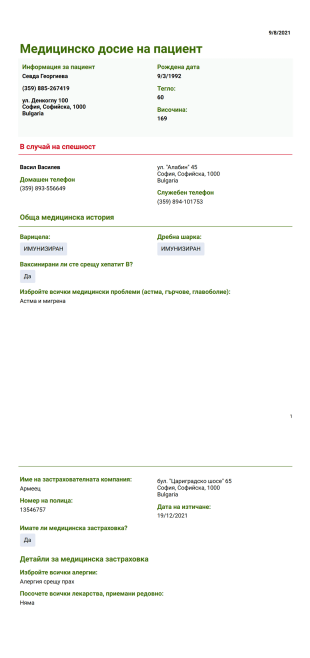
Шаблон за медицинско досие на пациент
При спешни случаи може да не успеете да комуникирате ефективно вашата пълна медицинска история с парамедиците. PDF шаблона на медицинско досие на пациент означава да се предостави медицинска история на пациента. С помощта на PDF шаблона за медицинска история, лекаря ще може да осигури по-добра грижа и лечение за пациента.С помощта на този шаблон на PDF за медицинска история можете да събирате данните на пациента, като лична информация, информация за контакт в спешен случай, въпроси относно общата медицинска история като хирургия, наранявания, заболявания, алергии и лекарства, които се приемат редовно. Освен това можете да съберете данните за медицинската застраховка на пациента, за да му помогнете. Освен това не се притеснявате за вашите данни, защото нашите шаблони са защитени с HIPAA съответствие. Можете да използвате този PDF шаблон за медицинска история с HIPAA съвместимост.
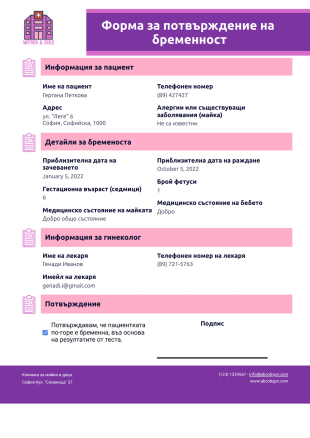
Шаблон за потвърждение на бременност
Документът за потвърждение на бременност се използва в болници, при майчинство и при престой в клиника. Това се дава на жена, която получава положителни резултати от тестове за бременност. Този документ също така служи като доказателство, че жената е бременна, което може да се използва за медицински преглед, подаване за отпуск по майчинство и искане за здравно осигуряване.Този добре проектиран шаблон за потвърждение на бременност съдържа информация за пациента, бременността и акушер-гинеколога. Детайлите за бременността показват предполагаемата дата на зачеването, последната менструация, очакваната дата на раждане, месеца на бременността и броя ембриони. Този шаблон също така уточнява дали майката има медицински заболявания и алергии.
Относно Шаблони за медицинска история
Лекарите и болниците използват медицинската история на пациента, за да прегледат неговата/нейната здравна история. Много важна част от техния работен процес е да се гарантира, че те осигуряват най-добрите грижи и лечение. Медицинската история на пациента може да включва подробности за минали заболявания, болести протичащи в семейството, предишни диагнози, медицински резюмета, терапии, алергии и лекарства. Да, това не е цялата картина, но с помощта на подробна медицинска история, лекарите могат да видят здравословните модели на пациентите с един поглед.
Много болници разчитат на хартиени форми за тази задача. Други използват онлайн форми, докато някои също използват PDF форми. И така, ето колекция от PDF шаблони за форми, които можете да използвате, като отправна точка. Трябва да зададете множество въпроси, но хубавото при използването на шаблон е свободата да го персонализирате. На всичкото отгоре започвате безплатно с красиви и добре проектирани PDF шаблони.
Why Use Medical History Templates?
- Medical History Templates are essential for maintaining accuracy in patient data collection, as they provide a consistent format that reduces the likelihood of errors. By capturing data in a standardized manner, healthcare providers can ensure that critical information is not overlooked, which is vital for effective patient care and treatment planning.
- The use of these templates significantly speeds up the patient intake process, allowing healthcare professionals to gather comprehensive patient information quickly and efficiently. This rapid data collection is crucial in medical settings where time is often of the essence, such as in emergency care or high-volume clinics.
- By employing professional Medical History Templates, healthcare organizations can present a polished and reliable image to patients. The structured and professional appearance of these templates reinforces patient confidence in the quality of care provided, fostering trust and patient satisfaction.
- Medical History Templates facilitate easy sharing and communication of patient information across different departments and healthcare professionals. This enhanced communication ensures that all parties involved in a patient's care have access to the same accurate and up-to-date information, promoting coordinated and effective treatment strategies.
- These templates support compliance with data management protocols by organizing patient information in a secure and accessible format. The use of digital templates allows for efficient data storage and retrieval, minimizing the risk of lost or misplaced records and ensuring that patient information is always available when needed.
Common Problems Solved by Medical History Templates
- One of the primary challenges in healthcare is the sheer volume of paperwork involved in patient data collection. Medical History Templates streamline this process by digitizing and automating data entry, drastically reducing the time and resources spent on manual paperwork.
- Manual data entry is prone to errors, which can have serious implications for patient care. By utilizing Medical History Templates, healthcare providers can minimize the risk of errors associated with manual data entry, ensuring that all patient information is recorded accurately and consistently.
- Lost or misplaced patient records are a common issue in paper-based systems. Medical History Templates eliminate this problem by providing a digital solution that ensures patient data is stored securely and can be easily retrieved whenever necessary, reducing the risk of lost information.
- The use of templates addresses the problem of inconsistent data collection methods across different departments or facilities. By standardizing the data collection process, these templates ensure that all necessary information is captured uniformly, supporting seamless communication and coordination in patient care.
- Medical History Templates can significantly reduce the administrative burden on healthcare staff, freeing up valuable time and resources that can be redirected towards patient care. By streamlining data collection and management processes, these templates enhance overall operational efficiency within healthcare organizations.
Matching Use Cases to Features
- The drag-and-drop form builder is instrumental in customizing Medical History Templates to fit specific healthcare needs. This feature allows users to easily modify templates by adding or rearranging fields, ensuring that all pertinent patient information is captured comprehensively.
- Conditional logic enhances the functionality of Medical History Templates by allowing healthcare providers to tailor the data collection process based on specific patient responses. This feature ensures that only relevant questions are presented, improving the efficiency and accuracy of data collection.
- Jotform Sign, the electronic signature feature, is crucial for obtaining patient consent and authorization directly within the Medical History Template. This capability ensures that all necessary legal acknowledgments are captured, facilitating compliance and streamlining the patient intake process.
- The PDF Editor enables automated PDF generation, allowing healthcare providers to convert completed forms into professional PDFs instantly. This feature ensures that patient information is documented in a polished and easily shareable format, supporting efficient communication and record-keeping.
- Jotform's Report Builder can be leveraged to generate detailed reports from the data collected through Medical History Templates. This capability supports data analysis and decision-making, allowing healthcare providers to identify trends and insights that can enhance patient care.
- Approval workflows can be integrated into Medical History Templates to streamline the review and approval process of patient information. This feature ensures that all collected data is verified and approved by the relevant parties, maintaining high standards of data integrity and accuracy.
- Jotform Tables offer secure data management, allowing healthcare organizations to store and organize patient information efficiently. This feature supports easy access and analysis of data, facilitating informed decision-making and enhancing patient care outcomes.
How to Create a Medical History Template
- Browse the Template List for a Medical History template or start from a blank Template. This initial step provides a foundation for designing a customized template tailored to specific healthcare needs.
- Customize the design and fields using the Drag-and-Drop Form Builder. This step allows for the addition of specific fields, logos, and design elements that align with the healthcare organization's branding and operational requirements.
- Publish and share via Direct Link, Email, or Website Embed. These sharing options ensure that the Medical History Template is easily accessible to patients and staff, facilitating efficient data collection and management.
Top Use Cases for Medical History Templates
- For Managers: Medical History Templates offer managers a streamlined approach to overseeing patient data collection and management processes. By standardizing data formats and automating entry, managers can ensure that their teams operate efficiently, reducing errors and enhancing the overall quality of patient records. This organized approach also allows managers to easily access and analyze data for reporting and decision-making purposes, ultimately driving operational improvements within the healthcare organization.
- For Teams: Healthcare teams benefit from Medical History Templates by gaining access to a reliable and consistent data collection tool that enhances communication and collaboration. These templates ensure that all team members are working from the same accurate and up-to-date patient information, supporting coordinated care efforts. Additionally, the automated data collection process reduces administrative burdens, allowing team members to focus more on patient care and less on paperwork.
- For Customers: Patients, as customers of healthcare services, experience improved interactions with healthcare providers through the use of Medical History Templates. These templates facilitate a smoother and more efficient patient intake process, reducing wait times and ensuring that all necessary information is collected in one go. This efficient process not only enhances the patient experience but also builds trust, as patients see that their healthcare provider values accuracy and professionalism in handling their personal medical information.
Summarizing Medical History Templates
Поверителността също е ключов момент, който трябва да имате впредвид. Законът за преносимост и отчетност на здравното осигуряване от 1996 г. (или HIPAA) е законодателство на Съединените щати, което предоставя разпоредби за поверителност и сигурност на данните за защита на медицинската информация. Добрите новини? Jotform предлага функции за HIPAA съответствие и това е огромен плюс за всеки в здравната индустрия. Така че, освен тези PDF шаблони, които са били предварително изградени и проектирани за вас, вие също се наслаждавате на предимствата от използването на платформа, която е HIPAA-адаптивна.
Тези шаблони са само предложени форми. Ако използвате форма, като договор или за събиране на лична (или лична здравна) информация или за някаква друга цел с правни последици, препоръчваме ви да си направите домашното, за да сте сигурни, че спазвате приложимите закони и да се консултирате с адвокат, преди да разчитате на някаква конкретна форма.
Често задавани въпроси
1) Is it free to create Medical History Templates on Jotform?
Yes, Jotform offers a free plan that allows users to create and use Medical History Templates, with options to upgrade for additional features and storage.
2) Кога имате нужда от шаблон на работна поръчка?
Yes, Jotform implements robust security measures, including SSL encryption and HIPAA compliance (for eligible plans), to ensure that all templates and submitted data are securely managed.
3) Do I need coding knowledge to build a Medical History template?
No, Jotform's drag-and-drop form builder allows users to create Medical History Templates without any coding knowledge, making it accessible to all users regardless of technical expertise.
4) What is Field Mapping in the context of Medical History Templates?
Field Mapping is the process of linking individual form fields on the template to specific data entries, ensuring that collected information is accurately positioned on the final PDF document.
5) Може ли работна поръчка да се използва, като фактура?
Yes, Medical History Templates can be accessed and filled out on mobile devices through Jotform Mobile Forms, supporting data collection in various settings.
6) Какви полета трябва да бъдат включени в шаблон на фактура?
Autoresponder PDF Attachment is a feature that automatically sends a PDF copy of the submitted Medical History Template to the form submitter via email, enhancing communication and record-keeping.
7) How does Password Protection enhance template security?
Password Protection adds an additional layer of security by requiring a password to open or view the PDF document generated from a Medical History Template, safeguarding sensitive patient information.