
The following suggestions are for informational purposes only. For official IRS instructions on how to fill out a 1098-T form, go to https://www.irs.gov/instructions/i1098et.
Form 1098-T helps students and parents report college tuition expenses so they can determine eligibility for education tax credits. You typically don’t fill it out yourself, but you may be able to use the information on it to help complete your tax return accurately.
Form 1098-T, also called the Tuition Statement, is issued by eligible educational institutions and plays a key role in claiming education-related tax benefits. Understanding how to read and use this form can help you avoid mistakes, reduce stress during tax season, and potentially lower your tax bill. Whether you’re a student paying tuition or a parent covering education costs, knowing how Form 1098-T works makes tax filing much smoother.
What is Form 1098-T and who receives it?
Form 1098-T is an IRS tuition statement that reports payments received for qualified education expenses during the tax year. Schools provide it to help students and families determine eligibility for education tax credits.
Eligible colleges, universities, and vocational schools issue Form 1098-T to students who paid qualified tuition and related education expenses. Typically, you’ll receive it by late January, either electronically or by mail. Both undergraduate and graduate students may receive this form if they meet reporting requirements.
Some students may not receive a 1098-T. This can happen, for example, if all tuition was covered by scholarships, if the student is a nonresident alien, or if expenses were paid entirely in a different tax year. Even without the form, students may still qualify for education credits using other documentation.
What information you need before filling out Form 1098-T
Before using Form 1098-T, gather personal details, enrollment records, and tuition payment information to ensure your tax return is accurate. Having everything ready prevents errors and delays when filing.
You’ll need the student’s full name, address, and Social Security number or taxpayer identification number. You should also have access to school records showing tuition payments, fees, and enrollment status. Bank statements or payment confirmations can help verify amounts listed on the form.
Accurate records matter because mistakes can affect your eligibility for education tax credits. Missing or incorrect information may trigger IRS questions or delay refunds. Keeping organized student tax documents is an important part of effective tax form management and makes it easier to match Form 1098-T data with what you report on your tax return.
How to fill out Form 1098-T
Form 1098-T contains numbered boxes that report tuition payments, adjustments, and enrollment information. Understanding what each box represents helps you use the form correctly when claiming education tax credits.
Some boxes provide informational details only, while others directly affect how you calculate credits like the American Opportunity Credit or Lifetime Learning Credit. Below is a box-by-box explanation to help you understand what each section means and how it applies to your taxes.
Box 1: Payments received for qualified tuition and related expenses
Box 1 shows the total payments (minus reimbursements or refunds) your school received for qualified tuition and related expenses during the tax year. This includes tuition and required enrollment fees but excludes other expenses like room, board, and insurance.
This box is crucial because it reflects actual payments made, not amounts billed. Use this figure when calculating education tax credits, but always compare it with your own payment records for accuracy.
Box 2: Amounts billed for qualified tuition (if applicable)
Box 2 reports amounts billed for qualified tuition and expenses instead of payments received. Many schools no longer use this box, but some may still report billing amounts.
If Box 2 is completed, it shows what the school charged rather than what was paid. This distinction matters because tax credits are generally based on payments made, not amounts billed.
Box 3: Changes made for a prior year
Box 3 indicates adjustments to amounts reported on a previous year’s Form 1098-T. This could happen if payments were refunded or corrected after filing.
If this box is checked, review prior tax returns to determine whether you need to amend them. Adjustments can affect previously claimed education credits.
Box 4: Adjustments made for a prior year
Box 4 shows reimbursements or refunds of qualified tuition and related expenses made during the tax year that relate to payments received that were reported in an earlier year. This often reflects refunds or retroactive changes.
These adjustments may reduce the amount of education credits you were eligible for previously. In some cases, you may need to repay part of a credit.
Box 5: Scholarships or grants
Box 5 lists scholarships, grants, and other third-party assistance applied to tuition during the tax year. This includes Pell Grants and institutional scholarships.
Scholarships reduce the amount of qualified expenses eligible for credits. You can compare this amount with Box 1 to calculate net education expenses.
Box 6: Adjustments to scholarships or grants
Box 6 reports changes to scholarship or grant amounts from a prior year. This may occur if awards were modified or returned.
Like Box 4, adjustments here can impact past tax filings. Keep records to determine whether changes affect previously claimed credits.
Box 7: Checkbox for academic period
Box 7 should be checked if Box 1 includes payments for an academic period beginning in the first three months of the following year.
This matters because certain credits allow you to count early payments toward the current tax year. Review carefully when calculating eligible expenses.
Box 8: Check if at least half-time student status
Box 8 indicates whether the student was enrolled at least a half-time student during the academic period. This status is required for some education credits.
The American Opportunity Credit requires at least half-time enrollment for at least 1 academic period. This box helps confirm eligibility.
Box 9: Graduate student status
Box 9 is checked if the student was enrolled in a graduate-level program. This information affects which education credits may apply.
Graduate students are generally not eligible for the American Opportunity Credit but may qualify for the Lifetime Learning Credit.
Box 10: Insurance contract reimbursement (if applicable)
Box 10 reports reimbursements from an insurance contract, which is rare and typically applies only to specific programs.
Most students will see this box blank. If completed, consult a tax professional to understand how it affects your return.
How Form 1098-T is used to claim education tax credits
Form 1098-T provides the financial information needed to determine eligibility for education tax credits. While you don’t submit it with your return, you use its data to calculate credits accurately.
The form supports claims for credits by documenting tuition payments and enrollment status. However, it should always be used alongside your own records to ensure accuracy.
American Opportunity Tax Credit overview
The American Opportunity Tax Credit applies to eligible undergraduate students in their first four years of higher education. It covers qualified tuition, fees, and course materials.
This credit can be partially refundable and requires at least half-time enrollment. Information from Boxes 1, 5, and 8 is especially important when calculating it.
Lifetime Learning Credit overview
The Lifetime Learning Credit is available for undergraduate, graduate, and professional students. It applies to a wider range of education expenses.
This credit is nonrefundable but can be claimed for an unlimited number of years. Box 9 often helps determine eligibility.
Key differences between the two credits
The American Opportunity Credit is limited to four years and requires half-time enrollment. The Lifetime Learning Credit has no enrollment minimum and no year limit.
Only one credit can be claimed per student per year. Choosing the right one depends on enrollment status and expenses.
Where Form 1098-T fits into each credit
Form 1098-T helps confirm tuition payments and enrollment details needed for both credits. It serves as a starting point, not the final calculation.
Always verify amounts using receipts and account statements. Because Form 1098-T is informational, families with more complex education expenses may find additional clarification in IRS Publication 970.
1098-T Generator by Jotform
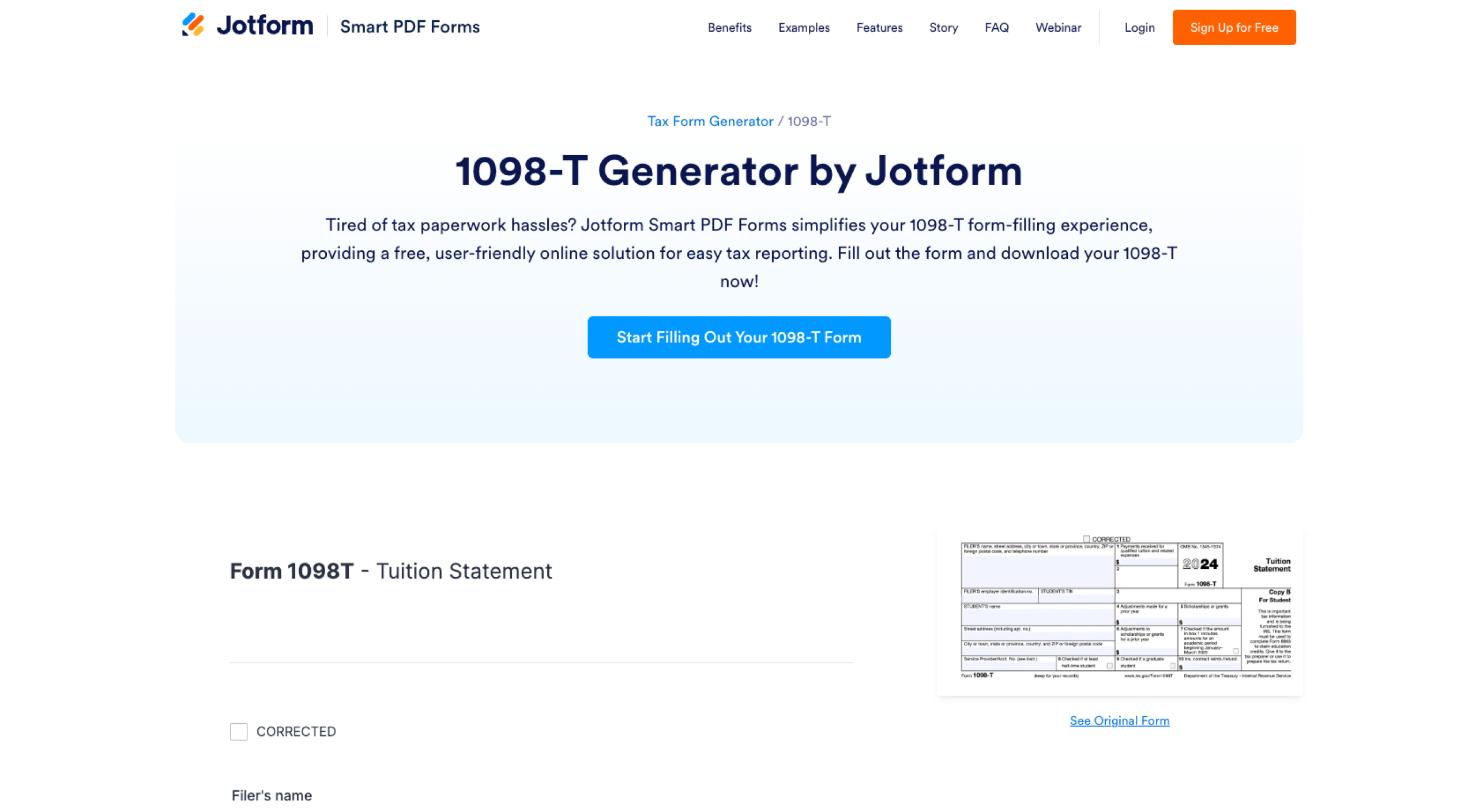
Jotform Smart PDF Forms simplifies your 1098-T form-filling experience by providing a free, user-friendly online solution for easy tax reporting. With Jotform’s 1098-T Generator, you can fill out the form accurately and download it instantly.
Safeguarding your data is Jotform’s top priority. All submissions are protected with GDPR- and CCPA-friendly features, a 256-bit SSL connection, and optional HIPAA compliance features for healthcare professionals. You can also add extra protection using Encrypted Forms 2.0 or CAPTCHA fields.
Jotform works smoothly on any device, so you can fill out your 1098-T form whenever it’s convenient. Whether you’re using a desktop computer, tablet, or mobile phone, the form automatically adjusts for a consistent, user-friendly experience.
Once your form is complete, you can instantly download it as a PDF. This makes it easy to save, share, or keep your student tax documents organized for future reference.
Jotform also lets you convert submissions back into the original 1098-T layout, helping ensure accuracy and professional formatting across all your tax records.
Your next steps after reviewing Form 1098-T
Form 1098-T helps students and parents understand tuition expenses and determine eligibility for education tax credits. Reviewing it carefully ensures accurate tax filing and fewer surprises.
Next, use the information to claim applicable credits and keep supporting documents on file. If your situation is complex or unclear, consider consulting a qualified tax professional. You can also explore helpful resources like tax form management tools and guidance on when you file taxes to stay organized and confident during tax season.
FAQ about the Form 1098-T
It depends on who claims the student as a dependent. If the student is claimed as a dependent, the parent typically claims the education credits. If the student is not a dependent, the student may claim them instead.
Schools calculate Form 1098-T based on payments they received for qualified tuition and related expenses during the tax year, minus scholarships or grants applied to those expenses.
Form 1098-T can help reduce your tax bill by supporting education tax credits. However, if the information is misunderstood or reported incorrectly, it may lead to errors or IRS follow-up questions.
AS ALWAYS, CONSULT AN ATTORNEY BEFORE RELYING ON ANY INFORMATION ON THIS PAGE. THE CONTENT ABOVE IS FOR INFORMATIONAL PURPOSES ONLY. JOTFORM IS NOT PROVIDING LEGAL, FINANCIAL OR OTHER ADVICE.



















Send Comment: