

Vorlagen für den Bildungsbereich

Schülerdatenblatt
Ein Schülerdatenblatt wird von Lehrern verwendet, um verschiedene Informationen über Schüler zu sammeln. Ganz gleich, ob Sie Schülerdaten für Ihre Klasse, für die Schulaufnahme oder für außerschulische Programme erfassen, mit unserem kostenlosen Online-Schülerdatenblatt können Sie wichtige Schülerdaten an einem sicheren Ort sammeln und speichern. Um loszulegen, müssen Sie nur das beigefügte Formular anpassen und in Ihre Schulwebsite einbetten. Sobald die Schüler ihre Antworten einreichen, werden ihr Name, ihre Kontaktinformationen und ihre persönlichen Daten automatisch im Schülerdatenblatt angezeigt. Sie müssen sich nicht für einen Kurs anmelden, um zu lernen, wie Sie Ihr Schülerdatenblatt anpassen können. Durch einfaches Ziehen und Ablegen können Sie Spalten umbenennen, neue Farben für Beschriftungen wählen und die verschiedenen Arten von Schülerinformationen in neue Tabs aufteilen. Sobald es fertig ist, können Sie von jedem Gerät aus auf Ihr Schülerdatenblatt zugreifen, es als PDF-, CSV- oder Excel-Datei herunterladen, für Schulunterlagen ausdrucken und mit anderen Lehrern und Dozenten teilen. Organisieren Sie Ihre Schülerdaten mit einer Online-Vorlage für Schülerdatenblätter, die perfekt auf Ihre Schule zugeschnitten ist.
Zur Kategorie:Bildung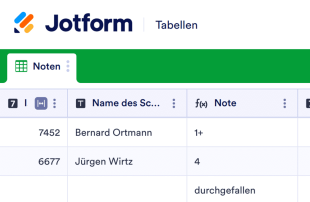
Notenblatt
Verfolgen und erfassen Sie die Noten Ihrer Schüler online mit diesem kostenlosen Notenblatt für Lehrer. Einfach herunterzuladen, zu drucken und weiterzugeben. Funktioniert auf jedem Gerät. Keine Programmierkenntnisse erforderlich.
Zur Kategorie:Bildung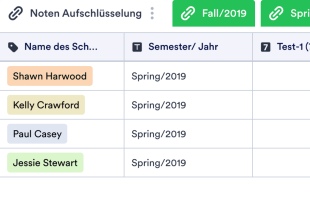
Notenbuch-Vorlage
Eine Notenbuch-Vorlage wird von Lehrern oder Pädagogen verwendet, um Noten für Klassenarbeiten, Quizfragen und Tests aufzuzeichnen. Unabhängig davon, welche Klasse oder welches Fach Sie unterrichten, verwenden Sie die kostenlose Online-Notenbuch-Vorlage von Jotform, um den Fortschritt der Schüler in Ihrem Klassenzimmer leichter zu verfolgen. Richten Sie einfach die Vorlage mit Zeilen für jeden Schüler und Spalten für jede benotete Aufgabe, jedes Quiz oder jeden Test ein, bevor Sie die Noten in die Tabelle eingeben. Sie können die Einträge von jedem Computer oder Mobilgerät aus ohne jegliche Codierung anzeigen, bearbeiten und gemeinsam nutzen. Als Lehrer/in ist Ihre Zeit wertvoll - deshalb haben wir es Ihnen leicht gemacht, Ihre Notenbuch-Vorlage schnell anzupassen. Fügen Sie einfach per Drag-and-drop weitere Spalten, Zeilen, Registerkarten und Beschriftungen hinzu, die Ihnen helfen, die Schülerdaten effizienter zu organisieren. Sie können sogar eine automatische Berechnungsfunktion auf Ihrem Arbeitsblatt einrichten, um sofort die Gesamtnoten der Schüler zu berechnen, wodurch Sie Zeit und Ressourcen sparen, die Sie besser für den Unterricht Ihrer Schüler verwenden können. Mit einer benutzerdefinierten Notenbuch-Vorlage, die Ihnen hilft, organisiert zu bleiben, und Ihnen Zeit bei der Benotung spart, sind Sie besser denn je auf das Schuljahr vorbereitet!
Zur Kategorie:Bildung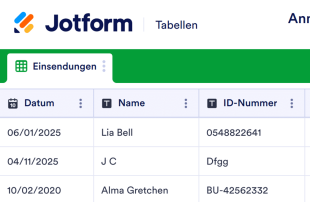
Anmeldeblatt für die Klasse
Erfassen Sie die Anwesenheit Ihrer Studierenden online mit dieser kostenlosen Online-Anwesenheitsliste! Teilen Sie einfach das beigefügte Formular per QR-Code und lassen Sie Ihre Studierenden es während des Unterrichts ausfüllen – oder teilen Sie es per Link, wenn Sie online unterrichten. Sobald Ihre Studierenden das Formular ausgefüllt und unterschrieben haben, werden ihre Daten automatisch in Ihre Anwesenheitsliste eingetragen. Sie können verschiedene Tabellenblätter erstellen, um die Anwesenheit in unterschiedlichen Sitzungen oder Semestern separat zu erfassen. Passen Sie Ihre Online-Anwesenheitsliste und das beigefügte Formular ganz einfach an Ihre Bedürfnisse an. Fügen Sie weitere Spalten und Tabellenblätter hinzu, berechnen Sie die Anwesenheitssummen mit vorgefertigten Formeln und ordnen Sie die Tabelle mit der benutzerfreundlichen Oberfläche von Jotform neu an. Schluss mit Papierkram – teilen Sie einfach das beigefügte Formular und erfassen Sie die Anwesenheit Ihrer Studierenden online mit dieser kostenlosen Anwesenheitsliste.
Zur Kategorie:BildungÜber Bildung
Tabellenvorlagen für Bildung helfen Ihnen, vielfältige Datensätze und Einsendungen effizient zu ordnen und zu verwalten. Sie sind auf die Anforderungen von Bildungseinrichtungen zugeschnitten und erleichtern die Erfassung von Informationen wie Anmeldungen von Schülerinnen, Schülern und Studierenden, Kursbewertungen, Feedback zur Lehre und Anmeldungen zu Veranstaltungen über Jotform-Formulare. Formularverantwortliche wie Lehrkräfte, Verwaltung und Fachbereiche verwalten so ihre Daten einfacher, weil alle erfassten Informationen geordnet abgelegt und leicht zugänglich sind. Mit dem Fokus auf die Verwaltung von Einsendungen helfen die Vorlagen, unterschiedliche Unterlagen im Bildungsbereich übersichtlich zu führen.
Jotform Tabellen ist die zentrale Stelle, an der Einsendungen aus verbundenen Jotform-Formularen automatisch erscheinen, sodass sich eingehende Daten effizient verwalten lassen. Jede Formularantwort wird zu einem Eintrag in der Tabelle, den Sie in der Tabellen- oder der Detailansicht prüfen können – flexibel in Darstellung und Auswertung. Mit Suche, Filtern, Gruppierung und verschiedenen Spaltentypen ordnen und prüfen Sie Einsendungen. Manuelle Eingabe sowie CSV- und Excel-Import stehen für vorhandene Daten zur Verfügung; im Mittelpunkt steht jedoch die automatische Übernahme vom Formular in die Tabelle – für einen schlanken Ablauf von der Datenerfassung bis zur Verwaltung.
Why Use Education Templates?
- Education Templates eliminate the need for manual data transfer by automatically populating responses into Jotform Tables, reducing the risk of errors and saving time for form owners.
- By keeping all responses together in a centralized database, these templates ensure that educational institutions can easily access and manage important information without losing track of any records.
- Users can find specific records faster through powerful search and filter features, allowing educators and administrators to quickly locate critical data when needed.
- Reviewing complete submission details becomes effortless with the ability to view and edit entries in the connected table, providing a comprehensive overview of all collected data.
- Coordination of follow-up actions is streamlined through real-time tracking and collaboration features, ensuring that all team members are informed and aligned on the next steps.
- The ability to generate detailed reports on collected data allows educational institutions to analyze trends, measure performance, and make informed decisions based on accurate information.
Common Problems Solved by Education Templates
- Manually copying submissions into spreadsheets is a time-consuming task that Education Templates solve by automatically populating entries directly into the table, minimizing effort and potential errors.
- Scattered responses across various platforms can lead to confusion and missed information, but with these templates, all data is centralized and easily accessible in one place.
- Locating specific records can be challenging in traditional spreadsheets, but Education Templates offer advanced search and filter options to quickly find the data needed.
- Inconsistent review processes can occur without a standardized system, but these templates provide structured views and column types to ensure that all submissions are reviewed thoroughly and uniformly.
- Hard-to-review uploads, such as documents or images, are simplified through Uploads View, which organizes and presents files in an easy-to-navigate format, enhancing the review process for educators.
Anwendungsfälle und passende Funktionen von Jotform Tabellen
- Incoming student registration data can be efficiently managed through the automatic appearance of submissions in the connected table, ensuring that all entries are organized and ready for review.
- Reviewing course evaluation submissions is simplified with Table View and Detail View, allowing educators to thoroughly analyze feedback and make necessary adjustments to course content.
- Team management of academic records is facilitated by access settings and assignees, ensuring that authorized personnel can manage and update data while maintaining data integrity.
- Reporting on academic performance or attendance becomes straightforward with Report View, providing a comprehensive overview of collected data for strategic planning and decision-making.
- Project submissions or research data can be organized using data grouping and column types, enabling educators to categorize and analyze information efficiently for better academic outcomes.
How to Use Education Templates with Jotform Forms
- Begin by selecting a relevant Education Template, starting with a blank table or utilizing the table connected to an existing Jotform Form. The Jotform Form will collect category-specific information, and new submissions will automatically appear in the connected table for seamless data management.
- Configure the table for submission review by naming columns, selecting appropriate column types, and choosing relevant views such as Table View, Detail View, Calendar View, or Uploads View to organize and analyze the data effectively.
- Manage submissions by utilizing search, filters, data grouping, formulas, access settings, assignees, and revision history. These capabilities ensure that the form owner or team can efficiently handle and analyze the collected data to support educational goals.
Top Use Cases for Education Templates
- For Form Owners: Form owners, such as teachers and administrative staff, benefit from the ability to review incoming responses promptly. They can edit submission data, check details or uploads, and keep records organized using Jotform Tables. This allows for a streamlined process in managing various educational submissions, ensuring that everything from student feedback to event registrations is handled efficiently and accurately.
- For Teams: Authorized team members can efficiently find and maintain entries within the tables, enhancing collaboration through coordinated responsibility with assignees when applicable. By using access settings and revision history, teams can support shared work, ensuring that all members are on the same page and that any changes are tracked for accountability. This structured approach fosters a collaborative environment conducive to achieving educational objectives.
- For Managers: Managers can monitor collected data to identify category-specific patterns and assess progress in educational projects. By reviewing data ownership and using Report View for oversight, they can ensure that the educational institution's goals are being met. This comprehensive view of submissions and their status supports informed decision-making and strategic planning, enabling managers to guide their teams effectively.
Summarizing Education Templates
Education Templates offer a practical and efficient solution for collecting and managing educational information through Jotform Forms and Jotform Tables. By streamlining the process from form submission to data management, these templates cater to the specific needs of educational institutions, promoting organized record-keeping and facilitating informed decision-making. Jotform Tables provides the flexibility and functionality needed to manage educational submissions effectively, ensuring that all data is accessible and actionable for educators, teams, and managers.
Häufig gestellte Fragen
1) Is it free to use Education Templates with Jotform Tables?
Jotform offers a Starter plan, which provides access to Jotform Tables and Education Templates. This allows users to explore the basic capabilities without any initial costs. However, for more advanced features and higher limits, users might consider upgrading to a paid plan.
2) How do submissions from Jotform Forms appear in Education Templates?
When a form is connected to an Education Template, each submission automatically appears in the linked table. This seamless integration ensures that responses are auto-populated as entries or rows, allowing users to manage and review data efficiently. New responses continue to populate the table, maintaining up-to-date records.
3) Can I edit, search, filter, group, and calculate data in Education Templates?
Yes, Jotform Tables allows submission edits, and users can search, filter, and group data to find specific information quickly. Different column types can be used to categorize data, and formulas can be applied for calculations. This flexibility aids in the efficient management of educational records.
4) Kann ich die Daten aus den Tabellen als CSV- oder Excel-Datei exportieren?
Yes, you can export data from Education Templates as CSV or Excel files. This feature enables users to add existing information alongside connected-form submissions and facilitates external data analysis and reporting. Exporting ensures that all necessary data handling requirements are met.
5) Which Jotform Tables views can I use with Education Templates?
With Education Templates, users can utilize Table View, Detail View, Calendar View, Report View, and Uploads View. Each view contributes to a comprehensive understanding of the data, helping form owners review and analyze submissions. These views provide different perspectives for effective data management.
6) Can teams collaborate on submissions in Education Templates?
Teams can indeed collaborate on submissions using Education Templates through access settings and collaboration features. Assignees can manage entries, and real-time tracking ensures everyone stays informed. Revision history further supports collaboration by keeping track of changes and updates made to the data.
7) Can I connect Education Templates to related data or other applications?
Yes, Education Templates support linked tables and integrations with other applications, allowing users to connect related data seamlessly. Action buttons can be used to perform specific tasks, enhancing the overall functionality and interoperability of the system. This connectivity streamlines workflows and enhances productivity.
8) Can I create reports, PDFs, and manage files from Education Templates?
You can generate reports using Report View and create PDFs for documentation purposes. Uploads View helps manage files associated with table data, and signed documents can be incorporated where necessary. These capabilities ensure comprehensive data handling and documentation for educational needs.