

Vorlagen für Picknick-Anmeldungen

Essen Anmeldeliste
Egal, ob Sie eine Buffet-Party oder ein Picknick veranstalten, finden Sie heraus, welche köstlichen Gerichte jeder mitbringt - mit diesem kostenlosen Online-Anmeldeformular für kulinarische Events! Alles, was Sie tun müssen, ist, das Anmeldeformular, das automatisch aus dieser Vorlage erstellt wird, weiterzugeben und zu sehen, wie die Anmeldungen in der Tabelle erscheinen! Die Gäste können ihren Namen, die Art der Speisen, die sie mitbringen möchten, ihr Gericht und dessen Zutaten sowie die Frage, ob sie eine Begleitperson mitbringen, eingeben, indem sie das Formular von einem beliebigen Gerät aus ausfüllen. Erstellen Sie ein benutzerdefiniertes Anmeldeformular für kulinarische Events ganz ohne Programmierung - fügen Sie einfach per Drag & Drop weitere Zeilen und Spalten hinzu, erstellen Sie farblich gekennzeichnete Etiketten, fügen Sie Tabs für zusätzliche Informationen ein und ändern Sie Ihre Tabelle sogar in eine Kartenansicht. Sobald Sie Eingaben über Ihr Formular akzeptieren, können Sie Ihr Essen Anmeldeformular von jedem Gerät aus anzeigen, ausdrucken oder mit nur einem Klick an Ihre Gäste weitergeben. Mit einem effizienten Speiseplan für Ihre nächste Veranstaltung stellen Sie sicher, dass niemand mit leeren Händen ankommt oder hungrig wieder geht.
Zur Kategorie:Anmeldebögen für Potlucks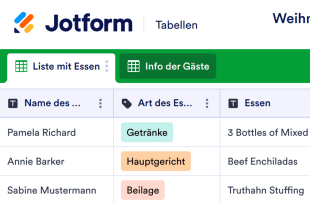
Weihnachtsbuffet Anmeldungen
Es ist die schönste Zeit des Jahres! Ob Sie Ihre jährliche Weihnachtsfeier ausrichten oder Feiertagsfeiern für das Büro planen, beginnen Sie mit unserem kostenlosen Online-Weihnachtsbuffet-Anmeldebogen. Alles, was Sie machen müssen, ist, das Anmeldeformular mit den Gästen zu teilen und zu beobachten, wie ihre Einsendungen wie von Zauberhand in Ihrer Tabellenkalkulation erscheinen. Mit einem beliebigen Gerät können die Gäste das Formular mit ihrem Namen und dem Essen, das sie mitbringen, ausfüllen. Sie können Ihre Tabellenkalkulation von Ihrem Desktop, Tablet oder Smartphone aus ansehen und sie mit nur einem Klick ausdrucken oder weitergeben. Wir machen Ihnen das Geschenk der individuellen Anpassung, damit Sie dieses Weihnachtsbuffet-Anmeldeformular Ihren Wünschen und Bedürfnissen anpassen können. Keine Codierung erforderlich – einfach per Drag-and-drop können Sie Zeilen und Spalten hinzufügen, farbkodierte Etiketten erstellen und Registerkarten für zusätzliche Informationen wie Zutaten oder Lebensmittelallergien einfügen. Wenn Sie mit dem Anpassen Ihrer Tabellenkalkulation fertig sind, wird sie gut genug aussehen, um in einer Schleife verpackt zu werden! Feiern Sie dieses Jahr eine fröhliche Weihnachtsfeier mit einem Online-Weihnachtsbuffet-Anmeldebogen.
Zur Kategorie:Anmeldebögen für Potlucks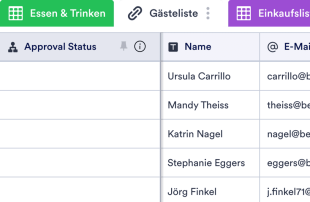
Anmeldeformular für das Erntedankfest
Organisieren Sie, wer welche Gerichte zu Ihrem Erntedankfest mitbringt, mit einem Anmeldeformular für das Erntedankfest. Kostenlos zu verwenden und anzupassen.
Zur Kategorie:Anmeldebögen für PotlucksÜber Vorlagen für Picknick-Anmeldungen
Vorlagen für Potluck-Anmeldelisten sind spezielle Tabellenvorlagen, die Formularverantwortlichen und Teams dabei helfen, alle Antworten und Datensätze im Zusammenhang mit Potluck-Veranstaltungen effizient zu organisieren und zu verwalten. Bei der Erfassung kategoriespezifischer Informationen über Jotform-Formulare erfassen diese Vorlagen jedes Detail darüber, was jede teilnehmende Person mitbringen möchte, und machen es leicht zugänglich. Formularinhaber wie Veranstaltungskoordinatoren oder Teamleiter nutzen diese Vorlagen, um Antworten zu verwalten. Diese Antworten umfassen Lebensmittel, Teilnehmerdaten und Sonderwünsche. Die Vorlagen strukturieren die gesammelten Informationen und verhindern das Chaos einer schlecht organisierten Veranstaltungsplanung.
Jotform Tabellen dienen als operative Drehscheibe, in die die Antworten aus verbundenen Jotform-Formularen integriert werden. Sobald Befragte ihre Formulare absenden, wandelt das System jede Antwort direkt in einen Eintrag in der Tabelle um. Sie können den Eintrag entweder in der Tabellenansicht oder in der Detailansicht einsehen. So organisieren Sie die Antworten schnell und effektiv. Nutzen Sie Funktionen wie Suche, Filter und Datengruppierung, um Ihren Überprüfungsprozess zu optimieren. Das System unterstützt außerdem manuelle Eingabe oder den Import von CSV- und Excel-Dateien, konzentriert sich jedoch weiterhin auf die automatische Integration von Daten aus Jotform-Formularen. So verwalten Sie alle Potluck-Informationen effizient und präzise.
Why Use Potluck Sign Up Sheet Templates?
- Potluck Sign Up Sheet Templates eliminate the tedious task of manually transferring data from forms to spreadsheets, ensuring all responses are automatically organized in one place. This automation reduces errors and saves time, allowing event planners to focus on other critical aspects of organizing.
- By using these templates, event coordinators can easily keep track of who is bringing what, which helps prevent duplicate items and ensures a diverse menu for the event. This results in a well-organized and enjoyable potluck experience for all attendees.
- With all submissions stored together, locating specific entries becomes a breeze. Using the search and filter features, form owners can swiftly retrieve information about individual participants or specific items, enhancing their ability to manage the event effectively.
- Reviewing complete submission details is simplified, as the templates offer a comprehensive view of each entry. This means coordinators can quickly verify all necessary information, such as contact details and dietary restrictions, ensuring nothing is overlooked.
- Coordinating follow-up actions, such as reminders or confirmations, becomes straightforward with the use of Jotform Tables' capabilities. Form owners can track changes, monitor participant responses, and generate reports to keep everyone informed and on schedule.
Common Problems Solved by Potluck Sign Up Sheet Templates
- Event planners often face the challenge of scattered responses, which can lead to confusion and miscommunication. Potluck Sign Up Sheet Templates centralize all submissions, making it easier to manage and review data efficiently.
- Manually copying responses into traditional spreadsheets can result in errors and inconsistencies. These templates automatically organize incoming data, ensuring accuracy and consistency across all entries.
- Locating specific records in a sea of responses can be time-consuming and frustrating. With advanced search and filter capabilities, these templates allow for quick retrieval of necessary data, streamlining the management process.
- Inconsistencies in reviewing submissions can lead to duplicated efforts or missed details. By using Jotform Tables' structured views, form owners can maintain a consistent review process, ensuring all entries are evaluated thoroughly.
- Uploads such as images or documents can be hard to manage without a dedicated system. The Uploads View in Jotform Tables makes it easy to store and review these attachments, providing context to each submission.
Anwendungsfälle und passende Funktionen von Jotform Tabellen
- When participants submit their potluck contributions via Jotform Forms, the responses are automatically populated into the connected table. This seamless integration allows form owners to have immediate access to all the necessary details for event planning.
- Reviewing submissions is made easy with Table View, where form owners can see all entries at a glance. By using filters and search functions, they can quickly sort and find specific entries, improving efficiency and organization.
- Team management is enhanced with features like access settings and assignees. This allows different team members to access, review, and manage assigned tasks or submissions, ensuring collaborative and coordinated efforts.
- Reporting is simplified with the use of Report View, which provides visual insights into the collected data. This helps form owners identify trends, such as popular dishes or common dietary restrictions, to better accommodate participants.
- Utilizing action buttons, form owners can quickly send out reminders or confirmations to participants, ensuring everyone is informed and prepared for the event. This enhances communication and keeps the planning process running smoothly.
How to Use Potluck Sign Up Sheet Templates with Jotform Forms
- Start by selecting a relevant Potluck Sign Up Sheet Template, a blank table, or the table connected to an existing Jotform Form. The form collects all the category-specific information, and as participants submit their responses, these automatically appear in the connected table.
- Configure the table to review submissions effectively by naming columns and choosing appropriate column types. Select relevant views such as Table View, Detail View, or Uploads View to ensure all necessary information is easily accessible and organized.
- Manage the submissions using search, filters, and data grouping to find specific entries quickly. Utilize access settings, assign tasks, and track changes with revision history to maintain collaborative efforts. Use features such as linked tables and action buttons to streamline follow-up actions and generate reports.
Top Use Cases for Potluck Sign Up Sheet Templates
- For Form Owners: Form owners, such as event coordinators, use Potluck Sign Up Sheet Templates to efficiently review and manage incoming responses. They can easily edit submission data to correct any errors or update information as needed. By checking the details or uploads associated with each entry, they ensure that all necessary information is complete. These templates help keep records organized within Jotform Tables, where they can easily track participation and manage event logistics.
- For Teams: Authorized team members benefit from Potluck Sign Up Sheet Templates by having a centralized system to find and maintain entries. They can coordinate responsibility with assignees, ensuring that each task is accounted for. With access settings and revision history, teams can support shared work by tracking who made changes and when, promoting a collaborative and transparent planning process.
- For Managers: Managers leverage Potluck Sign Up Sheet Templates to monitor collected data and identify patterns relevant to the event. They can review progress and ownership of tasks, ensuring that everything is on track. By utilizing Report View or other relevant views, managers gain insights into the overall planning process, which aids in making informed decisions and adjustments as needed.
Summarizing Potluck Sign Up Sheet Templates
Potluck Sign Up Sheet Templates offer a valuable solution for collecting and managing potluck-related information through Jotform Forms. By automatically integrating submissions into Jotform Tables, these templates streamline the event planning process, ensuring all data is organized and accessible. With capabilities for reviewing, organizing, and collaborating on entries, form owners and teams can efficiently manage every aspect of their potluck events, leading to successful and well-coordinated gatherings.
Häufig gestellte Fragen
1) Is it free to use Potluck Sign Up Sheet Templates with Jotform Tables?
Jotform offers a Starter plan, which allows users to access and utilize Potluck Sign Up Sheet Templates. While the plan provides free access, it's important to explore the specific features available under this plan. The Starter plan is a great way to begin using Jotform Tables, although users should be aware of any limitations it may have.
2) How do submissions from Jotform Forms appear in Potluck Sign Up Sheet Templates?
Submissions from Jotform Forms automatically appear in Potluck Sign Up Sheet Templates once a respondent completes and submits the form. The connected form ensures that each response becomes an entry in the linked table, usually as a row. This auto-population feature allows for seamless integration of new responses, providing an efficient and organized way to manage submissions.
3) Can I edit, search, filter, group, and calculate data in Potluck Sign Up Sheet Templates?
Yes, Potluck Sign Up Sheet Templates allow for a variety of data management capabilities. You can edit submissions directly within the table and utilize search and filter functions to locate specific entries. Additionally, you can group data by different criteria and perform calculations using formulas, enhancing your ability to analyze and organize the collected information effectively.
4) Kann ich die Daten aus den Tabellen als CSV- oder Excel-Datei exportieren?
Absolutely, the data within Potluck Sign Up Sheet Templates can be exported as CSV or Excel files. This feature allows you to add existing information alongside connected-form submissions or to share data externally. It provides a flexible way to integrate or distribute your collected data as needed.
5) Which Jotform Tables views can I use with Potluck Sign Up Sheet Templates?
Potluck Sign Up Sheet Templates offer various views, including Table View, Detail View, Calendar View, and Report View. Table View provides a comprehensive overview of all entries, while Detail View focuses on individual submissions. Calendar View is useful for event scheduling, and Report View helps in analyzing trends and summarizing data, supporting different aspects of event management.
6) Can teams collaborate on submissions in Potluck Sign Up Sheet Templates?
Yes, teams can collaborate effectively using Potluck Sign Up Sheet Templates. With access settings, you can control who can view or edit the data, ensuring secure and organized collaboration. Assignees and real-time tracking features help coordinate responsibilities, while revision history provides a log of changes, enhancing transparency and teamwork.
7) Can I connect Potluck Sign Up Sheet Templates to related data or other applications?
You can connect Potluck Sign Up Sheet Templates to related data using linked tables and integrations. Action buttons make it possible to perform tasks and interact with other applications, streamlining your workflow. This connectivity enhances the functionality of the templates, allowing for a more integrated and efficient event planning process.
8) Can I create reports, PDFs, and manage files from Potluck Sign Up Sheet Templates?
Yes, you can create reports using Report View, which is useful for summarizing data and identifying trends. PDF generation is available for creating document copies of your data, while Uploads View helps manage any files associated with submissions. These capabilities ensure that you have all the tools necessary for comprehensive data management and documentation.