

Vorlagen für Kostenvoranschläge

Angebotsvergleich
Eine Angebotsvergleichsvorlage ist ein Datenblatt, das zum Online-Vergleich von Geboten verwendet wird. Egal, ob Sie Baumaschinen verkaufen oder eine Auktion veranstalten, mit der Jotform Angebotsvergleichsvorlage behalten Sie den Überblick über die Gebote online! Beginnen Sie mit der Anpassung der Tabelle an Ihr Unternehmen - geben Sie dann die Gebotsdetails manuell ein oder verknüpfen Sie die Tabelle mit einem Online-Formular, um die Gebote von Kunden oder Klienten automatisch einzugeben. Sie können sogar zwischen Tabellenkalkulation und Kartenansicht wechseln, um zu entscheiden, wie Sie Ihre Informationen anzeigen möchten. Diese Vorlage für den Angebotsvergleich wurde für den Vergleich von Angeboten für Baumaschinen erstellt. Sie können sie jedoch nach Belieben anpassen, indem Sie die Bezeichnungen ändern und Zeilen hinzufügen oder entfernen, um das gewünschte Design zu erhalten. Und wenn Sie die Gesamtsummen addieren möchten, um zu berechnen, wie viel Geld Sie verdienen werden, können Sie dies mit der Sofortberechnungsfunktion von Jotform automatisch tun! Ganz gleich, wofür Sie Angebote einholen und vergleichen, mit dieser kostenlosen Vorlage für Angebotsvergleiche können Sie Angebotsinformationen online verwalten.
Zur Kategorie:Vorlagen für Kostenvoranschläge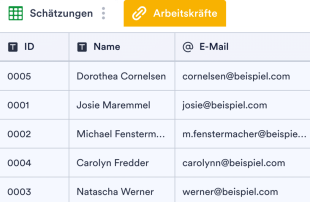
Vorlage Kostenvoranschlag für Autoreparaturen
Verwalten Sie Kostenvoranschläge für Autoreparaturen online. Ideal für Autoreparaturwerkstätten jeder Größe. Leicht anpassbar und zu aktualisieren. Addieren Sie automatisch die Summen.
Zur Kategorie:Vorlagen für Kostenvoranschläge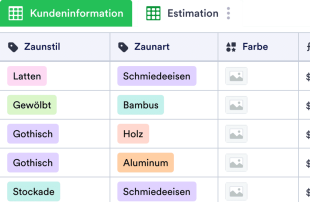
Zaun Kostenvoranschlag Vorlage
Verfolgen, betrachten und verwalten Sie Kostenvoranschläge für Zauninstallationen online. Ideal für unabhängige Auftragnehmer. Addieren Sie die Summen automatisch. Kostenlos und leicht anpassbar.
Zur Kategorie:Vorlagen für Kostenvoranschläge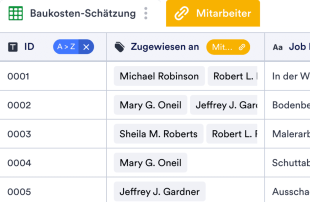
Baukostenvoranschlag Vorlage
Unsere raffinierte Vorlage für Baukostenvoranschläge bietet sowohl Bauunternehmen als auch unabhängigen Auftragnehmern eine hervorragende Möglichkeit, einen detaillierten Überblick über Schätzungen für Baumaterialien und Arbeitskosten für ihre geschätzten Kunden zu gewährleisten. Als Inhaber, Leiter oder Mitarbeiter eines Bauunternehmens oder einer Baustelle steht Ihnen diese kostenlose Vorlage zur Verfügung, um Ihre Kostenvoranschläge effizient online zu verwalten. Passen Sie die Kalkulationstabelle unkompliziert an die Bedürfnisse Ihres Unternehmens an, tragen Sie die potenziellen Kosten für jeden Kunden ein und präsentieren Sie anschließend die vollständigen Kostenvoranschläge bequem von jedem Gerät aus. Machen Sie Gebrauch von der Flexibilität, die unsere Vorlage bietet: Fügen Sie neue Zeilen oder Spalten hinzu, aktualisieren Sie Beschriftungen und Farben und integrieren Sie zusätzliche Tabs, um Ihre Kostenvoranschläge in alternativen Formaten darzustellen – das alles mit nur wenigen Klicks für ein individuelles Design! Und für diejenigen, die sich lieber ganz auf ihr Handwerk konzentrieren möchten, erlaubt unsere Sofortberechnungsfunktion, die Summen Ihrer Kostenvoranschläge automatisch zu addieren. Unabhängig von der Art des Bauunternehmens, das Sie betreiben, ermöglicht Ihnen die kostenlose Jotform-Vorlage für Baukostenvoranschläge, die Schätzungen Ihrer Kunden auf benutzerfreundliche Weise online zu verwalten. Lassen Sie uns gemeinsam den Weg für eine effiziente und transparente Kommunikation ebnen!
Zur Kategorie:Vorlagen für Kostenvoranschläge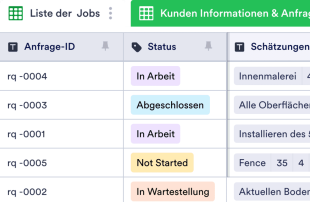
Online-Vorlage für Kostenvoranschläge
Mit einer Vorlage für einen Kostenvoranschlag können Bauunternehmen, Reparaturfirmen oder unabhängige Auftragnehmer Kostenvoranschläge für ihre Kunden erstellen, verwalten und einsehen. Ungeachtet der Art Ihrer Tätigkeit können Sie mit dieser kostenlosen Vorlage für Kostenvoranschläge Ihre geschätzten Kosten online besser verwalten! Sie können die Kalkulationstabelle zunächst an Ihre Bedürfnisse anpassen, dann Ihre Arbeits- und Materialkosten hinzufügen und sie auf jedem Gerät im Auge behalten. Fügen Sie mit wenigen Klicks neue Tabs hinzu, aktualisieren Sie Beschriftungen oder Farben, und ordnen Sie Zeilen und Spalten neu an, um Ihre Kostenvoranschläge auf eine neue Art und Weise zu sehen. Und falls Sie keine Lust mehr haben, die Summen von Hand zu addieren, können Sie dies mit der schnellen Berechnungsfunktion von Jotform automatisch tun! Egal, ob Sie für eine Baufirma arbeiten oder Ihr eigenes Unternehmen führen, mit dieser Online-Vorlage für Kostenvoranschläge können Sie die Kostenvoranschläge für Ihre Kunden mühelos verwalten.
Zur Kategorie:Vorlagen für KostenvoranschlägeÜber Vorlagen für Kostenvoranschläge
Tabellenvorlagen für Kostenvoranschläge helfen Ihnen, Datensätze geordnet zu verwalten. Sie eignen sich für alle, die über Jotform-Formulare detaillierte Angaben wie Anfragen, Bewerbungen, Feedback oder Bestellungen sammeln. Solche Einsendungen sind etwa im Bauwesen, in der Veranstaltungsplanung und im Vertrieb wichtig, wo Kostenvoranschläge und Berechnungen nachvollziehbar sein müssen. Die Vorlagen ordnen die gesammelten Angaben übersichtlich, sodass sie zur Prüfung oder Weiterbearbeitung bereitstehen. Die Tabelle dient als zentrale Datenbank, in der Teams und Abteilungen eingehende Daten verwalten, ohne sie von Hand abtippen zu müssen.
In Jotform Tabellen laufen die Einsendungen aus verbundenen Jotform-Formularen automatisch zusammen. Jede Antwort, die über ein Formular eingeht, wird zu einem Eintrag, den Sie in der Tabellen- oder Detailansicht prüfen. Ordnen Sie Ihre Daten mit Suche, Filtern und Gruppierung. Weitere Ansichten wie die Kalender- oder Uploads-Ansicht bieten zusätzliche Möglichkeiten, Informationen auszuwerten. Bestehende Daten können Sie manuell eingeben oder als CSV- oder Excel-Datei importieren; die Stärke der Tabellen liegt aber in der Verwaltung automatisch übernommener Formulareinträge, die den Weg von der Einsendung bis zur Bearbeitung vereinfacht.
Why Use Estimate Templates?
- Managing submissions through Jotform Tables eliminates the need for manual data transfer, which reduces errors and saves valuable time. By automatically populating responses from Jotform Forms, users can focus on more strategic tasks rather than mundane data entry.
- These tables keep all responses consolidated in one location, making it easier for teams to access and review submissions without sifting through scattered emails or documents. This centralized approach enhances productivity and ensures that no information is overlooked.
- Finding specific records is faster and more efficient with the use of search functions and filters, allowing users to quickly sort through large volumes of data and extract the information they need without delay.
- Reviewing complete submission details is seamless, with options to view data in multiple formats such as Table View and Detail View. This comprehensive oversight ensures that all necessary information is considered before any decisions or actions are taken.
- Coordinating follow-up actions is straightforward, as users can track changes, assign tasks, and manage responsibilities directly within the table. This functionality facilitates effective communication and collaboration across teams.
- Reporting on collected data becomes a streamlined process, thanks to built-in capabilities for generating reports and visualizing data trends. This feature supports informed decision-making and strategic planning.
Common Problems Solved by Estimate Templates
- Manually copying submissions into spreadsheets can lead to errors and inconsistencies. With Estimate Templates, data from Jotform Forms automatically populates the connected table, drastically reducing manual input and the associated risks.
- Scattered responses across various platforms make it difficult to maintain a comprehensive view of all submissions. These templates centralize data, ensuring that all information is easily accessible and properly organized.
- Difficulty locating records is a common issue, especially when dealing with high volumes of data. Search and filter capabilities in Jotform Tables make it easy to find specific entries quickly, improving efficiency and accuracy.
- Inconsistent review processes can lead to oversight and missed opportunities. By using column types and different views, Estimate Templates provide a structured framework for consistent and thorough data review.
- Hard-to-review uploads can be challenging to manage when not properly integrated into the data system. Uploads View in Jotform Tables allows users to handle files and documents efficiently within the submission review process.
Anwendungsfälle und passende Funktionen von Jotform Tabellen
- Incoming estimate requests submitted through connected Jotform Forms are automatically captured in the table, ensuring that each new entry is logged and organized without manual intervention. This auto-population feature keeps data up-to-date and ready for analysis.
- Review and organization of submissions are greatly enhanced with Table View and Detail View, allowing users to examine individual entries in detail or gain a broad overview of all collected data. This flexibility aids in thorough data assessment and informed decision-making.
- Search and filter functionalities help users quickly locate specific records within the table, streamlining data management and minimizing the time spent sifting through entries. This capability is particularly useful in fast-paced environments where timely access to information is critical.
- For team management, access settings and assignees ensure that the right individuals have control over specific data, fostering accountability and collaboration. Real-time tracking and revision history enable teams to monitor changes and maintain a clear record of data interactions.
- Reporting and document generation capabilities allow users to create detailed reports and PDFs from their data, providing valuable insights and documentation for stakeholders. These features support strategic planning and reporting needs.
How to Use Estimate Templates with Jotform Forms
- Begin with a category-relevant Jotform Tables template, a blank table, or the table connected to an existing Jotform Form. The form is designed to collect category-specific information, and new responses will automatically appear in the connected table, ensuring seamless data capture.
- Configure the table for submission review by naming columns and selecting appropriate column types to match the data being collected. Choose relevant views like Table View for general oversight or Uploads View for managing attached files, ensuring the data is organized and accessible.
- Manage submissions by applying search, filters, and data grouping to streamline the review process. Utilize access settings and assignees to coordinate team responsibilities, and employ action buttons for quick data-related tasks, ensuring efficient management of all entries.
Top Use Cases for Estimate Templates
- For Form Owners: Form owners who have created or own the connected Jotform Form play a crucial role in managing incoming responses. They regularly review new entries, edit submission data as needed, and check the completeness of details or uploads. By using Jotform Tables, they can keep records organized and ensure that all pertinent information is accurately tracked and easily retrievable.
- For Teams: Authorized team members benefit from the centralized system to find and maintain submissions effectively. They coordinate responsibilities with assignees, utilizing access settings to manage data interactions. Revision history supports collaborative work by providing a clear trail of changes, ensuring transparency and accountability in team efforts.
- For Managers: Managers use Jotform Tables to monitor collected data and review patterns specific to their category. They check the progress of tasks or ownership of submissions and employ Report View to gain insights into collected information. This oversight capability enables managers to make informed decisions and maintain control over the data management process.
Summarizing Estimate Templates
Estimate Templates provide significant value by streamlining the process of collecting and managing category-specific information through Jotform Forms. By automatically capturing responses in Jotform Tables, users can efficiently organize, review, and act on their data. This integrated approach reduces manual workload, enhances data accuracy, and supports effective collaboration and decision-making across teams and departments.
Häufig gestellte Fragen
1) Is it free to use Estimate Templates with Jotform Tables?
Jotform offers a Starter plan, which provides access to Estimate Templates in Jotform Tables. This plan allows users to explore the basic functionalities without incurring any costs. It is a great way to get started with managing submissions efficiently.
2) How do submissions from Jotform Forms appear in Estimate Templates?
When a Jotform Form is connected to an Estimate Template, each submission made through the form automatically appears in the linked table. The responses become entries or rows, ensuring that all incoming data is captured systematically. Future submissions continue to auto-populate the table as they arrive.
3) Can I edit, search, filter, group, and calculate data in Estimate Templates?
Yes, you can edit submissions, utilize various column types, and perform searches to find specific data points. Filters and data grouping help organize entries, while formulas and calculations can be applied to analyze the data further. These features enable comprehensive data management and analysis.
4) Kann ich die Daten aus den Tabellen als CSV- oder Excel-Datei exportieren?
You can export the data in Estimate Templates as CSV or Excel files. This capability allows users to integrate existing information with new submissions collected via connected forms. It ensures flexibility in data handling and facilitates further analysis or reporting outside the Jotform environment.
5) Which Jotform Tables views can I use with Estimate Templates?
Estimate Templates support several views, including Table View, Detail View, and Uploads View. Table View offers an overview of all entries, Detail View allows for in-depth examination of individual submissions, and Uploads View helps manage files associated with submissions. These views provide versatile options for reviewing data.
6) Can teams collaborate on submissions in Estimate Templates?
Teams can collaborate effectively by utilizing access settings to control data visibility and permissions. Assignees can be designated for specific entries, and real-time tracking ensures up-to-date information sharing. Revision history maintains a record of changes, supporting transparency and collaborative efforts across the team.
7) Can I connect Estimate Templates to related data or other applications?
Estimate Templates can be linked to related data through linked tables, allowing for integrated data management. Additionally, action buttons and integrations facilitate connections with other applications, providing extended functionality. This capability supports comprehensive data workflows and enhances operational efficiency.
8) Can I create reports, PDFs, and manage files from Estimate Templates?
Yes, you can create reports using Report View, generate PDFs for documentation purposes, and manage files through Uploads View. Signed documents associated with table data can also be handled effectively. These features support thorough data management and provide valuable documentation tools.