

Tabellenvorlagen für Non-Profit Organisationen

Vorlage für eine Spendenliste
Ganz gleich, ob Sie eine Wohltätigkeitsorganisation oder eine gemeinnützige Organisation leiten oder einfach nur Spenden für Ihre eigene Sache sammeln, den Überblick über alle Spenden zu behalten, kann überwältigend und ebenso erfreulich sein. Mit dieser kostenlosen, vollständig anpassbaren Vorlage für eine Spendenliste können Sie wichtige Spendeninformationen leicht im Auge behalten, ohne eine einzige Zeile Code schreiben zu müssen! Fügen Sie Ihrer Tabelle Informationen über ein Formular hinzu, tragen Sie Informationen manuell in die Tabelle oder geben Sie Ihre Tabelle mit der benutzerfreundlichen Oberfläche von Jotform-Tables für die Zusammenarbeit mit Teamkollegen frei. Die Vorlage für eine Spendenliste ist ideal für Fundraising-Manager und Projektkoordinatoren und ermöglicht es gemeinnützigen Organisationen, Sachspenden zu sammeln und Spenderinformationen in einer benutzerdefinierten Tabelle zu speichern. Zeigen Sie Ihre Daten in Tabellen-, Karten- oder Kalenderansicht an, um sie so zu sehen, wie es für Sie optimal funktioniert. Möchten Sie weitere Informationen speichern? Erstellen Sie einfach neue Registerkarten und fügen Sie farbkodierte Tags hinzu, um Ihre Informationen besser zu organisieren. Mit der kostenlosen Jotform-Vorlage für Spendenlisten können Sie wichtige Details zu den Spenden online sicher speichern.
Zur Kategorie:Non-Profit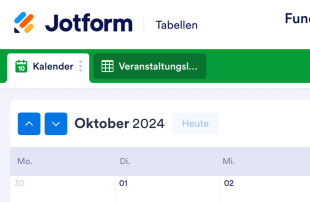
Fundraising Kalendervorlage
Behalten Sie den Überblick über die Fundraising-Veranstaltungen Ihrer gemeinnützigen Organisation mit der kostenlosen Jotform Fundraising Kalendervorlage! In diesem benutzerfreundlichen Workflow für die Veranstaltungsplanung können Sie ganz einfach Veranstaltungsdetails zu Gästen, Spendern, Veranstaltungsorten und Budget erfassen. Mit dieser Tabellenvorlage können Sie die Daten von Fundraising-Veranstaltungen in einem Kalender anzeigen und zur Tabellen- oder Kartenansicht wechseln, um Ihre Daten aus der Vogelperspektive zu betrachten. Füllen Sie einfach das beigefügte Formular aus, oder geben Sie die Veranstaltungsdaten direkt in die Vorlage für den Fundraising-Kalender ein. Sie können die Vorlage für den Fundraising-Kalender gerne an die Bedürfnisse Ihrer gemeinnützigen Organisation anpassen. Ohne Programmierkenntnisse können Sie Zeilen und Spalten hinzufügen, das Tabellenlayout neu anordnen und Filter und Formeln erstellen, die Ihre Daten automatisch genau so anzeigen, wie Sie es wünschen. Mit einer benutzerdefinierten Online-Vorlage für einen Spendenkalender müssen Sie sich weniger Gedanken über logistische Details machen und haben mehr Zeit, erfolgreiche Spendenaktionen für Ihre gemeinnützige Organisation zu organisieren!
Zur Kategorie:Non-Profit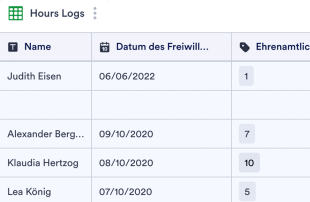
Stundenformular für Freiwillige
Behalten Sie den Überblick über die Stunden, die Ihre gemeinnützige Organisation ehrenamtlich geleistet hat, mit dem kostenlosen Logbuch für ehrenamtliche Mitarbeiter. Sie können es im Tabellen-, Karten- oder Kalenderformat anzeigen. Einfach anzupassen und weiterzugeben.
Zur Kategorie:Non-ProfitÜber Tabellenvorlagen für Non-Profit Organisationen
Tabellenvorlagen für gemeinnützige Organisationen helfen, Datensätze aus dem gemeinnützigen Bereich zu ordnen und zu verwalten. Über Jotform-Formulare erfassen Sie damit unterschiedliche Informationen, etwa Bewerbungen von Ehrenamtlichen, Spenderdaten, Feedback zu Veranstaltungen oder Förderanträge. Gemeinnützige Organisationen, Vereine und Initiativen müssen diese Einsendungen effizient verwalten, um ihre Arbeit zu vereinfachen. Die mit jedem Formular verbundene Tabelle dient als zentrale Ablage, in der alle erfassten Informationen geordnet vorliegen, sodass Formularverantwortliche und ihre Teams die Daten übersichtlich verwalten können.
Jotform Tabellen ist die Plattform, auf der Einsendungen aus verbundenen Jotform-Formularen eingehen und verwaltet werden. Jede Antwort wird automatisch als Eintrag in der verbundenen Tabelle gespeichert und erscheint in der Regel als Zeile in der Tabellenansicht oder zur genaueren Prüfung in der Detailansicht. Einsendungen lassen sich mit Suche, Filtern, Gruppierung oder verschiedenen Spaltentypen ordnen. Die Kalender-, Berichts- und Uploads-Ansicht bieten zusätzliche Blickwinkel für Auswertung und Darstellung. Manuelle Eingabe sowie CSV- und Excel-Import sind möglich; im Mittelpunkt steht jedoch die automatische Übernahme der Formulareinsendungen in eine strukturierte Tabelle – das macht die Datenverwaltung effizienter.
Why Use Nonprofit Sheet Templates?
- Managing submissions with Nonprofit Sheet Templates in Jotform Tables eliminates the need for manual data transfer, ensuring all responses are automatically recorded and organized. This automation saves time and reduces errors.
- Keeping all responses together in a singular, easily accessible location allows form owners and teams to quickly locate submissions, enhancing efficiency in reviewing and managing data.
- With Jotform Tables, users can review complete submission details, including any attachments or uploads, providing a comprehensive understanding of each entry.
- Nonprofit Sheet Templates enable effective coordination of follow-up actions by allowing users to assign tasks or track submission status, ensuring no response is overlooked.
- Utilizing search, filters, and data grouping features, form owners can quickly find specific records or entries, streamlining the process of data retrieval and analysis.
- The ability to report on collected data in various views allows nonprofits to generate insights and summaries that support informed decision-making and strategic planning.
Common Problems Solved by Nonprofit Sheet Templates
- Manual copying of submissions into spreadsheets is a tedious task frequently encountered by nonprofits, but Nonprofit Sheet Templates solve this by automatically populating new entries directly from Jotform Forms.
- Scattered responses across multiple platforms can lead to confusion and inefficiency. These tables centralize all submissions, making it easier to manage and review data.
- Difficulty locating specific records is a common issue, but the search and filter capabilities of Jotform Tables address this by allowing users to quickly find the needed information.
- Inconsistent review processes often result from missing context or disorganized data. Nonprofit Sheet Templates offer detailed views and organized columns to ensure thorough and consistent reviews.
- Handling uploads can be challenging when context is missing. The Uploads View and associated column types in Jotform Tables provide clear organization and context for each file, facilitating easier review and management.
Anwendungsfälle und passende Funktionen von Jotform Tabellen
- When a nonprofit organization receives volunteer applications through a Jotform Form, the submissions are automatically populated into the connected table, ensuring all entries are promptly recorded and ready for review.
- Using Table View or Detail View, form owners can thoroughly review each submission, edit details as needed, and maintain organized records for efficient data management.
- For managing team responsibilities, access settings and assignees allow nonprofits to coordinate responsibility and ensure that each team member has the appropriate level of access to the submissions.
- Reporting on the collected data is streamlined with Report View, enabling the creation of customized reports that summarize insights and trends, which are vital for strategic planning.
- With search and filters, nonprofits can quickly locate specific submissions or categories of responses, greatly improving the speed and accuracy of data retrieval.
- For grant requests, data grouping and column types help categorize and organize information, making it easier to analyze and prioritize submissions.
- Integrating action buttons allows nonprofits to execute approved actions directly from the table, such as sending follow-up emails or updating records, enhancing workflow efficiency.
How to Use Nonprofit Sheet Templates with Jotform Forms
- Start with a category-relevant Jotform Tables template, a blank table, or the table connected to an existing Jotform Form. The Jotform Form collects category-specific information, and new responses automatically appear in the connected table, ensuring all entries are systematically recorded.
- The form owner configures the table for submission review by naming columns, choosing appropriate column types, and selecting relevant views such as Table View, Detail View, Calendar View, Uploads View, or Report View to best suit their organizational needs.
- The form owner or team manages submissions with capabilities such as search, filters, grouping, formulas, access settings, assignees, revision history, linked tables, action buttons, and outputs, ensuring efficient data handling and collaboration.
Top Use Cases for Nonprofit Sheet Templates
- For Form Owners: Form owners benefit significantly from Nonprofit Sheet Templates as they provide a streamlined process for reviewing incoming responses. They can easily edit submission data, check details or uploads, and maintain organized records within Jotform Tables. This setup ensures that all collected information is systematically managed and readily accessible for further processing or action.
- For Teams: Authorized team members use Nonprofit Sheet Templates to efficiently find submissions and maintain entries. They can coordinate responsibility with assignees and use access settings to secure data handling. Revision history supports shared work by providing a clear audit trail of changes, ensuring transparency and accountability in data management.
- For Managers: Managers utilize Nonprofit Sheet Templates to monitor collected data, review category-specific patterns, and check progress or ownership of submissions. They can leverage Report View or other relevant views for oversight, gaining insights into the data that inform strategic decisions and operational improvements.
Summarizing Nonprofit Sheet Templates
Nonprofit Sheet Templates provide invaluable support for collecting and managing data specific to nonprofit needs. By using Jotform Forms to gather information and Jotform Tables to manage the resulting submissions, organizations can streamline their data processes and enhance their operational efficiency. These templates help maintain organized, accessible, and actionable records, ultimately aiding nonprofits in achieving their goals more effectively.
Häufig gestellte Fragen
1) Is it free to use Nonprofit Sheet Templates with Jotform Tables?
Jotform offers a Starter plan, which allows users to utilize Nonprofit Sheet Templates without an initial cost. This plan provides access to essential features needed to manage submissions effectively. However, it is important to review the specifics of the Starter plan to understand the features available.
2) How do submissions from Jotform Forms appear in Nonprofit Sheet Templates?
Submissions from Jotform Forms automatically appear in Nonprofit Sheet Templates as entries or rows in the connected table. This auto-population ensures that each response is captured promptly and accurately. Future submissions continue to be added seamlessly, providing a real-time record of all incoming data.
3) Can I edit, search, filter, group, and calculate data in Nonprofit Sheet Templates?
Yes, you can edit submissions and utilize features such as search, filters, data grouping, formulas, and calculations within Nonprofit Sheet Templates. These capabilities allow for in-depth data analysis and management without the need for external tools. This flexibility helps ensure that data is organized and insights are easily accessible.
4) Kann ich die Daten aus den Tabellen als CSV- oder Excel-Datei exportieren?
Data within Nonprofit Sheet Templates can be exported as CSV or Excel files. This functionality allows you to add existing information alongside connected-form submissions or share data with stakeholders who prefer these formats. Exporting data ensures compatibility and ease of use across different platforms.
5) Which Jotform Tables views can I use with Nonprofit Sheet Templates?
You can use various views such as Table View, Detail View, Calendar View, Report View, and Uploads View with Nonprofit Sheet Templates. Each view offers unique perspectives, like Table View for structured organization or Report View for data summaries. These views enhance the way submissions are reviewed and analyzed.
6) Can teams collaborate on submissions in Nonprofit Sheet Templates?
Teams can collaborate effectively using Nonprofit Sheet Templates by leveraging features such as access settings, collaboration tools, assignees, real-time tracking, and revision history. These capabilities support coordinated efforts and ensure that team members can work together seamlessly on submission management.
7) Can I connect Nonprofit Sheet Templates to related data or other applications?
Nonprofit Sheet Templates can be connected to related data through linked tables and integrations. Action buttons further enhance workflow by allowing specific actions to be executed directly from the table. This connectivity facilitates streamlined data management and operational integration.
8) Can I create reports, PDFs, and manage files from Nonprofit Sheet Templates?
Yes, you can create reports using Report View, generate PDFs, and manage files with Uploads View in Nonprofit Sheet Templates. These features enable comprehensive data presentation and secure document handling, supporting the diverse needs of nonprofit operations.