

Planungsvorlagen

Rezept Kalkulationsvorlage
Berechnen Sie die Kosten für Rezepte mit dieser kostenlosen Kalkulationstabelle. Perfekt für Profi- und Hobbyköche. Einfach zu betrachten, zu bearbeiten und zu teilen. Funktioniert auf jedem Gerät. Keine Programmierkenntnisse erforderlich.
Zur Kategorie:Planungsvorlagen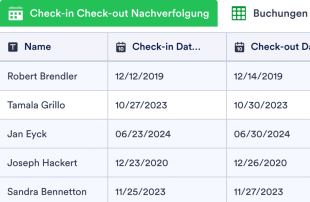
Hotel Reservierungsmanagement
Optimieren Sie den Empfehlungsprozess mit der Tabelle zur Empfehlungsverfolgung. Von jedem mobilen Gerät aus zugänglich und bearbeitbar. Vollständig anpassbar, keine Programmierkenntnisse erforderlich.
Zur Kategorie:Planungsvorlagen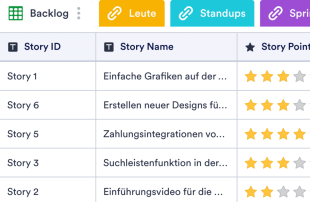
Sprint Planungsvorlage
Eine Sprint Planungsvorlage wird zur Planung und Verfolgung von Sprints, Stand-Ups und Personen in einem Produktentwicklungsteam verwendet. Mit unserer kostenlosen Online-Vorlage zur Sprintplanung können Sie Ihr Projektmanagementsystem leicht verbessern und wichtige Phasen der Produktentwicklung überwachen. Fügen Sie Ihrer Online-Tabelle relevante Informationen hinzu - wie Sprint-Ziele, Stories und Zeitpläne für Stand-Up-Meetings - so können Sie dazu beitragen, dass Ihr Team auf der Höhe der Zeit bleibt und sich auf ein einheitliches Ziel konzentriert. Müssen Sie das Layout dieser Sprint-Planungsvorlage neu organisieren? Es ist ganz einfach - mit nur wenigen Klicks können Sie Abschnitte umbenennen, das Layout neu anordnen oder neue Registerkarten hinzufügen, um die Informationen auf eine neue Art und Weise anzuzeigen. Da alle Informationen in einem leicht lesbaren Format angezeigt werden, ist unsere kostenlose Sprint-Planungsvorlage die perfekte Möglichkeit, Ihr Team auf Trab zu halten und alle Phasen der Produktentwicklung zu überwachen.
Zur Kategorie:Planungsvorlagen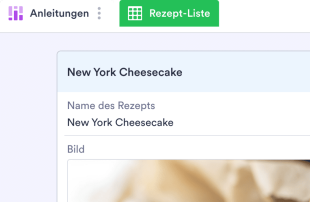
Rezept-Organisator
Haben Sie es satt, in Ihren Kochbüchern und Notizbücher mit Rezepten zu blättern? Ganz gleich, ob Sie Chefkoch in einem Restaurant sind oder einfach nur neue Gerichte zu Hause ausprobieren möchten, mit unserer kostenlosen Vorlage für einen Rezept-Organisator behalten Sie den Überblick über all Ihre Lieblingsrezepte. Geben Sie einfach Anweisungen und Zutaten in das Verzeichnis der Rezept-Organisator-Vorlage ein, um eine visuell beeindruckende und leicht zugängliche Tabellenkalkulation zu erstellen, auf die Sie jederzeit auf jedem Gerät zugreifen können – sogar während der Essensvorbereitung! Wenn Sie alle Rezepte, die Ihnen gefallen oder die Sie ausprobieren möchten, hinzugefügt haben, können Sie sie in der Rezept-Organisator-Vorlage in der aktuellen Form oder in einer Kartenansicht anzeigen, die jedes Rezept auf einer eigenen virtuellen Karte anzeigt. Sie können die Tabelle sogar als CSV-, Excel- oder PDF-Datei herunterladen, um sie mit Ihren Kollegen zu teilen. Mit unserer Rezept-Organisator-Vorlage können Sie Ihre Küche besser organisieren. Guten Appetit!
Zur Kategorie:PlanungsvorlagenÜber Planungsvorlagen
Partys, Hochzeiten, Baby-Showers - was immer Sie auch planen sollen, stellen Sie mit Jotforms kostenlosen Planner-Vorlagen sicher, dass das Event reibungslos abläuft! Wählen Sie unten eine Vorlage aus und passen Sie dies an Ihren Event, Ihr Unternehmen oder Ihre Organisation an. Dann könne Sie über das angehängte Formular die Planungs oder RSVP Details
Mit Jotform Tabellen können Sie Ihre Planungsvorlage in verschiedenen Formaten anzeigen. Sie können eine Liste Ihrer Aufgaben in der Tabellenansicht anzeigen, sich auf einen bestimmten Kunden oder eine bestimmte Aufgabe in der Kartenansicht konzentrieren oder Ihre Termine in einem professionellen Kalender übersichtlich darstellen! Sie können Ihre Daten auch durchsuchen und filtern, Dateien hochladen und das Layout anpassen, indem Sie die Spaltentypen ändern, verschiedenfarbige Labels hinzufügen oder die Informationen in verschiedene Tabs aufteilen. Sie müssen Ihre Partyplanungsdaten nicht in mehreren Apps verwalten — wechseln Sie einfach zu einem digitalen Arbeitsplatz mit den kostenlosen Vorlagen von Jotform.
Why Use Planner Templates?
- By managing form submissions within Jotform Tables, form owners eliminate the need for manual data transfer, reducing errors and saving time. This is particularly beneficial for departments dealing with high volumes of data, like HR or customer service.
- Keeping responses centralized in the connected table ensures that all data is accessible in one location. This centralization is crucial for teams managing ongoing projects or tracking customer feedback, as it prevents data from being scattered across multiple platforms.
- Finding specific records becomes a breeze with Jotform Tables' search and filter functionalities, allowing users to quickly locate and review relevant submissions. This capability is essential for industries like legal and compliance, where timely access to information is critical.
- Reviewing complete submission details is simplified, as each entry can be expanded in Detail View to examine every aspect of the submission. This feature is invaluable for educational institutions processing student applications or assessments.
- Coordinating follow-up actions is streamlined with Jotform Tables, where submissions can be assigned to team members for further action. This is particularly beneficial in sales and customer service settings, where timely responses can impact customer satisfaction.
- Tracking changes and reporting on collected data is facilitated by the revision history and report generation features. These tools are indispensable for project managers who need to document progress and report findings to stakeholders.
Common Problems Solved by Planner Templates
- Manually copying submissions into spreadsheets is a time-consuming task prone to errors. With Jotform Tables, form submissions automatically populate the connected table, eliminating this tedious process and ensuring data accuracy.
- Scattered responses across different platforms can lead to incomplete data analysis. By centralizing submissions within Jotform Tables, users can maintain a comprehensive view of all collected information, enhancing data-driven decision-making.
- Difficulty locating specific records is a common challenge, especially as data volumes grow. Jotform Tables' search and filter options allow users to quickly find and review necessary submissions, improving efficiency.
- Inconsistent review processes can result in overlooked details. By using Jotform Tables' Detail View, users can ensure every aspect of a submission is considered, leading to more thorough evaluations.
- Unclear ownership of submissions can stall workflows. Jotform Tables enables the assignment of submissions to specific team members, clarifying responsibility and improving accountability.
Anwendungsfälle und passende Funktionen von Jotform Tabellen
- Event managers can seamlessly collect registration information through a connected Jotform Form, with responses auto-populating the table. This ensures that all attendee data is instantly accessible and organized for event planning.
- Educational institutions can use Table View and Detail View to review student submissions, such as applications or assessments, allowing staff to evaluate entries efficiently and comprehensively.
- Teams dealing with ongoing projects can utilize search, filters, and data grouping to organize submissions based on project phases or client categories. This organization facilitates quick access to relevant data, streamlining project management.
- For departments requiring regular reporting, Jotform Tables' Report View allows users to compile and present data insights effectively. This feature is particularly useful for marketing teams analyzing campaign performance.
- Collaboration is enhanced through access settings and assignees, ensuring that only authorized team members can view or edit submissions. This control supports secure and effective teamwork.
- Linked tables and integrations enable users to connect Planner Templates with related data or applications, expanding the capabilities of their data management and facilitating comprehensive analyses.
How to Use Planner Templates with Jotform Forms
- Start by selecting a relevant Jotform Tables template, creating a blank table, or using the table connected to an existing Jotform Form. The Jotform Form will serve as the primary tool for collecting category-specific information, with new responses automatically appearing in the connected table.
- Configure the table to facilitate submission review by naming columns and selecting appropriate column types. Choose relevant views such as Table View, Detail View, Calendar View, Uploads View, or Report View to suit the type of data being managed.
- Manage submissions effectively by utilizing search, filters, grouping, and formulas. Leverage access settings to control who can view or edit the table, assign submissions to team members, and use revision history to track changes. Linked tables and action buttons can further enhance data management capabilities.
Top Use Cases for Planner Templates
- For Form Owners: As the creator or owner of a connected Jotform Form, you have the ability to review incoming responses thoroughly. You can edit submission data to correct any discrepancies, check details or uploads to ensure completeness, and keep records organized within Jotform Tables. This centralized management system streamlines your workflow, allowing you to focus on insights rather than administrative tasks.
- For Teams: Authorized team members benefit from easy access to submissions, maintaining entries, and ensuring data consistency. By coordinating responsibility through assignees, teams can efficiently manage workloads and priorities. Access settings and revision history support shared work by providing transparency and accountability, making collaborative efforts more effective.
- For Managers: Managers can monitor collected data to identify trends and patterns relevant to their category. By reviewing progress or ownership, managers ensure that projects stay on track and deadlines are met. Using Report View or other relevant views, managers can gain oversight and make informed decisions based on comprehensive data analysis.
Summarizing Planner Templates
Planner Templates offer a structured approach to collecting and managing category-specific information through Jotform Forms. Utilizing Jotform Tables, form owners and teams can efficiently organize, review, and act on the submissions they receive. This streamlined workflow not only enhances data accuracy but also facilitates collaborative efforts and decision-making across various industries.
Häufig gestellte Fragen
1) Is it free to use Planner Templates with Jotform Tables?
Jotform offers a Starter plan, allowing you to explore the functionalities of Planner Templates at no initial cost. This plan provides an opportunity to understand how Jotform Tables can benefit your data management needs without financial commitment. As your requirements grow, you can explore additional features through other plans.
2) How do submissions from Jotform Forms appear in Planner Templates?
Submissions from Jotform Forms appear automatically in the connected Planner Template. Each response becomes an entry in the linked table, typically as a row in Table View. This auto-population ensures continuous and seamless data integration as new responses are submitted.
3) Can I edit, search, filter, group, and calculate data in Planner Templates?
Yes, you can edit submissions and utilize various tools such as search, filters, data grouping, formulas, and calculations within Planner Templates. These features allow you to organize and analyze your data effectively, tailoring the table to meet your specific category needs without relying on automated decisions.
4) Kann ich die Daten aus den Tabellen als CSV- oder Excel-Datei exportieren?
You can export data from Planner Templates as CSV or Excel files. This capability allows you to add existing information to your connected-form submissions or share data with external stakeholders. Exporting data provides flexibility in how you manage and utilize the collected information.
5) Which Jotform Tables views can I use with Planner Templates?
With Planner Templates, you can utilize views such as Table View, Detail View, Calendar View, Report View, and Uploads View. Table View offers a structured overview of entries, Detail View allows in-depth examination, Calendar View visualizes data over time, Report View supports comprehensive reporting, and Uploads View helps manage file attachments.
6) Can teams collaborate on submissions in Planner Templates?
Teams can collaborate effectively on submissions using access settings, collaboration features, and assignees within Planner Templates. Real-time tracking and revision history provide transparency and accountability, ensuring that team efforts are coordinated and that everyone is informed of any changes.
7) Can I connect Planner Templates to related data or other applications?
Yes, you can connect Planner Templates to related data through linked tables and integrations. Action buttons further enhance the capability to interact with other applications, providing a comprehensive data management system that supports a wide range of operational needs.
8) Can I create reports, PDFs, and manage files from Planner Templates?
Planner Templates support creating reports, generating PDFs, and managing files through various views. Report View allows for data analysis and presentation, while PDF generation and Uploads View facilitate document management. These capabilities ensure that you can handle your data and associated documents efficiently.