

Vorlagen für das Gesundheitswesen

Patienten Behandlungsübersicht
Eine Vorlage für eine Patientenliste ist ein medizinisches Dokument, das von Ärzten verwendet wird, um den Status eines Patienten während seiner Behandlung zu verfolgen. Ganz gleich, ob Sie Hausarzt, Physiotherapeut, Psychiater oder Facharzt sind, unsere Patientenliste hilft Ihnen, die Gesundheit Ihrer Patienten besser im Auge zu behalten. Um loszulegen, geben Sie einfach Patienteninformationen und Termindetails - wie Name, Behandlungsdatum, Anwesenheit und Verlaufsnotizen - in die Patientendatenbank ein. Sie können Ihre Vorlage für die Patientenliste von jedem Desktop- oder Mobilgerät aus anzeigen und eingeben und diese Informationen mit nur einem Klick an Patienten und anderes medizinisches Personal weitergeben. Wenn Sie Ihre Vorlage für die Patientenliste anpassen möchten, können Sie so viele Spalten, Zeilen, Tabs und Etiketten hinzufügen, wie Sie benötigen. Es ist keine Codierung erforderlich - nehmen Sie Änderungen an der Tabelle einfach per Drag & Drop vor. Und wenn Sie Ihr Konto auf HIPAA-Konformität erweitert haben, können Sie sicherstellen, dass alle Einträge, die sensible Patientendaten enthalten, gemäß den HIPAA-Standards geschützt werden. Verfolgen Sie die Fortschritte Ihrer Patienten und unterstützen Sie sie bei ihrer vollständigen Genesung mit unserer Online-Vorlage für die Patientenliste - das ist genau das, was der Arzt verordnet hat!
Zur Kategorie:Vorlagen für das Gesundheitswesen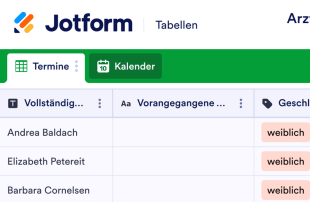
Arzttermin Aufnahmebogen
Verwalten Sie Patientendaten und termine online. Kostenlose Vorlagen für Anmeldebögen. Ansicht als Arbeitsblatt, Kalender oder Karten. Mobilfreundlich. Keine Programmierkenntnisse erforderlich.
Zur Kategorie:Vorlagen für das Gesundheitswesen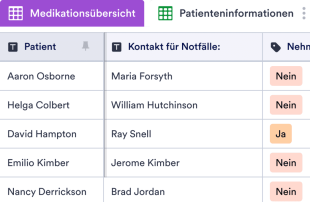
Vorlage Medikationsübersicht
Eine Medikamentenliste dient dazu, Informationen über verschreibungspflichtige Medikamente, rezeptfreie Medikamente, Vitamine, Nahrungsergänzungsmittel und andere Arzneimittel aufzuzeichnen. Unabhängig davon, ob Sie ein Arzt sind, der eine Möglichkeit zur Aufzeichnung von Informationen über die Medikation seiner Patienten benötigt, oder ob Sie einfach nur den Überblick über Ihre eigenen Medikamente behalten möchten, verwenden Sie unsere kostenlose Online-Vorlage für Medikamentenlisten, um die Informationen über die Medikation besser zu organisieren. Um zu beginnen, geben Sie einfach Details zu jedem Medikament in die Tabelle ein, wie Name, empfohlene Dosierung und Häufigkeit sowie den Grund für die Anwendung. Diese vorgefertigte Arzneimittellistenvorlage können Sie sofort verwenden. Sie können das Arbeitsblatt jedoch jederzeit anpassen, wenn Sie weitere Spalten, Zeilen, Etiketten und Register hinzufügen möchten. Ohne jegliche Codierung können Sie die Vorlage genau so aussehen lassen, wie Sie es wünschen, indem Sie einfach Elemente von Ihrem Desktop oder mobilen Gerät aus per Drag & Drop verschieben und den Text ändern. Sobald alle Ihre Informationen eingegeben sind, können Sie Ihre Medikamentenliste mit nur wenigen Klicks herunterladen, freigeben und drucken. Unsere Arzneimittellistenvorlage erleichtert es, wichtige Arzneimittelinformationen an einem sicheren und leicht zugänglichen Ort aufzubewahren. Sie ist genau das, was der Arzt verordnet hat!
Zur Kategorie:Vorlagen für das Gesundheitswesen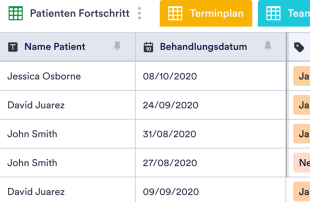
CRM-Vorlage für das Gesundheitswesen
Wenn Sie eine Privatpraxis führen und ein unkompliziertes CRM benötigen, das Sie nicht in den Bankrott treibt, haben Sie Glück! Die kostenlose Online-CRM-Vorlage für das Gesundheitswesen von Jotform ist das perfekte Tool, mit dem Sie Patientendaten in einem sicheren, leicht zugänglichen Bereich sammeln und verwalten können. Um anzufangen, betten Sie einfach das angehängte Formular in Ihre Website ein und beobachten Sie, wie die Eingaben automatisch in der Tabelle erscheinen! Mit unserem Drag-and-drop Formular-Builder können Sie das Formular leicht anpassen, um neue Patienten zu registrieren, Termine zu planen und vieles mehr. Das Anpassen Ihrer CRM-Vorlage für das Gesundheitswesen an Ihre genauen Bedürfnisse erfordert keine Programmierung oder technische Kenntnisse. Mit nur wenigen Klicks können Sie neue Etikettenfarben und -namen auswählen, Spalten für zusätzliche Patienten- oder Termindetails hinzufügen, neue Registerkarten erstellen, um noch mehr Informationen für Ihre Praxis zu speichern. Vergessen Sie nicht, ein Upgrade auf HIPAA-Konformität durchzuführen, um sicherzustellen, dass sensible Gesundheitsdaten gemäß den Industriestandards geschützt sind! Mit einem benutzerfreundlichen CRM für das Gesundheitswesen können Sie die Patienteninformationen mühelos verfolgen und organisiert bleiben, ohne Zeit zu verlieren, die Sie besser für die Rettung von Leben verwenden können.
Zur Kategorie:Vorlagen für das Gesundheitswesen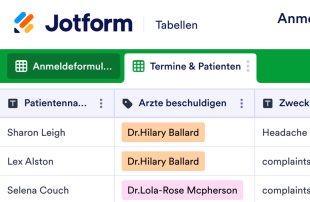
Anmeldeformular für Patienten
Bieten Sie Ihren Patienten ein reibungsloses, kontaktloses Erlebnis bei ihrer Ankunft in Ihrer Klinik oder Ihrem Krankenhaus. Mit dieser kostenlosen Online-Anmeldeformularvorlage können sich Patienten vor ihrem Termin oder spontanen Besuch so einfach wie nie zuvor anmelden. Lassen Sie die Tabelle einfach auf dem Tablet im Wartezimmer geöffnet, damit Ihre Patienten sie ausfüllen können – oder lassen Sie sie das Anmeldeformular vor ihrem Termin mit einem beliebigen Gerät ausfüllen. Die Einträge erscheinen automatisch in der Tabelle, die sich leicht einsehen, bearbeiten und mit dem Empfangs- und Verwaltungspersonal teilen lässt. Verbessern Sie das Patientenerlebnis, indem Sie Ihr Anmeldeformular mit wenigen Klicks individuell anpassen. Ohne Programmierkenntnisse können Sie ganz einfach Zeilen und Spalten hinzufügen, neue Bezeichnungen erstellen und neue Registerkarten für die Terminansicht im Kalender anlegen. Sobald das Formular einsatzbereit ist, können Patienten ihren Namen, Ankunftsdatum und -uhrzeit, Termindetails und ihren Arzt angeben – ganz ohne Papierformulare. Behalten Sie mit einem individuell auf Ihre Einrichtung zugeschnittenen Online-Anmeldeformular den Überblick über Ihre Patienten und deren Termine!
Zur Kategorie:Vorlagen für das GesundheitswesenÜber Vorlagen für das Gesundheitswesen
Tabellenvorlagen für das Gesundheitswesen sind Vorlagen, mit denen Sie Einträge und Unterlagen rund um medizinische Leistungen ordnen und verwalten. Sie eignen sich, um über Jotform Formulare ganz unterschiedliche Angaben zu erfassen, etwa Patientenangaben, Anamnesedaten, Terminanfragen, Rückmeldungen und weitere wichtige Einsendungen. Ärztinnen und Ärzte, Verwaltungsteams sowie Einrichtungen im Gesundheitswesen verwalten damit die eingehenden Daten. Die Tabellen dienen dazu, die gesammelten Angaben zu ordnen und zu verwalten, sodass alle Einsendungen systematisch geprüft und gepflegt werden.
In Jotform Tabellen erscheinen Einsendungen aus verknüpften Jotform Formularen automatisch, und jede Antwort wird zu einem geordneten Eintrag. Jede Einsendung landet als Eintrag in der verknüpften Tabelle und lässt sich in der Tabellen- oder Detailansicht in Ruhe prüfen. Mit Suche, Filtern, Gruppierung und verschiedenen Spaltentypen ordnen und durchleuchten Sie die Einsendungen. Weitere Ansichten wie die Kalender- oder Uploads-Ansicht zeigen die Daten aus anderen Blickwinkeln. Einträge lassen sich auch von Hand anlegen oder per CSV- und Excel-Datei importieren, im Mittelpunkt steht aber der Weg vom Formular in die Tabelle, der Zeit spart und Fehler vermeidet.
Warum Tabellenvorlagen für das Gesundheitswesen?
- Mit den Vorlagen für das Gesundheitswesen entfällt das Übertragen von Hand: Alle Antworten aus Jotform Formularen landen automatisch in der verknüpften Tabelle. Das verringert Fehler und spart deutlich Zeit.
- Die Tabellen halten alle Einsendungen an einem Ort zusammen, sodass sich Patientenangaben, Terminanfragen und weitere Daten leichter einsehen und verwalten lassen, ohne in Dokumenten und E-Mails zu suchen.
- Mit Suche und Filtern finden Formularinhaber einzelne Einträge schnell, etwa wenn sie Angaben zu einer Patientin oder einem Patienten oder frühere Anamnesedaten brauchen.
- Die Vorlagen zeigen alle Angaben einer Einsendung samt Uploads und zusätzlichen Notizen. So können Fachkräfte im Gesundheitswesen auf Grundlage vollständiger Informationen entscheiden.
- Die Vorlagen erleichtern die Nachverfolgung und die Abstimmung mit Patientinnen, Patienten und im Team, weil alle nötigen Angaben und Aufgaben an einem Ort liegen. Das vereinfacht Kommunikation und Aufgabenverwaltung.
- Änderungen nachzuverfolgen und Auswertungen zu erstellen, ist ebenfalls einfach: Die Vorlagen führen ein Änderungsprotokoll, und Sie erstellen Berichte, die wichtige Kennzahlen und Erkenntnisse zusammenfassen.
Diese Probleme lösen Tabellenvorlagen für das Gesundheitswesen
- Einsendungen von Hand in Tabellen zu kopieren, führt zu Fehlern und kostet Zeit. Mit den Vorlagen werden Formularantworten automatisch übernommen, das macht die Angaben verlässlicher und spart Zeit.
- Wenn Antworten über verschiedene Kanäle verstreut sind, lässt sich kaum ein vollständiger Überblick behalten. Weil alle Einsendungen in einer Tabelle zusammenlaufen, haben Sie eine verlässliche Übersicht über alle Angaben aus dem Praxis- oder Klinikalltag.
- Bei vielen Einsendungen ist es mühsam, einzelne Einträge zu finden. Mit Suche und Filtern gelingt das schnell, das spart Zeit und verkürzt Antwortzeiten.
- Uneinheitliche Abläufe bei der Durchsicht führen leicht dazu, dass Angaben übersehen oder falsch eingeordnet werden. Der feste Aufbau der Vorlagen erleichtert es, jede Einsendung nach demselben Schema zu prüfen, und sorgt für einheitliche, verlässliche Ergebnisse.
- Hochgeladene Dateien wie Aufnahmen oder Befunde zu verwalten, ist oft umständlich. In der Uploads-Ansicht von Jotform Tabellen rufen Sie solche Dateien schnell auf und prüfen sie, sodass wichtige Unterlagen griffbereit sind.
Anwendungsfälle und passende Funktionen von Jotform Tabellen
- Wenn Formularinhaber Anamnesebögen oder Terminanfragen einsammeln, erscheinen die Antworten automatisch in der verknüpften Vorlage. So stehen neue Einsendungen zeitnah zur Prüfung und Bearbeitung bereit.
- Mit Tabellen- und Detailansicht prüfen Formularinhaber Patientenangaben effizient und sehen sich jeden Eintrag genau an, um alle nötigen Informationen zu erfassen und einzuordnen.
- Für die Zusammenarbeit im Team legen Sie über Zugriffseinstellungen und Zuständige fest, wer wofür verantwortlich ist und wer Daten einsehen oder bearbeiten darf. So bleibt der Ablauf geordnet, und die Angaben sind nur für die richtigen Personen sichtbar.
- Mit der Berichtsansicht erstellen Leitungen im Gesundheitswesen ausführliche Auswertungen, etwa zur Struktur der Patientenschaft, zur Entwicklung der Termine oder zu Rückmeldungen zu Ihren Leistungen. Das hilft bei der Planung.
- Mit passenden Spaltentypen und Gruppierungen ordnen Formularinhaber ihre Einsendungen, etwa nach Art der Behandlung, benötigter Leistung oder Dringlichkeit eines Termins. So lassen sich die Daten gezielter auswerten.
So nutzen Sie die Vorlagen mit Jotform Formularen
- Wählen Sie eine passende Vorlage für Jotform Tabellen oder legen Sie eine neue Tabelle an, die mit einem bestehenden Jotform Formular verknüpft ist. Das Formular erfasst die Angaben, die Sie im Gesundheitswesen brauchen, und jede neue Antwort erscheint automatisch in der verknüpften Tabelle, sodass sie zeitnah zur Verfügung steht.
- Richten Sie die Tabelle für Ihre Prüfung ein: Benennen Sie die Spalten eindeutig, wählen Sie passende Spaltentypen und entscheiden Sie sich für die Ansichten, die zu Ihnen passen, etwa Tabellen-, Detail- oder Uploads-Ansicht. So bleiben die Daten übersichtlich und leicht zugänglich.
- Organisieren Sie Einsendungen mit Suche, Filtern und Gruppierung. Nutzen Sie Zugriffseinstellungen und Zuständige für die Zusammenarbeit und verbinden Sie über Aktionsschaltflächen oder verknüpfte Tabellen weitere Abläufe, um effizienter zu arbeiten.
Die wichtigsten Anwendungsfälle
- Für Formularinhaber: Wer die verknüpften Jotform Formulare erstellt oder betreut, prüft eingehende Antworten in einem geordneten Ablauf. Angaben lassen sich korrigieren, Details und Uploads prüfen und alle Einträge übersichtlich halten. So bleiben die Daten aktuell und verlässlich, und Fachkräfte im Gesundheitswesen können sich auf ihre eigentliche Arbeit konzentrieren.
- Für Teams: Berechtigte Teammitglieder finden Einsendungen schnell und pflegen die Einträge effizient. Über die Zuständigen verteilen sie Aufgaben, sodass nichts liegen bleibt. Zugriffseinstellungen und Versionsverlauf unterstützen die gemeinsame Arbeit: Es ist geregelt, wer Daten einsehen und ändern darf, und jede Änderung ist nachvollziehbar.
- Für die Leitung: Die Leitung behält mit den Vorlagen die gesammelten Daten im Blick und erkennt Muster im Praxis- oder Klinikalltag. Sie verfolgt den Stand und die Zuständigkeiten bei Aufgaben und gewinnt mit der Berichtsansicht Einblicke in die Abläufe. Das hilft, fundiert zu entscheiden und die Organisation insgesamt zu verbessern.
Tabellenvorlagen für das Gesundheitswesen im Überblick
Die Tabellenvorlagen für das Gesundheitswesen von Jotform bieten einen klaren Rahmen, um gesundheitsbezogene Angaben über Jotform Formulare zu erfassen und in Jotform Tabellen zu verwalten. Weil Einsendungen automatisch eingehen und geordnet vorliegen, passen die Vorlagen gut zu den Anforderungen im Gesundheitswesen, und alle Angaben sind leicht zugänglich und nutzbar. Jotform Tabellen ist dabei der zentrale Ort, an dem Sie Einsendungen verwalten, prüfen und auswerten und so Ihre tägliche Arbeit unterstützen.
Häufig gestellte Fragen
1) Kann ich die Vorlagen für das Gesundheitswesen kostenlos mit Jotform Tabellen nutzen?
Mit dem kostenlosen Starter-Tarif von Jotform nutzen Sie die Vorlagen für das Gesundheitswesen. Er bietet die Grundfunktionen, um Einsendungen und verknüpfte Tabellen zu verwalten. Einige erweiterte Funktionen erfordern einen kostenpflichtigen Tarif, für Einzelpersonen und kleine Teams ist der Starter-Tarif aber ein guter Einstieg.
2) Wie erscheinen Einsendungen aus Jotform Formularen in den Vorlagen?
Sobald jemand ein Jotform Formular abschickt, wird die Antwort automatisch in die verknüpfte Vorlage übertragen. Jede Einsendung erscheint als Eintrag, in der Regel als Zeile in der Tabelle. So werden auch künftige Antworten erfasst und stehen ohne Zutun zur Prüfung bereit.
3) Kann ich Daten in den Vorlagen bearbeiten, durchsuchen, filtern, gruppieren und berechnen?
Ja, Sie können Einsendungen bearbeiten, gezielt nach Einträgen suchen und mit Filtern die Auswahl eingrenzen. Außerdem lassen sich Daten nach verschiedenen Kriterien gruppieren und mit Formeln berechnen. So verwalten und werten Sie Ihre Daten direkt in der Tabelle aus.
4) Kann ich die Daten aus den Tabellen als CSV- oder Excel-Datei exportieren?
Ja, Sie können Daten aus den Vorlagen im CSV- oder Excel-Format exportieren. So lassen sich die Einsendungen aus verknüpften Formularen um Daten aus anderen Quellen ergänzen. Außerdem können Sie die Daten flexibel mit anderen Systemen oder Beteiligten teilen, die bestimmte Formate benötigen.
5) Welche Ansichten von Jotform Tabellen kann ich mit den Vorlagen nutzen?
Sie können mehrere Ansichten nutzen: Tabellen-, Detail-, Kalender-, Uploads- und Berichtsansicht. Die Tabellenansicht zeigt alle Einträge im Überblick, die Detailansicht einzelne Einsendungen im Detail. Die Kalenderansicht eignet sich für Termine, die Uploads-Ansicht für Dateien, und die Berichtsansicht liefert Auswertungen.
6) Können Teams gemeinsam an Einsendungen arbeiten?
Ja, Teams arbeiten mit den Vorlagen gut zusammen. Über anpassbare Zugriffseinstellungen legen Sie fest, wer Daten einsehen oder bearbeiten darf. Wenn Sie Aufgaben an Teammitglieder zuweisen und Echtzeit-Nachverfolgung und Versionsverlauf nutzen, bleibt die gemeinsame Arbeit nachvollziehbar und gut abgestimmt.
7) Kann ich die Vorlagen mit zugehörigen Daten oder anderen Anwendungen verbinden?
Über verknüpfte Tabellen und Aktionsschaltflächen verbinden Sie die Vorlagen mit zugehörigen Daten und anderen Anwendungen, ohne aufwendige Einrichtung. Das vereinfacht Abläufe, und Ihre Daten stehen dort zur Verfügung, wo Sie sie brauchen.
8) Kann ich mit den Vorlagen Berichte und PDFs erstellen und Dateien verwalten?
Ja. Mit der Berichtsansicht erstellen Sie Auswertungen, die Sie auf Ihre Fragestellung zuschneiden. Außerdem erzeugen Sie PDFs für Ihre Dokumentation und verwalten Dateien in der Uploads-Ansicht, sodass alle zugehörigen Unterlagen direkt in der Tabelle abrufbar sind.