Yahoo! SiteBuilder is a builder for professional looking websites or stores with our easy-to-use tools — no prior experience necessary. Jotform forms can be embedded to the Yahoo Site Builder by following these steps:
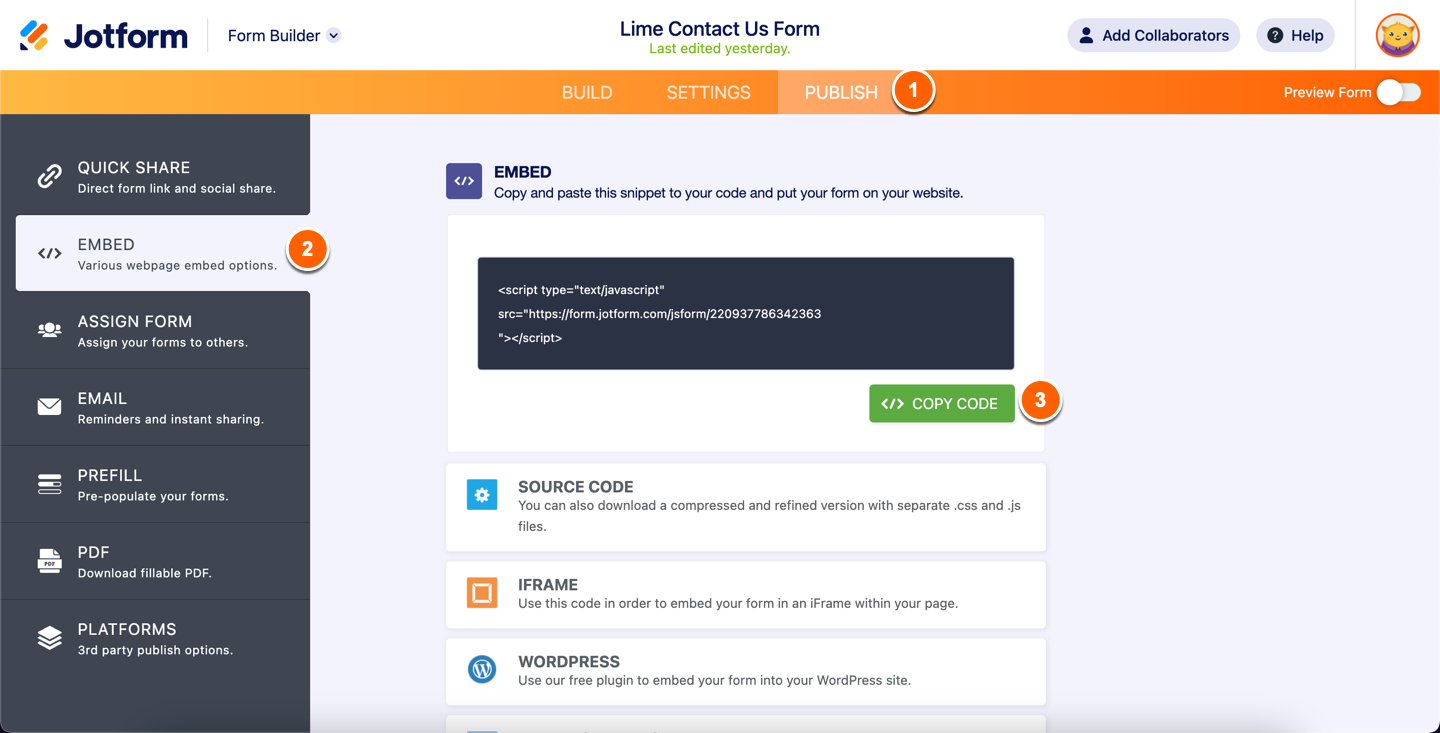
- 1. Click on the Publish button in the Form Builder toolbar.
- In the Publish window, click on the Embed option in the left menu.
- Click on the Copy Code button.
3. Open your page in Yahoo site builder.
4. Click on Insert > Code Elements > HTML option.

5. Paste the code that is copied from Jotform into the HTML code window.

6. Expand the HTML table size to your form size.
7. Click the publish button and set your website addresses. Wait until you get the success message on the screen.

Send Comment:
9 Comments:
April 23, 2012
good
April 21, 2012
Nice :D
April 19, 2012
it is so great take many for help people
November 27, 2011
facile da creare ragazzi ma come faccio ad includerlo nel mio sito che ho creato con dream weaver????
November 27, 2011
perfetto!
September 15, 2011
ส่งไปให้เราได้ไหมค่ะ SieamThong@yahoo.com
August 2, 2011
I have successfully loaded the link into my Bigpond web page. When I try to open the link I get an error message telling me that Windows does not recognise the MME file extension. Can you advise
March 2, 2011
pakisuli na po
March 2, 2011
can you give back my cf