

Templat Aplikasi Pendidikan

Aplikasi Bimbingan Belajar
Aplikasi Bimbingan Belajar digunakan oleh lembaga bimbingan belajar untuk merekrut tutor dan menjadwalkan janji temu dengan siswa. Aplikasi Bimbingan Belajar gratis ini mencakup Formulir Permintaan Tutor bagi siswa untuk mengisi informasi kontak umum dan menentukan bidang studi mereka, serta Formulir Janji Temu Tutor untuk menjadwalkan janji temu setelah tutor ditetapkan. Terdapat juga Formulir Aplikasi Tutor untuk merekrut tutor baru, serta Formulir Umpan Balik Sesi E-Learning di mana siswa dapat menilai kinerja tutor. Ingin menyesuaikan aplikasi Anda agar sesuai dengan branding lembaga Anda? Interface seret-dan-lepas Jotform memudahkan untuk menambah atau mengubah elemen formulir, mengunggah logo Anda, mempersonalisasi halaman splash Anda, dan lainnya — tidak diperlukan coding. Bagikan aplikasi Anda dengan tautan dan siswa akan dapat mengakses serta mengunduhnya di smartphone, tablet, atau desktop mana pun. Bantu menghubungkan siswa dengan tutor dalam waktu singkat dengan Aplikasi Bimbingan Belajar yang sepenuhnya dapat disesuaikan ini.
Buka Kategori:Aplikasi Pendaftaran Kursus & Pelatihan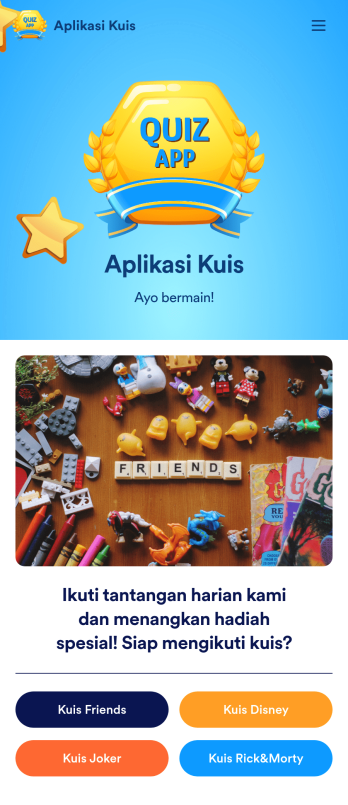
Aplikasi Kuis
Aplikasi kuis memungkinkan Anda mengikuti kuis dan mengirimkan jawaban dari perangkat apa pun. Baik jika Anda membutuhkan tempat untuk berbagi kuis untuk kelas, pesta kantor, atau grup teman, mulailah dengan Aplikasi Kuis gratis dari Jotform! Templat siap pakai ini berisi empat kuis siap pakai yang dapat Anda isi menggunakan perangkat apa pun dan bagikan dengan orang lain. Dengan pembuat seret dan lepas kami, Anda dapat membuat dan menambahkan kuis Anda sendiri. Semua jawaban akan langsung disinkronkan ke akun Jotform Anda yang aman dan mudah diakses untuk penilaian yang cepat dan mudah. Jadikan Aplikasi Kuis ini milik Anda hanya dengan beberapa klik. Anda hanya perlu menyeret dan melepas untuk membuat dan menambahkan kuis, mengunggah tabel untuk melihat hasilnya, menyematkan tautan dan dokumen, membuat halaman dan tombol baru, mengunggah foto dan video, dan banyak lagi. Saat aplikasi Anda siap digunakan, unduh ke perangkat favorit Anda dan bagikan dengan orang lain melalui tautan aplikasi atau dengan mengirimkan undangan email. Tingkatkan kuis online Anda ke level selanjutnya dengan Aplikasi Kuis yang sepenuhnya dapat disesuaikan dan menarik, yang dapat digunakan di mana saja.
Buka Kategori:School Management Apps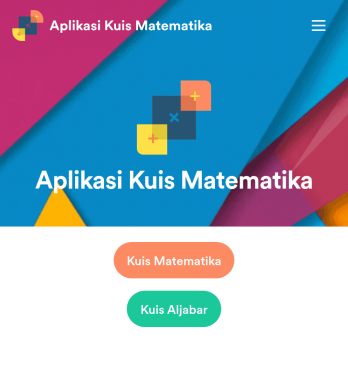
Aplikasi Kuis Matematika
Buat kuis matematika untuk siswa Anda dan bagikan dalam aplikasi gratis yang dapat diunduh dengan Jotform. Baik jika Anda seorang guru matematika atau tutor, buat kuis yang dapat diisi dengan lancar di perangkat apa pun — termasuk komputer, tablet, atau smartphone — untuk mengumpulkan tanggapan secara instan online. Aplikasi siap pakai ini menyediakan kuis yang sudah dibuat sebelumnya, yang secara otomatis menghitung hasil tanggapan. Anda dapat menambahkan kuis Anda sendiri atau mengubah yang sudah ada untuk memulai. Setelah selesai, bagikan aplikasi tersebut kepada peserta kuis Anda. Tanggapan disimpan di akun Anda yang aman dan siap dilihat di Tabel Jotform atau diubah menjadi laporan menggunakan Pembuat Laporan Jotform. Sesuaikan templat Aplikasi Kuis Matematika ini dengan pembuat seret-dan-lepas kami. Ubah ikon aplikasi atau splash screen, tambahkan kuis baru atau perbarui kuis yang sudah ada, dan sertakan tautan, dokumen, dan gambar sebanyak yang Anda suka. Anda bahkan dapat mengatur perhitungan untuk menghitung nilai setiap siswa secara otomatis! Hemat waktu dan kertas dengan Aplikasi Kuis Matematika gratis dari Jotform.
Buka Kategori:Education AppsTentang Templat Aplikasi Pendidikan
Kelola kelas Anda seperti seorang profesional dengan Aplikasi Pendidikan gratis dari Jotform. Untuk memulai, pilih templat aplikasi di bawah ini yang paling sesuai dengan kebutuhan Anda — lalu sesuaikan dengan menggunakan pembuat aplikasi seret dan lepas tanpa-kode kami. Setelah aplikasi Anda terlihat bagus, unduh ke ponsel cerdas, tablet, atau komputer Anda untuk mulai mengumpulkan informasi siswa dengan cepat dan aman. Hemat waktu untuk tugas manual dan nikmati lebih banyak waktu untuk dihabiskan bagi siswa Anda dengan bantuan Templat Aplikasi Pendidikan gratis yang dapat diunduh ke perangkat apa pun.
Jotform Apps offers a no-code app builder specifically tailored for creating dynamic Education apps. Utilizing Progressive Web App (PWA) technology, these apps can be installed directly via any web browser without the need for an App Store, making them accessible across iOS, Android, tablets, and desktops. With centralized data management through Jotform Tables, educators can ensure all data is seamlessly integrated and easily accessible, facilitating streamlined workflows and improved educational management processes.
Why Use Education Apps?
- Education apps provide a centralized platform for managing student data, which simplifies the process of tracking academic progress and administrative tasks. This ensures that educators and administrators can focus more on teaching and less on paperwork.
- These apps offer enhanced communication channels between students, teachers, and parents. With features like push notifications, important updates and reminders can be sent instantly, ensuring that everyone stays informed and engaged.
- The ability to automate workflows within education apps can significantly reduce the time spent on repetitive tasks. This automation allows educators to allocate more time to curriculum development and student interaction.
- Education apps support seamless integration with various payment systems, enabling smooth processing of tuition fees and other payments. This integration helps streamline financial transactions, ensuring they are secure and efficient.
- By offering a wide range of customization options, education apps can be tailored to meet specific institutional needs. This flexibility allows for the creation of unique educational experiences that cater to diverse learning environments.
Common Problems Solved by Education Apps
- One of the primary challenges in education is the management of student records and data. Education apps address this by providing a centralized database that allows for easy storage and retrieval of student information, thereby reducing administrative burden.
- Effective communication is often a struggle within educational institutions, with messages getting lost or delayed. Education apps solve this by facilitating instant communication through various channels, ensuring that important information reaches its intended recipients promptly.
- Many educational institutions face challenges with scheduling and resource allocation. Education apps offer solutions by providing tools to efficiently schedule classes, manage classroom resources, and ensure optimal use of facilities.
- Payment processing for tuition and other fees can be a cumbersome and error-prone process. Education apps integrate with secure payment systems, allowing for automated, error-free financial transactions that are both secure and convenient for users.
- Keeping up with technological advancements can be daunting for educational institutions. Education apps ensure that schools and universities stay current with the latest tech, providing cutting-edge features that enhance the learning experience.
Matching Use Cases to Features
- For institutions looking to streamline their communication processes, the Push Notifications feature within education apps ensures that all stakeholders receive timely updates. This feature improves engagement and ensures that no critical information is missed.
- Schools aiming to manage their financial operations more efficiently can benefit from Payment Integrations with platforms like Stripe and PayPal. This capability allows for secure and hassle-free processing of tuition fees and other financial transactions.
- To support diverse learning environments, the Publish Options feature offers different levels of access, such as Public, Private, and Company-only modes. This ensures that educational content is shared with the appropriate audience, maintaining privacy and security.
- For institutions that require data accessibility across various devices, Jotform Apps' compatibility with iOS, Android, and desktops ensures a seamless user experience. This cross-platform functionality allows educators and students to access necessary resources anytime, anywhere.
- The Drag-and-Drop Interface is ideal for educators with limited technical skills, as it simplifies the app creation process, allowing for easy customization and updates, ensuring that educational content remains relevant and engaging.
How to Create an Education App
- Choose a category-relevant template from the Template List or start from scratch.
- Customize using the Drag-and-Drop Interface to tailor the app to your educational needs.
- Share via Link, QR Code, or Embed to distribute your app efficiently to students and educators.
Top Use Cases for Education Apps
- For Managers: Education app templates empower managers with the ability to oversee and streamline administrative processes within educational institutions. By providing centralized access to data and communication tools, managers can ensure that operations run smoothly and efficiently. The ability to automate routine tasks also allows managers to focus on strategic planning and improving educational outcomes.
- For Teams: Teams within educational settings, such as faculty committees or administrative groups, benefit from improved collaboration and communication facilitated by education apps. These apps provide a shared workspace where team members can access important documents, track project progress, and communicate effectively, leading to enhanced teamwork and productivity.
- For Customers: For students and parents, education apps offer a convenient and accessible way to engage with educational content and stay informed about academic progress. These apps provide a user-friendly interface where users can access schedules, assignments, and important updates, fostering a more connected and informed educational community.
Summarizing Education Apps
Education apps, powered by Jotform’s no-code app builder, offer significant business value by enhancing the efficiency and effectiveness of educational operations. They provide a centralized platform for managing data, facilitating communication, and streamlining administrative processes. By integrating cutting-edge technology and customizable features, education apps empower educational institutions to deliver high-quality, engaging learning experiences to their students.
Tanya Jawab
1) Is it free to create and use Education apps on Jotform?
Jotform offers a Starter plan that allows users to create and use education apps at no cost. This plan is ideal for individuals or small educational institutions looking to explore the capabilities of Jotform Apps without financial commitment. Users can build apps with basic features and experience the platform's core functionalities before deciding to upgrade for more advanced options.
2) Are the data and payments collected through the app secure?
Yes, security is a top priority for Jotform, and all data and payment transactions are protected with high-level security measures, including GDPR compliance. Jotform ensures that sensitive information is encrypted and securely stored, providing peace of mind to users who manage confidential educational and financial data.
3) Do I need any coding skills to create an Education Apps app with Jotform?
No coding skills are required to create an education app using Jotform. The platform's intuitive Drag-and-Drop Interface allows users to easily customize their apps to meet specific educational needs. This accessibility enables educators and administrators to focus on content and functionality rather than technical details.
4) Can I collect payments for services directly through the app?
Yes, Jotform Apps supports payment collection directly through the app with integrations such as Stripe and PayPal. These integrations allow educational institutions to process tuition fees and other payments securely and efficiently, providing a seamless experience for both administrators and users.
5) Does Jotform support offline data collection for Education apps?
Yes, Jotform Apps supports offline data collection through its Mobile Forms capability. This feature is particularly useful in educational settings where internet access may be limited, as it allows users to collect data offline and sync it once a connection is available, ensuring continuous data collection.
6) Are Jotform Apps compatible with both iOS and Android devices?
Jotform Apps are designed to be compatible with both iOS and Android devices, ensuring that users have a consistent experience across different platforms. This compatibility allows educators and students to access educational apps on their preferred devices, enhancing accessibility and convenience.
7) Bagaimana aplikasi pendidikan dapat meningkatkan keterlibatan siswa?
Education apps enhance student engagement by providing interactive content and instant communication channels. Features like push notifications keep students informed and motivated, while customizable content ensures that learning materials are relevant and engaging, fostering a more interactive educational experience.
8) Can education apps facilitate remote learning?
Yes, education apps are instrumental in facilitating remote learning by providing a centralized platform for content delivery, communication, and assessment. With features that support cross-platform accessibility and seamless data integration, these apps enable educators to deliver comprehensive learning experiences to students regardless of their location.