

Online Store Templates

Aplikasi Katalog Produk
Baik jika Anda sudah memiliki pelanggan tetap maupun ingin menarik pelanggan baru, Aplikasi Katalog Produk gratis kami adalah cara sempurna untuk memamerkan dan menjual produk secara online! Dengan templat aplikasi siap pakai ini, pelanggan dapat melihat-lihat produk Anda, mendaftar untuk promosi, dan mengisi formulir kontak umum untuk menerima sampel perlengkapan kuku gratis. Tersedia juga formulir terpisah untuk meminta katalog produk. Aplikasi Anda dapat diakses dan diunduh dari perangkat apa pun, baik ponsel pintar, tablet, maupun komputer! Ingin menyesuaikan Aplikasi Katalog Produk Anda agar sesuai dengan branding salon Anda? Mudah sekali! Dengan interface seret-dan-lepas kami, Anda dapat menambahkan atau mengubah formulir, memilih font dan warna, mengunggah logo atau gambar mini katalog, memperbarui nama atau teks aplikasi, dan banyak lagi — semuanya tanpa coding. Setelah itu, Anda dapat membagikan tautan di situs web atau media sosial Anda dan mulai menerima pesanan. Berhentilah bertanya-tanya bagaimana cara menjual produk Anda secara online dan pamerkan produk Anda dengan Aplikasi Katalog Produk yang gratis dan sepenuhnya dapat disesuaikan ini!
Buka Kategori:Online Store Apps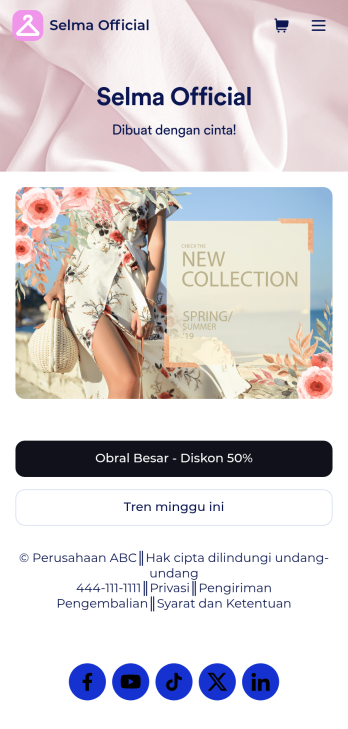
Templat Aplikasi E-commerce
Aplikasi e-commerce digunakan oleh toko untuk menjual produk e-commerce secara online. Aplikasi E-commerce siap pakai ini memungkinkan pelanggan untuk membeli produk dari katalog Anda, memasukkan informasi pengiriman dan penagihan mereka, dan membayar baik dengan kartu atau melalui PayPal. Tersedia formulir terpisah untuk menampilkan penjualan mingguan dan barang diskon. Pesanan dan pembayaran akan langsung disinkronkan ke akun Jotform Anda yang aman, dan dapat diakses dari perangkat apa pun. Ingin mempersonalisasi template aplikasi ini agar sesuai dengan branding toko Anda? Tidak perlu pengkodean — cukup gunakan pembuat formulir seret-dan-lepas kami untuk menambah atau mengganti elemen formulir, memilih font dan warna, mengunggah gambar thumbnail produk Anda, menetapkan harga dan diskon, dan banyak lagi. Anda juga dapat menyesuaikan splash page Anda dengan gambar produk terbaru Anda. Setelah selesai, Anda dapat membagikan aplikasi Anda di situs web atau media sosial Anda dengan sebuah tautan, di mana aplikasi tersebut dapat diunduh di smartphone, tablet, atau desktop apa pun. Berhenti bertanya-tanya bagaimana cara menjual produk e-commerce secara online dan mulailah melakukannya hari ini dengan Aplikasi E-commerce dari Jotform ini.
Buka Kategori:Apparel Selling Apps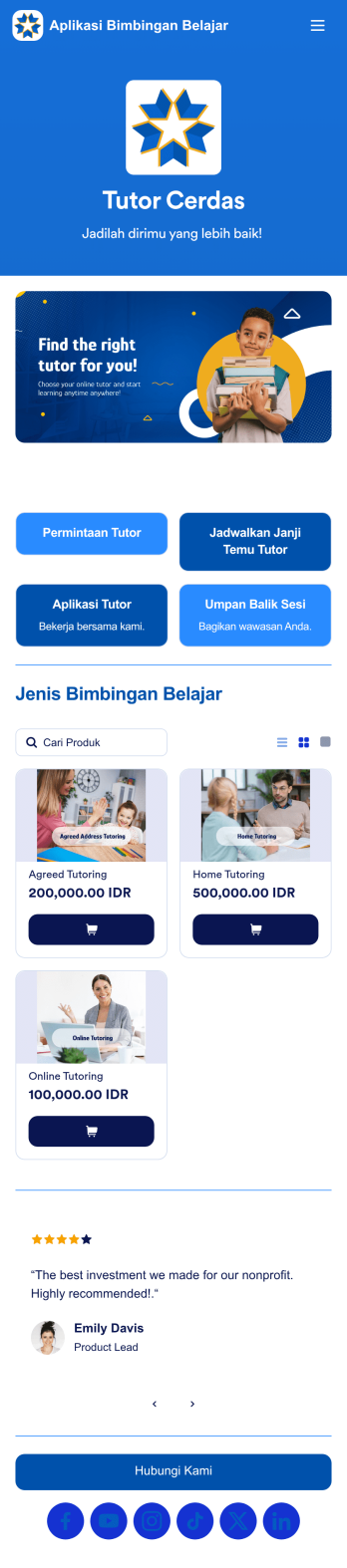
Aplikasi Bimbingan Belajar
Aplikasi Bimbingan Belajar digunakan oleh lembaga bimbingan belajar untuk merekrut tutor dan menjadwalkan janji temu dengan siswa. Aplikasi Bimbingan Belajar gratis ini mencakup Formulir Permintaan Tutor bagi siswa untuk mengisi informasi kontak umum dan menentukan bidang studi mereka, serta Formulir Janji Temu Tutor untuk menjadwalkan janji temu setelah tutor ditetapkan. Terdapat juga Formulir Aplikasi Tutor untuk merekrut tutor baru, serta Formulir Umpan Balik Sesi E-Learning di mana siswa dapat menilai kinerja tutor. Ingin menyesuaikan aplikasi Anda agar sesuai dengan branding lembaga Anda? Interface seret-dan-lepas Jotform memudahkan untuk menambah atau mengubah elemen formulir, mengunggah logo Anda, mempersonalisasi halaman splash Anda, dan lainnya — tidak diperlukan coding. Bagikan aplikasi Anda dengan tautan dan siswa akan dapat mengakses serta mengunduhnya di smartphone, tablet, atau desktop mana pun. Bantu menghubungkan siswa dengan tutor dalam waktu singkat dengan Aplikasi Bimbingan Belajar yang sepenuhnya dapat disesuaikan ini.
Buka Kategori:Aplikasi Pendaftaran Kursus & Pelatihan
Aplikasi Pendaftaran Acara
Pada tahun 2025, Aplikasi Pendaftaran Acara Jotform menonjol sebagai salah satu aplikasi pendaftaran acara terbaik untuk para perencana, membantu Anda tetap terorganisir untuk setiap jenis acara. Dipercaya oleh ribuan perencana acara di seluruh dunia, aplikasi siap pakai ini menggabungkan formulir pendaftaran, sponsor, dan umpan balik dalam satu platform yang andal. Tamu dapat dengan mudah mendaftar, berbagi umpan balik, atau menanyakan rincian dari smartphone, tablet, atau komputer mereka — memastikan pengalaman yang lancar di berbagai perangkat pada tahun 2025. Ingin menyesuaikan Aplikasi Pendaftaran Acara ini? Tanpa pengkodean apa pun, Anda dapat menyesuaikan formulir dan halaman agar sesuai dengan branding acara Anda — unggah logo, perbarui ikon, sesuaikan halaman splash, dan banyak lagi. Setelah aplikasi Anda siap, bagikan dengan menyematkan tautan di situs web acara Anda. Persiapkan acara Anda berikutnya dengan Aplikasi Pendaftaran Acara Jotform — pilihan utama di antara platform pendaftaran acara untuk perencana yang membutuhkan solusi cepat dan profesional.
Buka Kategori:Aplikasi Pemesanan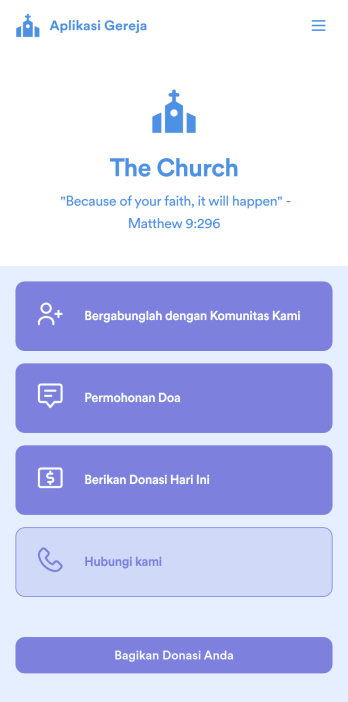
Aplikasi Donasi Gereja
Apa pun jenis gereja yang Anda kelola, buat aplikasi online Anda sendiri dengan Aplikasi Donasi Gereja gratis kami! Anda dapat membagikan semua formulir gereja Anda — seperti formulir donasi, formulir kontak, formulir permintaan doa, dan banyak lagi — melalui aplikasi Anda, sehingga lebih mudah untuk tetap terhubung dengan komunitas Anda. Anggota gereja Anda saat ini dan yang baru dapat membuka aplikasi dari ponsel pintar, tablet, atau komputer mana pun dan bahkan mengunduhnya untuk penggunaan di masa mendatang. Ingin menyesuaikan Aplikasi Donasi Gereja ini agar lebih mewakili gereja Anda? Doa Anda telah terjawab — menggunakan pembuat seret-dan-lepas kami, Anda dapat dengan mudah menjadikan templat siap pakai ini milik Anda! Jangan ragu untuk membuat dan menambahkan formulir baru, memperbarui nama dan ikon aplikasi, mengubah gambar latar belakang atau halaman pembuka, menyematkan tautan, dan banyak lagi. Setelah siap, bagikan aplikasi Anda kepada anggota gereja Anda melalui tautan. Tetap terhubung dengan anggota gereja Anda saat bepergian dengan Aplikasi Donasi Gereja khusus untuk jemaat Anda.
Buka Kategori:Aplikasi Portal Komunitas & Keterlibatan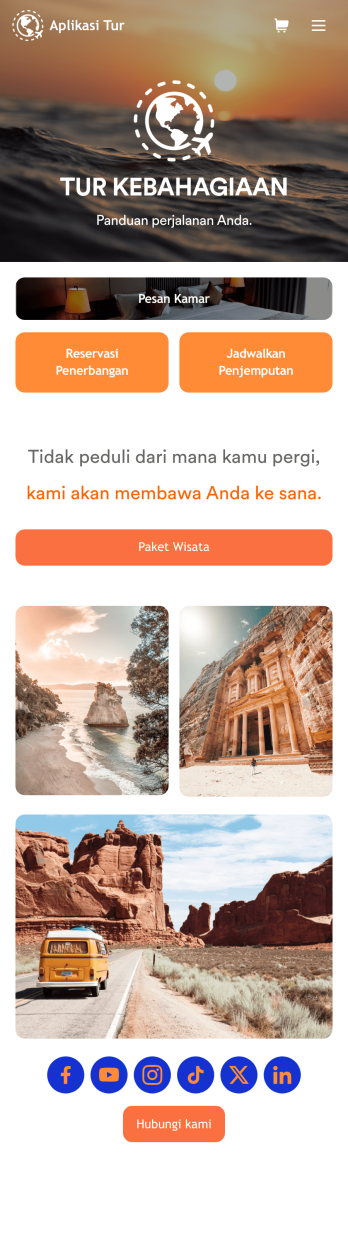
Aplikasi Tur
Ingin tahu cara menjual paket wisata online? Aplikasi tur digunakan oleh agen perjalanan untuk memfasilitasi pemesanan dan reservasi bagi para traveler. Dengan Aplikasi Tur ini, pelanggan dapat memesan kamar hotel menggunakan Formulir Pemesanan Kamar, melakukan reservasi penerbangan dengan Formulir Reservasi Penerbangan, dan meminta layanan penjemputan mobil dengan Formulir Pemesanan Online — semuanya dari satu aplikasi yang nyaman. Tanggapan langsung disinkronkan ke akun Jotform Anda yang aman, di mana tanggapan tersebut dapat diakses dari perangkat mana pun. Perlu menyesuaikan templat aplikasi ini agar sesuai dengan branding agen perjalanan Anda? Tidak diperlukan coding — cukup gunakan pembuat formulir seret-dan-lepaskami untuk menambahkan atau menukar elemen formulir, memilih font dan warna, mengunggah logo Anda, dan banyak lagi. Anda juga dapat memperkaya splash screen dan halaman formulir individual dengan foto kamar hotel dan tujuan perjalanan. Setelah selesai, bagikan aplikasi Anda dengan tautan atau sematkan di situs web Anda, dan pelanggan dapat mengunduhnya di smartphone, tablet, atau desktop mana pun. Jadikan perencanaan perjalanan menjadi mudah dan jual paket wisata online dengan Aplikasi Tur siap pakai ini dari Jotform.
Buka Kategori:Aplikasi Janji Temu dan PemesananTentang Online Store Templates
Bawa bisnis Anda online dalam hitungan menit dengan Pembuat Toko Jotform. Apa pun industri Anda, Anda dapat memilih aplikasi toko online siap pakai di bawah ini untuk disesuaikan tanpa pengkodean. Cukup seret dan lepas untuk menambahkan logo Anda, daftar produk dan harga Anda, dan ubah ikon aplikasi dan skema warna untuk sentuhan yang dipersonalisasi. Kemudian integrasikan dengan salah satu dari 25+ pemroses pembayaran — termasuk platform populer seperti PayPal dan Square — untuk menerima pembayaran online tanpa membayar biaya transaksi tambahan ke Jotform. Aplikasi Anda yang dapat diunduh akan berfungsi dengan lancar di iOS dan Android, atau dapat disematkan di situs web Anda untuk mulai mengumpulkan pesanan dengan cepat!
Jotform Apps, renowned for its no-code app builder technology, offers a unique proposition in the realm of Online Store Apps. Built on Progressive Web App (PWA) technology, these apps can be installed directly via a browser, eliminating the need for an App Store, and ensuring compatibility across diverse devices, including iOS, Android, tablets, and desktops. With centralized data capabilities powered by Jotform Tables, businesses can manage their data efficiently, ensuring that information is up-to-date and accessible. This workflow-oriented approach simplifies the complexities associated with online store management, empowering businesses to focus on growth and customer satisfaction.
Why Use Online Store Apps?
- Online Store Apps provide businesses with a platform to reach a wider audience by setting up a virtual storefront that is accessible 24/7. This continuous availability helps in capturing sales opportunities around the clock, unlike traditional brick-and-mortar stores with limited hours.
- They enhance the customer experience by providing an intuitive and user-friendly interface that makes browsing and purchasing products straightforward and enjoyable. This ease of use can lead to increased customer satisfaction and repeat business.
- With integrated payment solutions, these apps streamline the checkout process, offering customers multiple payment options such as credit cards and digital wallets. This flexibility not only caters to customer preferences but also minimizes cart abandonment rates.
- Online Store Apps enable effective inventory management through real-time tracking and updates, ensuring that stock levels are accurate and reflective of actual availability. This capability helps prevent overselling and ensures customer orders are fulfilled promptly.
- The apps support a global business reach by offering multi-language and multi-currency options, allowing businesses to cater to international customers seamlessly. This global accessibility helps businesses tap into new markets and expand their customer base.
Common Problems Solved by Online Store Apps
- Managing inventory across multiple sales channels can be a daunting task for businesses. Online Store Apps solve this by centralizing inventory management, providing real-time updates, and synchronizing stock levels across various platforms, thus reducing errors and overselling.
- High operational costs and inefficiencies in traditional retail setups can strain resources. By transitioning to Online Store Apps, businesses can significantly cut down on overhead costs related to physical store maintenance and staff while optimizing operational efficiency.
- Customer engagement and retention often suffer in the absence of personalized shopping experiences. These apps address this issue by offering features such as push notifications and personalized offers, which keep customers engaged and enhance their shopping experience.
- The complexity of integrating multiple payment gateways can be challenging. Online Store Apps simplify this by offering seamless integration with popular payment providers, ensuring secure and flexible payment options for customers, and reducing the complexity for businesses.
- Businesses often struggle with limited customer insights due to fragmented data. Online Store Apps address this by consolidating customer data, providing actionable insights that help businesses make informed decisions and tailor their marketing strategies effectively.
Matching Use Cases to Features
- For businesses looking to create a dynamic and engaging storefront, the Drag-and-Drop Interface of Jotform Apps allows easy customization, enabling the rapid development of a visually appealing store layout that resonates with brand identity.
- Businesses aiming to maintain constant communication with their customers can utilize Push Notifications to send timely updates about new products, promotions, or order statuses, thereby enhancing customer engagement and satisfaction.
- The Store Builder feature is essential for businesses that need to launch an online store quickly and efficiently. It provides a structured framework that simplifies the setup process, allowing for swift entry into the online market.
- With Payment Integrations like Stripe and PayPal, businesses can offer secure and diverse payment options, catering to customer preferences and ensuring a smooth transaction experience, which is crucial for reducing cart abandonment.
- Jotform Apps' Workflow Automation feature is invaluable for businesses that require streamlined operations. It automates repetitive tasks such as order processing and inventory updates, freeing up valuable time for staff to focus on strategic growth initiatives.
- The various Publish Options provided by Jotform Apps, such as Public, Private, and Company-only, allow businesses to control who accesses their online store, ensuring that sensitive business operations remain secure while still reaching the intended audience.
- Sharing Methods like Direct Link, Email, QR Code, and Social Media enhance the reach of the online store, making it easy for businesses to market their store across various platforms and attract more customers.
How to Create an Online Store App
- Choose a category-relevant template from the Template List or start from scratch.
- Customize using the Drag-and-Drop Interface.
- Share via Link, QR Code, or Embed.
Top Use Cases for Online Store Apps
- For Managers: Online Store Apps provide managers with a centralized dashboard to oversee business operations efficiently. They can monitor sales performance, track inventory levels, and generate real-time reports that offer valuable insights into business trends. This centralized access to critical data empowers managers to make informed decisions quickly, enhancing operational efficiency and strategic planning.
- For Teams: Teams benefit from the collaborative features of Online Store Apps, which facilitate seamless communication and task management. By automating repetitive tasks such as order processing and inventory updates, teams can focus on more strategic initiatives, improving productivity and reducing the risk of errors. Additionally, the ability to access the app from any device ensures that teams can collaborate effectively, regardless of location.
- For Customers: Online Store Apps offer customers a seamless and personalized shopping experience. With intuitive navigation, secure payment options, and real-time product availability updates, customers can shop with confidence and convenience. Push notifications keep customers informed about new arrivals and exclusive promotions, enhancing their engagement and satisfaction with the brand.
Summarizing Online Store Apps
Online Store Apps are a pivotal asset for businesses aiming to establish or enhance their online presence. These apps streamline various aspects of store management, from inventory tracking to customer engagement, ensuring a seamless shopping experience for customers. Jotform Apps, with its no-code app builder and PWA technology, offers businesses a versatile and efficient solution to create robust online stores. By leveraging features such as centralized data management and customizable interfaces, businesses can optimize their operations and drive growth.
Tanya Jawab
1) Is it free to create and use Online Store apps on Jotform?
Jotform offers a Starter plan that allows users to create and utilize Online Store apps at no cost. This plan is designed to provide individuals and small businesses with the essential features needed to build and manage their online stores effectively. As your business grows, you can opt for premium plans that offer additional features and capabilities to further enhance your online store.
2) Are the data and payments collected through the app secure?
Security is a top priority for Jotform, and the apps are designed to ensure that all data and payments collected are secure and compliant with GDPR regulations. The platform employs advanced encryption technologies to protect user information and transaction details, providing peace of mind to both businesses and their customers. This commitment to security helps build trust and credibility with your customer base.
3) Do I need any coding skills to create an Online Store Apps with Jotform?
No coding skills are required to create an Online Store app with Jotform. The platform's no-code app builder is designed to be user-friendly and intuitive, allowing users to create professional-grade apps with ease. The Drag-and-Drop Interface facilitates customization, enabling users to tailor their apps to meet specific business needs without the need for technical expertise.
4) Can I collect payments for services directly through the app?
Yes, you can collect payments directly through the app using integrated payment options such as Stripe and PayPal. These integrations allow businesses to offer secure and convenient payment methods to their customers, streamlining the transaction process. By providing multiple payment options, businesses can cater to a wider audience and improve the overall shopping experience.
5) Does Jotform support offline data collection for Online Store apps?
Jotform supports offline data collection via Mobile Forms, ensuring that businesses can continue to capture data even without an internet connection. This feature is particularly useful for businesses operating in areas with unreliable connectivity or for those attending events where internet access may be limited. Once connectivity is restored, the data is automatically synced, ensuring no information is lost.
6) Are Jotform Apps compatible with both iOS and Android devices?
Jotform Apps are built on Progressive Web App (PWA) technology, making them compatible with both iOS and Android devices. This ensures that businesses can reach a broader audience by providing a consistent app experience across different platforms. Users can access the app directly from their browsers without the need for downloads from an App Store, simplifying the user experience.
7) How can Online Store Apps help in improving customer engagement?
Online Store Apps enhance customer engagement by providing features such as push notifications and personalized promotions. These features ensure that customers are consistently updated on new products, sales, and other relevant information, keeping them connected with the brand. By offering a personalized shopping experience, businesses can improve customer satisfaction and foster loyalty.
8) Can I customize the design of my Online Store app?
Yes, Jotform's Drag-and-Drop Interface allows you to fully customize the design of your Online Store app. This feature enables you to create a store layout that aligns with your brand's visual identity and meets your specific business requirements. From adjusting color schemes to adding custom elements, the customization options are extensive, allowing you to create a unique and engaging online storefront.