

Formulir Rapat

Templat Laporan Rapat
Templat laporan rapat adalah dokumen yang dirancang untuk mengumpulkan rincian rapat. Sesuaikan dan isi di mana saja, kapan saja.
Buka Kategori:Formulir Laporan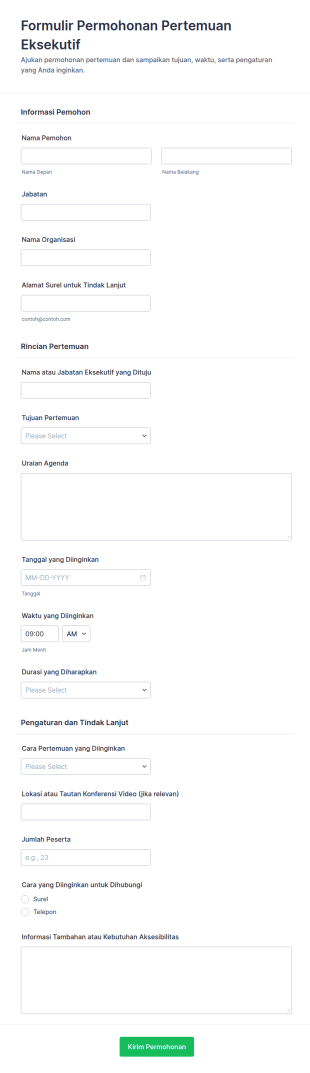
Form Permohonan Rapat Eksekutif
Kelola permintaan audiensi pimpinan dengan Formulir Permohonan Pertemuan Eksekutif untuk mengumpulkan data, menata jadwal, dan memudahkan tindak lanjut bagi sekretariat, kantor direksi, dan tim administrasi.
Buka Kategori:Formulir RapatTentang Formulir Rapat
Pindah rapat Anda menjadi online dengan Formulir Rapat gratis dari Jotform. Baik jika Anda ingin menjadwalkan rapat, memeriksa kehadiran rapat, mengumpulkan pendaftaran, merencanakan perjalanan, atau yang lainnya, templat formulir siap pakai kami dapat membantu Anda memulainya dalam waktu singkat. Cukup pilih templat yang sesuai dengan Anda, dan sesuaikan dengan pembuat formulir online intuitif kami.
Menyesuaikan formulir rapat Anda sendiri menjadi mudah dengan pembangun seret dan lepas Jotform. Buat perubahan desain seperti menambahkan aset atau logo merek Anda sendiri, mengubah huruf dan warna, mengintegrasikan dengan platform yang bermanfaat — termasuk Google Drive, Asana, Slack, dan lainnya — untuk menyinkronkan tanggapan ke akun Anda yang lain. Jadikan rapat lebih mudah dari sebelumnya dengan Formulir Rapat online gratis dari Jotform.
Why Use Meeting Forms?
- Meeting Forms provide a structured approach to collecting essential information, ensuring that nothing is overlooked during the planning process. This accuracy is crucial for effective meeting preparation and execution, reducing the likelihood of missed details.
- The speed at which data can be collected and accessed using Meeting Forms is a significant advantage. Instantaneous data retrieval allows for quick decision-making and adjustments, keeping meetings efficient and on track.
- Professional data handling is enhanced with Meeting Forms, as they offer secure methods for capturing and storing sensitive information. This is vital for maintaining confidentiality and complying with data protection regulations.
- By digitizing the information collection process, Meeting Forms eliminate the need for paper forms, which can be cumbersome and prone to loss. This not only streamlines operations but also supports environmental sustainability by reducing paper waste.
- Automated workflows integrated with Meeting Forms save time by minimizing repetitive tasks, allowing staff to focus on more strategic activities. This leads to increased productivity and better resource allocation within the organization.
Common Problems Solved by Meeting Forms
- One of the primary issues solved by Meeting Forms is the cumbersome nature of paperwork. By transitioning to digital forms, businesses can significantly reduce the time spent managing physical documents and the risk of losing important information.
- Manual data entry is another challenge addressed by Meeting Forms. Automated data capture means less room for human error, leading to more accurate and reliable information for decision-making.
- The risk of data loss is mitigated with Meeting Forms, as they provide secure storage options. This ensures that all collected data is preserved and easily retrievable, safeguarding against the loss of critical meeting information.
- Meeting Forms also address the problem of disorganized data management. With centralized data collection and storage, businesses can maintain a clear overview of all meeting-related information, facilitating better analysis and follow-up actions.
Matching Use Cases to Features
- For teams looking to streamline meeting scheduling, the Drag-and-Drop Form Builder allows for easy customization of forms to include all necessary scheduling fields. This feature enables quick setup and modification of meeting forms, ensuring all relevant details are captured effortlessly.
- The incorporation of Conditional Logic in Meeting Forms can greatly enhance operational outcomes by displaying only relevant questions to respondents based on their previous answers. This leads to more concise forms and a better user experience.
- With over 30 Payment Gateways like Stripe and PayPal, collecting payments for events or paid consultations directly through Meeting Forms becomes seamless. This integration simplifies the payment process, ensuring timely and secure transactions.
- Electronic Signatures via Jotform Sign can be utilized to capture consent or approvals, ensuring that all agreements are formalized and legally binding. This feature is crucial for meetings involving contracts or sensitive agreements.
- Jotform's PDF Editor facilitates automated PDF generation, allowing for the conversion of form submissions into professional documents. This is particularly useful for sharing meeting minutes or summaries with stakeholders.
- For organizations using multiple platforms, the 100+ Third-party Integrations, such as Google Sheets and Salesforce, enable seamless data flow between systems. This connectivity enhances data consistency and accessibility across different departments.
- Secure Data Management with Jotform Tables ensures that all meeting data is stored safely, protecting against unauthorized access and ensuring compliance with data protection regulations.
How to Create a Meeting Form
- Start by browsing the Template List for a Meetings template that suits your needs or begin from a blank form to create a custom solution.
- Customize the design and fields of your form using the Drag-and-Drop Form Builder, ensuring it meets all specific requirements for your meetings.
- Once your form is ready, publish it and share it with participants via Direct Link, Email, or Website Embed to start collecting responses.
Top Use Cases for Meeting Forms
- For Managers: Meeting Forms enable managers to efficiently coordinate meetings by providing a structured framework to gather necessary details such as agendas, participant lists, and objectives. This organization aids in setting clear expectations and ensuring that all participants are prepared, leading to more productive meetings. Additionally, the ability to collect feedback post-meeting helps managers assess the effectiveness of the meeting and make improvements for future sessions.
- For Teams: Teams benefit from Meeting Forms by having a centralized system to schedule and manage meetings, ensuring that all team members are aligned and informed. The ease of data sharing and integration with other platforms facilitates seamless communication and collaboration, enhancing team productivity. Moreover, the ability to capture meeting outcomes and actions ensures accountability and follow-through on discussed items.
- For Customers: Customers experience a streamlined interaction when Meeting Forms are used to schedule consultations or service meetings. The forms allow for easy submission of requests and preferences, ensuring that meetings are tailored to meet customer needs. This level of personalization improves customer satisfaction and fosters stronger relationships. Additionally, the secure handling of personal data reassures customers of their privacy and builds trust.
Summarizing Meeting Forms
Meeting Forms are an indispensable asset for businesses aiming to enhance their meeting management processes. By leveraging the capabilities of Jotform's online form builder, organizations can create highly customized and efficient forms that streamline data collection and improve overall meeting productivity. The centralized data management and automation features not only save time but also ensure that all meeting-related information is accurately captured and securely stored. Ultimately, Meeting Forms contribute to more organized, effective, and impactful meetings.
Tanya Jawab
Apa itu form pertemuan?
Formulir rapat adalah alat online yang digunakan untuk mengatur, menjadwalkan, dan mengelola rapat dengan mengumpulkan informasi penting seperti detail peserta, poin agenda, dan umpan balik.
2. Mengapa formulir rapat penting bagi organisasi?
Formulir rapat membantu menyederhanakan proses perencanaan, mengurangi konflik penjadwalan, memastikan semua informasi yang diperlukan dikumpulkan, dan meningkatkan komunikasi di antara para peserta.
3. Informasi apa yang harus disertakan dalam formulir rapat?
Bidang yang biasa meliputi tanggal dan waktu pertemuan, lokasi, nama dan email peserta, topik agenda, persyaratan khusus, dan status RSVP.
4. Apakah ada berbagai jenis formulir rapat?
Ya, formulir rapat dapat disesuaikan untuk penjadwalan, RSVP, pengajuan agenda, pencatatan menit, pengumpulan umpan balik, dan lainnya, tergantung pada tujuan rapat.
5. Siapa yang dapat menggunakan form rapat bisnis?
Setiap orang yang terlibat dalam mengatur atau mengelola pertemuan — seperti administrator kantor, pemimpin tim, staf HR, dan koordinator acara — dapat memperoleh manfaat dari menggunakan formulir pertemuan.
6. Bagaimana formulir rapat meningkatkan efisiensi rapat?
Mereka memusatkan informasi, mengotomatisasi notifikasi, dan menyediakan cara terstruktur untuk mengumpulkan dan mengelola data terkait pertemuan, sehingga mengurangi pekerjaan manual dan kesalahan.
7. Dapatkah formulir rapat diintegrasikan dengan alat bisnis lainnya?
Ya, formulir rapat Jotform dapat diintegrasikan dengan aplikasi kalender, platform email, dan alat manajemen proyek untuk mengotomatisasi penjadwalan dan tugas tindak lanjut.
Apakah pengiriman formulir rapat aman dan pribadi?
Jotform memastikan bahwa semua pengiriman formulir tersimpan dengan aman dan hanya dapat diakses oleh pengguna yang berwenang, membantu organisasi menjaga privasi dan perlindungan data.