

Jotform is the best tool available when you need to create File Upload Forms. We cover so many upload related features, such as high upload limits, and sending your uploads to other services like Dropbox, Google Drive and Box automatically. On top of all of that, we now give you the ability to receive uploads in the emails you receive as attachments.
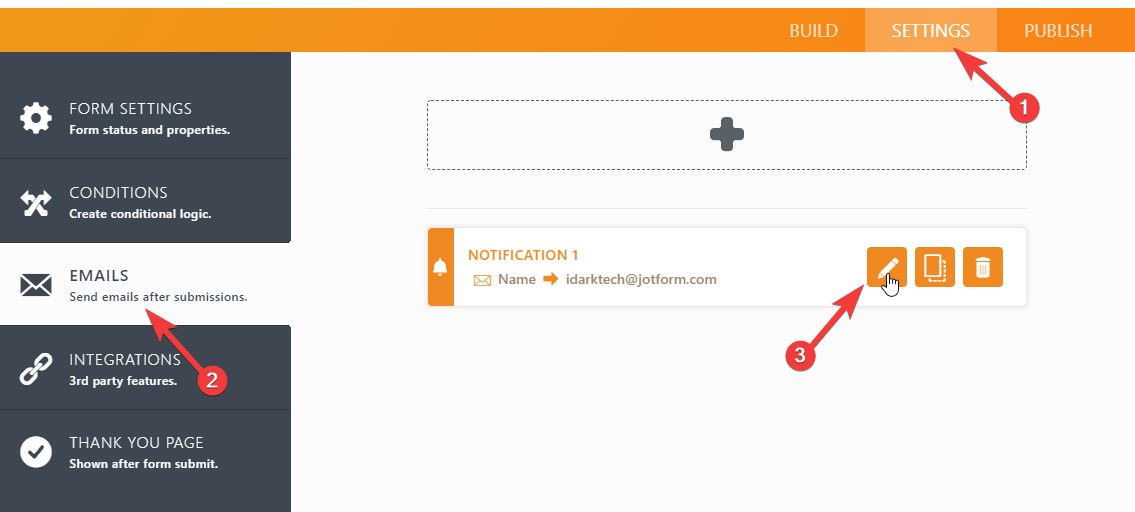
Enabling this feature on your forms is pretty easy. Just open your form in Form Builder and then select Emails under Settings tab. Next, click Edit Notification button.
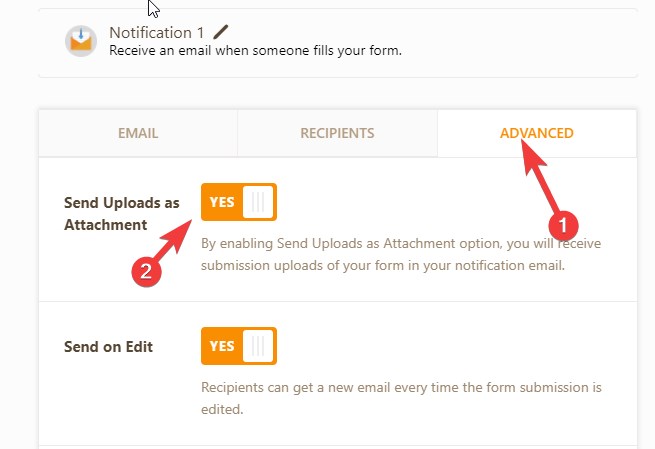
After that, click on Advanced tab and set Send Uploads as Attachment toggle to ‘Yes’.
That’s it! You are now able to receive uploaded files as part of your notification emails. For more options, including attaching uploaded files, adding a PDF copy of the submission, or inserting a download link, visit Jotform Attachments.










Send Comment:
28 Comments:
October 3, 2019
How can I know the features of an email attachment
January 10, 2019
So does this feature create links to the storage space on the Jotform backend? Or does this just act as a email attachment with the small file size limit? What is the file size limit?
November 7, 2017
We would like to attach the uploaded form to the AutoResponder email. Submitter uploads a document then Submitter receives an email receipt with the uploaded document attached. I see this was requested in July 2016 - any update? If not, I would also request this feature.
August 9, 2017
This was working on my forms but has suddenly stopped. The files appears to be attached to the email, but the files are empty and won't open.
June 19, 2017
I see this works on the "notification" but not available on "auto responder", will this be added in the future?
thanks
April 27, 2017
Is this feature is broken on my forms. Can forward form as PDF with photos in it but there are no photos being attached to emails.
February 28, 2017
I'm trying to place a pdf ebook to the attachment, when I when I submit the form with my own email to see if it works I see the attachment but it doesn't allow to open it on my Mac because I get an error message saying the file is empty.
Any suggestions?
August 21, 2016
I couldn't allow a form, this is "Teacher's evaluation". Can you tell me, why?
August 21, 2016
Even me could do it. Though, after the first form, I could not repeat it with the second one. :-(
July 27, 2016
Does this feature allow me to add an "upload file" button on my website, whereas my clients could click and upload a large video file (say, two gigs) and then that file would be sent to my email?
July 26, 2016
you guys rock
July 26, 2016
Hey it's the middle of Winter here in Australia! Don't rub it in. :-)
July 26, 2016
niiiiiiiiiiiiiice
July 26, 2016
Do that for AutoResponder emails too and we'll be thrilled!
July 12, 2016
this article shows more interesting information.thanks for sharing this nice article.it was helpful to us to learn more.
July 1, 2016
Do the attachments ever expire in the notification emails?
July 1, 2016
Amazing you are the best.
June 30, 2016
Great news!
You guys might want to take a look at the "drag and drop" widget. This does not seem to attach the files.
June 30, 2016
This is great!!
June 29, 2016
Perfect - thank you!!
June 29, 2016
SON LOS MEJORES MUCHAS GRACIAS CHINGON!
June 29, 2016
Perfect. Jotform saves the day every day
June 29, 2016
you are amazing
thank you so muchJune 29, 2016
Aytekin Tank ..... your team rocks !!
June 29, 2016
Keep up the good work, amazing feature!