

Gift Certificate Templates

Vorlage für Tattoo Geschenkgutschein Formular
Sich tätowieren zu lassen, wird jetzt immer beliebter, modischer, attraktiver und trendiger. Als Inhaber eines Tattoostudios ist dies der beste Zeitpunkt, um Geschenkgutscheine an potenzielle Kunden und bestehende Kunden zu verschenken. Das wird Ihren Umsatz definitiv ankurbeln und neue Kunden anlocken.
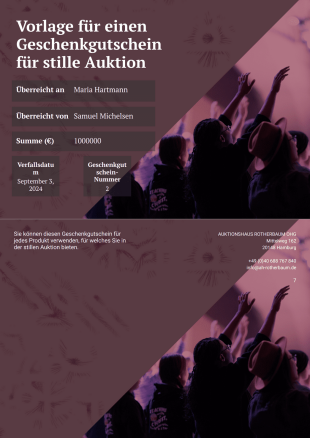
Vorlage für einen Geschenkgutschein für stille Auktion
Eine stille Auktion zu veranstalten ist sehr aufregend und gleichzeitig eine Herausforderung. Laden Sie mehr Teilnehmer ein, indem Sie Ihren bestehenden Kunden oder neuen Kunden einen Geschenkgutschein für eine stille Auktion schenken. Dies wird die Zahl der Teilnehmer an der stillen Auktion mit Sicherheit erhöhen.Diese wunderbare Vorlage für einen Geschenkgutschein für eine stille Auktion zeigt den Namen der Person, die den Gutschein erhalten hat, die Person oder das Unternehmen, das den Gutschein zur Verfügung gestellt hat, den Wert des Gutscheins, die Gutschein-ID und das Ablaufdatum. Diese PDF-Vorlage verwendet das Widget Unique ID, um für jede Antwort eine eindeutige Gutscheinnummer zu generieren. Sie können mit dem PDF-Editor auch zusätzliche Anweisungen oder Notizen in die PDF-Datei einfügen.
Über Gift Certificate Templates
PDF-Vorlagen für Geschenkgutscheine sind vorgefertigte, anpassbare Layouts, die die Erstellung und den Vertrieb von Geschenkgutscheinen für verschiedene geschäftliche Zwecke vereinfachen. Diese Vorlagen sind auf die Anforderungen verschiedener Branchen zugeschnitten. Unternehmen können damit Geschenkgutscheine als Belohnungen, Werbemittel oder Zeichen der Wertschätzung für Kunden anbieten. In der Praxis sind diese Vorlagen ein wesentlicher Bestandteil der Geschäftsabläufe im Einzelhandel, im Gastgewerbe und in dienstleistungsorientierten Unternehmen. Sie erleichtern die Ausstellung personalisierter Geschenkgutscheine für Kunden oder Mitarbeiter und stärken so die Kundenbindung und -loyalität.
Jotform stands out as the premier online form builder for creating and managing Gift Certificate PDF Templates. With its intuitive drag-and-drop interface, users can easily customize templates to suit their specific branding and operational needs. The platform’s automated data collection capabilities streamline the process, ensuring that each gift certificate is generated accurately and efficiently. Additionally, Jotform Tables centralizes data management, allowing for easy tracking and organization of issued gift certificates, which is essential for maintaining an organized and responsive business environment.
Why Use Gift Certificate Templates?
- Vorlagen für Geschenkgutscheine steigern die betriebliche Effizienz erheblich, da sie den Zeitaufwand für die Gestaltung von Geschenkgutscheinen deutlich reduzieren. Dadurch können sich Unternehmen stärker auf den Kundenkontakt konzentrieren und administrative Aufgaben verringern. So gewährleisten sie einen reibungslosen und professionellen Service.
- Mit Vorlagen gewährleisten Sie ein einheitliches Branding. Sie passen jeden Geschenkgutschein einfach an den Stil und die Botschaft Ihres Unternehmens an. So bewahren Sie eine einheitliche Markenidentität an allen Kundenkontaktpunkten. Das stärkt Markenbekanntheit und Kundenbindung.
- Die automatisierte PDF-Erstellung mit dem PDF Editor von Jotform gewährleistet präzise Datenverarbeitung. Sie verringert das Risiko menschlicher Fehler, die bei manueller Eingabe auftreten können. Dadurch sind die in jedem Geschenkgutschein enthaltenen Informationen wie Ablaufdaten und Nutzungsbedingungen zuverlässiger.
- Vorlagen verkürzen die Bearbeitungszeiten bei der Ausstellung von Geschenkgutscheinen. Das ist besonders in Hochsaisonzeiten oder während Aktionszeiträumen von Vorteil. Die schnellere Bearbeitung erhöht die Kundenzufriedenheit. Unternehmen können außerdem zeitnah Marketingchancen nutzen.
- Unternehmen behalten mit den Funktionen des zentralisierten Data Managements von Jotform leicht den Überblick über ausgestellte Geschenkgutscheine. Sie überwachen die Einlösequoten und analysieren Kundenpräferenzen. Dieser datengestützte Ansatz unterstützt fundierte Entscheidungen und strategische Planung.
Common Problems Solved by Gift Certificate Template
- Manuelle Erstellung von Geschenkgutscheinen erzeugt viel Schreibarbeit. Vorlagen automatisieren den Gestaltungs- und Ausstellungsprozess und reduzieren den Verwaltungsaufwand erheblich.
- Manuelle Dateneingabe führt häufig zu Fehlern und Unstimmigkeiten. Diese Fehler können sich negativ auf die Kundenzufriedenheit und den Ruf Ihres Unternehmens auswirken. Vorlagen für Geschenkgutscheine bieten ein strukturiertes Format. Dieses Format minimiert das Fehlerrisiko und gewährleistet zuverlässige sowie einheitliche Informationen.
- Verlorene Daten und verlegte Gutscheine können ein erhebliches Problem darstellen, insbesondere in Umgebungen mit hohem Datenaufkommen. Durch die Verwendung digitaler Vorlagen speichern Sie alle Gutscheine sicher. Bei Bedarf rufen Sie sie jederzeit problemlos ab. So verhindern Sie Datenverlust.
- Unternehmen haben oft Schwierigkeiten, in ihren Unterlagen ein professionelles Erscheinungsbild zu wahren. Mit Vorlagen gestalten Sie jeden Geschenkgutschein professionell. So stärken Sie die Glaubwürdigkeit Ihres Unternehmens und fördern das Vertrauen der Kunden.
Passende Anwendungsfälle für Features
- Für Unternehmen, die regelmäßig Geschenkgutscheine ausstellen, ist der Drag-and-Drop-Formulargenerator von unschätzbarem Wert, um Layouts schnell an spezifische Branding-Anforderungen anzupassen. Diese Funktion sorgt dafür, dass jede Vorlage sowohl funktional als auch optisch ansprechend ist, was die Customer Experience verbessert.
- Bedingte Logik ist eine Funktion, mit der Unternehmen den Inhalt eines Geschenkgutscheins anhand bestimmter Kriterien wie Kaufhistorie oder Kundengruppe anpassen können. Diese Personalisierung kann die Kundenzufriedenheit und Kundenbindung deutlich erhöhen.
- Mit elektronischen Signaturen (Jotform Signatur) können Unternehmen Geschenkgutscheine digital authentifizieren. So erhalten Aussteller und Empfänger mehr Sicherheit und Zuverlässigkeit. Diese Funktion ist besonders nützlich für Geschenkgutscheine mit hohem Wert, die eine Überprüfung erfordern.
- The PDF Editor’s Automated PDF Generation capability ensures that each gift certificate is generated accurately and promptly, providing a seamless experience for both the business and the customer. This automation reduces the workload on staff and speeds up the distribution process.
- Secure Data Management with Jotform Tables allows businesses to track the issuance and redemption of gift certificates effectively. This functionality supports operational efficiency and ensures that no gift certificate is unaccounted for, providing valuable insights into customer behavior.
- Offline Data Collection (Jotform Mobile Forms) is particularly beneficial for businesses that operate in environments with limited internet connectivity. This feature ensures that gift certificates can still be issued and managed effectively, regardless of location.
- The Approval Workflows feature facilitates internal validation processes, ensuring that all gift certificates meet the necessary criteria before they are issued. This helps maintain quality control and reduces the risk of unauthorized or incorrect certificates being distributed.
How to Create a Gift Certificate Template
- Start by browsing the Template List for a Gift Certificate template that suits your needs, or choose to begin from a blank template if you prefer a more customized approach.
- Utilize the Drag-and-Drop Form Builder to tailor the design and fields of the template. This step allows you to incorporate your company’s branding, terms, and any specific information you wish to include on the gift certificate.
- Once your template is customized to your satisfaction, publish it and share it with your intended audience via Direct Link, Email, or Website Embed. This ensures that your gift certificates are easily accessible and distributable to your customers or clients.
Top Use Cases for Gift Certificate Templates
- For Managers: Gift Certificate Templates offer managers a streamlined method for issuing rewards and incentives to both customers and employees. By utilizing these templates, managers can maintain a consistent approach to gift certificate issuance, ensuring that all certificates align with company policies and branding. This consistency is crucial for maintaining professional standards and enhancing the perceived value of each certificate.
- For Teams: Teams benefit from the increased efficiency and organization that Gift Certificate Templates provide. By standardizing the design and issuance process, teams can focus more on strategic activities and less on administrative tasks. This not only increases productivity but also fosters a more collaborative working environment, as team members can easily access and manage certificates through centralized data management.
- For Customers: Customers appreciate the professionalism and ease of use that Gift Certificate Templates offer. These templates ensure that each certificate is easy to redeem and understand, enhancing the overall customer experience. By providing clear terms and a polished appearance, businesses can bolster customer satisfaction and encourage repeat business, as customers feel valued and respected.
Summarizing Gift Certificate Templates
Geschenkgutscheinvorlagen bieten Unternehmen einen großen Vorteil, weil sie Abläufe optimieren und die Kundenbindung stärken. Sie stellen einen strukturierten, anpassbaren Rahmen bereit. Damit verringert sich der Verwaltungsaufwand bei der Ausstellung von Geschenkgutscheinen, und die Ausstellung bleibt präzise sowie effizient. Die leistungsstarken Funktionen von Jotform, wie die automatisierte PDF-Erstellung und das Data Management mit sicherer Datenverwaltung, steigern den Nutzen dieser Vorlagen zusätzlich und machen sie zu einem unverzichtbaren Bestandteil einer modernen Geschäftsstrategie. Unternehmen sichern damit ihren Wettbewerbsvorteil und bieten ihren Kunden ein professionelles Erlebnis.
Häufig gestellte Fragen
1) Ist die Erstellung von Geschenkgutschein-Vorlagen auf Jotform kostenlos?
Ja, Jotform bietet einen kostenlosen Tarif an, mit dem Sie Vorlagen für Geschenkgutscheine erstellen und anpassen können. Für erweiterte Funktionen und höhere Limite für Antworten sollten Sie jedoch möglicherweise einen der Premium-Tarife von Jotform in Betracht ziehen.
2) Sind Vorlagen und übermittelte Daten sicher?
Jotform schützt Ihre Daten mit Verschlüsselung und sicheren Data-Management-Verfahren. So bleiben Ihre Vorlagen und Antworten vertraulich und vor unbefugtem Zugriff geschützt.
3) Benötige ich Programmierkenntnisse, um eine Vorlage für einen Geschenkgutschein zu erstellen?
Nein, dank der benutzerfreundlichen Drag-and-Drop-Oberfläche von Jotform können Sie Gutscheinvorlagen erstellen, ohne über Programmierkenntnisse zu verfügen. Dieser intuitive Gestaltungsprozess ermöglicht es Nutzern aller Kenntnisstufen, Vorlagen mühelos anzupassen.
4) Was bedeutet „Feldzuordnung“ im Zusammenhang mit Geschenkgutscheinvorlagen?
Feldzuordnung verknüpft Eingabefelder eines Web-Formulars mit bestimmten Positionen in einer PDF-Vorlage. So übernimmt das System die über das Formular erfassten Daten korrekt in die entsprechenden Abschnitte des Geschenkgutscheins.
5) Können diese Vorlagen auf mobilen Geräten verwendet werden?
Ja, die Geschenkgutschein-Vorlagen von Jotform sind vollständig mit mobilen Geräten kompatibel. So können Sie Geschenkgutscheine auch unterwegs effizient erstellen, verwalten und versenden.
6) Wie verbessert die Funktion „PDF-Anhang in automatischen Antworten“ die Nutzung von Geschenkgutscheinvorlagen?
Die Funktion „PDF-Anhang in automatischen Antworten“ ermöglicht es, eine automatisch generierte PDF-Datei des Geschenkgutscheins direkt an die E-Mail-Adresse des Empfängers zu senden. Dies optimiert den Versandprozess und gewährleistet die sofortige Zustellung an den vorgesehenen Empfänger.
7) Welche Rolle spielt der Passwortschutz bei der Verwaltung von Geschenkgutschein-Vorlagen?
Passwortschutz bietet eine zusätzliche Sicherheitsebene. Benutzer müssen ein Passwort eingeben, bevor sie die PDF-Datei des Geschenkgutscheins anzeigen oder öffnen können. Diese Funktion schützt sensible Informationen und regelt den Zugriff auf die Inhalte.
8) Können Sie Genehmigungs-Workflows in Vorlagen für Geschenkgutscheine integrieren?
Ja, mit Jotform können Sie Genehmigungs-Workflows in Gutscheinvorlagen integrieren. Dadurch prüfen und validieren Sie Gutscheine, bevor Sie sie ausstellen. So entsprechen alle Gutscheine den Genehmigungsprozessen Ihres Unternehmens, und Sie behalten Qualität und Kontrolle.