Mailchimp is a popular marketing platform that helps businesses of all sizes connect with their audience, share their brand story, and grow. While it’s best known for its email marketing tools, it also offers helpful features like automation, analytics, social media integration, and e-commerce support.
By connecting your form to Mailchimp, you can automatically send new leads, customers, or subscribers straight to your mailing lists—making it easier to stay in touch and keep your audience engaged.


Whether you’re setting up a new form or updating an existing one, integrating your form with Mailchimp takes no time—here’s how:
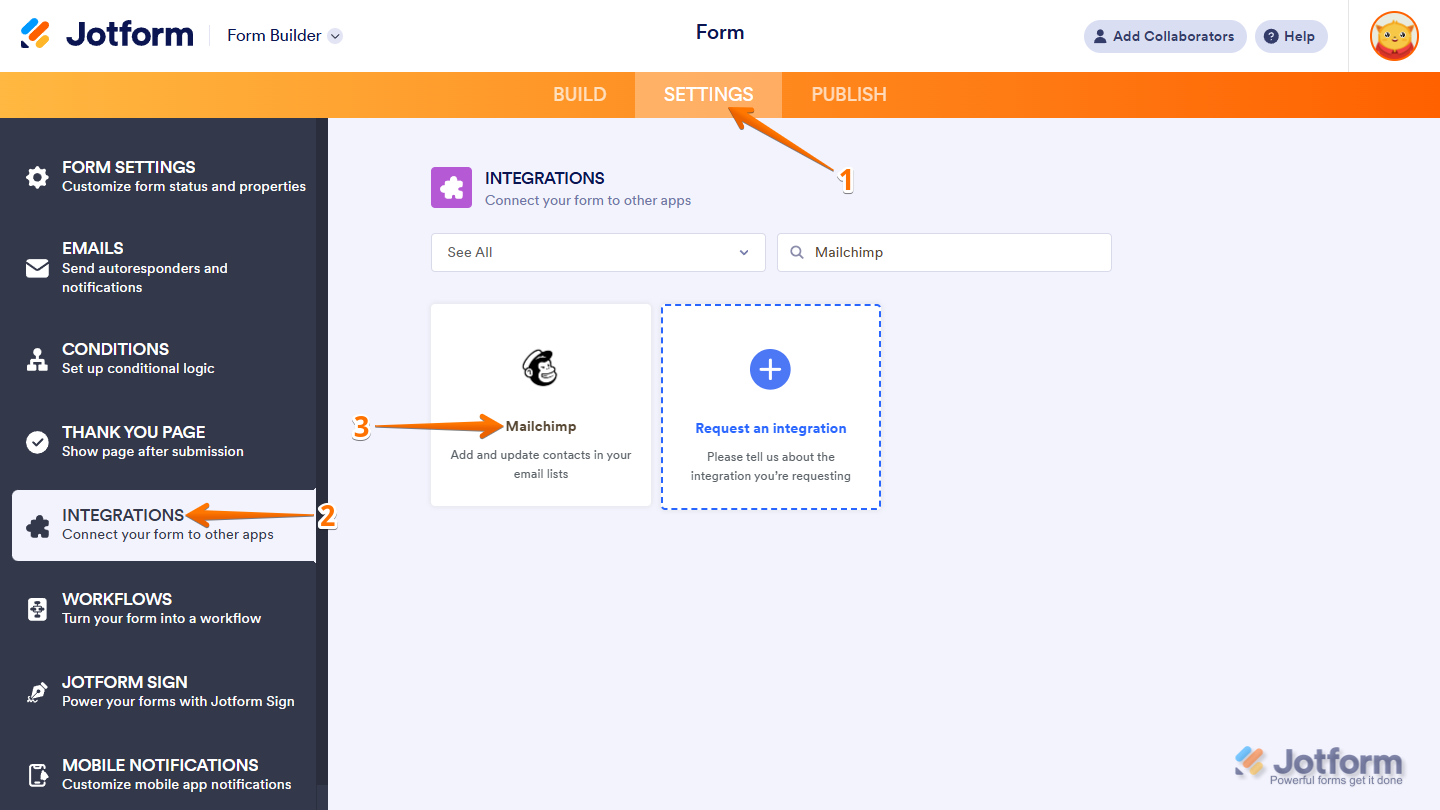
- In Form Builder, in the orange navigation bar at the top of the page, click on Settings.
- In the menu on the left, click on Integrations.
- Then, search for Mailchimp and click on it.
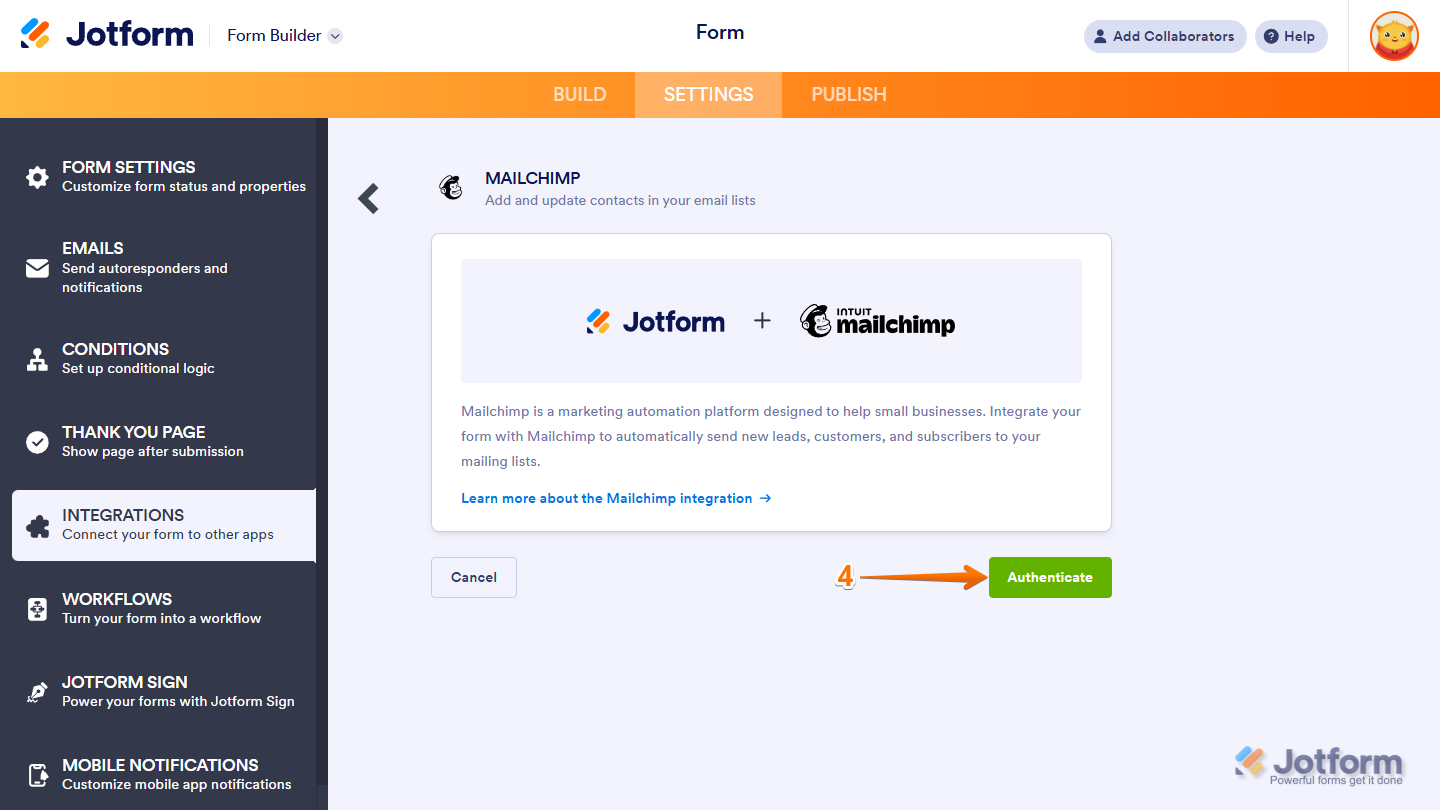
- Now, click on Authenticate and log in to your Mailchimp account.
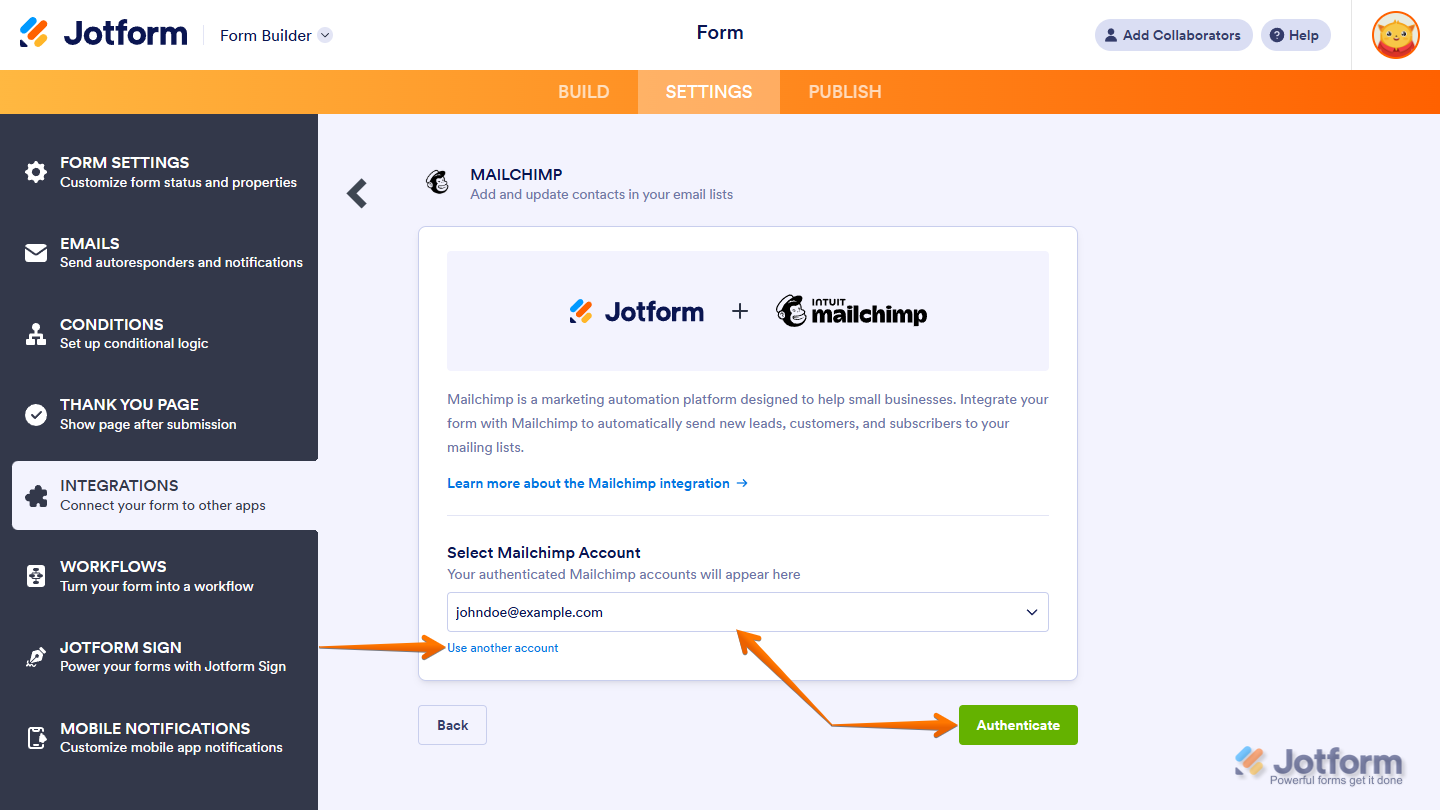
If you’ve logged in before, just pick your Mailchimp account from the dropdown and click on Authenticate. To use a different one, click on the Use another account link.
- Once you’re connected, start by setting up these first steps:
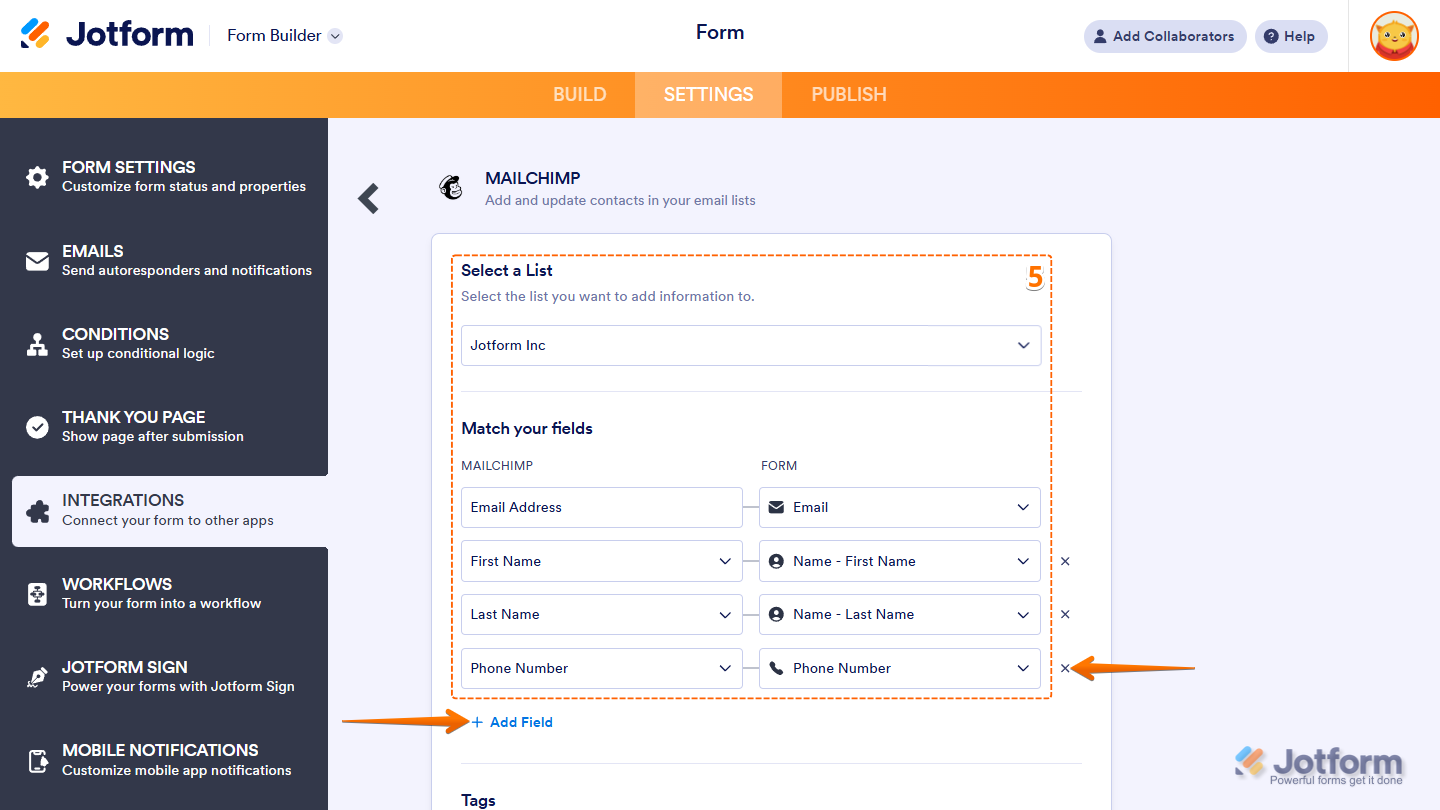
- Select a list — Choose where you want to send the information.
- Match your fields — Pick the Mailchimp fields on the left and match them with your form fields on the right.
Note
To map more fields, just click + Add Field at the bottom of the section. To remove a mapped field, click the X icon on the right side of the field.
- Next, continue in the middle part to set up these things:
- Tags — Label your contacts to keep them organized and make targeting easier. Take a look at our guide on How to Use Mailchimp Tags for more details.
- Interest Groups — Group your contacts by their interests, such as contact method or customer type. Check out our guide on Adding Mailchimp Subscribers to Interest Groups to learn more.
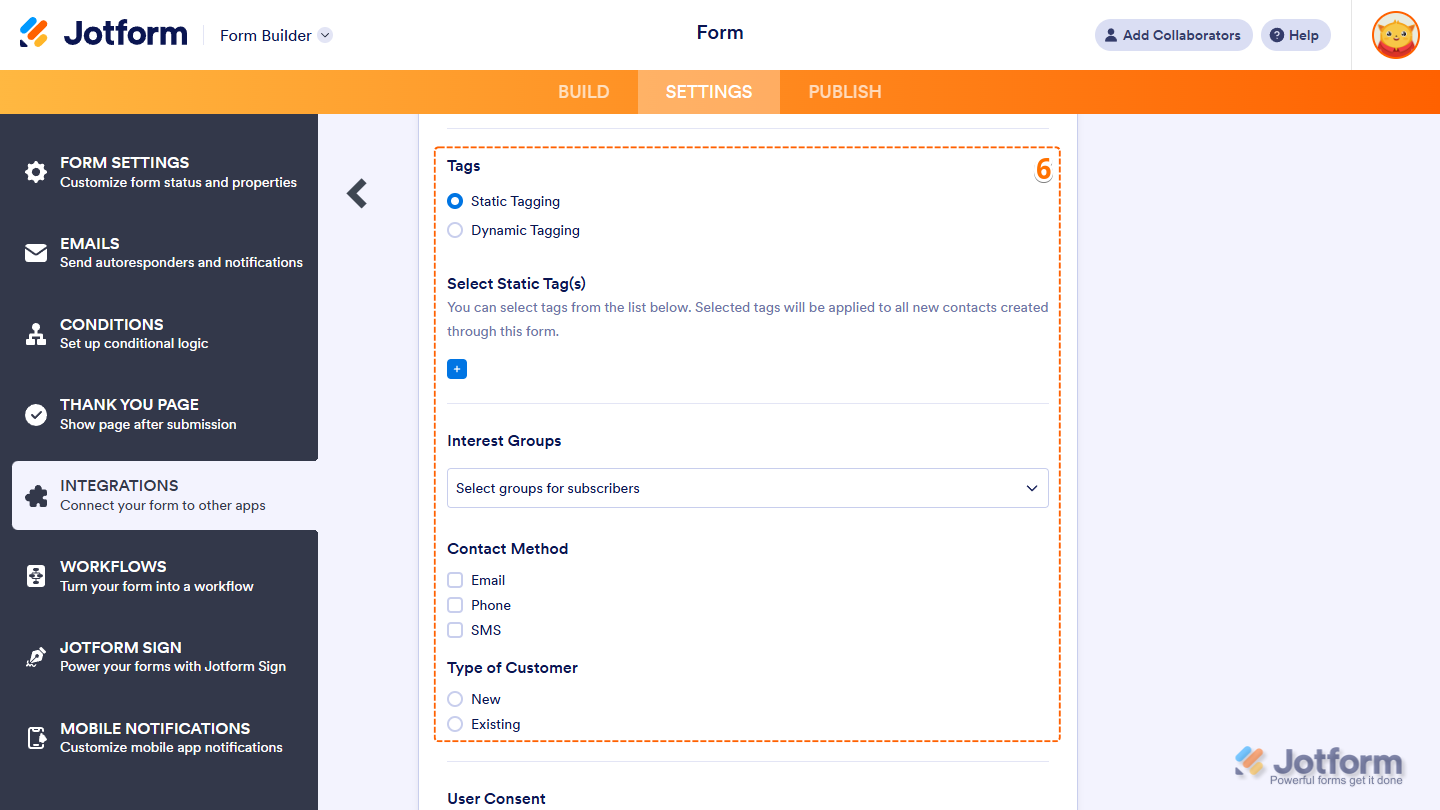
- Then, scroll down to the bottom and continue to set up these options:
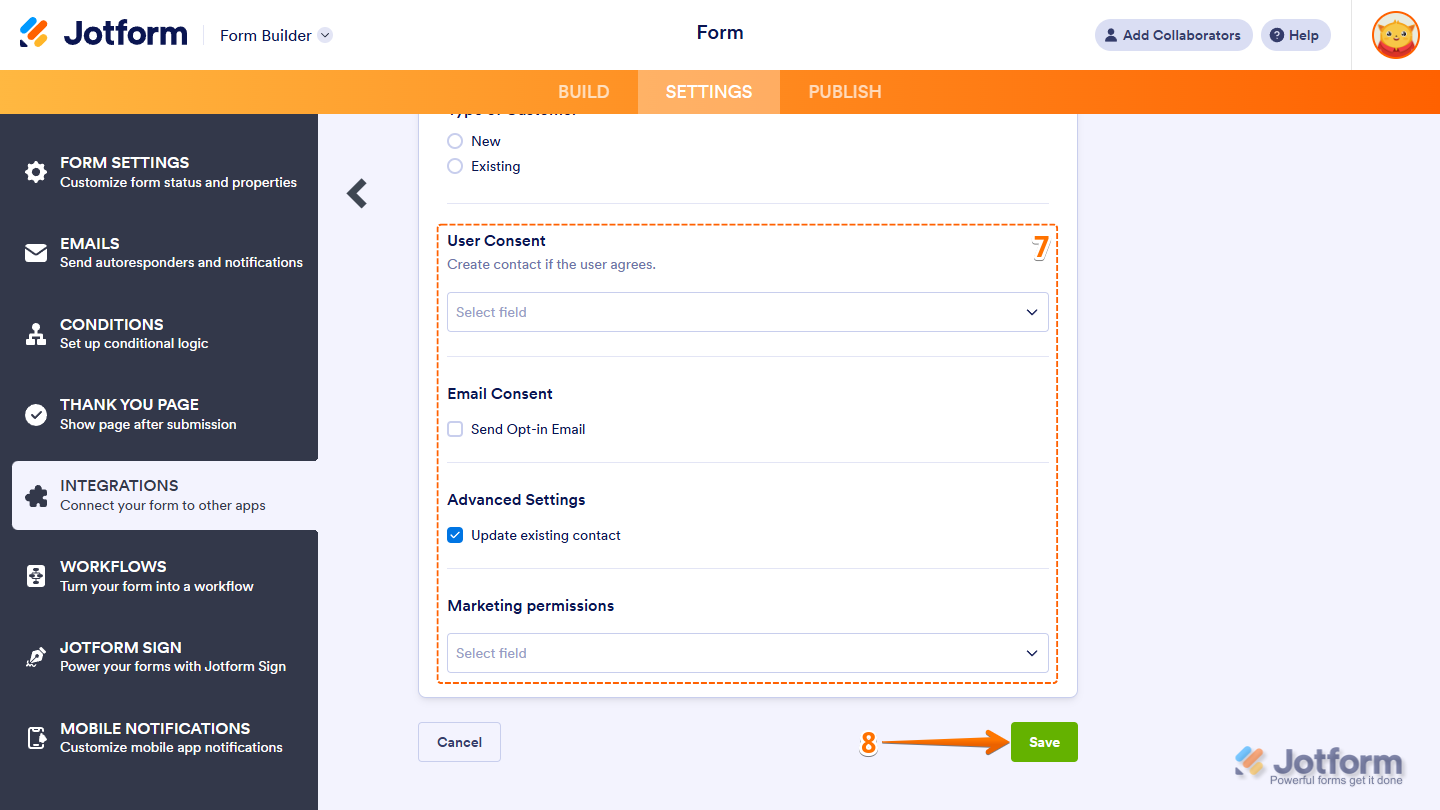
- User Consent — Only send someone’s info to Mailchimp if they respond to a specific field you choose. Works with Single Choice and Multiple Choice fields.
- Email Consent — Turn on “Send Opt-in Email” if you want people to confirm their subscription before they’re added to your list.
- Advanced Settings — Enable “Update Existing Contact” to ensure existing Mailchimp contacts are updated with the latest info.
- Marketing Permissions — For GDPR compliance, choose a field that lets users opt in to your emails. This also works with Single Choice and Multiple Choice fields.
- Once you’re done, click on Save to finalize the integration.
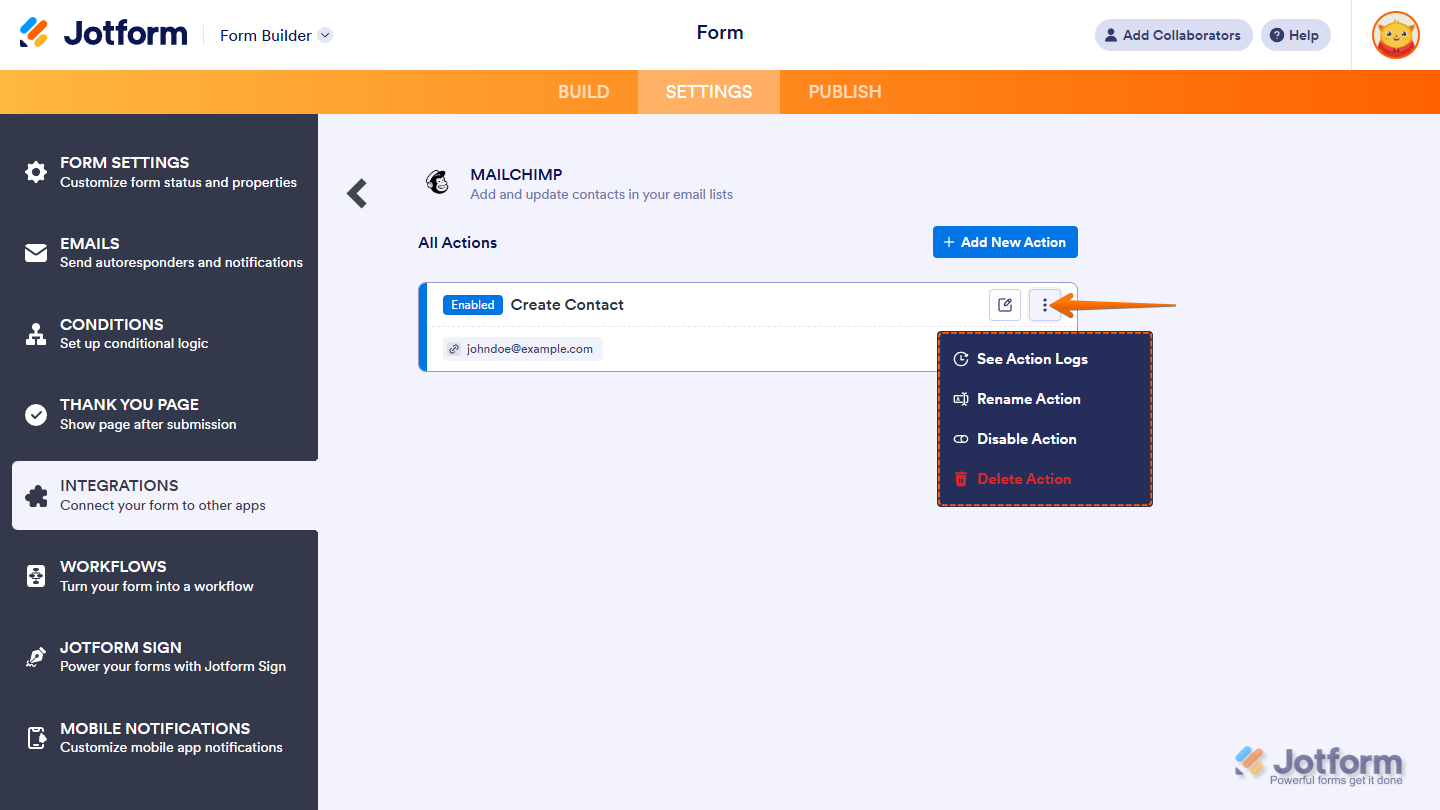
And that’s it! After saving the integration, you’ll see the list of actions you’ve set up and the Add New Action button on the main page. Hover your mouse over an action and click on the Three Dots icon on the right side of it to access these options:
- See Action Logs — View successful and failed runs, helpful for troubleshooting.
- Rename Action — Change the action’s title.
- Disable Action — Temporarily stop the integration from sending data.
- Delete Action — Remove the action from your form.



Send Comment:
64 Comments:
November 1, 2024
My mailchimp and jotform will not integrate. it keeps saying session expired every time. i have tried from mobile and desktop.
May 14, 2024
Buongiorno,
Per inviare comunicazioni a 15.000 contatti è necessario acquistare il servizio? A quanto ammonta il costo?
December 8, 2023
Hi, how can I integrate SMS opt-in checkbox into the Jotform?
April 24, 2023
hi - i just want to confirm that jotform is using Mailchimp's API 3.0? cuz they are turning off 1.0 and 2.0 as of June 1, 2023... so need to know if our integrations are good! thanks
April 12, 2023
I followed the steps above but the COMPLETE INTEGRATION button does not light up.
January 11, 2023
Happy new year!
I was building some forms and intergrations with MailChimp. I get the message "Integration ready" but I do not receive on my MailChimp list any update in one of the 2 forms I connected. The other one seems to be sending the contacts. I removed the integration and tried again and still not working.
I intend to build and intergrate more forms in the next days and it would be great to solve the issue before continuing.
Would appreciate the support, thank you in advance
December 15, 2022
What is the turnaround time from a Jotform submission to the user being added to MailChimp?
November 9, 2022
Does the JotForm-Mailchimp integration exchange data with only the form integrated, or the entire Jotform account?
September 20, 2022
Thank you so much for your time.
I'm looking forward to having a great adventure with you!
October 12, 2020
Can I send contacts that sign up to my course via Jotform to my audience list in Mailchimp only as a contact not a subscriber to my newsletter?
September 21, 2020
In my jot form, there is room for an optional second email. First email for the parent, second for the child who is being registered. I have integrated the primary email into MailChimp. Can I integrate the second email address, and that person's info into mail chimp, too?
May 18, 2020
Hi there - I need a 'double opt-in' for my email list subscribers - in order to comply with GDPR
On my current form, they have to check a box to be included in the newsletter
I want them to receive an Autoresponder that confirms if they want to be on the list.
When designing the Autoresponder, what do I place in the email content box to ensure they receive a link back to the Mailchimp sign-up
Many thanks
D
April 1, 2020
Can i add custom fields in the match your fields dropdown, besides email, phone number address and birthday?
February 3, 2020
I do not want to ask anyone to subscribe to our email list. I want to be able to send a jotform survey along with a message and have the answers go to the email that is on our account. How do I do that?
October 17, 2019
At the match your field there is nothing in the dropdown box
October 10, 2019
Hi,
I can't find the Send Mailchimp Welcome Email on option on my integration. Can you please help me?
Thank you!
August 6, 2019
On our Jotform, we have a question that asks "do you want to subscribe to our weekly newsletter?" How do we send only those that answer "yes" to our MailChimp account? Please note, I am not asking to set up 2 different lists as a prior user asked. We merely want only those that answer "yes" on the Jotform question to be added to our Mailchimp newsletter account. Thank you.
May 9, 2019
Hey there
I just did the MailChimp integration. I get the message "Integration ready" but I do not receive on my MailChimp list any update. I removed the integration and tried again and still not working. Why are the contacts not being added?
Would appreciate the support, thanks
April 24, 2019
n the form I have completed all the steps. I get a brief message "you have 6 contacts ...." and then "you have completed integration," but contacts are not added in MailChimp
April 23, 2019
Hi We have an account in jotform and like to integrate to mailchimp. When integrate it. my match your field " Email " is empty. I cannot select any field to match email. How can I fix it?
Frank Chan
frank.chan@renogy.com
January 25, 2019
You said go to settings at the top. At the top of where? Where does the integration start, in wordpress or in mailchimp? And are these instructions for an embedded form which I can have on my wordpress blog posts?
November 30, 2018
Is it possible to have two different embedded mailchimp signups that go to different lists? ie. We want people to sign up for a marketing email as well as an IT email. These are two different lists being signed up from the same Jotform.
Thanks
November 12, 2018
Hi, I think I am almost there.
I have followed the instructions and have got both Name and Email fields on the form as shown. However, there seems to be a piece of missing information - we have the integration API for Mailchimp, but don't know where to put it when in Mailchimp?
When clicking Publish (next to Settings in Jotform), I can get the direct link to the form:
So where does this go?
I can see html code for the form embed for a website - but we don't want to do that - we need to get the form in an email and send it out to people. Please can you give us some more info?
Thanks
November 2, 2018
Is it possible to add an email address to a list depending on an answer to question on the form?
I.e. are you attending - YES or NO - YES gets added to ATTENDING list - NO gets added to NOT ATTENDING list
Thanks
October 26, 2018
I have Integrated Mailchimp into my form but my list isnt picking up all of the information.
Only the name and the email adresse ist being sent to my mailchimp account. Is this a flaw of the integration or a problem with mailchimp?
pls help