

Moduli per Fotografi

Modulo Di Contratto Per Fotografia Di Matrimonio
Gestisci richieste e dettagli operativi per servizi fotografici di matrimonio con il Modulo di contratto per fotografia di matrimonio, utile a fotografi e studi per raccogliere dati online e organizzare ogni evento in modo coerente.
Vai alla Categoria:Moduli Matrimonio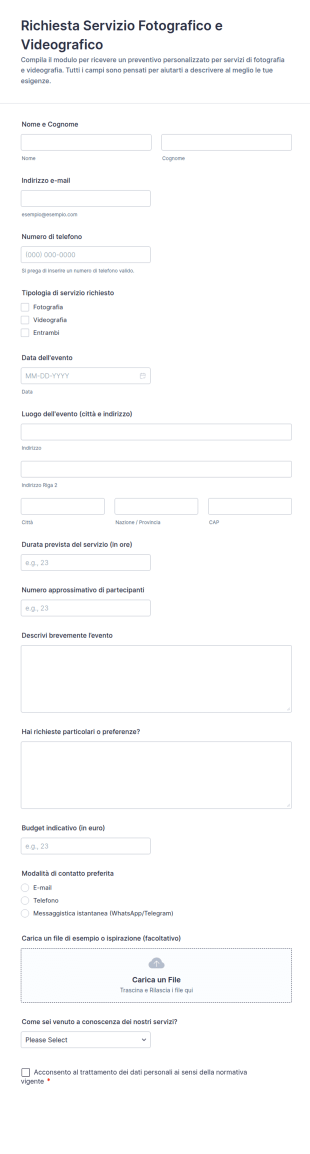
Richiesta Di Fotografia E Videografia
Raccogli richieste per servizi fotografici e videografici con il Modulo di Richiesta Servizio Fotografico e Videografico, ideale per studi creativi e freelance che vogliono organizzare la raccolta dati e gestire ogni risposta in Jotform.
Vai alla Categoria:Moduli di Richiesta
Contratto Per Sessione Fotografica Mini
Raccogli richieste e conferme per mini sessioni fotografiche con il Modulo Contratto per mini sessione fotografica, ideale per fotografi e studi che vogliono gestire la raccolta dati e l’invio del modulo in modo ordinato con Jotform.
Vai alla Categoria:Moduli per Fotografi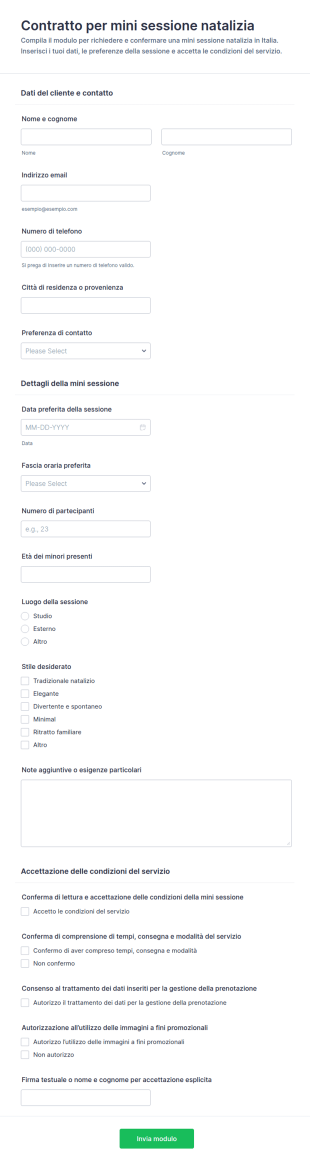
Contratto Per Sessione Mini Vacanze Form
Gestisci richieste e conferme per mini sessioni natalizie con il Modulo di contratto per mini sessione natalizia di Jotform, utile a fotografi e studi per prenotazioni, raccolta dati e accettazione delle condizioni in un unico flusso.
Vai alla Categoria:Moduli Natalizi
Modulo Di Contratto Per Servizi Fotografici Familiare
Organizza richieste e accordi per sessioni fotografiche di famiglia con il Modulo di contratto per fotografia di famiglia, utile per fotografi e studi per gestire pianificazione, preferenze creative e raccolta dati in modo ordinato.
Vai alla Categoria:Moduli Fotografia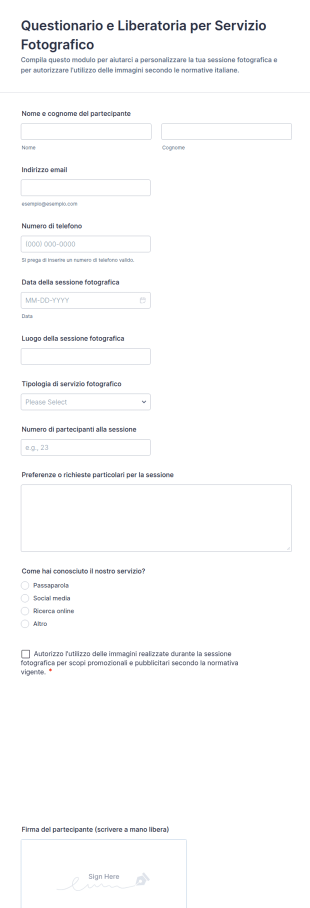
Modulo Di Consenso E Questionario Per Sessione Fotografica 📸✨
Raccogli in modo ordinato dettagli organizzativi e consenso per servizi fotografici con il Questionario e Liberatoria Form per Servizio Fotografico, ideale per studi creativi, fotografi freelance ed eventi che richiedono raccolta dati online.
Vai alla Categoria:Moduli di ConsensoInformazioni sui Moduli per Fotografi
Goditi un modo più semplice e veloce per raccogliere liberatorie, firmare contratti, ottenere feedback e ricevere pagamenti con Moduli gratuiti per Fotografi. Per iniziare, scegli uno dei template già pronti qui sotto, quindi personalizzalo con il tuo logo, aggiungi nuovi campi, integralo con oltre 30 gateway di pagamento e modifica il design senza scrivere neanche una linea di codice. Una volta pronto, incorpora il modulo nel tuo sito web o condividilo via e-mail per iniziare a raccogliere le risposte. I moduli cartacei possono essere complicati e richiedere molto tempo. Offri un'esperienza utente migliore a te stesso e ai tuoi clienti con potenti moduli online per fotografi che possono essere compilati agevolmente da qualsiasi dispositivo.
Jotform stands out as the premier online form builder for photographers, offering a robust platform that simplifies form customization and automates data collection processes. With Jotform, photographers can effortlessly tailor forms to meet specific business needs through its user-friendly Drag-and-Drop Form Builder. The platform also supports centralized data management with Jotform Tables, ensuring that all client and business data is securely stored and easily accessible. This not only enhances operational efficiency but also allows photographers to focus more on their creative work, knowing that the administrative side is well managed.
Why Use Photographer Forms?
- Photographer Forms significantly improve the accuracy of data collection. By eliminating manual entry errors, photographers can ensure that client information, booking details, and payment records are correct and up-to-date. This leads to a reduction in misunderstandings and enhances client satisfaction.
- Speed is another critical advantage of using Photographer Forms. The automation capabilities of Jotform allow photographers to quickly gather and process information, reducing the time spent on administrative tasks. This efficiency enables photographers to allocate more time to their core activity—capturing stunning images.
- Professional data handling is a hallmark of Photographer Forms. With secure data management features, photographers can ensure that client data is protected and confidential, meeting industry standards for data privacy and security. This builds trust with clients who are increasingly concerned about data security.
- Customization is a key feature that sets Photographer Forms apart. Whether it's altering the layout or adding specific fields, photographers can easily tailor forms to align with their brand and operational needs. This flexibility ensures that every form is a true reflection of the photographer's unique style and business requirements.
- Photographer Forms also facilitate seamless client communication. By integrating with third-party applications like Google Sheets and Slack, photographers can keep track of all interactions and updates, ensuring no detail is missed and all parties are informed promptly.
Common Problems Solved by Photographer Forms
- Paperwork overload is a common issue in the photography industry, where manual documentation can be cumbersome and prone to errors. Photographer Forms digitize these processes, reducing paper usage and associated costs while boosting operational efficiency.
- Manual data entry often leads to inaccuracies, which can affect service delivery and client satisfaction. By automating data collection, Photographer Forms eliminate these errors, ensuring that all client information is accurate and readily available for decision-making.
- Lost data can be a significant concern, especially during busy seasons or large events. With Photographer Forms, all data is securely stored and easily retrievable, preventing loss and ensuring continuity in service delivery without interruptions.
- Time-consuming administrative tasks can detract from the creative aspects of photography. Photographer Forms streamline these processes, allowing photographers to automate repetitive tasks and focus more on their creative endeavors, thus enhancing productivity.
Funzionalità per ogni utilizzo
- For client bookings, the Drag-and-Drop Form Builder allows photographers to create intuitive and easy-to-use booking forms. This feature simplifies the scheduling process, ensuring that all client appointments are accurately captured and managed.
- When dealing with event logistics, Conditional Logic can be employed to create dynamic forms that adapt based on client responses. This ensures that photographers can gather all necessary information without overwhelming clients with irrelevant questions.
- Financial transactions are simplified with the integration of 30+ Payment Gateways, such as Stripe and PayPal. This allows photographers to process payments directly through their forms, ensuring secure and efficient financial management.
- For legal and compliance needs, Electronic Signatures via Jotform Sign allow photographers to obtain necessary client approvals and model releases digitally, ensuring that all legal requirements are met without the need for physical paperwork.
- Photographers requiring analytics on their business performance can utilize the Report Builder to generate insightful reports. This feature enables photographers to analyze data trends and make informed business decisions, enhancing strategic planning and growth.
- The PDF Editor allows photographers to automatically generate professional PDF documents from form submissions. This is particularly useful for creating client contracts, invoices, and other official documents with ease and consistency.
- Offline Data Collection via Jotform Mobile Forms ensures that photographers can gather client information even in locations without internet connectivity. This feature is invaluable for on-location shoots where connectivity may be a challenge.
How to Create a Photographer Form
- Start by browsing the Template List for a Photographers template or begin from a blank form to tailor it to your specific needs.
- Customize the design and fields using the Drag-and-Drop Form Builder, ensuring the form aligns with your branding and operational requirements.
- Publish and share the form via Direct Link, Email, or Website Embed to reach your clients effectively.
Top Use Cases for Photographer Forms
- For Managers: Photographer Forms provide managers with the ability to oversee operations efficiently by digitizing administrative tasks and streamlining communication. With centralized data management, managers can easily track project progress, manage client relationships, and handle financial transactions. This increases operational transparency and improves decision-making processes.
- For Teams: Team collaboration is enhanced through the use of Photographer Forms, as they facilitate seamless information sharing and task delegation. By integrating with platforms like Slack and Salesforce, team members can stay updated on project developments, ensuring everyone is aligned and working towards common goals. This fosters a collaborative work environment and enhances team productivity.
- For Customers: Customers benefit from the convenience and efficiency offered by Photographer Forms. They can easily book appointments, make payments, and provide feedback through user-friendly interfaces. This not only enhances the customer experience but also builds loyalty by making interactions smooth and hassle-free, ultimately leading to higher satisfaction and repeat business.
Summarizing Photographer Forms
In summary, Photographer Forms are a vital asset for those in the photography industry looking to streamline their operations and enhance client interactions. By leveraging Jotform's capabilities such as customizable form creation, secure data management, and seamless integrations, photographers can optimize their workflows. This leads to increased efficiency, reduced administrative burdens, and improved client satisfaction, allowing photographers to focus on their core creative work while ensuring business operations run smoothly.
Domande Frequenti
1) Is it free to create Photographer Forms on Jotform?
Yes, Jotform offers a free plan that allows you to create and use forms with basic features. However, for advanced functionalities and higher submission limits, you may need to consider one of their paid plans.
2. I moduli e i dati inviati sono sicuri?
Absolutely, Jotform ensures data security through encryption and compliance with industry standards such as GDPR. Your forms and data are protected to maintain confidentiality and integrity.
3) Do I need coding knowledge to build a Photographer Form?
No, Jotform's Drag-and-Drop Form Builder is designed to be user-friendly, allowing you to create forms without any coding expertise.
4. Posso riscuotere pagamenti direttamente tramite i miei moduli?
Yes, you can collect payments directly through your forms using Jotform's integration with over 30 payment gateways like Stripe and PayPal.
5. È possibile utilizzare questi moduli su dispositivi mobili?
Yes, Jotform forms are mobile-responsive and can be accessed and completed on any mobile device, ensuring convenience for users on the go.
6. Posso trasformare le risposte dei moduli in documenti PDF professionali?
Jotform garantisce che tutti i dati raccolti tramite moduli di intrattenimento siano archiviati in modo sicuro e possano essere gestiti in conformità con le normative sulla privacy, proteggendo sia gli organizzatori che i partecipanti.
7) How can Photographer Forms help with client scheduling?
Photographer Forms streamline client scheduling by allowing clients to book appointments directly through the forms, which automatically updates your calendar and notifies you of new bookings.
8) Can Photographer Forms integrate with my existing CRM system?
Yes, Jotform supports integration with over 100 third-party applications, including popular CRM systems like Salesforce, enabling seamless data synchronization and management.