

Moduli per Agricoltori

Indagine Agricola
Raccogli dati e opinioni dalle aziende agricole con il Modulo Sondaggio Agricolo Italiano, ideale per enti, associazioni e ricercatori che vogliono analizzare pratiche, criticità e tendenze del territorio.
Vai alla Categoria:Template Sondaggio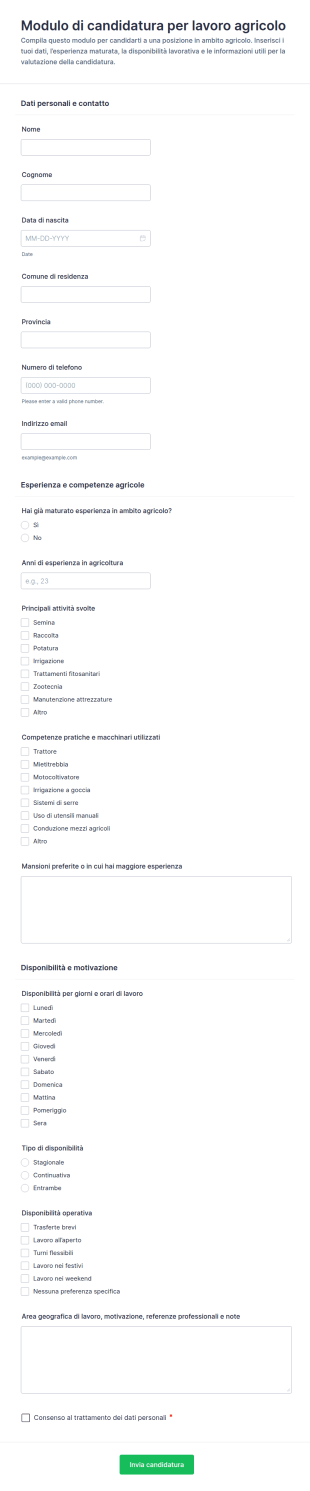
Candidatura Per Lavoro Agricolo
Raccogli e gestisci candidature per posizioni agricole stagionali o continuative con il Modulo di candidatura per lavoro agricolo di Jotform, ideale per aziende agricole e cooperative che vogliono velocizzare la raccolta dati.
Vai alla Categoria:Moduli Domanda di Lavoro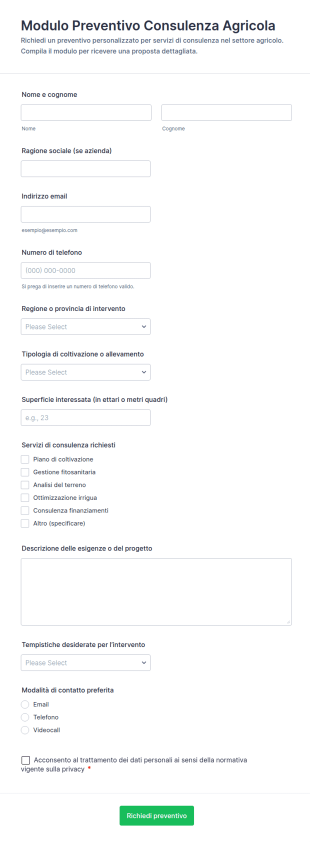
Richiesta Di Preventivo Per Consulente Agronomo
Raccogli richieste di preventivo per consulenza agricola con Jotform, organizzando la raccolta dati da aziende e professionisti per preparare proposte personalizzate e gestire le risposte in modo ordinato.
Vai alla Categoria:Moduli di Preventivo per Consulenza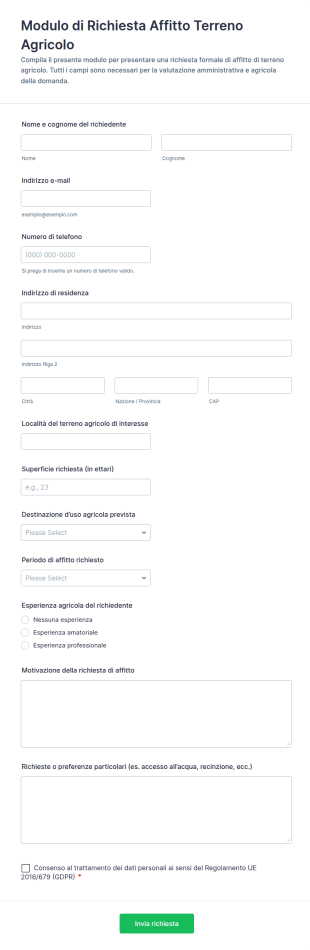
Modulo Di Domanda Per Affitto Agricolo
Raccogli e gestisci richieste di affitto di terreni agricoli con il Modulo di richiesta affitto terreno agricolo di Jotform, ideale per proprietari, aziende e enti che vogliono organizzare la raccolta dati e le risposte in modo chiaro.
Vai alla Categoria:Moduli di Richiesta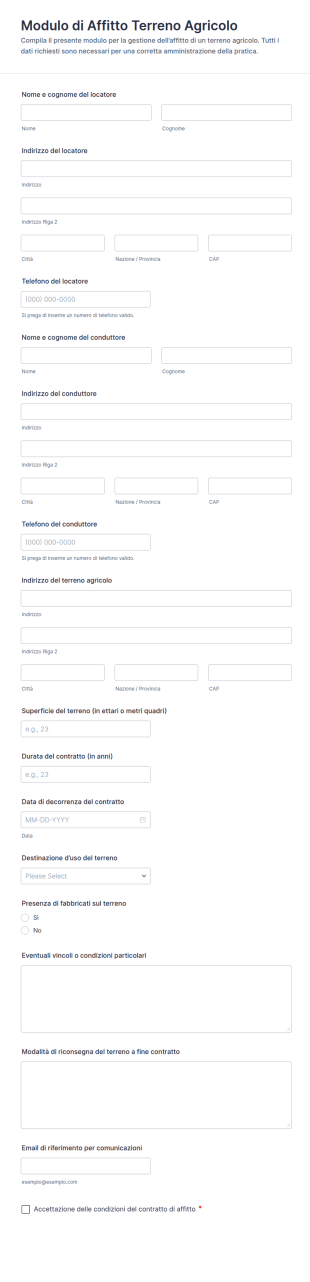
Modulo Di Locazione Terreni Agricoli
Raccogli i dettagli per la locazione di un terreno con il Modulo di Affitto Terreno Agricolo, ideale per proprietari e aziende agricole che vogliono gestire la raccolta dati e ogni risposta del modulo in modo ordinato con Jotform.
Vai alla Categoria:Moduli Legali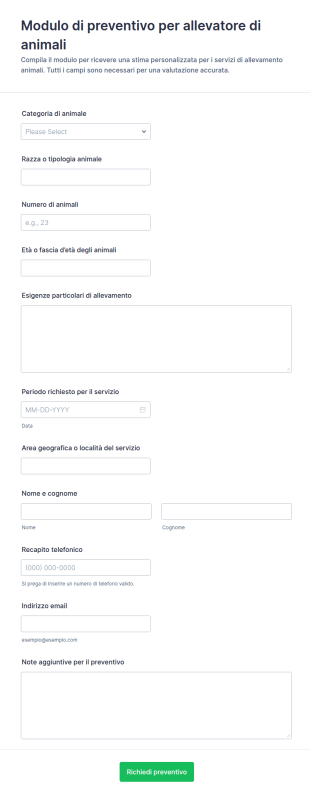
Modulo Di Stima Per Allevatori Di Animali 🐾
Raccogli richieste di preventivo per servizi di allevamento e gestione animali con il Modulo di preventivo per allevatore di animali, utile per allevatori e strutture che vogliono organizzare la raccolta dati e rispondere più rapidamente ai clienti.
Vai alla Categoria:Moduli Preventivo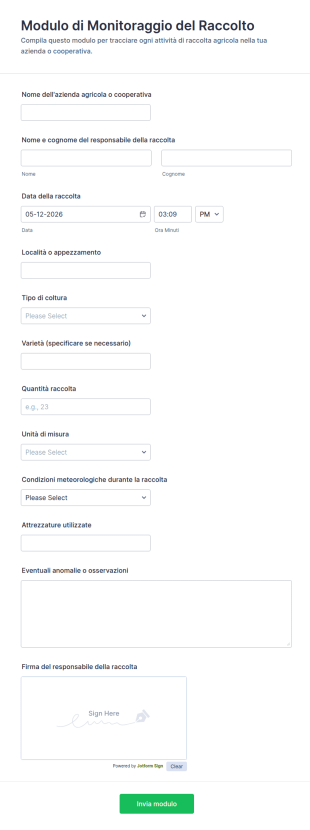
Modulo Di Monitoraggio Del Raccolto
Registra e confronta le attività di raccolta in azienda agricola o cooperativa con il Modulo di Monitoraggio del Raccolto, ideale per la raccolta dati, la gestione delle risposte e la condivisione rapida tramite Jotform.
Vai alla Categoria:Moduli per AgricoltoriInformazioni sui Moduli per Agricoltori
Raccogli e gestisci i dati per la tua azienda agricola grazie ai moduli online gratuiti per Agricoltori. Se hai bisogno di compilare contratti di locazione di terreni, vendere i tuoi prodotti o ricevere candidature di lavoro, scegli un modello qui sotto e personalizzalo secondo le tue esigenze tramite il nostro generatore di moduli drag-and-drop. Non dovrai scrivere neanche una linea di codice! Una volta realizzato il modulo, puoi anche incorporarlo nel tuo sito web, condividerlo tramite il link o compilarlo tu stesso direttamente dal tuo smartphone, tablet o computer. Abbandona la carta stampata, e passa ai Moduli digitali online per Agricoltori, che funzionano alla perfezione su qualsiasi dispositivo.
Jotform stands out as the premier online form builder for creating Farmer Forms due to its intuitive and flexible platform. With Jotform’s user-friendly interface, farmers can easily customize their forms to suit specific needs, ensuring they capture the right data every time. The platform's ability to automate data collection processes significantly reduces manual effort, freeing up time for more critical tasks. Additionally, Jotform Tables offers centralized data management, allowing farmers to organize, filter, and analyze their data efficiently. This comprehensive approach to form building and data handling ensures that farmers can maintain precise and accessible records, ultimately driving better operational outcomes.
Why Use Farmer Forms?
- Farmer Forms enhance data accuracy by eliminating the risks of manual data entry errors inherent in traditional paper forms. Digital forms ensure that every entry is legible and correctly formatted, which means more reliable records for audits and decision-making processes.
- The speed of data collection and processing is drastically improved with Farmer Forms, as information is instantly captured and saved in the system. This immediacy allows for better responsiveness to changing conditions, such as weather patterns or market trends, which can directly impact crop yields and profitability.
- Professional data handling is a key advantage of these forms, providing farmers with a robust framework for organizing and storing critical information. This structured approach supports compliance with industry regulations and enhances the ability to share data with stakeholders or regulatory bodies efficiently.
- Customization capabilities with Farmer Forms allow for tailoring each form to fit unique operational requirements. This flexibility ensures that farmers can create forms that reflect their specific processes, from planting schedules to equipment checklists, improving overall workflow efficiency.
- Jotform’s integration capabilities mean that Farmer Forms can seamlessly connect with over 100 third-party applications, such as Google Sheets and Salesforce. This connectivity facilitates the smooth transfer of data across platforms, enabling more comprehensive analysis and reporting.
Common Problems Solved by Farmer Forms
- One of the most prevalent issues in farming is the reliance on paper-based processes, which are prone to errors and loss. Farmer Forms mitigate these risks by digitizing data entry, ensuring that information is both accurate and easily retrievable.
- Manual data entry is time-consuming and often leads to inefficiencies. With Farmer Forms, this process is automated, freeing up farmers’ time to focus on core activities such as crop management and market strategy development.
- Data loss and mismanagement can be detrimental to farm operations, particularly when dealing with compliance and audits. Farmer Forms provide a secure platform for data storage, ensuring that critical information is preserved and accessible whenever needed.
- Communication gaps within farming teams can lead to operational delays and misunderstandings. By using Farmer Forms, all team members have access to up-to-date information, facilitating better coordination and collaboration across various departments.
Funzionalità per ogni utilizzo
- For managing farm inventories, the Drag-and-Drop Form Builder is invaluable. It allows farmers to quickly create forms tailored to track equipment, supplies, and produce, ensuring accurate inventory levels and timely replenishments.
- Conditional Logic is perfect for creating dynamic forms that adapt based on user input, which is especially useful for complex processes like livestock tracking or crop rotation planning. This feature streamlines form interactions, making data collection more efficient and user-friendly.
- Farmers handling transactions can benefit from the 30+ Payment Gateways offered by Jotform, such as Stripe or PayPal. This feature facilitates secure, seamless financial transactions directly through forms, improving cash flow management.
- Jotform Sign empowers farmers to collect Electronic Signatures, which is crucial for authorizing contracts and compliance documents. This capability ensures that all agreements are legally binding and stored securely.
- Farmers looking to generate detailed reports can utilize the Report Builder. This feature allows for the creation of comprehensive visual reports based on collected data, aiding in strategic planning and performance analysis.
- The PDF Editor enables automated PDF Generation from form submissions, which is essential for creating professional, standardized documents for record-keeping or sharing with stakeholders.
- Offline Data Collection through Jotform Mobile Forms is a game-changer for fieldwork, allowing farmers to gather data in remote locations without internet access. Once connectivity is restored, data syncs automatically, ensuring continuity in data management.
How to Create a Farmer Form
- Browse the Template List for a Farmers template or start from a blank form. This initial step allows you to find a pre-existing template that closely matches your needs or gives you the flexibility to start from scratch.
- Customize the design and fields using the Drag-and-Drop Form Builder. This step ensures that the form meets your specific operational requirements, from field labels to layout adjustments.
- Publish and share via Direct Link, Email, or Website Embed. This final step makes it easy to distribute your form to the intended audience, facilitating seamless data collection and collaboration.
Top Use Cases for Farmer Forms
- For Managers: Farmer Forms are instrumental for managers overseeing multiple aspects of farm operations. They can use these forms to streamline data collection processes, monitor team productivity, track financial performance, and ensure regulatory compliance. This comprehensive data oversight supports strategic decision-making and optimizes resource allocation.
- For Teams: Teams on the ground benefit from Farmer Forms by having a centralized platform for data input and communication. These forms facilitate real-time updates on field conditions, inventory levels, and task completion, ensuring everyone is aligned and informed. This enhances workflow efficiency and reduces the likelihood of errors or delays.
- For Customers: Customers or clients can experience improved service delivery when Farmer Forms are employed. These forms allow for seamless order placements, inquiries, and feedback collection, ensuring that customer needs are met promptly and accurately. This level of service fosters trust and strengthens business relationships.
Summarizing Farmer Forms
Farmer Forms are a powerful asset for the agricultural industry, providing robust solutions for data collection and management. By leveraging Jotform’s comprehensive platform, farmers can automate many of their operational tasks, resulting in improved accuracy, efficiency, and productivity. These forms not only simplify complex workflows but also enhance data accessibility and security, ensuring that farmers can focus on what they do best—delivering quality agricultural products. In essence, Farmer Forms empower users to optimize their operations, enabling them to navigate the challenges of modern farming with confidence and ease.
Domande Frequenti
1. Cos'è un modulo per agricoltori?
Un modulo per agricoltori è un documento digitale o cartaceo utilizzato per raccogliere, organizzare e gestire le informazioni relative alle attività agricole, come il monitoraggio delle colture, la gestione del bestiame, la manutenzione delle attrezzature, e la registrazione dei lavoratori agricoli.
2. Perché i moduli per agricoltori sono importanti in agricoltura?
I moduli per agricoltori aiutano a semplificare la raccolta dei dati, migliorare la tenuta dei registri, garantire la conformità alle normative e facilitare la comunicazione tra il personale della fattoria, i fornitori e i clienti.
3. Quali informazioni vengono generalmente raccolte con un modulo per agricoltori?
Informazioni comuni includono tipi di colture, date di semina e raccolta, dettagli sul bestiame, registri di manutenzione delle attrezzature, informazioni sui lavoratori, dettagli sugli ordini e osservazioni sul campo.
4. Esistono diversi tipi di moduli per agricoltori?
Sì, ce ne sono vari tipi, tra cui moduli di monitoraggio delle colture, registri della salute del bestiame, liste di controllo per la manutenzione delle attrezzature, moduli d'ordine per i prodotti e moduli di registrazione dei lavoratori agricoli, ciascuno adattato a specifiche esigenze agricole.
5. Chi può utilizzare i moduli per agricoltori?
I moduli per agricoltori sono utilizzati da agricoltori individuali, gestori di aziende agricole, consulenti agricoli, operai agricoli, cooperative e acquirenti di prodotti per gestire e documentare le operazioni agricole.
6. In che modo i moduli per agricoltori agevolano la conformità e la tracciabilità?
Registrando sistematicamente attività e dati, i moduli per l'agricoltura supportano la conformità alle normative agricole e le certificazioni, oltre a migliorare la tracciabilità per la sicurezza alimentare e la garanzia della qualità.
7. I moduli per agricoltori possono essere utilizzati sia per piccole che grandi aziende agricole?
Certamente. I Moduli per Agricoltori sono scalabili e possono essere personalizzati per soddisfare le esigenze delle piccole aziende agricole familiari così come delle grandi attività agricole commerciali.
8. Le informazioni raccolte nei moduli per agricoltori sono sicure e private?
Quando si utilizza Jotform, tutti i dati vengono archiviati in modo sicuro e protetti con misure di sicurezza standard del settore, garantendo la privacy e la riservatezza delle informazioni della tua azienda agricola.