OpenTable Reviews Widget
Show OpenTable Reviews Where Diners Choose Restaurants
Bring diner ratings and feedback from your OpenTable restaurant profile to your website. Customize how reviews appear and help guests evaluate real dining experiences alongside your menu, location, and reservation options.


Choose Review Layouts for Every Restaurant Page
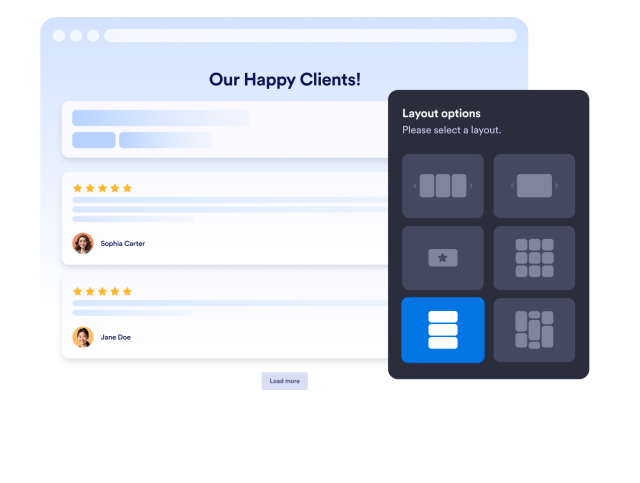
Present OpenTable feedback in a format that fits your restaurant website and available space. Add a compact rating badge near a reservation button or create a larger diner review section with a carousel, grid, list, masonry wall, or horizontal slider.
Available layouts include:
Match Reviews to Your Restaurant Brand
Keep diner feedback consistent with your restaurant’s visual identity. Choose a light or dark theme, adjust text and button colors, and add a custom widget title that introduces OpenTable reviews within the context of your dining experience.
Customization options include:

Place Diner Feedback Near Menu Details
Give guests useful context while they consider your restaurant. Show star ratings and diner comments alongside menus, cuisine descriptions, location details, or reservation options, then customize the widget header and visible review information to keep the section focused.
Display settings include:

Help Guests Explore Real Dining Experiences
Let potential guests browse several OpenTable reviews without creating an excessively long restaurant page. Slider arrows, pagination controls, and smooth horizontal browsing help diners compare experiences related to your food, service, atmosphere, and overall visit.
Navigation features include:

Connect Restaurant Reviews With Guest Feedback
Display OpenTable reviews to share previous dining experiences, then use Jotform forms to collect feedback directly from your guests. Gather satisfaction ratings, comments, dietary requests, or service feedback in a structured format.
Create Your OpenTable Reviews Widget